Quick wins for a faster PC:
Repair Windows errors before they cause bigger problemsFix Now →Scan for outdated or missing drivers - takes under a minuteDriver Scan →Clear out junk files and repair common Windows errorsFree Scan →Most Bedrock iron farms that stop producing golems fail one of three things: the village does not meet the population and bed thresholds, the villagers are not actually working or linked the way the spawn logic expects, or the spawn platform sits outside the area the game searches. Work through the checks below in that order, because the first one that fails is usually the cause.
Start with the village thresholds
A Bedrock village has to meet a population and bed requirement before the game will spawn iron golems there. The figures below come from the Minecraft Wiki’s community-maintained farm and mechanics guide. The guide does not state which exact game release its numbers were checked against, so treat them as the baseline and confirm them against your own version if something disagrees.
- Beds: at least 20 beds in the village.
- Villagers: at least 10 villagers.
- Bed links: every villager must be linked to a bed. An unlinked villager is not a harmless spare; it counts against the village.
- Work: at least 75% of villagers must have worked at their workstations during the previous in-game day.
Count these yourself rather than estimating. A farm that looks full from the outside often has one or two villagers who lost their bed or workstation after a rebuild, a trade reset, or a villager that wandered to a different bed.
Check actual links and work, not just counts
Passing the numbers does not guarantee the links behind them are correct. Mojang’s public Bedrock issue tracker lists two reports that matter for this kind of farm.
Do these 3 things before closing this tab:
1Scan for outdated or missing drivers - takes under a minute2Clear out junk files and repair common Windows errors3Fix the driver behind crashes, sound loss and screen glitches#1 Best Overall

- Minecraft fans can join Steve on a quest to save the Village from attack with this Village Raid action figures and accessories set!
- The collectible pack includes 3 Minecraft action figures and 3 accessories to recreate the action in real life for play or display!
- Steve, a Raid Captain and a Ravager are included in 3-inch scale with movable joints for action moves and posability!
- Storm into the story with accessories that include an iron sword, enchanted crossbow and ominous banner!
- The collectible Minecraft set makes a fun, themed toy for video-game players and fans ages 6 years old and up!
- Workstation-link behavior: a confirmed issue, still unresolved at the time of the tracker entry, describes workstation links behaving incorrectly in affected Bedrock versions. If villagers look employed but are not counted as working, this is the first thing to consider.
- Extra villager without a bed link: a reported setup shows that one villager without a bed link can interrupt spawning even when the other numbers are met. This is an edge case tied to that setup, not a universal rule.
Neither report establishes that every affected farm fails the same way, so use them as reasons to inspect links, not as a diagnosis on their own.
Locate the village center and the spawn volume
Iron golems do not spawn anywhere near the village. The game searches a fixed volume around the village center, which the Minecraft Wiki guide gives as 17 blocks wide, 13 blocks tall, and 17 blocks deep.
Rank #2

- Interactive Gaming Experience: Enhance your augmented reality gameplay with Minecraft Earth boost mini figure that keeps the fun going
- Authentic Video Game Characters: Based on characters from the famous video game with game-authentic features and Minecraft's signature 8-bit style
- In-Game Enhancement Features: Each boost mini figure offers a unique in-game boost such as attack power, defense power or resurrection to enhance your Minecraft Earth experience
- NFC Technology Integration: Features an NFC chip inside that you scan with a mobile device to unleash the boost for your character in the game
- Compact Collectible Size: Measures 1 inch in height, making it easy to display, collect, and trade with other members of the Minecraft community
The village center is not fixed. It can move when villagers or points of interest are linked or unlinked. A platform that was correctly placed when the farm was built can end up outside the search volume after a villager, bed, or workstation changes, which is why a farm that worked for months can suddenly stop.
Inside that volume, the spawn position needs valid space: the blocks the golem occupies must be clear. A platform that is buried, blocked by a roof or slab, or crowded by other blocks can prevent spawning even when the village is otherwise correct.
Rank #3

- Capture the excitement and adventurous play of Minecraft
- Each 3.25-inch scale Minecraft action figure comes with accessories to re-create favorite in-game moments
- The character figures are posable with movable joints for even more ways to play
- The designs of the figures and accessories stay true to the unique, pixelated world of Minecraft
- Makes a great toy for video-game players and fans ages 6 years old and up, who will want them all (Each sold separately, subject to availability.)
Rule out golems you are not collecting
The village has a limit on how many iron golems it can support relative to its villagers. If golems are already spawning and wandering nearby, in caves or on the surrounding ground, they can use up that capacity. The farm then appears to stop, even though the spawn logic is working. Look for golems outside your collection system before rebuilding anything.
Diagnostic sequence
- Count beds and villagers in the village. Confirm at least 20 beds and at least 10 villagers.
- Confirm every villager has a bed link. Find any villager without one and either link it or remove it from the logical village.
- Confirm that at least 75% of villagers worked at linked workstations during the previous in-game day. If you built or relinked the farm recently, allow a full day of work before judging the result.
- Search for extra beds, workstations, or villagers that might change the village center. Unlinked points of interest can move it.
- Locate the current village center and confirm your spawn platform falls inside the 17×13×17 search volume.
- Check the platform for valid spawn space and clearance.
- Search the area around the farm for golems that are spawning outside your collection system.
- If every check passes, record your exact Bedrock version, platform, and farm layout before assuming a bug or rebuilding.
Matching symptoms to causes
| Symptom | Most likely area | What to check |
|---|---|---|
| Golems never appear | Village thresholds | Bed count, villager count, and bed links |
| Villagers look employed, but the farm is still idle | Workstation links or prior-day work | Linked workstations and the 75% work rule over the previous day |
| Farm worked, then stopped after a rebuild | Village center shifted | Nearby beds, bells, workstations, and villagers that changed links |
| Spawns happen, but golems are not collected | Spawn platform or stray golems | Platform position inside the search volume, spawn clearance, and golems outside the farm |
| One extra villager stops spawning | Unlinked villager edge case | Any villager without a bed link |
The table is a starting point, not a guarantee. A single farm can show more than one symptom, and each check should be done in order.
Rank #4

- Each Minecraft Legends figure is designed in 3.25-inch scale and comes with its own attack feature.
- Fans can trigger the figure's attack move and battle enemies with easy activation for dramatic play.
- Players will love fidgeting with the attack feature as they contemplate their next difficult in-game move!
- The action figures have movable joints, so Minecraft fans can pose them for action and storytelling play!
- Character design and personality details stay true to the unique, pixelated world of Minecraft Legends -- perfect for collecting!
The Minecraft Wiki guide is the source of the numeric thresholds and the search volume. Mojang’s public issue tracker is the source of the two Bedrock reports above. The official Minecraft article offers general context on iron golems, but it does not give the detailed farm checklist.
Independent reader supportYour contribution helps us test, update, and keep practical guides available for everyone.When a bug is worth suspecting
If the thresholds, links, work requirement, village center, and spawn space all check out, you are in territory where a version- or platform-specific problem is plausible. Note the exact Bedrock version and platform, describe the farm layout, and compare your observations against the open entries in Mojang’s issue tracker. Without those details, no general fix can be confirmed for a particular build.
Free tools Windows power users keep installed
One-click scans. No signup required.
Best Value
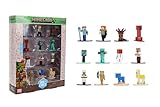
- Epic Minecraft lineup in your hands; features 12 fan-favorite characters including Steve, Alex, and Snow Golem
- Die-cast durability meets blocky style; each figure crafted in solid metal with pixel-perfect detailing for display or play
- Sized for collectors and kids alike; 1.65-inch scale fits easily on shelves, desks, or in toy worlds of their own
- Ready for creative adventures; includes animals, mobs, and heroes like Glow Squid, Yellow Llama, and Wild Axolotl
- Jada Toys – official Minecraft partner; trusted for authentic die-cast figures from the world’s biggest brands
Rebuilding is the last resort. Most farms that stop can be fixed by correcting one link, moving one platform, or clearing one stray golem.
Quick Recap
Product prices and availability are accurate as of the date/time indicated and are subject to change. Any price and availability information displayed on Amazon at the time of purchase will apply.




