The Tool Desk
Outbyte PC Repair FREERepair Windows errors before they cause bigger problemsFix Now →Outbyte Driver Updater FREEScan for outdated or missing drivers - takes under a minuteDriver Scan →If an amiibo will not work in Animal Crossing: New Horizons, first confirm that it supports the game and the feature you’re trying to use. Open that feature’s in-game scanner, tap the amiibo on the controller’s NFC touchpoint, and keep it still. Then check for a game update and any progression requirements. A scan may be detected successfully without producing the character or result you expected.
Check that the amiibo supports the game and feature
Amiibo figures and cards work only with select games, and their functions can differ from one game to another. For New Horizons, check Nintendo’s amiibo instructions and Animal Crossing compatibility catalog for the specific figure or card and the feature you want to use. If the game reads the amiibo but does not offer the character or content you expected, compatibility or feature support may be the issue—not the controller’s NFC reader.
| # | Preview | Product | Price | |
|---|---|---|---|---|
| 1 |

|
42Pcs NFC Mini Villager Cards with Storage Box | $29.99 | Buy on Amazon |
| 2 |
|
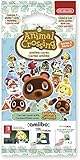
Nintendo Animal Crossing Amiibo Cards - Series 5 | $18.55 | Buy on Amazon |
| 3 |

|
40Pcs NFC Animal Small Cards | $28.89 | Buy on Amazon |
The same amiibo can have different functions in different games. Some games use an amiibo for bonus content, while others may read or save data. Consult the game’s instructions rather than assuming a scan has the same effect everywhere; Nintendo summarizes these differences in its amiibo FAQ.
Scan from the feature you want to use
In New Horizons, there is not one universal scanning spot for every amiibo interaction. Start the feature, then follow its on-screen prompt:
#1 Best Overall
- 🎮🎁What You Can Get: Upgrade your package and receive four bonus surprise cards, for a total of 42 cards (38 cards + 4 bonus cards).US version! for your entertainment needs!
- 🎮🎁Small Size NFC Cards:1.25 x 0.86 Inches mini card,easy to carry on the go, meet your outdoor entertainment needs
- 🎮🎁NFC MINI Cards can be reused indefinitely. You can share cards with friends (once a day for one device).
- 🎮🎁Fresh Card:These NFC cards are all mint condition unused/unscanned pulled straight from the pack into a protected binder!
- Invite a camper: At Resident Services, use the Nook Stop’s “Invite a camper” option.
- Invite someone to the Roost: Use the amiibo Call Center in the café.
- Use Photopia: Go to Harv’s island photo studio, choose a room, and activate the amiibo controls.
- Use a VIP room at the resort hotel: Use the hotel’s amiibo scanner.
Nintendo lists these feature paths in its Animal Crossing: New Horizons amiibo instructions. If you tap an amiibo before opening the relevant feature, the game may not be ready to scan it.
Place the amiibo on the controller’s NFC touchpoint
Follow the game’s prompt and hold the amiibo over the correct reader until the scan completes. The NFC touchpoint is in a different place depending on the controller:
- Joy-Con: On the right control stick.
- Nintendo Switch Lite: On the right control stick.
- Nintendo Switch Pro Controller: Over the Nintendo Switch logo at the top center.
Keep the amiibo steady while it is being read, and remove anything obstructing the touchpoint. Nintendo’s Switch amiibo scanning instructions show where to scan on supported controllers.
Rank #2
- Set includes a random selection of Animal Crossing characters plus 1 Special Character.
- Use Animal Crossing amiibo figures and cards to unlock customizations like costumes for your amiibo characters and new houses for your board game village.
- Use an amiibo card in the Animal Crossing: New Horizons game and to invite a character to your campsite or to Harvey's Photopia!
- For use with Nintendo 3DS, Nintendo 3DS XL and Nintendo 2DS systems, a Nintendo 3DS NFC Reader/Writer accessory is required to tap in amiibo Cards or amiibo figures.
Check for updates and progression requirements
Some games require a software update or a particular point in progression before amiibo features become available. Update New Horizons if needed, then check the feature’s instructions and your in-game progress. Nintendo notes these possible requirements in its amiibo troubleshooting guidance.
Do these 3 things before closing this tab:
1Repair Windows errors before they cause bigger problems2Fix the driver behind crashes, sound loss and screen glitches3Clear out junk files and repair common Windows errorsKnow what a successful scan does—and does not do
A scan can work without immediately achieving the larger goal. For example, getting a character to move to your island through campsite invitations requires inviting them multiple times and continuing to interact. If an amiibo supports more than one character, the game may also let you choose which one to use. Check the feature instructions for the expected next step.
Do not erase an amiibo’s saved data as a first troubleshooting step. Nintendo says an amiibo can store data for one game at a time, and a player may need to erase that data before using it with another game that reads and writes amiibo data. That does not establish saved data as a general cause of New Horizons scanning failures.
Rank #3
- 40Pcs NFC animal small cards.
- NFC small card size: 1.26"L x 0.85"W.
- Clear pattern printing and built-in chip, with a waterproof surface material.
Test whether the problem is the amiibo or the controller
If you have access to another compatible amiibo or controller, use these checks to narrow down the cause:
- Try a different known-compatible amiibo on the same controller. If it reads, the first amiibo’s compatibility or condition may be the issue.
- Try the same amiibo on another compatible controller. If it reads there, the original controller may need attention.
- If multiple amiibo fail on one controller or console, follow Nintendo’s troubleshooting steps. Nintendo notes that persistent problems may require service for the controller or console.
Choosing an amiibo for Animal Crossing
If you need an amiibo for a particular character feature, Animal Crossing amiibo cards are one supported form; official amiibo figures are another. Before buying, verify the exact character or character set, the Animal Crossing game and feature you want, and that the product is an official compatible amiibo. Nintendo’s compatibility catalog and feature instructions are the reference for checking support.
Quick Recap
Product prices and availability are accurate as of the date/time indicated and are subject to change. Any price and availability information displayed on Amazon at the time of purchase will apply.



