Free tools Windows power users keep installed
One-click scans. No signup required.
Ubisoft may screen phone numbers for community-protection or other security reasons, and its Terms of Use say it can restrict account access or features when a number does not meet those standards. Ubisoft does not publish the specific checks, so the public explanation cannot identify why your particular number was rejected. For an account-specific answer, contact Ubisoft through its official account support form and include the exact error and where it appeared.
What Ubisoft says about rejected phone numbers
Ubisoft’s US Terms of Use, section 2.1, say the company may verify telephone numbers and may prevent account creation, block an account, or restrict access to certain features if a phone number or email address does not meet its community-protection standards or for other security reasons.
“We may prevent the creation of your account or block your account, or restrict your access to certain functionalities, if your telephone number or e-mail address does not meet our community-protection standards or other security reasons.”
This is a policy-level explanation, not a diagnosis of an individual failure. The terms do not spell out the screening criteria or say whether a particular carrier, country, number type, or previous account association caused a rejection.
The Tool Desk
Outbyte Driver Updater FREEScan for outdated or missing drivers - takes under a minuteDriver Scan →Outbyte PC Repair FREEClear out junk files and repair common Windows errorsFree Scan →#1 Best Overall

- Bluetooth Controller for iPhone & Android: Mocagen mobile gaming controller Compatible with all iPhone models (including 18/17 series) and Android devices. Pairing steps: 1. Turn on Bluetooth on your phone and go to the pairing screen. 2. Press and hold the Home button for 3 sec until LED4 flashes. 3. Find "XBOX Wireless Controller" on your phone and tap to pair. Quick reconnect: After first pairing, simply press the Home button once (with Bluetooth on) to reconnect
- Play Most Controller-Compatible Games: This iPhone game controller supports cloud gaming (e.g., Xb*x Game Pass, GeForce NOW), Xbox Remote Play, emulator games, and native mobile games (e.g., Apple Arcade). Enjoy effortless control and play Fortnite, Call of Duty, Roblox, Genshin Impact, and many more anytime, anywhere. Note: Controller only works with games that support controller input, and does not support PS Remote Play
- 5M-Cycle Lifespan & Zero Drift: MC1 mobile gaming controller features a Hall-effect joystick with a 5M cycle lifespan, 2.5x longer than standard carbon-film sticks. Its innovative electromagnetic induction technology ensures drift-free operation, enabling precise character control in intense games and significantly extending this phone game controller durability
- Ergonomic Grip Design: The handle is ergonomically shaped with a l*ser-engraved texture for anti-slip and enhanced grip, effectively reducing fatigue during long gaming sessions. The scientifically designed joystick and button layout ensures smooth operation. Whether for personal use or as a gift, it delivers a more comfortable and healthier gaming experience
- 7-Color RGB Light Ring & 600mAh Battery: The mobile game controller features a 7-color adjustable light ring on the joystick(ABXY button lights can be turned off, but their colors are not adjustable). The lighting is vibrant yet eye-friendly. The built-in 600mAh battery provides up to 6 hours of battery life in brightness mode — enough for a full day of gaming
What to do when Ubisoft won’t let you add your number
- Record the message and the account flow. Note the exact on-screen error and whether it appeared during account creation, account settings, or a security setup. That distinction gives support useful context without guessing at the cause.
- Contact Ubisoft through its official account support form. Ubisoft’s Help page provides an online form for account-related questions. Submit the exact error text, the step where it appeared, and any relevant account details requested by the form.
- Use the documented support route for account issues. Ubisoft says its Discord and X channels cannot provide account-related support, so use the online form for this problem.
Is a phone number always required?
Not necessarily. Ubisoft’s instructions for protecting an account with two-step verification say you may be asked to add a recovery phone number when setting up authenticator-app verification. Those instructions also describe email-based setup and six recovery codes; they do not establish that every account, region, or security flow requires a phone number. The Spanish-language instructions are available on Ubisoft Help.
What the public explanation does not establish
Ubisoft’s published terms do not say that a failed number is already attached to another account, unsupported by its carrier or country, classified as virtual or VoIP, or temporarily rate-limited. Those may sound like possible explanations, but the cited policy does not identify them as the cause in your case. It also does not promise that waiting, changing browsers, using a VPN, borrowing a number, or getting another SIM will resolve a security decision.
Quick Recap
Best Value
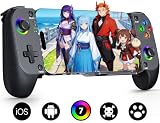
- Bluetooth Controller for iPhone & Android: Mocagen mobile gaming controller Compatible with all iPhone models (including 17/16 series) and Android devices. Pairing steps: 1. Turn on Bluetooth on your phone and go to the pairing screen. 2. Press and hold the Home button for 3 sec until LED4 flashes. 3. Find "XBOX Wireless Controller" on your phone and tap to pair. Quick reconnect: After first pairing, simply press the Home button once (with Bluetooth on) to reconnect
- Play Most Controller-Compatible Games: This iPhone game controller supports cloud gaming (e.g., Xb*x Game Pass, GeForce NOW), Xbox Remote Play, emulator games, and native mobile games (e.g., Apple Arcade). Enjoy effortless control and play Fortnite, Call of Duty, Roblox, Genshin Impact, and many more anytime, anywhere. Note: Controller only works with games that support controller input, and does not support PS Remote Play
- 5M-Cycle Lifespan & Zero Drift: MC1 mobile gaming controller features a Hall-effect joystick with a 5M cycle lifespan, 2.5x longer than standard carbon-film sticks. Its innovative electromagnetic induction technology ensures drift-free operation, enabling precise character control in intense games and significantly extending this phone game controller durability
- Ergonomic Grip Design: The handle is ergonomically shaped with a l*ser-engraved texture for anti-slip and enhanced grip, effectively reducing fatigue during long gaming sessions. The scientifically designed joystick and button layout ensures smooth operation. Whether for personal use or as a gift, it delivers a more comfortable and healthier gaming experience
- 7-Color RGB Light Ring & 600mAh Battery: The mobile game controller features a 7-color adjustable light ring on the joystick(ABXY button lights can be turned off, but their colors are not adjustable). The lighting is vibrant yet eye-friendly. The built-in 600mAh battery provides up to 6 hours of battery life in brightness mode — enough for a full day of gaming
Rank #4

- 【TMR-JOYSTICKS–10X PRECISION, NO DRIFT, 0 DEAD ZONE】TMR sensors (Tunneling Magnetoresistance): 3000 points/axis, 10x more precise than Hall Effect, 4096-level sampling, 1/40 power consumption, zero stick drift. 0 Dead Zone: Press button once to activate for both joysticks – button and rings glow red. Press again to return to factory dead zone (button off, RGB rings restore). Mode not saved; resets after power off
- 【PS5-STYLE ERGONOMICS GRIP & CUSTOMIZABLE RGB】 Full-size non-slip grips designed for hours of comfortable play. Dynamic RGB lighting on joysticks and ABXY buttons with multiple color mode–personalize your setup for late-night sessions
- 【UNIVERSAL COMPATIBILITY–SWITCH 2, iOS & ANDROID】 Seamless Bluetooth connection to Nintendo Switch 2/Switch 1, iPhone, Android, and iPad Mini. Supports Xbox Cloud Gaming, Steam Link, GeForce Now, and Apple Arcade. Telescopic clamp securely holds phones with most standard cases–for optimal fit, bulky or irregular cases need to be removed
- 【PRO-LEVEL FEATURES–MACRO, TURBO & BACK BUTTONS】 2 programmable back paddles (M1/M2) for custom shortcuts, Turbo auto-fire with 3 speed levels, and macro recording for complex combos. Built-in 6-axis gyro for motion-controlled aiming in supported titles
- 【1000mAh BATTERY–15 HOURS OF GAMING & 90°CHARGING CABLE】 TMR sensors drastically reduce power consumption–the built-in 1000mAh battery delivers a full 15 hours of playtime per charge. The included 90°charging cable (one end straight, one end 90°angled) enables charging & playing simultaneously–perfect for long sessions without the cable getting in the way
Rank #3

- 【CONNECTION GUIDE】 ①Make sure the phone controller is NOT in charging before connected. ②Observe if the 4th LED on controller is flashing quickly (if flashing 1.2.3, it is incorrect), If not, press and hold the 'HOME' button to turn off the controller and then connect again: Open your bluetooth on mobile phone, then long press 'HOME' and the 4th light will flash quickly, then find corresponding Bluetooth name and connect.
- 【TIPS FOR IPHONE GAME CONTROLLER】 When the wireless phone controller encounters abnormal situations such as inability to connect/charge, joystick offset, you can try resetting it: poke the 'RESET' hole on the back of controller with a needle, and then restart the controller for iphone to solve most non quality problems
- 【TIPS FOR CLOUD GAMING CONTROLLER】 Please use this mobile game controller to play games on a high-speed and stable network. This is because cloud games have high network requirements and require a high-speed and low latency network environment to reduce latency caused by network congestion and enhance the gaming experience
- 【PLAY ANY CONTROLLER SUPPORTED APP GAMES】 The iphone game controller is designed to enjoy unstoppable gaming experience, work for iPhone/Android, support nearly all cloud gaming services including Xbox Game Pass, Steam Link, GeForce NOW, MFi Apple Arcade & hundreds of popular mobile games like Call of Duty, Roblox, etc. The phone controller perfects your mobile gaming experience beyond a console by making it happen anywhere, anytime, to anyone
- 【WIRELESS IPHONE GAME CONTROLLER WITH HALL JOYSTICK】 Only hold on 'HOME', you can connect controller for iphone with phone via Bluetooth. The Hall effect joystick provide ultra precise control, No drift, No deadzone! It helps you gain dominant position of games faster and the performance and game experience has been improved qualitatively
Rank #2

- Bluetooth Mobile Game Controller for Nintendo Switch 2 & iOS & Android & Tablets, Wireless Gamepad Grip with Hall Effect Trigger Joystick, Ergonomic Phone Controller for iPhone, iPad Pro, Samsung
- TURBO FUNCTION This MFi wireless controller has a turbo function, you can adjust the turbo button according to your needs and achieve one-click bursts, programming buttons are designed on the behind of the stretched gamepad, support macro programming, customise personalised game. making it easier for you to win in FPS games, and it is a good helper for you to play games.
- Hall effect joystick and linear trigger: mobile controller is with hall effect joystick, high precision, stable performance, faster response speed and long service life. Linear trigger has such high fluidity and response speed that gives you a competitive advantage in any game.
- ERGONOMIC DESIGN: Game accessory controllers are ergonomically designed to ensure flawless control and execution. The shape of the gamepad fits naturally in the hand, so you can better immerse yourself in the fun even during prolonged use. 360° rotating joystick analog sticks and trigger buttons ensure precise accuracy and comfort as well as increased sensitivity so you can better control your gaming remote control.
- Supports controllers up to 11 inch: Scalable design supports most tablets such as 11 inch iPad Pro (M5), 11 inch iPad Air (M3), iPad (A16), iPad mini (A17 Pro), 11 inch iPad Pro (M4), 11 inch iPad Pro 4/3/2/1, for Samsung, Lenovo, Amazon, Huawei tablets etc. (Not compatible with the 12.9-inch iPad Pro and 13-inch iPad Air)
Product prices and availability are accurate as of the date/time indicated and are subject to change. Any price and availability information displayed on Amazon at the time of purchase will apply.
Independent reader supportYour contribution helps us test, update, and keep practical guides available for everyone.



