If Wild Rift’s frame rate started dropping after an update, the timing is worth documenting—but it does not prove the patch caused the problem. Riot’s latest retrieved release is Patch 7.3a, dated September 29, 2026; its notes do not announce a general FPS regression or a fix for one. There is no confirmed widespread Patch 7.3 FPS bug in the official material reviewed here.
Why is Wild Rift FPS dropping after the latest patch?
Riot’s news page lists Patch 7.3a, dated September 29, 2026, as the newest retrieved release. The Patch 7.3 notes describe gameplay changes but do not identify a general frame-rate regression. That does not rule out a device-specific issue or establish that no players are affected; it means the official notes do not confirm the patch as the cause.
Riot has addressed performance problems in earlier releases. Patch 7.1f described loading and in-game stutter optimizations, including for lower-end devices and some mid-to-high-end Android phones, and said it improved overheating issues. Those earlier fixes do not establish that a current FPS drop has the same cause.
What to record before changing settings
Write down the details below first. They make it easier to compare results after each change and give Riot Support useful conditions to investigate if the problem persists.
#1 Best Overall

- 【20W Power Ultra-Fast Cooling】The wired magnetic phone cooler utilizes high-performance Peltier element (TEC) with high heat dissipation capacity, and its heat dissipation ability lowers the temperature of the main unit by about 95℉. NOTE: Connection to power supply required for use. Power must exceed 20W for optimal performance. Data cable not included in packag.
- 【Simple Control】The cell phone cooling fan has a built-in Type-C interface, just connect the power cord and it is ready to use. Switch between overclocking mode and silent mode with the click of a button. 12N strong magnetic force holds the phone firmly in place and prevents it from falling off.
- 【Compact and lightweight design】The Magnetic cell phone cooler weighs only 0.18 lb in a small size, leaving more space for hand operation and being without overheavy burden.
- 【Quiet Operation】This smartphone cooler adopts noise reduction design, and the operating noise in silent mode is only 30db, allowing you to play games or watch videos comfortably.
- 【Vertical Air Duct Design】The vertical air duct design of FunCooler 5 smartphone cooling fan focuses on the user's actual experience and innovative ergonomic design, which provides a comfortable grip and does not dissipate heat to the hand.
- Phone model and operating-system version.
- Wild Rift patch number and selected FPS target.
- Graphics preset and resolution, if those controls are available.
- Whether the phone becomes hot before or during a drop.
- Whether dips happen mainly in fights, at particular moments, or throughout the match.
Change one setting at a time and compare stability—not just the highest FPS shown. A drop during busy fights, a decline as the phone heats up, and stuttering across an entire match are useful observations, but none alone proves a particular cause.
Check whether the phone meets Riot’s minimum requirements
Riot’s requirements published for Patch 7.0 list Android 8 or later, 3 GB of RAM, and specified CPU/GPU classes for Android; for iPhone, they list iPhone 6s or later, iOS 15 or later, and 2 GB of RAM. See Riot’s Patch 7.0 minimum specifications for the listed processor and graphics baselines.
Rank #2
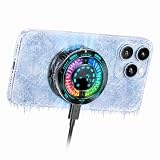
- Great Companion for iPhone:Helps cool your phone and improve performance efficiency. It helps stabilize your iPhone’s performance during photography, gaming, and live streaming. No need to worry about your phone overheating. Say goodbye to overheating, screen freezes, and black screens.
- AI Intelligent Temperature Control:Works with the temperature control system to help you cool your device efficiently by adjusting fan speed based on your phone's temperature. This allows you to use your iPhone efficiently at all times without worrying about it overheating.
- Magnetic & Clip-On:The product packaging includes a magnetic strip to help you attach the phone cooler to the back of your phone; it can be used even with non-magnetic phones. It also comes with a clip for attaching it to the back of your phone—installation is simple and requires no tools.
- Plug in Via USB-C to Use:Simply plug it into any USB-C port for plug-and-play use—such as with tablets, smartphones, or power banks. It cools down quickly and requires no batteries, making it convenient to use.
- Sleek, Stylish Design & Silent Operation:The product is lightweight, so it won’t weigh down your hands and can be used normally. Its design features LED lamp effect to create a unique ambiance. The fan operates at a low decibel level and does not produce loud noise.
These are minimum compatibility requirements, not a promise of stable performance at every FPS target. A phone that meets them may still struggle to sustain a high frame rate, particularly if it heats up or is under heavier load.
Try the earlier Riot-recommended stutter workaround
Riot’s Patch 7.1f notes gave the following temporary steps for stuttering. They are earlier-version guidance, not a confirmed Patch 7.3 fix. Menu names and availability may have changed, so check the controls in your current client.
Windows Errors? Fix Them Before They Spread
Repair common Windows errors and clear accumulated junk for a smoother, more stable PC - no reinstall needed.Free scan · no reinstallOutdated Drivers Are Slowing You Down
One free scan finds every outdated or missing driver and matches the right update for your exact hardware.Free scan · exact hardware matchRank #3

- 【High Power Ultra-Fast Cooling】 This phone cooler adopts semiconductor refrigeration, the cooling pad turns ice cold instantly after startup. In a 25°C room, the cooling surface of the phone cooler drops to 0°C within 25 seconds. It’s an essential gadget for gamers and live streamers to stop mobile phones from overheating and sustain stable peak performance.
- 【AI Smart Temperature Control】 This phone cooling case equipped with over temperature protection device, which can monitor the temperature in real time through AI. It can adjust the rotation speed and power according to the temperature conditions, while cooling down effectively preventing the device from being damaged by condensed water, ensuring a safer and more worry-free usage experience.
- 【Wide Compatibility】 iPhone cooler can be directly magnetically absorbed or buckled into the mobile phone clip for use. Fit most devices, such as iPhone /Android phones, iPads, tablets, laptop, etc. iPhone 12 series and above can attached without magnetic stickers, non-magnetic phones can be used with magnetic sheets or phone clip. (package includes magnet sticker and phone clip).
- 【Compact and Portable】 Cell phone cooler only 82.5g, small footprint, easy to carry while not interfering with the operation of the phone. Noise as low as 25db, make your gaming experience better, keeps your phone cool even during long live streams or video calls.
- 【RGB Light and Digital Display】 Phone cooling fan equipped with 3 modes and 6 colors of rgb light effects, full of coolness to create an e-sports atmosphere. You can control the lighting effect and turn it off by double-clicking the switch button. Also phone cooling case with intelligent digital display, can display real-time temperature and gear position.
- Lower graphics quality and resolution.
- Turn off Highlights under Settings → Replay.
- Turn off the mobile and Wi-Fi network optimization option under Settings → Other → Network Optimization, if that control is still present.
Riot documented these steps in its Patch 7.1f notes. Test each change separately so you can tell whether it affects the drops.
If the phone heats up, test a lower FPS target
Heat is a reason to compare settings, not proof that the update caused the problem. First try reducing graphics quality or resolution; then test a lower FPS target and see whether performance remains steadier over a full match.
Rank #4

- Instant Cooling Technology: Powered by a high-performance TEC semiconductor chip and high-speed fan, this phone cooler drops your device's temperature to -5°C in just 3 seconds, preventing overheating, throttling, and lag during gaming, streaming, or vlogging.
- Dual Power Supply Modes: Plug in via USB cable for continuous indoor use, or attach the included 3000mAh rechargeable battery for up to 3 hours of wireless cooling outdoors, keeping your device cool without interrupting your session.
- 3-Level Adjustable Cooling: Features a physical power switch and three adjustable refrigeration levels, letting you customize cooling intensity to match your needs, whether gaming, binge-watching, live streaming, or navigating in the car.
- Universal Compatibility & Flexible Mounting: Includes both a magnetic sticker and a secure back clip, making it compatible with virtually all iPhones, Android phones, iPads, tablets, laptops, Nintendo Switch, Steam Deck, and more.
- RGB Lighting & Portable Design: Eye-catching customizable RGB lighting enhances your gaming setup while indicating cooling and battery status, all in a compact, lightweight build ideal for on-the-go use.
Riot’s Patch 2.2 documentation described Performance mode as a balance between FPS and stability at the expense of graphics, and cautioned that 120 FPS could risk overheating or performance degradation. That is historical guidance from 2021: it does not establish that the same options or 120 FPS support are available on your device today. Riot also noted that FPS spikes in Performance mode can feel like in-game latency.
Independent reader supportYour contribution helps us test, update, and keep practical guides available for everyone.Tell frame-rate stutter apart from network lag
Low or uneven FPS is a rendering-performance problem; network latency is a connection-delay problem. They can both make play feel bad, but one does not establish the other. Riot’s older Patch 2.2 note about FPS spikes feeling like latency describes a possible sensation, not an equivalence between low FPS and a network issue.
Free tools Windows power users keep installed
One-click scans. No signup required.
Best Value

- 【20W Ultra-Fast Cooling】 The wired magnetic phone cooler features Black Shark’s proprietary ICECOLD 2.0 cooling system, capable of reducing the device’s temperature by approximately 100℉. With a powerful 12N magnetic force, it securely attaches to your phone to prevent it from falling. NOTE: Connection to power supply required for use. Power must exceed 20W for optimal performance. Data cable not included in packag.
- 【Simple Control】The cell phone cooling fan features a built-in Type-C interface, so you can start using it right away by simply connecting the power cable. Click the button to switch between overclock mode, standard mode and silent mode.
- 【Compact and lightweight design】 Weighing just 75g, this Magnetic cell phone cooler is compact, providing ample space for handling and is easy to use without feeling cumbersome.
- 【In-APP Control】The cellphone cooler is customizable in Shark Arsenal APP. Choose power output mode, adjust the speed of the fan, pick up your own lighting effect and color, and set a timer for the auto shutdown.
- 【Quiet Operation】This smartphone cooler adopts noise reduction design, and the operating noise in silent mode is only 25 db, allowing you to play games or watch videos comfortably.
When documenting the problem, note whether the image visibly stutters or whether actions appear delayed despite smooth animation. That distinction helps describe what you are experiencing without assuming the cause.
When to report a reproducible problem
If the drops began with Patch 7.3 and continue under repeatable conditions, send a report through Riot Player Support. Include your phone model, OS version, patch, FPS target, graphics settings, temperature observations, and when the dips occur. The official sources cited here do not provide a Patch 7.3-specific diagnosis.
Quick Recap
Product prices and availability are accurate as of the date/time indicated and are subject to change. Any price and availability information displayed on Amazon at the time of purchase will apply.




