The ASTRO C40 TR works on a PS5 when you play a PS4 game, but PlayStation does not support it for PS5 games. The key distinction is the game’s generation, not just the console you are using: PS4 titles played through PS5 backward compatibility are supported with licensed standard PS4 controllers, while PS5 games require a DualSense wireless controller, according to PlayStation’s compatibility FAQ.
Does the ASTRO C40 TR work on PS5?
It depends on what you are playing. The C40 TR is a standard-form PS4 gamepad. PlayStation says licensed PS4 controllers in that category work with PS4 games played on PS5, but “They are not supported for playing PS5 games.” PlayStation’s FAQ names the Astro C40 TR in this guidance.
As an Amazon Associate I earn from qualifying purchases.
| What you are playing on the PS5 | C40 TR support | What to use or know |
|---|---|---|
| A PS4 game | Supported, provided the controller is a licensed standard-form PS4 controller, as PlayStation’s FAQ specifies. | The C40 TR is included in PlayStation’s guidance for this category. |
| A PS5 game | Not supported for the C40 TR as a standard-form PS4 gamepad, according to PlayStation’s FAQ. | PlayStation says PS5 games require the DualSense wireless controller. |
| A game using a specialty controller | May be supported for a particular PS4 or PS5 game, depending on that game. | PlayStation gives examples such as steering wheels and arcade fight sticks; this exception does not establish C40 TR support for PS5 games. |
Why the game’s generation matters
A PS5 can run supported PS4 games, but that does not turn a PS4 controller into a supported controller for native PS5 titles. PlayStation distinguishes between the game being played and the console running it: licensed standard-form PS4 controllers can be used with PS4 games on PS5, while PS5 games are designed around the DualSense wireless controller and its features.
Do these 3 things before closing this tab:
1Fix the driver behind crashes, sound loss and screen glitches2Repair Windows errors before they cause bigger problems3Scan for outdated or missing drivers - takes under a minuteSo, if a game has both PS4 and PS5 versions, check which version you launch. Playing the PS4 version on your PS5 falls under PlayStation’s PS4-game controller guidance; launching the PS5 version does not.
#1 Best Overall

- Ready for any environment, the TR line of ASTRO Gaming products deliver Premium design and performance for every type of Gamer
- Optimum rear button layout for superior ergonomics improves Precision during Critical moments. Mappability streamlines the Controller for any genre and playstyle while improving response time
- Quickly and easily swap the analog stick or d-pad modules for consistently sharp performance. Setup the Controller in either offset or parallel configurations
- Quickly and easily activate the trigger stops, which adjusts the throw of your triggers, to allow hair-trigger performance in most FPS titles
- The C40 TR Controller delivers high fidelity game sound and voice chat in wired and wireless mode via the 3.5mm jack. Compatible with any gaming Headset
Can a cable, adapter, or C40 accessory make it work with PS5 games?
ASTRO’s C40 TR quick-start guide documents wired and wireless use with PS4 and PC, but does not provide a PS5 setup procedure. It does not establish that plugging the C40 TR into a PS5 by USB, or using an adapter, makes the controller supported for PS5 games. PlayStation’s game-support rule remains the deciding point.
The guide also describes C40 TR features such as customizable profiles and replaceable stick and D-pad modules. Those options concern the controller’s configuration and hardware; the guide does not say that they add compatibility with PS5 games.
Rank #2
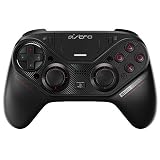
- Ready for any environment, the TR line of ASTRO Gaming products deliver Premium design and performance for every type of Gamer
- Optimum rear button layout for superior ergonomics improves Precision during Critical moments. Mappability streamlines the Controller for any genre and playstyle while improving response time
- Quickly and easily swap the analog stick or d-pad modules for consistently sharp performance. Setup the Controller in either offset or parallel configurations
- Quickly and easily activate the trigger stops, which adjusts the throw of your triggers, to allow hair-trigger performance in most FPS titles
- The C40 TR Controller delivers high fidelity game sound and voice chat in wired and wireless mode via the 3.5mm jack. Compatible with any gaming Headset
How to use the C40 TR with a PS4 game on PS5
PlayStation’s compatibility guidance covers licensed standard-form PS4 controllers with PS4 games on PS5. ASTRO’s setup instructions are for PS4 rather than PS5, so they should not be mistaken for a dedicated PS5 setup procedure. For the original PS4 wired setup, ASTRO’s guide gives these steps:
The Tool Desk
Outbyte PC Repair FREERepair Windows errors before they cause bigger problemsFix Now →Outbyte Driver Updater FREEFix the driver behind crashes, sound loss and screen glitchesFind Drivers →- Set the C40 TR mode switch to Wired.
- Connect the controller’s micro-USB port to the PS4 using a USB-A connection.
- Press the PS button.
ASTRO documents wired and wireless PS4 use, but its guide does not give PS5-specific connection steps. Follow the console and game support guidance for the title you are playing.
Rank #3

- Improve ASTRO C40 module issues such as drift that is not remedied by a controller reset by replacement existing module on the left stick or right stick.
- Easily installation. Replace by Epindon hand-made stick module with attached T6 screwdriver for about 5 minutes.
- 【NOTE】: After installation, it must be reset. (Reset method: Press and hold the reset button to vibrate, then press and hold it again in 30 seconds and vibrate to complete the reset.)
- 【TIPS】: Place the ASTRO C40 controller on a flat, level surface when performing reset/calibration. Multiple reset attempts may be required.
What controller should you use for a PS5 game?
PlayStation identifies the DualSense wireless controller for PS5 games. Its FAQ says: “PS5 games will require use of the DualSense wireless controller, as they have been designed to take advantage of its immersive new features.” The DualSense is the supported alternative for a PS5 game; it does not enable the C40 TR to control that game.
If you are keeping a C40 TR for PS4 games, ASTRO’s guide lists replacement parts and accessories including analog-stick modules and micro-USB cables. The guide identifies those accessory types but does not establish their current availability.
Quick Recap
Best Value

- Tailor C40 TR controller stick module to your preferred tension and height with new interchangeable thumbstick and extender.
- Enhance your aiming with new adjustable-tension thumbsticks module.
- Fixes common thumbstick module issues such as drift that is not remedied by a controller reset by replacement existing modules.
- NOTE:After installation, it must be reset. (Reset method: Press and hold the reset button to vibrate, then press and hold it again and vibrate to complete the reset.)
- 【TIPS】: Always place the ASTRO C40 controller on a flat, level surface when performing reset/calibration. Multiple reset attempts may be required.
Rank #4
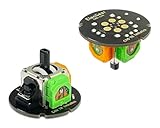
- [TMR Joystick for C40 TR] – The joystick PCB assembly works with ASTRO C40 TR controller. It’s a direct repair replacement for stock analog stick module. With the newest TMR stick sensors inside, the control stick delivers higher sensitivity and accuracy. No more wear of traditional carbon film resistor, smoother movement and longer lifespan
- [About Calibration] – Swap the old analog stick PCB with new TMR stick PCB. Gently screw in the 2 screws. Not too hard for the plastics is fragile. Press and hold the Program Button on the underside for 5 seconds. The controller will rumble once. Wait for 30 seconds. It will rumble once again. The center was reset. Rock the joystick 3-4 circles to calibrate the outer range
- [What’s in box: TMR-C40] – 2x TMR Stick PCB Assembly, 1x T6 Screwdriver. (🔺1. Controller, the plastic enclosure and screws are NOT included. 2. Please refer to the video on the same product ID of U.S. Amazon for the demonstration of the installation steps.)
Product prices and availability are accurate as of the date/time indicated and are subject to change. Any price and availability information displayed on Amazon at the time of purchase will apply.




