What’s actually slowing this PC down?
Pick the symptom - the matching free tool is one click away.
To reset Wordle, delete the Wordle website’s stored data—not just the browser cache. The safest method is to remove data for only the Wordle site, which may clear locally stored game progress and statistics while leaving other websites signed in. The exact result depends on where Wordle saved your data and whether you use the browser version or an app.
Before you reset Wordle
Check the live Wordle interface first for any reset or statistics option available in your current version. The available game UI can change, so do not rely on older instructions or assume a particular button is present.


As an Amazon Associate I earn from qualifying purchases.
If you proceed with a browser reset, remember that website data can include cookies, localStorage, and other persistent storage. Deleting only cached files may not remove Wordle’s saved state. A site-data reset can also sign you out of that site or remove saved preferences.
Chrome on desktop
Delete only Wordle’s data
- Open Chrome.
- Select More → Settings.
- Select Privacy and security → Third-party cookies.
- Select See all site data and permissions.
- Search for the website name shown in Wordle’s address bar.
- Select Delete beside the site, then confirm with Delete.
Close and reopen the Wordle page afterward. This current Chrome path uses Third-party cookies and See all site data and permissions; older guides may show different labels. See Google’s Chrome site-data instructions.
#1 Best Overall
Clear broader Chrome data
Use this only if deleting the individual site does not work or you intentionally want a wider reset:
- Select More → Delete browsing data.
- Choose Basic or Advanced.
- Check Cookies and other site data.
- Choose a time range, such as All time.
- Select Delete data.
This can remove unrelated website logins, preferences, and saved data.
Rank #2
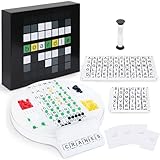
- Wordle Experience in a Board Game – Love Wordle? Boardle brings the same addictive 5-letter word challenge to your table, no screens required. Compete in real life word-guessing duels that capture the fun of the online game in a social, face-to-face format. (This game is unaffiliated with NYT/Hasbro Wordle.)
- Head-to-Head 2-Player Word Duel – Challenge a friend or partner in a battle of wits. Boardle is a 2-player board game where each player takes turns secretly writing a 5-letter word while their partner deciphers the other’s word through strategic guesses. It’s perfect for couples’ game nights or a quick round of competitive fun with a buddy.
- Fun for Family Game Night & Parties – Bring family and friends together with this fast-paced word puzzle game. Play one-on-one or form teams for group play. Boardle spices up parties, classrooms, and family game nights by getting everyone thinking and laughing as they race to crack the code.
- Build Vocabulary & Brainpower – More than just a game, Boardle is an educational word puzzle that helps expand vocabulary and sharpen spelling skills. Great for English learners and word enthusiasts, it’s an engaging tool for teachers or parents to make learning fun. (Screen-free brain teaser!)
- Premium Quality & Complete Set – Boardle comes with a durable game board, letter tiles, color-coded clue pegs, and even a sand timer for timed rounds – everything you need for endless play. High-quality components ensure longevity, and the sleek design makes it a great gift for puzzle lovers. (Ages 14+)
Firefox on desktop
Clear data from the open Wordle site
- Open the Wordle page.
- Select the padlock or shield icon to the left of the address bar.
- Select Clear cookies and site data.
- Confirm the deletion.
Remove Wordle manually from Firefox settings
- Select the menu button → Settings.
- Select Privacy and security.
- Under Browsing data, select Manage Data….
- Search for the Wordle website.
- Select it, choose Remove All Shown, then select Save Changes and OK.
Mozilla’s current instructions are available in its Firefox cookie and site-data guide.
Clear all Firefox site data
For a complete browser-wide deletion, select the menu button → Settings → Privacy and security → Clear Data…. Set When: to Everything, check Cookies and site data and Temporary cached files and pages, then select Clear. This affects more than Wordle.
Rank #3

- Guess the Secret Word: Inspired by the most popular online word game that broke the internet, 5-Letter Wordlet is the wordle style party game families and friends can enjoy together.
- Play All Day: With 5-Letter Wordlet, the fun never ends, as players aren't limited to one word puzzle a day like the online version. Unlimited play with dry erase guessing boards and markers means unlimited fun!
- Grab and Go Game: 5-Letter Wordlet's game boards are specifically designed to pick up and hold.
- Party Game Night: Make it a party game night with 5-Letter Wordlet, the wordle based game that is great for evenings with friends and family, game nights, or date nights.
- What's Inside: The 5-Letter Wordlet Word Party Game is loaded with 3 Dry Erase Guessing Boards, 3 Dry Erase Markers, 90 Guessing Chips, 200 Secret Words, and Instructions to get your game night started in five minutes or less
Safari on iPhone
Remove website data
- Open Settings.
- Select Apps → Safari → Advanced → Website Data.
- Select Remove All Website Data.
- Confirm with Remove Now.
This removes website data used for login information and other browsing state. Apple’s current path includes the Apps menu; older instructions may say Settings → Safari. See Apple’s Safari support guide.
Clear Safari history and website data
For a broader deletion, open Settings → Apps → Safari → Clear History and Website Data, choose the timeframe, and select Clear History. If the button is gray, Apple says there may be no data to clear, or Screen Time web-content restrictions may be blocking the action.
Rank #4
Android
If you use a Wordle app rather than the website, open Android’s app settings, select the relevant app, choose Storage or Storage & cache, and use Clear storage or Clear data. The exact labels and path vary by device manufacturer.
Do not choose only Clear cache. Android distinguishes temporary cache files from stored app data. Clear storage permanently deletes the app’s saved data and is the action relevant to an app reset. Check Google’s Android guidance before confirming.
Best Value

- PLAY WORDLE IN REAL LIFE WITH FRIENDS: Inspired by the popular digital version, Wordle: The Party Game features the same gameplay fans love, but players compete in real life to solve the Wordle
- THE WORD IS … PARTY: Swap solo play for social with this analog version of the Wordle game. Players take turns writing down a 5-letter Secret Word. The others try to guess it in the fewest tries to win
- UNLIMITED PLAY WITH DRY-ERASE BOARDS: No more waiting for a new Wordle game. Use the Wordle dry-erase boards and markers to play as many rounds as there are players. Replay again and again
- 4 WAYS TO WORDLE: Try the classic play or 3 variations. In fast mode, players race to solve the Wordle first. In timed mode, beat the clock—or receive more points. Or compete in groups with team mode
- FRIENDS & FAMILY GAME NIGHT: Break out this fun game for evenings with friends or family game nights. For ages 14 and up, it’s a great gift for adults, teens, Wordle fans, and word puzzle lovers
Advanced method: clear localStorage in the browser console
If you are comfortable with developer tools, open the Wordle page, open the browser’s developer console, and run:
localStorage.clear();Then reload the page:
location.reload();localStorage.clear() removes every localStorage entry for the page’s current origin. It does not automatically remove cookies, IndexedDB, cached files, service-worker data, or storage belonging to another origin. If you know the exact storage key you want to remove, use:
localStorage.removeItem("KEY_NAME");Replace KEY_NAME only with a key you have actually identified; do not guess a Wordle key name. For background, see Mozilla’s localStorage documentation.
Quick wins for a faster PC:
Fix the driver behind crashes, sound loss and screen glitchesFind Drivers →Repair Windows errors before they cause bigger problemsFix Now →Why a Wordle reset may not work
- You cleared only the cache: cached files are not the same as cookies, site data, or persistent
localStorage. Use the site-data controls above. - You deleted the wrong site: storage is tied to an origin. Confirm the protocol, host, and port in the address bar.
- You used another subdomain: a different subdomain has separate storage.
- You cleared localStorage but the state remains: Wordle may also use cookies, IndexedDB, cache, or service-worker storage. Use the browser’s per-site data deletion instead.
- The fresh state will not persist: blocked cookies or restricted site storage can prevent persistent page data from being saved.
- You used Incognito or Private Browsing: private-session storage is separate from the normal profile and is cleared when the last private tab closes. Opening Wordle privately does not erase the normal profile’s data.
Which reset method should you use?
| Goal | Best option | Main trade-off |
|---|---|---|
| Reset Wordle while affecting as little else as possible | Delete only the Wordle site’s data | You may need to repeat the process if data exists in another origin. |
| Reset an Android Wordle app | Use Clear storage | All data saved by that app is removed. |
| Reset a known browser storage entry | Use localStorage.removeItem() |
Requires knowing the correct key and may leave other storage untouched. |
| Erase wider browser data | Use the browser’s clear-all site-data option | Other logins, preferences, and website data may be deleted. |
For most people, the recommended approach is the narrow, per-site reset: delete the Wordle site’s stored data, reopen the page, and avoid clearing all browser data unless the narrower option fails.
Quick Recap
Product prices and availability are accurate as of the date/time indicated and are subject to change. Any price and availability information displayed on Amazon at the time of purchase will apply.




