Do these 3 things before closing this tab:
1Clear out junk files and repair common Windows errors2Scan for outdated or missing drivers - takes under a minute3Repair Windows errors before they cause bigger problemsFirst identify your console: the original Xbox One uses a replaceable external power brick; Xbox One S, Xbox One S All-Digital Edition, and Xbox One X have internal power supplies. A brick sold for the original model will not power an S or X. Before buying anything, reset the original console’s brick and rule out the outlet, cable, accessories, and a fault inside the console.
Identify your Xbox One model before choosing a power supply
| Console | How to identify it | Power-supply type |
|---|---|---|
| Original Xbox One | Large, angular black console with a separate rectangular brick and a proprietary low-voltage cable to the console. | External adapter; replace the complete brick if faulty. |
| Xbox One S | Smaller console, commonly white, with a power cable connecting directly to the console. | Internal PSU; replacement requires opening the console. |
| Xbox One S All-Digital Edition | Similar to the One S but without a disc drive; model 1681 is identified in the iFixit repair guide. | Internal PSU; verify the replacement’s exact compatibility. |
| Xbox One X | Compact black console with a power cable connecting directly to the rear. | Internal PSU; Xbox One X model 1787 is listed with PSU model 1815. |
Color alone is not a reliable identifier. Check for an external brick, the console’s model information, and the power connection. The original Xbox One adapter is not compatible with Xbox One S or X.
Symptoms that can point to a power problem
A power-supply fault is possible if the console does nothing, starts and quickly shuts down, loses power intermittently, or makes unusual buzzing, clicking, or whining noises. The original Xbox One brick’s LED may stay orange, go dark, or behave differently when connected to the console. These symptoms are clues, not a diagnosis: a bad outlet or AC cord, damaged connector, shorted accessory, overheating, or console motherboard fault can look similar.
How to interpret the original Xbox One brick’s light
- Orange or amber: Microsoft describes the adapter’s light behavior in its original Xbox One power-supply information. Orange while the adapter is powered but not actively running the console is generally standby; it does not by itself prove failure.
- White: Generally indicates active power delivery while the console is running.
- No light: Could mean an adapter fault, an AC-input or cord problem, a protection state, or a bad outlet.
- Light goes out when connected: May indicate an overload or short, but the adapter itself can also fail under load.
Use the reset and substitution checks below rather than diagnosing the unit from LED color alone.
Free tools Windows power users keep installed
One-click scans. No signup required.
#1 Best Overall

- 【Latest version Power Supply for Xbox One】The cooling fan and the internal design of the xbox one power brick have seen significant upgrades by our engineers. It is quieter and more durable with no noise.Xbox 360 Adapter
- 【Global Power Supply Adapter for Xbox One】The output voltage is DC 220W 12V--17.9A; 5Vsb--1A, with an input AC voltage range of 100-240V 4.91A 50-60Hz. The auto voltage allows the xbox 1 power supply can be used in any country in the globe.
- 【Safe Build】Ponkor's Xbox One power supply brick is made of ABS fireproof material and has a smart chip put in to protect against overheating, overcurrent, overvoltage, and shortcircuiting.
- 【Power supply Compatible with Xbox One】This power brick replacement only works with the Xbox One and cannot be used by others. When you're not using it, please unplug this power supply.
- 【What You Get】The package comes with 1x Xbox One power supply brick, 1x ac power cord and after sales service.
Reset the original Xbox One power supply
Microsoft’s power-supply reset instructions are the first step before replacing the external brick.
- Turn off the Xbox One.
- Disconnect the power cable from the back of the console.
- Disconnect the cable from the external brick.
- Unplug the brick from the wall outlet and wait at least 10 seconds.
- Plug the brick directly into a known-good wall outlet, initially bypassing an extension strip or surge protector.
- Let the brick return to standby, then reconnect it to the console.
- Try to turn on the console.
If it still fails, try another known-working outlet and, if available, a compatible AC cord. Disconnect external USB drives and other accessories for the test. A damaged or loose console-side connector, burnt smell, or visible damage is a reason to stop and seek diagnosis.
Separate an adapter fault from a console fault
The strongest practical check is a known-good power supply that is verified for the exact console model. If the console starts normally with that supply, the original adapter is strongly implicated. If behavior is unchanged, the console may be at fault. If the known-good unit also shuts down or its light goes out when connected, stop testing; the console could have a short or another serious fault.
Rank #2

- 【Advanced No Noise Design】An latest updated radiator fan system that makes for little fan noise.The quietest high quality power supply in the market at moment,it adopts optimized motherboard to make sure it does a great job.Prevent overheating when charging and provide a longer life time.And it has longer lasting life,you can enjoy the fun of games longer.
- 【Buit-in Smart Chip】Against Over-Heated/Over-Current/Over-Voltage/Short-Circuit.A new generation of Synchronous Rectifier (SR) controller ICs is used to obtain under-voltage protection and internal over-temperature protection.Its high level of integration allows the design of a cost-effective power supply with a very low number of external components.
- 【Worldwide Compatible】It is Global Universal Adapter,Input:AC 100-240V ~ 4.91A 47-63Hz, Output:DC 220W 12V—17.9A;5Vsb—1.0A(Standby), auto voltage (100-240V) allows the ac adapter power supply to be used worldwide.Let the happy game time follow you anywhere in the world.
- 【Dual LED Light Indicaters】The power supply has different LED indicators to show its status.When the connection is secure,LED lights up: Green-Power On,Orange-Standby.When the connection is error,state of LED Light is off or blinking.
- 【What You Get】One AC Adapter Charger, One Charging Cable,One Package Box. And Brand Warranty provides 12 months Warranty,30-Day money-back guarantee for any reason and 24H x 7 email support.
- Do not try random bricks. Confirm generation, connector, output rating, regional input rating, and return terms.
- Inspect the AC cord and console connector for damage; do not use a burnt, cracked, melted, or loose connection.
- A multimeter check can reveal some electrical failures, but it is not a complete test under load.
- Do not open or probe a mains-powered external brick unless qualified. Capacitors can retain hazardous energy after unplugging.
Choose the correct replacement
Original Xbox One: external adapter
Replace the complete external adapter assembly for the original Xbox One; its low-voltage console cable is typically part of the brick assembly. Check the detachable AC cord separately if it is damaged. Confirm the replacement is specifically for the original Xbox One, with the correct connector and regional mains input. Do not substitute an Xbox 360 supply or modify a connector.
Recommended Free Tools
iFixit lists an original Xbox One adapter as a used B-stock product, part IF294-000-2, and says it is compatible with the original Xbox One, not the S or X. The listing also says iFixit is not an authorized Xbox parts distributor. Its price was observed at $47.99 around August 16, 2026; price and availability can change and may vary by region. Check the product listing for current terms and compatibility.
Xbox One S: internal PSU
iFixit lists the Xbox One S PSU as part N15-120P1A, with PA-1131-13MX also listed as a compatible part number. Its stated input is 100–240 VAC, 1.8 A, 50/60 Hz, and output is 12 V DC, 10 A. The listing describes a replacement time of about 15 minutes for the power-block replacement and rates the job moderate; the estimate applies to that listing and does not guarantee total disassembly time. Its observed price was $29.99 around August 16, 2026, for a used internal module. Verify model and revision before ordering. Check current part details.
Rank #3
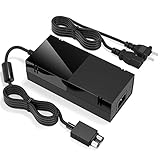
- Designed for Xbox One - This Power Brick (Non-OEM) is specifically designed for Xbox One Console, but not Xbox One S or Xbox One X. It's really a great replacement for your official power cord.
- Heat Dissipation - This Power Supply brick for Xbox One Brick Maintain great heat dissipation even at max performance. Thanks to the enhanced mute fan design which ensures the better air flow inside the brick.
- LED Lights Indicate the Status- It's very easy to use the Xbox One power supply cord, when plug it in, the orange LED shows the adapter on stand by mode while the green LED shows that the adapter is ON. This power cable is auto-voltage 100-240V, you may use it worldwide.
- Usage Tips - If the power brick supply is still on while the console is off, you'd better turn it on energy saving mode instead of instant-on. To increase the lifespan of the accessory, unplug your Power Supply cord from the outlet whenever it's not in use.
Xbox One S All-Digital Edition: internal PSU
The All-Digital Edition has an internal supply, not an original Xbox One brick. iFixit’s guide identifies the console as model 1681 and estimates 45 minutes to one hour for the moderate repair. Confirm the PSU matches the exact console before purchase, and use the model-specific All-Digital Edition replacement guide.
Xbox One X: internal PSU
iFixit lists the Xbox One X model 1787 with PSU model 1815, rated at 12 V DC, 20.42 A. Its estimated replacement time is 30 minutes to one hour, with moderate difficulty; actual time varies with skill and console condition. The listed product’s observed price was $47.99 around August 16, 2026, and is not a guaranteed current price. Check the listing and compatibility. Do not use an Xbox One S module just because both are internal 12 V supplies; current rating, connectors, mounting, shielding, and board compatibility differ.
Used OEM, third-party, repair, or replacement console?
| Option | When it makes sense | Main trade-off |
|---|---|---|
| Used genuine external adapter | Original Xbox One owner seeking a close match to the factory accessory. | Age, wear, fan noise, and previous overheating may be unknown; a genuine used brick cannot fix a console fault. |
| Third-party external brick | Original Xbox One owner finds a clearly specified unit from a seller with a meaningful return policy. | Quality and labeling vary; “Xbox One compatible” may not specify the original model, output, or region. |
| Internal PSU replacement | S or X owner has reasonable evidence the PSU failed and is comfortable with electronics disassembly. | Requires model-specific work; damage to clips, connectors, shielding, or other parts is possible. |
| Professional diagnosis | Symptoms suggest a motherboard fault, short, surge or liquid damage, or the owner is not equipped for internal repair. | Ask for a diagnosis and estimate before authorizing a parts swap. |
| Replace the console | Several faults exist, parts are costly or scarce, or repair total approaches the local cost of a working used or refurbished console. | Compare actual local prices and condition; there is no fixed repair-cost threshold that applies everywhere. |
For third-party units, check exact model compatibility, output specifications, regional input rating printed on the unit, seller return policy, and whether the photographs and reviews refer to the same revision. Avoid listings with no model or rating information, unclear compatibility, damaged connectors, or any requirement to splice or rewire. A low price does not establish safe construction.
Rank #4

- Fast charging with wonderful LED light indication: Power source connected Red light turns on,Green light shows the ac adapter start working
- High efficiency working and powerful motor which make this power supply supply durable and sustainable.
- Upgraded Advanced technology chip allow the power supply working longer time than previous version.Overheat protection and it will automatically cut off if met high heat caused by long time working.
- No more power troubles, low loud noise. Charge and Use your Xbox one console conveniently. Compatible with Xbox One console only. Voltage ranges from 100 to 240V.You can take it and use wherever you go.It support all countries power source.
- TROUBLESHOOT STEPS: If you find this power supply stopped working,pls unplug it for seconds and then plug into power source again. This power supply will work normally as before.
Microsoft support is the right place to check serial-number-specific warranty or service eligibility and regional availability; do not assume that an Xbox One PSU is currently sold or serviced in every country. Xbox Support.
Independent reader supportYour contribution helps us test, update, and keep practical guides available for everyone.Replacement safety: external brick versus internal PSU
Replacing the original Xbox One external brick
- Unplug the old brick from the wall, then disconnect it from the console.
- Inspect the console-side connector for bent, burnt, or loose contacts.
- Connect the replacement to the console, then plug it directly into a wall outlet for the initial test.
- Confirm the console boots and the adapter behaves normally before reconnecting accessories or cable-management equipment.
Keep the brick uncovered and ventilated. Do not place it inside a closed cabinet or under clothing.
Replacing an Xbox One S, All-Digital, or X internal PSU
There is no single safe teardown sequence for all three models and revisions. Use a guide specific to the console, disconnect every cable before opening, and use the correct security Torx equipment. The All-Digital guide lists opening tools and TR10 and T8 security Torx tools. Take photos of screw locations and cable routing, release connectors by their plugs rather than pulling wires, and do not touch or probe PSU circuitry unnecessarily.
Best Value
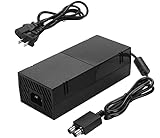
- [DURABLE & LESS NOISE] Optimized for mounting the xbox one power supply brick, we have made great improvements — no loud noise now. This durable xbox one power supply emits far less noise than many other similar products.
- [GLOBAL POWER AC ADAPTER] Auto Voltage support (100-240V), no loud buzzing or fan noise. This xbox one power brick works quietly, making power supply much more silent. No need to worry about noise anymore.
- [VITAL POWER SUPPLY BRICK DATA INFO] INPUT: AC 100-240V ~ 4.91A 47-63Hz, OUTPUT: DC 220W 12V--17.9A, 5Vsb--1A. This is a reliable xbox power supply for your console.
- [LONG LASTING LIFE] We have greatly improved the cooling fan, ensuring a long lifespan for this ac adapter for xbox one. Built to last.
- [USING TIPS] Please use this power supply cord according to the requried Voltage, if the power supply is still on while the console is off, you must rem
- Work on a stable, static-aware surface and keep screws organized.
- Inspect for swelling, scorching, melted connectors, or liquid contamination; stop if present.
- Unplugging does not make every internal power component immediately safe. A repair guide warns that coils and capacitors can present shock hazards: iFixit electrical-safety guidance.
- Reassemble the console before powering it on. Opening a console may affect service eligibility depending on region and status; check applicable terms rather than assuming a universal warranty rule.
The All-Digital repair guide cautions that the console must be disassembled and that improper work can damage other components. If you lack the tools or experience, use a repair technician.
When a replacement PSU does not fix the problem
The console remains dead
Possible causes include a failed motherboard power circuit, damaged power connector, shorted USB accessory, liquid or surge damage, an incorrect or defective replacement, or another console-side failure. Disconnect accessories, repeat the original-model reset if applicable, and test only with a verified compatible supply. If behavior is unchanged, request board-level diagnosis instead of buying another PSU blindly.
The adapter shuts off when connected
This may be a console short or overload, a damaged cable or connector, or a brick that fails under load. Do not keep cycling power. Stop immediately if the unit grows hot, smells burnt, buzzes loudly, or has visible damage.
The console starts and then shuts down
A voltage drop under load is one possibility, but overheating, a fan or heatsink problem, motherboard faults, storage problems, or a loose internal connector after prior repair can produce similar behavior. A PSU replacement is not a reliable fix without diagnosis.
Windows Errors? Fix Them Before They Spread
Repair common Windows errors and clear accumulated junk for a smoother, more stable PC - no reinstall needed.Free scan · no reinstallCrashes, No Sound, or Screen Glitches?
Random freezes, missing sound and display glitches usually trace back to one bad driver. Find and replace yours safely.Free scan · under a minuteThe console or adapter was exposed to liquid
Do not power it on to test it. Disconnect it from mains power and have it inspected or replace the affected supply. Liquid can cause corrosion and shorts that appear later.
When to stop DIY troubleshooting
- The power connector is burnt, melted, loose, or visibly damaged.
- A supply repeatedly shuts down, overheats, or smells burnt.
- The console has liquid or surge damage, or a verified supply produces the same failure.
- You are not comfortable opening a console or working around power components.
- The likely total repair cost is close to a suitable replacement console in your area.
For professional service, ask the technician to confirm the console model, test the PSU under load, inspect for shorts or burnt components, confirm the replacement part match, and provide an estimate before work begins.
Quick Recap
Product prices and availability are accurate as of the date/time indicated and are subject to change. Any price and availability information displayed on Amazon at the time of purchase will apply.




