What’s actually slowing this PC down?
Pick the symptom - the matching free tool is one click away.
Yes. GuliKit’s TT PRO and TT MAX controllers have tension-adjustable joysticks, and GuliKit says you can fine-tune stick resistance within a ±30g range. The company also sells a separate replacement joystick kit for several existing controller families. That kit is a hardware swap that requires soldering, not a screw-in adjustment for a stock stick.
Which GuliKit controllers have adjustable stick tension
The adjustable option is part of GuliKit’s TT Series, which includes two models: the TT PRO and the TT MAX. GuliKit’s launch announcement, dated January 15, 2026, says global sales began on that date and that the TT Series can be bought through local Amazon platforms. Regional availability and pricing vary, so check GuliKit’s store or your local retailer before you buy.
GuliKit describes the TT Series sticks as “720° tension-adjustable” TMR joysticks. TMR refers to tunnelling magnetoresistance, a magnetic sensing method that GuliKit uses for these sticks. The company’s announcement does not explain what the 720° figure measures, so treat it as GuliKit’s own product label.
What the ±30g range means in practice
GuliKit’s launch announcement says stick resistance “can be fine-tuned within a ±30g range, allowing players to customize the feel to match their preferences.” This is a manufacturer specification. No independent test of the range has been published in the sources reviewed for this article, so the figure tells you the adjustment span GuliKit advertises, not how a given stick will feel to you.
#1 Best Overall

- KK3Pro Now Features Switch2 Wake-Up:We’ve just launched the wake-up feature with Switch2 for KK3Pro. To enjoy this update, please update your device to the latest BT Firmware V5.03 downloaded from our site.
- SPECIAL PAIRING METHOD FOR SWITCH 2 WAKEUP: 1.1 Set the controller to Switch mode, then hold the pairing button to enter pairing mode. 1.2 Enter the Controller → Change Grip/Order interface on Switch 2. 1.3 After the Switch 2 displays that the controller has been paired successfully, take off any one of the left and right JOYCON controllers on Switch 2, wait until Switch 2 shows that the JOYCON controller has reconnected, and next install the JOYCON controller back onto Switch 2 to complete the special pairing process.
- Upgraded Auto-Pilot Gaming (APG) - Advanced auto-control engine that goes beyond macros. With GuliKit innovative APG feature,you can record any series of inputs up to 10 seconds and map to the APG button for your custom commands or macros.Totally optimized with higher replay accuracy.
- Upgraded Hall Effect Joysticks - As the leader in Hall effect joystick technology,GuliKit KK3 PRO is equipped with new-gen Hall magnetic joysticks with anti stick drift and butter-like smooth control performances,high precision at level 2200 allows for more delicate micro-control.
- Patented Maglev Vibration Motor - GuliKit self-developed Maglev motor technology provides 3 vibration modes(HD rumble,Super Haptic,Rotor vibration) and 2 vibration strengths(weak,strong) for the most immersive gaming experience.
GuliKit also says the adjustment mechanism is concealed to reduce accidental input. That design choice means the adjustment is not meant to be changed casually during play. The company’s announcement does not include a step-by-step procedure for changing tension, and this article does not offer one.
Changing tension on an existing controller
Owners of some existing controllers can buy GuliKit’s 720° Tension Adjustable TMR Joystick replacement kit, which GuliKit announced at Gamescom 2025. The product page describes the kit as a direct replacement that does not require circuit modifications. The same route has practical limits that the replacement page and the Gamescom announcement both make clear:
Rank #2

- KK3Pro Now Features Switch2 Wake-Up:We’ve just launched the wake-up feature with Switch2 for KK3Pro. To enjoy this update, please update your device to the latest BT Firmware V5.03 downloaded from our site.
- SPECIAL PAIRING METHOD FOR SWITCH 2 WAKEUP: 1.1 Set the controller to Switch mode, then hold the pairing button to enter pairing mode. 1.2 Enter the Controller → Change Grip/Order interface on Switch 2. 1.3 After the Switch 2 displays that the controller has been paired successfully, take off any one of the left and right JOYCON controllers on Switch 2, wait until Switch 2 shows that the JOYCON controller has reconnected, and next install the JOYCON controller back onto Switch 2 to complete the special pairing process.
- Upgraded Auto-Pilot Gaming (APG) - Advanced auto-control engine that goes beyond macros. With GuliKit innovative APG feature,you can record any series of inputs up to 10 seconds and map to the APG button for your custom commands or macros.Totally optimized with higher replay accuracy.
- Upgraded Hall Effect Joysticks - As the leader in Hall effect joystick technology,GuliKit KK3 PRO is equipped with new-gen Hall magnetic joysticks with anti stick drift and butter-like smooth control performances,high precision at level 2200 allows for more delicate micro-control.
- Patented Maglev Vibration Motor - GuliKit self-developed Maglev motor technology provides 3 vibration modes(HD rumble,Super Haptic,Rotor vibration) and 2 vibration strengths(weak,strong) for the most immersive gaming experience.
- It is not plug-and-play. GuliKit says installation requires soldering skills.
- It requires recalibration. GuliKit provides model-specific calibration instructions, and the page says the controller case and screws should be reinstalled before calibration and testing.
- It is a hardware change. Swapping the stick is a repair. If you are not comfortable desoldering and resoldering small components, a repair technician is the safer route.
The kit is listed for the following controllers. The calibration route depends on the model:
| Controller | Calibration route named by GuliKit |
|---|---|
| Nintendo Switch Pro Controller | GuliKit’s third-party open-source calibration tool |
| PS5 DualSense | GuliKit’s third-party open-source calibration tool |
| PS5 DualSense Edge | GuliKit’s third-party open-source calibration tool |
| PS4 DualShock | GuliKit’s third-party open-source calibration tool |
| Xbox Series controllers | Recalibrate on an Xbox console, or with Xbox Accessories software on PC |
| Xbox Elite Series 2 | Recalibrate on an Xbox console, or with Xbox Accessories software on PC |
Before buying the kit, confirm that your exact model appears on the product page. The compatibility list is specific to the controller families named above.
Windows Errors? Fix Them Before They Spread
Repair common Windows errors and clear accumulated junk for a smoother, more stable PC - no reinstall needed.Free scan · no reinstallCrashes, No Sound, or Screen Glitches?
Random freezes, missing sound and display glitches usually trace back to one bad driver. Find and replace yours safely.Free scan · under a minuteRank #3
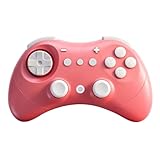
- INSTANT SWITCH 1 / 2 WAKE-UP:Elves 2 is the first third party controller to support Switch 2 wake-up. Make sure to follow the SPECIAL pairing method for Switch 2 wake-up: 1. Set controller to NS mode, turn it on, hold pairing button for 2 seconds, the indicator flashes quickly to start pairing. 2. Set Switch 2 into sleep mode first( black screen), press HOME button on Joy-Con to wake the screen, next enter the controller pairing interface and get paired. (Pairing by regular way without setting Switch 2 into sleep mode first will cause only paired but with no Switch 2 wake-up support.) Please follow the uploaded pairing video for reference. (Please make sure to update to latest firmware.)
- RETRO-INSPIRED CONTROLLER WITH MODERN TECHNOLOGIES:Inspired by the classic controller, the GuliKit Elves 2 pink controller features its retro shape which offers excellent ergonomics for comfort, and more of modern technologies like dual Hall effect thumbsticks, vibrations, six-axis gyro motion control, etc for modern games.
- SMOOTH ANTI-DRIFT HALL EFFECT JOYSTICKS: Engineered with GuliKit leading-edge Hall Effect electromagnetic thumbsticks,anti-friction stick ring, this gamepad delivers anti-drift durability and exceptional 2200-level high precision control.
- BROAD COMPATIBILITY WITH ULTRA-FAST SPEED: Compatible with consoles Switch 2, Switch, Switch Lite, Switch OLED, Windows, iOS, Steam Deck,ROG Ally / X handhelds and Android devices, ideal choice for multi-platform gaming. Supports ultra-fast lag-free wired (1000Hz on PC only, No Cable Attached) and low latency Bluetooth wireless (730Hz) connection. (Not compatible with Sega Genesis,Mega Drive,Sega Saturn).
- ADVANCED FEATURES FOR PRO GAMERS: Classic floating D-pad for fighting games,tactile digital triggers,compact(5.9×3.9×1.2inches more suitable for people with small hands)and lightweight(6.3oz)body, stick deadzone on/off, Turbo, 800mAh 20 hours rechargeable battery, portable carrying case for gaming on the go.
Adjustable dead zones are a separate setting
Dead zones and sensitivity are adjusted in software, not by changing the stick’s mechanical resistance. The TT Series announcement lists adjustable dead zones as a feature separate from its tension-adjustable sticks. If your goal is to reduce unwanted drift or change how far the stick must move before input registers, a software setting may be what you need. If you want the stick itself to feel firmer or looser, you need the TT Series or the replacement kit.
What is not established
GuliKit’s sources describe the adjustment range and the replacement compatibility, but they do not include independent measurements of stick resistance, anti-drift behaviour, precision, or durability. Claims about those qualities are manufacturer statements. No independent reviewer’s quotation on the TT Series tension system was verified for this article.
Rank #4

- Versatile compatibility: supports Xbox Series X/S, Xbox One X/S consoles and PC Win10 and above (including the game platform Steam).
- Precise control: features Hall joysticks and Hall triggers for a comfortable feeling, long service life and improved game accuracy.
- Plug and Play Convenience: Wired USB connection (removable) for easy setup and instant play without the need for additional drivers.
- Customizable experience: Includes 2 custom backbuttons that allow users to eliminate false triggers and improve their gaming experience.
- Impressive gameplay: Provides a pulsating vibration trigger and an asymmetric vibration grip motor for intense tactile feedback.
Official launch and product details were checked against GuliKit’s own announcements. Retail price, stock, and region-specific availability were not verified for this article and may have changed since publication.
Quick Recap
“
Product prices and availability are accurate as of the date/time indicated and are subject to change. Any price and availability information displayed on Amazon at the time of purchase will apply.
Quick wins for a faster PC:
Clear out junk files and repair common Windows errorsFree Scan →Fix the driver behind crashes, sound loss and screen glitchesFind Drivers →Repair Windows errors before they cause bigger problemsFix Now →



