Start with this diagnostic checklist
avmenum.dll is an AVM-related file, and a missing avmenum.dll message usually points to old AVM ISDN-controller or communications software rather than a normal Windows component. Before copying anything, establish:
- Which program or shortcut shows the error
- Whether it appears at startup, when opening an old application, or after antivirus action
- Whether an AVM device such as a FRITZ.Card or another ISDN controller is still installed
- Whether the caller is 32-bit or 64-bit
- Whether Windows reports “the specified module could not be found,” which can indicate a missing dependency rather than a missing file
The safest repair is to restore or remove the complete AVM software package that owns the file. Do not begin by downloading avmenum.dll from a random DLL archive.
As an Amazon Associate I earn from qualifying purchases.
What avmenum.dll belongs to
avmenum.dll is associated with AVM GmbH’s legacy avmenum32 software and the AVM ISDN-controller driver ecosystem. It may appear alongside CAPI, NDIS WAN, TAPI, or other communications components used by older AVM hardware.
It is not normally part of a current Windows installation, and it is not a Microsoft Visual C++ runtime, DirectX component, or standard modern Windows DLL. Historical Windows systems may have contained an AVM-signed copy in a protected or cached system location, but that reflects an old AVM driver installation, not a universal Windows requirement.
#1 Best Overall
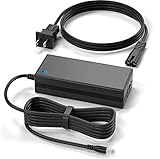
- Brand New, High Quality Replacement AC Wall Power Charger Adapter
- Input: AC 100-240V 50/61Hz Auto (Worldwide AC Input)
- Over Voltage Protection, Over Heat Protection
- Tested Units. In Great Working Condition.
The filename alone does not prove that a copy is safe. A genuine replacement should come from the original AVM installation media or a package obtained through an official AVM or FRITZ support channel for the specific hardware and Windows version.
Fix 1: Repair or reinstall the AVM package
This is the most likely fix if you still use the application or device that triggers the error.
Identify the installed package
- Press Windows + I to open Settings.
- Select Apps.
- Open Installed apps on Windows 11, or Apps & features on Windows 10.
- Search for entries containing AVM, FRITZ, FRITZ.Card, ISDN, CAPI, or the name of the old communications application.
- Select the entry and choose Advanced options, if available.
- Select Repair and test the original application.
If there is no Repair button, open Control Panel:
- Press Windows + R.
- Enter
appwiz.cpland press Enter. - Select the AVM or FRITZ software.
- Choose Change, Repair, or Modify, if offered.
- Restart Windows and test again.
If repair is unavailable or fails, uninstall the package and reinstall the complete version from the original installer. Restart after uninstalling before running the installer again. This matters because the package may install more than the DLL, including device drivers, services, registry entries, CAPI components, and architecture-specific files.
Quick wins for a faster PC:
Fix the driver behind crashes, sound loss and screen glitchesFind Drivers →Repair Windows errors before they cause bigger problemsFix Now →Scan for outdated or missing drivers - takes under a minuteDriver Scan →Run the installer by right-clicking it and selecting Run as administrator. Choose the package intended for your AVM hardware and Windows architecture. Do not mix files from different AVM driver releases.
A successful repair removes the loader message and allows the AVM application or device software to start. If the same message returns, note the exact program named in the error and continue with the next checks rather than copying a different DLL.
Fix 2: Check whether antivirus quarantined the file
If the message began immediately after a security scan, the file may have been quarantined.
Rank #2
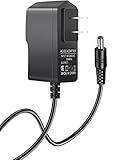
- Power specifications: Input 100V-240V 50/60Hz, Output 12V 2A 24W. Plug type: barrel plug, size: 5.5mm × 2.1mm (for 2.5mm), Inner positive (+) outer negative (-), length: 6 feet / 1.8m.
- Compatible with: Netgear N150 N300 N600 N450 N450-100NAS DGN2000-100NAS DGND3300-100NAS DGND3700 EX6200 EX6200-100NAS; CM600 CM600-100NAS, DM200-100NAS; DGN3500-100NAS DSA-12R-12AUS/ DSA 12R 12AUS/ DSA12R12AUS 120120, P/N: 332-10006-01 332-10190-01 332-10169-01.
- Also compatible with: 12V wireless router power adapters for Netgear, Arris SURFboard, Comcast Xfinity, Motorola SURFboard, Linksys, Belkin, TP-LINK, Eero Home WiFi.
- Multiple intelligent protection: Built-in Short-circuit protection, Overcurrent protection, High pressure protection, High temperature protection, Automatic overload protection. No fire hazard, low temperature operation, stable current.
- Open Windows Security from the Start menu.
- Select Virus & threat protection.
- Under Current threats, select Protection history.
- Review entries from the time the error first appeared.
- Open a detection related to the AVM installation and inspect its path and details.
Restore the file only when all of these are true:
- The file was inside the expected AVM installation directory.
- You still use the associated AVM program or hardware.
- The installer or file came from original media or an official AVM support package.
- The detection is understood and the file’s publisher information is consistent with AVM.
Do not restore a file simply because its name is avmenum.dll. If Defender detects it again, do not repeatedly restore it. Reinstall the complete verified AVM package and investigate the detection first.
Do these 3 things before closing this tab:
1Fix the driver behind crashes, sound loss and screen glitches2Clear out junk files and repair common Windows errors3Scan for outdated or missing drivers - takes under a minuteFix 3: Update or reinstall the associated device driver
A stale or partially removed AVM driver can leave a startup entry looking for avmenum.dll.
- Right-click Start and select Device Manager.
- Expand Network adapters, Modems, Other devices, and any category containing an AVM or FRITZ entry.
- Right-click the relevant device and select Properties.
- Open the Driver tab and record the provider and version information.
- If the device is still required, use the original AVM driver package to update or reinstall it.
- If the device is no longer used, select Uninstall device. Enable Attempt to remove the driver for this device only when you are certain the package is obsolete.
- Restart Windows.
Do not remove an active network or communications device before confirming what depends on it. On older systems, removing the driver without removing the associated AVM software can leave the same startup error behind.
When the manual process involves hunting through old driver packages and matching hardware revisions, Outbyte Driver Updater can scan for stale driver entries; its free scan identifies the issues, while driver installation is handled by the full version. For this file, however, reinstalling the correct AVM package remains the definitive fix.
Use Windows Features only for a confirmed dependency
avmenum.dll is not normally restored by enabling a random Windows feature. Still, an old application may depend on a Windows component that was disabled.
Recommended Free Tools
- Press Windows + R.
- Enter
optionalfeaturesand press Enter. - Review the list without enabling unrelated legacy features.
- Enable a feature only if the AVM application’s documentation specifically requires it.
- Select OK, allow Windows to apply the change, and restart if prompted.
Do not enable deprecated components merely to make a missing-DLL message disappear. That can increase system exposure without restoring the AVM driver chain.
Fix 4: Repair Windows components when corruption is plausible
Use this step when Windows system files are damaged, the error appeared after a failed update, or several unrelated applications also report missing system components. It is not a substitute for reinstalling the AVM application.
Rank #3

- Product Type: Replacement AC Adapter
- Input: 100-240V 50/60Hz
- Certification: ETL Listed, with FCC,CE,ROHS certified
- Compatibility: AVM Fritz!Box 7590 Router Power Supply Mains PSU, Black
- Protection: OVP / OCP / SCP
- Open Start and type Command Prompt.
- Right-click Command Prompt and select Run as administrator.
- Run:
DISM.exe /Online /Cleanup-Image /RestoreHealth
- Wait for DISM to finish.
- In the same elevated window, run:
sfc /scannow
- Restart Windows after both commands complete.
DISM repairs the Windows component store. SFC then checks protected Windows files against that repaired store. Neither command is designed to download or reconstruct an arbitrary third-party AVM DLL.
If you repeatedly run these commands without knowing what changed, Outbyte PC Repair can scan for the underlying Windows issues; its free scan shows what it found, while repair is performed by the full version. If the missing file belongs to an AVM application, reinstalling that application is still the definitive repair.
What success looks like: SFC reports that it found no integrity violations or repaired corrupted files, and the original application starts after a restart. If Windows reports that it could not repair files, return to the AVM package repair rather than placing a downloaded DLL in a system folder.
Fix 5: Check architecture and dependencies
A 32-bit application needs a compatible 32-bit copy of its supporting DLL, even when it runs on 64-bit Windows. A 64-bit copy is not interchangeable.
Windows uses:
C:WindowsSystem32for 64-bit system binaries on 64-bit WindowsC:WindowsSysWOW64for 32-bit system binaries on 64-bit Windows
Those names are confusing, so do not choose a destination by guessing. The installer should place the file where its application and driver package expect it.
The message “The specified module could not be found” can also mean that avmenum.dll exists but one of its dependencies is absent. Reinstalling the complete AVM package is safer than replacing only the named file because it restores the dependency chain together.
The Tool Desk
Outbyte PC Repair FREEClear out junk files and repair common Windows errorsFree Scan →Outbyte Driver Updater FREEScan for outdated or missing drivers - takes under a minuteDriver Scan →To identify the caller:
- Right-click the shortcut that produces the error and select Properties.
- Check the Target field.
- In Task Manager, open the Startup apps tab and look for AVM or FRITZ entries.
- Open Event Viewer by pressing Windows + R, entering
eventvwr.msc, and pressing Enter. - Review Windows Logs → Application around the time of the failure.
If a service or startup entry belongs to software you no longer use, uninstall the complete AVM package. Removing the orphaned program is safer than restoring a DLL solely to keep abandoned software launching.
Rank #4
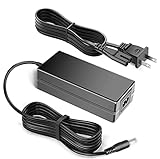
- This 12V high-quality power adapter is compatible with the AVM FRITZ!Box 7590 Router.
- This power Adapter is comaptible for the AVM FRITZ!Box 7590 Router
- 100% Brand New, High Quality AC/DC Power Charger
- Input: 100V-240V AC; great for replacemnt or travel back up
- Build in Dynamic IC, Charger IC & Power fuse for rapid charging and over charge protection.
Fix 6: Use System Restore as a fallback
Use System Restore when the error began after a driver installation, failed upgrade, or accidental removal and a suitable restore point exists.
- Open Start and search for Create a restore point.
- Open the matching Control Panel result.
- Select System Restore.
- Choose a restore point dated before the error began.
- Select Scan for affected programs.
- Review the changes and continue only if they are acceptable.
- Restart Windows and test the original application.
System Restore does not replace a missing installation source. If the AVM software was deliberately uninstalled, reinstalling it from verified media is the better route.
Independent reader supportYour contribution helps us test, update, and keep practical guides available for everyone.Why copying or registering the DLL usually fails
Avoid copying avmenum.dll into System32, SysWOW64, or an application directory from an unverified source. Public records for this legacy filename disagree about versions, architecture, and file size, so a file that appears to match may still be incompatible or modified.
Free tools Windows power users keep installed
One-click scans. No signup required.
A copied DLL also does not recreate:
- AVM driver services
- CAPI or NDIS configuration
- registry entries
- hardware bindings
- dependent runtime files
- the correct 32-bit or 64-bit installation context
regsvr32 is not a general missing-DLL repair command. It registers DLLs that expose a registration entry point such as DllRegisterServer. Unless AVM documentation specifically instructs you to register this exact file and the file exports the required function, do not run:
regsvr32 avmenum.dll
The command may produce an error, or it may register a component without fixing the driver or dependency that caused the failure.
Avoid random DLL download sites
Generic DLL download sites can provide:
- malware disguised as a familiar filename
- the wrong architecture
- a different historical build
- a file with missing dependencies
- a copy that does not match the installed AVM package
Use the original AVM installation media, the application’s official installer, or an official AVM or FRITZ support package for the exact device. If that legacy package is no longer available and you no longer use the hardware, uninstalling the obsolete caller is safer than forcing a replacement file into Windows.
Best Value
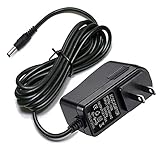
- Compatible With Netgear N150 N300 N600 N450 N450-100NAS, R6700, R6900, R6900P, R7000, R7000P, R6900P, R7000P, R7500, R7800, XR450, XR500, D7000, D7800, EX8000, C6300, C6300B, C6300T, C6900, C7000, C7000B.
- Please check compatible model listed or connector photo to ensure the compatibility.
- Input: AC 100V - 240V, Output: 12V 2A(Compatible 12V 1A, 12V 1.5A), 5FT extra long enough power cord.
- Security & Protection: This adapters was made with the highest quality materials, provides overcharge protection system, short circuit protection, overload protection, over-heat protection.
- 30 days refund, 12-months worry free warranty. If you have any quality problems, please contact us.
FAQ
Is avmenum.dll a Windows 10 or Windows 11 file?
Not normally. It is associated with legacy AVM ISDN-controller and communications software. Its presence usually comes from an old device package or application.
What’s actually slowing this PC down?
Pick the symptom - the matching free tool is one click away.
Is avmenum.dll malware?
The filename alone cannot answer that. Verify the file path, digital signature, installer source, and antivirus detection. An AVM association does not make every copy trustworthy.
Will Visual C++, DirectX, or .NET reinstall it?
There is no verified Microsoft redistributable that specifically installs avmenum.dll. Repair the AVM package that requested it.
Should I download a replacement DLL?
No. Obtain the complete original AVM package from a legitimate source, or remove the obsolete software if the associated hardware is gone.
Why does the message say the module is missing when the file exists?
A dependency may be missing, the architecture may be wrong, or the file may not match the application. Reinstall the complete package and check Event Viewer for the calling program.
Can I remove the AVM startup entry?
Yes, if you have confirmed that no current AVM hardware or software uses it. Prefer uninstalling the obsolete AVM package first, then verify the Startup apps and Services entries no longer point to it.
Quick Recap
Product prices and availability are accurate as of the date/time indicated and are subject to change. Any price and availability information displayed on Amazon at the time of purchase will apply.




