Most Xbox Series X owners do not need an external cooling fan. Microsoft designed the console around a single axial fan and Parallel Cooling Architecture, so open airflow and correct placement should come before any accessory purchase. If you still want an add-on, the G-STORY cooling fan is the clearest Series X-specific option identified here—but it should be treated as optional, not as a proven performance or lifespan upgrade.
Short answer: most Xbox Series X owners do not need an external cooling fan. The console was designed around a single internal axial fan and Microsoft’s Parallel Cooling Architecture. Before buying an accessory, give the console an open, hard, well-ventilated position. If it is still unusually loud, overheating, or shutting down, the more appropriate fix may be cleaning, professional repair, or replacement of the internal fan—not a plug-in fan.
As an Amazon Associate I earn from qualifying purchases.
For readers who specifically want an add-on, the G-STORY cooling fan for Xbox Series X is the clearest direct-fit option identified for this guide. Treat it as an optional exhaust accessory, not as a proven performance upgrade. Cooling stands can also be useful when you need organization, controller charging, or vertical stability, but exact Series X compatibility must be confirmed because many similarly named stands are made for the smaller Xbox Series S.
Best Xbox Series X cooling accessories at a glance
This article may contain affiliate links. If you buy through one, the site may earn a commission at no additional cost to you. Prices, stock, seller, warranty coverage, and compatibility can change, so verify those details on the product page before ordering.
| Accessory | Best for | What to know |
|---|---|---|
| G-STORY cooling fan for Xbox Series X | Owners who specifically want an external top exhaust fan | Advertised with a 140 mm fan, USB power, three listed speeds of 1,500/1,750/2,000 RPM, automatic temperature-based adjustment, an LED display, and RGB lighting. These product features are not independent proof of lower console temperatures. |
| Xbox Series X cooling stand with controller charging | Organization, charging, and a compact setup | Consider cooling a secondary feature. Confirm that the listing explicitly names Xbox Series X; Series S accessories are not automatically compatible. |
| Xbox Series X replacement fan | A console with a genuinely failing or abnormal internal fan | This is a repair part, not an external accessory. Microsoft’s Model 1882 replacement listing is intended for out-of-warranty self-repair by people with suitable technical competence. |
Why ventilation matters more than an aftermarket fan
Microsoft describes the Series X cooling system as Parallel Cooling Architecture. The motherboard is split around a central aluminum chassis, and a single axial fan draws air through the console and across its major heat-producing components. The design is intended to move heat efficiently while keeping acoustic output low. That is why Microsoft’s official guidance concentrates on unobstructed airflow and placement rather than recommending an additional fan.
#1 Best Overall

- Attention: Compatible with PS5/PS5 Slim/PS5 Pro.
- 【Multifunctional Design for PS5/PS5 Slim/PS5 Pro】This PS5 stand comes with an efficient 3‑speed PS5 cooling fan, a PS5 controller charging station, 3 extra USB ports, LED charge indicators, a headset holder, slots for an external hard drive and a remote control, plus storage for 14 game discs. It keeps all your PS5 accessories clean and neatly organized.
- 【Excellent Storage & Easy Operation】This PS5 vertical stand with a 3‑speed PlayStation 5 fan integrates multiple functions into one unit. It saves a lot of space by storing your PS5 console, PS5 controllers, headset, remote control, and 14 games all together. You can keep so many PS5 accessories in one place, which avoids having to search for items during use. Everything can be stored safely in a vertical position.
- 【Efficient 3‑Speed Cooling】Because the base of the PS5 console has an air outlet, the suction cooling system helps dissipate heat from your PS5 console, preventing overheating after long gaming sessions. It offers low noise and faster cooling for your PS5. There are three different speed settings ranging from 3100 to 3500 RPM; the PS5 fan can be adjusted or turned off via the touch switch on the side of the PS5 holder according to your needs.
- 【Fast Charging & Indicators】This PS5/PS5 Slim/PS5 Pro cooling stand charger can charge two PlayStation 5 controllers simultaneously within 2.5 hours. On the bottom of the PS5 charging station, there is a light that shows the charging status: a breathing light means the PS5 controllers are still charging, while a blue light indicates they are fully charged or in standby mode. You can also check the charging status via the LED indicator next to it: red means charging, green means fully charged/standby.
The Series X is approximately 15.1 cm × 15.1 cm × 30.1 cm. It can be used vertically or horizontally when positioned on the correct feet and given adequate ventilation. Its orientation does not remove the need to keep the intake and exhaust path clear.
Set up the Xbox Series X correctly before buying anything
- Use a hard, stable surface. Do not place the console on a bed, sofa, carpet pile, or another soft surface that can cover or restrict ventilation openings.
- Keep the top exhaust unobstructed. In the usual vertical position, hot air exits through the large upper grille. Do not place objects directly over it or press the console beneath a shelf with little room above it.
- Keep the lower intake and surrounding sides clear. Do not push the console tightly against a wall or cabinet panel. Avoid arrangements that block air entering around the lower portion of the enclosure.
- Be cautious with entertainment cabinets. Microsoft advises against confined bookcases, racks, or stereo cabinets unless they are well ventilated. An open front alone may not be enough if the back traps hot air.
- Keep it away from additional heat. Do not position the console beside a radiator, heat register, stove, or amplifier.
- Remove visible exterior dust carefully. Keep the grilles open and do not seal, cover, or force debris deeper into the console. If dust buildup is substantial or the fan is abnormal, use a qualified repair route rather than improvising.
These steps are more important than adding a fan to a poorly ventilated cabinet. An external accessory cannot reliably compensate for blocked intake openings, hot air recirculating inside a cabinet, or a console sitting on a surface that restricts airflow.
Recommended Free Tools
When is an external cooling fan worth considering?
An external fan is most defensible when it solves a specific, identifiable problem without interfering with the console’s own airflow. Examples include:
- you want a top-mounted accessory intended to assist exhaust flow;
- you need a stand that also provides organization, charging, or USB expansion;
- your setup has adequate open airflow but you still prefer an optional supplemental accessory;
- you have verified that the product is designed for the Xbox Series X rather than the Series S.
There is no sound basis for treating an external fan as a requirement for long gaming sessions, a guaranteed way to prevent overheating, a performance enhancer, or a proven method of extending the console’s service life. Retailer descriptions and user reviews can describe a product’s features or subjective experience, but they are not controlled thermal testing. Microsoft does not endorse third-party cooling accessories merely because they are sold for the console.
Top exhaust fan or bottom cooling stand?
These categories do different jobs:
- Top-mounted exhaust fan: positioned to assist the movement of hot air out of the console. It should not cover the top grille or force air in a direction that conflicts with the console’s natural exhaust path.
- Bottom-mounted cooling stand: usually pushes air toward the console’s lower intake area while adding a base. Its practical value may be stability, cable organization, controller charging, battery charging, or USB ports rather than demonstrated thermal improvement.
Fan-speed controls, temperature-triggered operation, RGB lighting, USB power, and charging functions are convenience features. They do not by themselves demonstrate that an accessory cools the console better than Microsoft’s built-in system. Also consider added noise, another USB cable, the possibility of fan dust, and whether the accessory makes the console harder to position in open air.
The best direct-fit option: G-STORY cooling fan for Xbox Series X
The G-STORY model is the strongest match for shoppers specifically searching for an Xbox Series X cooling fan. The reviewed listing describes a 140 mm fan, USB power, three speed levels—1,500, 1,750, and 2,000 RPM—automatic temperature-based adjustment, an LED display, and RGB lighting.
Quick wins for a faster PC:
Clear out junk files and repair common Windows errorsFree Scan →Fix the driver behind crashes, sound loss and screen glitchesFind Drivers →Repair Windows errors before they cause bigger problemsFix Now →That makes it an optional accessory for someone who wants an add-on exhaust fan and adjustable operation. It does not establish that the accessory lowers temperatures by a particular number of degrees, improves frame rates, prevents shutdowns, or extends the console’s life. The automatic temperature-control claim should be treated as a product-description feature unless independent testing is available.
Rank #2

- PS5/SLIM/PRO COOLING STATION:This ps5 cooling station is specifically designed for the PS5, PS5 Slim, and PS5 Pro. The PS5 cooling base features concealed built-in cables and sturdy security screws, ensuring a stable and secure connection with the PS5 console for safety and balance. Its aesthetically pleasing design harmonizes beautifully with the PS5. for PlayStation 4 Chargers
- MULTIPLE POWER SUPPLY DEVICES:This multifunctional ps5 cooling stand can not only seamlessly connect to the USB port on the back of the PS5 console for power but is also compatible with various power sources, such as personal computers, USB hubs, wall sockets, and AC adapters. Simply place the PS5 Slim console securely on the PS5 cooling stand, then retrieve the screws and cables from the bottom to effortlessly complete the installation. for PlayStation 4 Chargers
- PS5 ORIGINAL & EDGE CONTROLLERS: With moveable USB charging port on the ps5 controller charger, effortlessly charge your PS5 original or Edge controller by adjusting the port up or down. Achieve a full charge for the PS5 original controller in just about 3.5 hours, and for the PS5 edge controller in approximately 2.5 hours. The controller's LED icon illuminates RED during charging and switches to GREEN upon reaching a full charge or entering standby mode. for PlayStation 4 Chargers
- MULTIFUNCTIONAL INTEGRATION:Featuring 3 integrated USB HUBs on the side, PS5 docking station effortlessly charges 3 other devices. Beyond charging, ps5 base stand facilitates data transfer, screenshot capture, and PS5 controller updates. What's more, ps5 stand has a dedicated media remote slot for easy storage, effortlessly attaching to the PS5 slim console. for PlayStation 4 Chargers
- INTELLIGENT SAFETY & COOLING SYSTEM:Built with high-efficiency cooling fans and intelligent multi-protection chips, this PS5 cooling station delivers powerful heat dissipation without distracting loud noise, effectively lowering the console’s operating temperature during long-hour gaming sessions and preventing overheating, lagging and shutdown issues. It supports intelligent over-charging, over-current and over-temperature protection to safeguard your console and controllers. for PlayStation 4 Chargers
Before ordering the G-STORY fan
- Confirm the product title and compatibility say Xbox Series X, not Xbox Series S or Xbox One.
- Check the current seller, stock, return policy, and power requirements.
- Confirm that the fan will not obstruct the console’s top exhaust grille.
- Make sure the console remains in an open position after the accessory is installed.
- Decide whether extra noise and RGB lighting are acceptable for your setup.
Cooling stands: useful for organization, but verify the model
A cooling stand can make sense if you also want controller charging, a more stable vertical base, battery charging, or additional USB connectivity. In that case, the stand may be worthwhile even if its cooling effect is modest or unproven.
Compatibility is the critical issue. The Xbox Series S and Series X have different dimensions and physical layouts. The NexiGo product page identified in the research describes a multifunctional vertical cooling stand with dual fans and three fan levels for Xbox Series S; that evidence does not establish Series X compatibility. Do not buy it—or any similarly named product—unless the exact listing explicitly supports the Series X.
Comparison pages may mention brands such as NexiGo, OIVO, KIWIHOME, and MENEEA, but those references are discovery leads rather than independent thermal evidence. Check the exact model number, console compatibility, dimensions, stand orientation, charging behavior, and return terms before purchasing.
When the internal fan is actually failing
An external fan is the wrong solution if the Series X’s own fan is noisy, intermittently stops, scrapes, fails to spin, or the console becomes abnormally hot despite correct placement. Those symptoms point toward an internal cooling problem, dust or heatsink obstruction, or another hardware fault that an external accessory may mask without fixing.
Microsoft lists a replacement fan for Xbox Series X Model 1882, including compatibility information for Model 1882 variants, screws, and a cosmetic sticker. Microsoft describes the part as intended for out-of-warranty self-repair by people with the necessary knowledge and technical competence. Microsoft also warns that damage caused during self-repair is not covered by the limited hardware warranty.
iFixit also offers a replacement Series X fan and a repair guide for the 2020-release Series X models. The documented procedure involves fully shutting down and unplugging the console, removing the back panel, removing fan screws, disconnecting the fan cable, and removing the fan assembly. That is substantially more invasive than attaching a USB accessory.
Repair decision checklist
- Under warranty or unsure of the fault? Contact Microsoft or an appropriately qualified repair service before opening the console.
- Out of warranty and technically competent? Verify the exact console model and replacement-part compatibility before ordering.
- Attempting self-repair? Use a suitable T8/T10 Torx driver set, ESD-safe tweezers, and a spudger where required by the repair guide. Fully shut down and unplug the console first.
- Not experienced with console repair? Do not open a working console merely to improve cooling. Professional repair is safer than turning an optional cooling concern into additional damage.
What to avoid when shopping
- Claims that an external fan guarantees a longer Xbox lifespan.
- Specific temperature reductions that are supported only by retailer copy or user anecdotes.
- Fans that cover the top exhaust or obstruct the lower intake.
- Series S stands described vaguely as fitting “Xbox consoles.”
- Accessories that require a USB port but do not clearly explain power requirements.
- Opening the console when there is no symptom of an internal fault.
- Assuming RGB lighting, more RPM, or more fans automatically means better cooling.
Our buying recommendation
For most owners: buy no fan initially. Place the Xbox Series X on a hard surface with open space around its intake and top exhaust, and keep it away from heat sources and poorly ventilated cabinets.
Free tools Windows power users keep installed
One-click scans. No signup required.
Rank #3
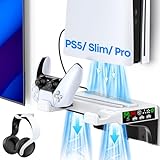
- 【Versatile Wall Mount for All PS5 Console】PS5 wall mount with charging and cooling fan is tailored to PS5 original disc & digital, PS5 slim disc & digital, PS5 pro disc & digital. It comes with an efficient cooling system, a dual controller charger, a headset holder, and an additional USB port for charging other devices.
- 【2.5 Hours Quick Charging】As PS5 controller charger wall mount, it can fully charge two PS5 remotes in just 2.5 hours which draws power either from the PS5 console or a wall adapter. The charging status is clearly indicated by LED lights: blue when fully charged and orange during charging, allowing you to easily monitor the charging progress.
- 【Fits for PS5 & Edge Controller】Our PS5 mount kit is designed to be fully compatible with both the PS5 original and the PS5 Edge controller. Keep your controllers organized and within easy reach.
- 【3 Gear to Adjust Fan Speed】Upgrade your PS5 experience with our vented base! It houses two silent cooling fans with 3-gear speed adjustment via a touch switch. You can select high, medium, low, or turn them off. This setup offers superior heat dissipation, effectively keeping your PS5 or PS5 slim/pro cool and extending its lifespan. Even better, it supports charging and cooling in standby mode.
- 【Sturdy Metal Mount & Streamlined Installation】Made of high quality stainless steel, PS5 shelf mount has strong anti-deformation capacity, making PS5 console more stable and safer. With its integrated design, it eliminates the need for complex multi-step installations. With just a few simple steps, you can securely mount your PS5 on the wall, saving you time and energy.
If you specifically want an external accessory: consider the G-STORY cooling fan for Xbox Series X, provided it fits without obstructing airflow and you accept that its advertised cooling performance has not been independently established here.
If you want charging or organization too: look for a cooling stand that explicitly supports Xbox Series X. Treat cooling as a secondary feature and verify the exact model.
If the console’s internal fan is failing: pursue diagnosis, Microsoft’s compatible Model 1882 replacement path, an iFixit-compatible part and guide, or professional repair. A plug-in fan is not a substitute for repairing a defective internal cooling system.
Frequently Asked Questions
Does the Xbox Series X need an external cooling fan?
Usually not. Microsoft designed the Series X around a single axial fan and Parallel Cooling Architecture. Correct placement on a hard surface with unobstructed intake and exhaust areas matters more than adding an accessory.
The Tool Desk
Outbyte Driver Updater FREEScan for outdated or missing drivers - takes under a minuteDriver Scan →Outbyte PC Repair FREERepair Windows errors before they cause bigger problemsFix Now →What is the best external cooling fan for Xbox Series X?
The G-STORY cooling fan for Xbox Series X is the clearest direct-fit candidate identified for this guide. Its listing advertises a 140 mm fan, USB power, three speeds, automatic temperature-based adjustment, and lighting. Those features do not independently prove better console temperatures.
Will an Xbox Series S cooling stand fit Xbox Series X?
Yes, but only if the exact product listing explicitly supports Xbox Series X. Series S and Series X stands are not automatically interchangeable because the consoles have different dimensions and layouts.
When should I replace the Xbox Series X internal fan?
Unusual noise, scraping, intermittent fan operation, shutdowns, or persistent excessive heat despite proper placement can indicate an internal problem. Consider Microsoft or professional repair; an external fan will not repair a failing internal fan.
The Bottom Line
Bottom line: correct ventilation is the best Xbox Series X cooling upgrade. External fans are optional, and the G-STORY is the clearest direct-fit candidate for readers who still want one. For abnormal noise, overheating, or fan failure, investigate the internal fan or seek repair instead of relying on an external accessory.




