Quick wins for a faster PC:
Repair Windows errors before they cause bigger problemsFix Now →Scan for outdated or missing drivers - takes under a minuteDriver Scan →Clear out junk files and repair common Windows errorsFree Scan →The best Wii controller adapter depends on which controller you have and what you want to connect it to. For a Wii Remote or a Classic Controller plugged into a Wii Remote, 8BitDo’s USB Wireless Adapter 2 is a manufacturer-documented option for Nintendo Switch and Windows, with important feature limits. For a wired Wii Classic Controller, 8BitDo GBros. is another option. If you want to use a Classic Controller on a Wii or GameCube, raphnet makes a dedicated adapter—but it only works with Wii consoles that have GameCube controller ports, and its product page currently reports it out of stock.
Choose an adapter by controller and destination
“Wii controller adapter” can mean several different things: connecting a Wii Remote to a Switch or PC, using a wired Classic Controller on another system, or adapting a Classic Controller for a Wii or GameCube. These are different connection paths, and an adapter does not guarantee that every controller feature or every game will work.
As an Amazon Associate I earn from qualifying purchases.
| Your controller | Destination | Option to consider | Key limitation |
|---|---|---|---|
| Wii Remote, with or without a Classic Controller attached | Nintendo Switch | 8BitDo USB Wireless Adapter 2 | Requires Pro Controller Wired Communication and Switch system version 3.0.0 or above; motion and several other features are unsupported. [c1] |
| Wii Remote, with or without a Classic Controller attached | Windows PC | 8BitDo USB Wireless Adapter 2 | Requires Windows 10 version 1903 or above; motion and IR control are unsupported. [c2] |
| Wired Wii Classic Controller | Switch or Windows | 8BitDo GBros. | Check the manufacturer’s compatibility information for the target device and game. [c3] |
| Wii Classic or Classic Pro Controller | GameCube or a Wii with GameCube controller ports | raphnet Classic Controller to GameCube/Wii adapter | Does not work with Wii consoles lacking GameCube ports; manufacturer page currently reports out of stock. [c4] |
The compatibility and limitations here are manufacturer-declared, not the result of independent comparative testing. They do not establish universal support across games.
Free tools Windows power users keep installed
One-click scans. No signup required.
Using a Wii Remote on Switch or Windows
8BitDo USB Wireless Adapter 2
8BitDo documents the USB Wireless Adapter 2 for a Wii Remote on Switch and Windows. A Wii Classic Controller can also be connected to the Wii Remote and used through that route. The adapter connects to the destination over USB; pairing uses the adapter’s pair button and the Wii Remote’s SYNC button. Consult the relevant manufacturer instructions before connecting:
#1 Best Overall
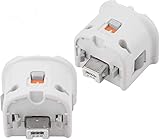
- Brand new and high quality.
- Connect Wii MotionPlus to your Wii Remote controller to increase accuracy and enhance play control on compatible games.
- Contains additional sensors that respond to your wrist's slightest motion for greater results with more economical movement.
- Compatible with a variety of Wii games.Perfect motion plus adapter for your Wii Remote controller.
- Allow it to more accurately capture complex motion and It tracks the player's movements in finer detail and with greater accuracy.
The supported features differ by destination, so this is not a way to preserve the Wii Remote’s motion-sensing gameplay.
Switch requirements and missing features
For Switch, 8BitDo’s instructions require system version 3.0.0 or above and the setting Pro Controller Wired Communication enabled. The manual states: “Motion control, NFC scanning, IR camera, HD rumble, notification LED, player indicator are not supported, nor can the system be waken up.” The Wii Remote may therefore serve as a button input device, but it does not retain those functions through this adapter.
Rank #2

- 《NOTICE》This adapter is only compatible with Windows PCs equipped with a USB interface. Use with other models is not guaranteed. Supported OS are Windows 10, Windows 8-8.1, Windows 7 (SP1), Windows Vista (SP2), and Windows XP (SP3). This converter has been verified to be compatible only with the Wii Game Classic Controller / Classic Controller Pro. Other controllers have not been tested and cannot be guaranteed.
- 《CLASSIC CONTROLLER / CLASSIC CONTROLLER PRO TO USB》Wii Game Classic Controller or Classic Controller Pro can be connected to your Windows PCs. With a fast response model that allows you to input up to 60 times per second, you can play comfortably without missing button operations. You can set the continuous shooting mode by pressing each button while pressing the HOME button. Perfect for a fast shooter!!
- 《PLUG AND PLAY - NO SOFTWARE or DRIVER INSTALLATION IS NECESSARY》 No need to install any software or driver. Simply just connect the adapter to the USB port to you desktop or laptop computer and ready to go!! It works for Windows OS PCs.
- 《ADAPTER COMPATIBILITY》 Compatible with Windows 10 / Windows 8 / Windows 7 (SP1) / Windows Vista (SP2) / Windows XP (SP3)
- 《PRODUCT DETAILS》 Size: 2.4" X 1" X 0.6" (62mm X 26mm X 17mm). Cable length: 39" (1m). Weight: 32g. Adapter from Wii Classic Controller (RVL-005) / Wii Classic Controller Pro (RVL-005 / RVL-005-02) to USB port. Compatible with Windows 10 / Windows 8 / Windows 7 (SP1) / Windows Vista (SP2) / Windows XP (SP3). The adapter is for only one player.
Windows requirements and missing features
For Windows, 8BitDo’s manual requires Windows 10 version 1903 or above. It says motion and IR control are unsupported. The manufacturer’s stated Windows requirement does not establish that every PC game will recognize or map the controller in the same way; check the target game’s controller support.
Using a wired Wii Classic Controller
8BitDo GBros.
If your controller is a wired Wii Classic Controller rather than a Classic Controller attached to a Wii Remote, consider 8BitDo GBros. 8BitDo lists a Wii Classic controller port and lists compatibility with Switch and Windows. Check its manufacturer product page for the connection details and compatibility information relevant to your device. This option is distinct from the USB Wireless Adapter 2 route, which starts with a Wii Remote.
Rank #3

- 【Latest Firmware Support】 Ensure optimal performance by updating the 8BitDo Receiver to the latest firmware before use; enables seamless compatibility and enhanced features.
- 【Wireless Freedom for Classic Consoles】 Play your Nintendo GameCube (NGC) and Wii (RVL-001) wirelessly with your favorite modern controllers—no cables needed.
- 【Wide System Compatibility】 Works with NGC, Wii (RVL-001 model only), and Windows 10/11 PCs for flexible gaming across retro and modern platforms.
- 【Extensive Controller Support】 Connect X box Series X/S, X box One(Bluetooth), PS5/PS4, Switch Pro, and Wii U Pro controllers via Bluetooth for unified gameplay.
- 【Virtually lag-free Precision Gaming】 Experience virtually lag-free response for precise control, ideal for competitive and retro gaming sessions.
Using a Classic Controller on a Wii or GameCube
Check the Wii model before buying
The raphnet Classic Controller to GameCube/Wii adapter is a wired option for using a Wii Classic or Classic Pro Controller with GameCube hardware and compatible Wii consoles. The Wii must have GameCube controller ports. Nintendo Support states: “Only Wii consoles with model number RVL-001 are compatible with Nintendo GameCube accessories.” Check the model number on the console and whether the game supports the controller before choosing this connection path. The Nintendo GameCube controller support page describes the compatibility and exceptions for Wii use.
Availability and game support
At the time its page was accessed on October 8, 2026, raphnet’s product page reported the adapter out of stock. Availability can change. The maker’s page also reported firmware v1.7 shipping; treat that as a changeable product detail rather than a compatibility guarantee.
Rank #4

- Switch to “Wii U” or “PC” mode by using the switch located on the side.
- The GameCube Controller Adapter allows you to connect up to four GameCube controllers (or wireless GameCube controllers) to a Wii U system, PC USB, Switch/Switch 2.
- Supports the built-in Vibration Feedback with no delays by plugging the two USB ports of the adapter into your Wii U system or PC USB connector ports.
- Compatible with Windows XP, Vista, Windows 7,Windows 8, 10, 11 and Mac OS under the PC mode.
- The driver is required if you need the vibration feedback on the PC mode.
Game support matters even when the physical connection works. Xgaming says its Wii wireless adapter must connect to a Wii Remote that is on and synced, and that it works on Wii only with games that support the Classic Controller. This is a useful reminder to check the game’s controller options, not a current competitive purchase recommendation. See Xgaming’s Wii wireless adapter information.
If you mean Wii video on a monitor
A controller adapter will not send Wii video to a computer monitor. That requires a video connection solution. Nintendo describes using a PC TV card with suitable legacy inputs and says it does not manufacture VGA or DVI cables. See Nintendo’s Wii-to-TV guidance for that separate connection question.
Quick Recap
Best Value

- ►【 Accurate motion reaction】 Without the obsession of any delay,one of the greatest pleasures you can get from these wii motion plus adapters is that they can the most accurately find your guesture even the slightest twist of the wrist,it can enhance the induction strength ofthe remotes and allows you to become even more immersed in Wii game play.Packing list: you can get 2 adapters and 2 silicone cases.
- ► 【Remarkable matching ability】Still worried about game compatibility? This wii motion plus can work with the wii sensor bar and the accelerometer,it is compatible with all original and third party remotes and can be easily attached to Wii controllers.
- ► 【Remarkable matching ability】Still worried about game compatibility? This wii motion plus can work with the wii sensor bar and the accelerometer,it is compatible with all original and third party remotes and can be easily attached to Wii controllers.
- ► 【Remarkable matching ability】Still worried about game compatibility? This wii motion plus can work with the wii sensor bar and the accelerometer,it is compatible with all original and third party remotes and can be easily attached to Wii controllers.
- ► 【Remarkable matching ability】Still worried about game compatibility? This wii motion plus can work with the wii sensor bar and the accelerometer,it is compatible with all original and third party remotes and can be easily attached to Wii controllers.
Product prices and availability are accurate as of the date/time indicated and are subject to change. Any price and availability information displayed on Amazon at the time of purchase will apply.




