To put a homebrew game on original Game Boy hardware, export a ROM from GB Studio, write it to a compatible flash cartridge with a cartridge flasher, then test it in the intended console. The key is matching the cartridge’s mapper and capacity to the game. Building a cartridge PCB from components is a separate, more involved route.
Choose how you want to make the cartridge
There are two different projects that are often called “making a cartridge.” If you already have a game and want to play it on original hardware, use a compatible flash cartridge and flasher. If you want to assemble the cartridge electronics yourself, you need a platform-specific PCB design, components, programming equipment, and soldering work.
As an Amazon Associate I earn from qualifying purchases.
| Route | What you do | Best suited to |
|---|---|---|
| Flash a compatible cartridge | Write your exported ROM to a flash cartridge using a compatible flasher. | Playing a finished homebrew ROM on the target console without assembling a board. |
| Assemble a cartridge PCB | Fabricate or obtain a platform-specific board, choose and populate components, program it, and fit it into a shell. | Builders who want to make the cartridge hardware and can manage component selection, soldering, and testing. |
For either route, check the exact console, game mapper and memory needs, save and real-time-clock requirements, programming method, and shell fit. Cartridge hardware is not interchangeable between platforms.
Recommended Free Tools
Flash a GB Studio game to a Game Boy cartridge
1. Export the ROM
In GB Studio, use Game > Export As > Export ROM. GB Studio compiles the project and places the ROM in the project’s build directory. The exported file can be run in an emulator or written to compatible physical hardware. Adafruit’s GB Studio export guide documents this workflow.
#1 Best Overall
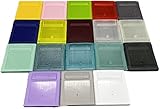
- Model for gameboy color; for gameboy classic GB
- Game Card Replacement Shell
- Made of new upgraded mold, high quality plastic
- Only guaranteed compatibility with original game cards
- package:1PCS
2. Match the cartridge to the game
Do not choose a cartridge by its shell or label alone. Check its flash capacity and mapper or memory-controller support against the ROM and the target system. Adafruit describes typical GB Studio ROMs as 138KB and up; it says these need a 512KB, 1MB, 2MB, or 4MB flash cartridge with an MBC (Memory Bank Controller) or an FPGA/CPLB equivalent. The same guide gives 32KB as the direct-address limit it describes for a Game Boy cartridge without an MBC. These are guide-level descriptions, not a compatibility guarantee for every game or cartridge revision. Read Adafruit’s flash-cartridge guidance and confirm the specific cart supports your game’s mapper, memory, saves, and any RTC needs.
3. Write the ROM
Adafruit documents the GBxCart RW flasher with the open-source FlashGBX software. Confirm that the exact flasher and cartridge revision are compatible before buying; named equipment is not guaranteed to work with every reproduction board or product revision.
Rank #2

- Package include: 12pcs Game Card Case.
- Material: Plastic.
- Size: 2.4" x 2.8" (approx.).
- Compatible with: Nintendo Game Boy Color GBC.
- Protect your game cartridges from dust, dirt, drops, bumps, etc.
- Connect the compatible flasher to your computer and insert the flash cartridge.
- Open FlashGBX, select Game Boy mode, and choose Write ROM.
- Select the exported
.gbfile and start the write. - When the software finishes, disconnect the cartridge and test it in the intended Game Boy system.
This process writes a game ROM to flash hardware. It does not involve designing or soldering a cartridge PCB from individual components.
What’s actually slowing this PC down?
Pick the symptom - the matching free tool is one click away.
Build a Game Boy cartridge PCB instead
A DIY board is a more demanding route than flashing a ready-made cartridge. MouseBiteLabs publishes an MBC3 cartridge design with Gerber fabrication files. Its project specifies a 0.8mm PCB, ENIG surface finish, chamfered gold fingers, and an unplated slot. It says its boards work with GBxCart and FlashGBX; an EEPROM programmer with a TSOP adapter is another option, but requires desoldering the chip for each programming session. See the MouseBiteLabs project and its current build materials before ordering parts or boards.
Rank #3
- Model for gameboy color; for gameboy classic GB
- Game Card Replacement Shell
- Made of new upgraded mold, high quality plastic
- Only guaranteed compatibility with original game cards
- package:1PCS
Choose components for the game and board revision
The design is not a universal drop-in recipe. Select components for the game’s requirements and the donor MBC3 revision. Set the RAM-size jumpers to match the game; RTC components and jumper handling also depend on whether the game uses a real-time clock. Check the current board revision and bill of materials rather than assuming parts from one build apply to another.
Plan battery work and testing
The project advises assembling initially without the battery so solder rework is easier. Remove the battery before applying a hot iron nearby and verify polarity when installing it. It also describes measuring battery current after programming and powering the cartridge once; any current or lifetime figures should be read as tied to its specified chips and test setup, not as guarantees for every build.
Rank #4

- Compatible Model: for GBA GBA SP NDSL NDS GBM
- Package includes: 1 x Card Case ,1 x Screws
- Change your game card to a new one shell
- Various colors for you to choose
- Please carefully check the picture, type, applicable model and color of the product before purchase to see if it is what you need. Enjoy your shopping.
Check the shell fit before using the cartridge
Fit is an electrical concern as well as a cosmetic one. MouseBiteLabs warns that a poor-fitting shell can let the board rotate, misalign it in the console, and cause garbled startup or a short that shuts the Game Boy off. Its newer board revision adds tabs to reduce rotation, and some shell edges may need trimming. Test alignment and clearance before relying on the finished cartridge.
The Tool Desk
Outbyte Driver Updater FREEScan for outdated or missing drivers - takes under a minuteDriver Scan →Outbyte PC Repair FREERepair Windows errors before they cause bigger problemsFix Now →Other consoles need their own cartridge design
The Atari Lynx is a separate example, not a variation on the Game Boy build. The Atari Lynx Vault guide describes a Lynx cartridge PCB that is 0.6mm thick, with the assembled flash and EEPROM bringing the board to 1.8mm, for a shell usable in Lynx models 1 and 2. Its listed core parts include an SST39SF040 flash chip and a 93C46 EEPROM; certain 93CxxC alternatives are supported by the CC65 Lynx library. The guide also covers KiCad files, board assembly, small-lot boards, and a 3D-printed shell. Those parts and instructions are Lynx-specific and do not transfer to Game Boy cartridges. Consult the Atari Lynx Vault cartridge guide for that platform’s design.
Best Value
- Model for gameboy color; for gameboy classic GB
- Game Card Replacement Shell
- Made of new upgraded mold, high quality plastic
- Only guaranteed compatibility with original game cards
- package:1PCS
Flash cartridges are not the same as SD game loaders
Epilogue’s support documentation distinguishes flash cartridges, which its Operator device can write when supported, from SD game loaders, which store game data on an SD card and are not supported for that writing workflow. This describes Epilogue’s device and stated compatibility; it is not a universal rule about every cartridge flasher. Check Epilogue’s support documentation for the Operator’s current compatibility information.
Quick Recap
Check these points before ordering
- Target console: Confirm the cartridge and board are designed for the exact system you intend to use.
- ROM requirements: Match flash capacity and mapper or controller support to the game; account for save memory and RTC needs.
- Programming path: Verify that the flasher/software combination supports the specific cartridge, or that your board’s chips can be programmed with your equipment.
- Assembly effort: Flashing a compatible cart avoids board assembly; a DIY PCB adds sourcing, soldering, component, jumper, battery, and testing decisions.
- Mechanical fit: Check the PCB thickness, contacts, shell clearance, and resistance to rotation before inserting a self-built cartridge into a console.
Product prices and availability are accurate as of the date/time indicated and are subject to change. Any price and availability information displayed on Amazon at the time of purchase will apply.




