No. A GameCube memory card saves GameCube game data, not Wii game progress. Only the original Wii model, RVL-001, has GameCube memory-card slots; later RVL-101 and Wii mini RVL-201 models do not.
Can you use a GameCube memory card on a Wii?
Yes, if the console is model RVL-001. Nintendo identifies this Wii as the model that supports GameCube memory cards. Open the slot cover and insert the card into one of the GameCube memory-card slots. The Wii data-management menu identifies these as slots A and B, where you can view and manage GameCube card data. See Nintendo’s instructions for using GameCube memory cards and its Wii Operations Manual: Channels and Settings.
As an Amazon Associate I earn from qualifying purchases.
Check the Wii model first
| Wii model | GameCube memory-card slot | GameCube discs |
|---|---|---|
| RVL-001 | Yes | Supported |
| RVL-101 | No | Not supported |
| Wii mini RVL-201 | No | Not supported |
Nintendo’s model comparison covers the hardware differences. Check the model number on the console before buying a card: an RVL-101 or RVL-201 has no compatible slot. Nintendo also explains how to play a game disc.
Quick wins for a faster PC:
Fix the driver behind crashes, sound loss and screen glitchesFind Drivers →Repair Windows errors before they cause bigger problemsFix Now →Can a GameCube memory card save Wii games?
No. A GameCube card stores save information for GameCube game discs; it cannot store Wii game saves or replace an SD card. Nintendo distinguishes GameCube data from Wii data in its Wii data-management instructions. If you need to save a Wii game, use the save-data options for that Wii game and console—not a GameCube memory card.
#1 Best Overall

- Essential accessory for saving game data that you worked so hard to achieve.
- Real 16344 blocks non-compress. Eight 128MB parts, pressing the button on the card to switch.
- High speed and efficient product. Easy to use.
- Only Wii consoles with model number RVL-001 and Gamecube consoles are compatible.
Use the card safely
Do not remove a GameCube memory card while the Wii is reading or writing data or initializing the card. Nintendo’s Wii Hardware Setup Manual warns that doing so can damage the console or card or destroy data.
Quick Recap
Best Value
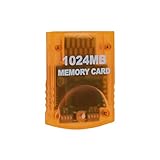
- Essential accessory for saving game data that you worked so hard to achieve.
- Real 16344 blocks non-compress. Eight 128MB parts, pressing the button on the card to switch.
- High speed and efficient product. Easy to use.
- Only Wii consoles with model number RVL001 and Gamecube consoles are compatible.
- Made by Third Party, NOT official item.
Rank #4
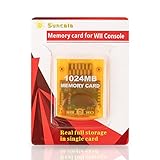
- High speed: Upgraded innovation chip that processes and saves the games 20% faster than older versions, game is smooth and steady without any interruptions.
- Compatibility: Fully compatible with Gamecube and Wii Consoles (Model number RVL-001)
- Storage System: 8 improved storage sections that can save up to 16344 blocks. To change storage sections, press the switch button.
- Newly designed package, fresh and elegant look. Sleek package allows you to easily insert and remove memory card.
- 60 months worry-free warranty. Friendly and supportive customer service is always there to answer all your questions within hours.
Rank #3

- ★Universal GameCube & Wii Compatibility★This high-quality Gamecube memory card seamlessly works with Nintendo GameCube (NGC) and Wii consoles (RVL-001 model). Designed as a plug-and-play third-party accessory, it replaces bulky original cards while maintaining full compatibility with classic games
- ✔128MB Massive Storage (2043 Blocks)✔Never delete saves again! With a Memory card gamecube capacity of 128MB (2043 blocks), store hundreds of game files from Super Smash Bros. to Zelda. Perfect for collectors needing reliable Game cube memory cards to preserve hard-earned progress
- ⚡High-Speed & Crash-Proof Design⚡Engineered for durability, this Ngc memory card features rapid data transfer to prevent lag during saves. The shock-resistant build protects your files from accidental drops or power outages—essential for marathon gaming sessions
- ✨Third-Party Reliability, First-Party Performance✨A budget-friendly Gamecube memory card for Wii/GC that outperforms aging OEM cards. The streamlined profile fits snugly in any console slot, eliminating the "card wobble" issue common in generic alternatives
- ▲Wii RVL-001 Model Exclusive Support▲Note: This Gamecube memory card for wii is ONLY compatible with Wii RVL-001 (launch edition). Verify your console’s model before purchase to ensure flawless game data transfers between NGC and legacy Wii systems
Rank #2

- CHECK YOUR CONSOLE MODEL: This memory card works only for Wii consoles with model number RVL-001 and for GameCube consoles. It is not supported on other models for Wii or on consoles for Wii U, so check the model number on your console before you order.
- FOUR 128MB AREAS: The 512MB memory card is split into four 128MB areas, and each area saves 2043 blocks. Press the area button on the card to move to the next area, and the matching light on the card shows which of the four areas is active.
- PLUG AND PLAY: The card needs no setup and is ready to save as soon as it is inserted. Insert or remove the memory card only while the console is turned off, and if a save seems to be missing, change areas first because the console reads one area at a time.
- ROOM FOR A BIG LIBRARY: The four areas add up to 8172 usable blocks of non-compressed save space, so one memory card can hold saves from a large collection of games without deleting older files.
- TRANSLUCENT BLUE WITH AREA LIGHTS: The memory card has a translucent blue shell with the 512MB label on the front, and four small lights on the card show which 128MB area is active, so you can see the current area before you start a game.
Product prices and availability are accurate as of the date/time indicated and are subject to change. Any price and availability information displayed on Amazon at the time of purchase will apply.
Independent reader supportYour contribution helps us test, update, and keep practical guides available for everyone.



