Yes—Xbox consoles with an optical disc drive can play Blu-ray movies, but support depends on the model. Xbox Series X plays Blu-ray and Ultra HD Blu-ray movies once you install the Blu-ray Player app. Xbox Series S has no disc drive, and Microsoft says USB external disc drives are not supported.
Which Xbox models play Blu-ray movies?
Microsoft lists different disc hardware across the Xbox One and Xbox Series families. The distinction matters: the original Xbox One has a Blu-ray drive, while Xbox One S and Xbox One X have 4K UHD Blu-ray drives. Series X supports movie playback from Blu-ray and Ultra HD Blu-ray discs with the Blu-ray Player app. Series S is digital-only.
| Xbox model | Optical drive and movie-disc support | Setup |
|---|---|---|
| Xbox One | Blu-ray drive; supports Blu-ray movies, not a 4K UHD Blu-ray drive, according to Microsoft’s console comparison (Microsoft Xbox consoles). | Microsoft’s Series X FAQ describes app installation for that model; it does not specify Xbox One setup here. |
| Xbox One S | 4K UHD Blu-ray drive, according to Microsoft’s console comparison (Microsoft Xbox consoles). | Setup details not stated in the cited model comparison. |
| Xbox One X | 4K UHD Blu-ray drive, according to Microsoft’s console comparison (Microsoft Xbox consoles). | Setup details not stated in the cited model comparison. |
| Xbox Series X | Microsoft confirms playback of DVD, Blu-ray, and Ultra HD Blu-ray movie discs (Xbox Support: Play a DVD or Blu-ray on Xbox). | Install the Blu-ray Player app from the Store app on the console. |
| Xbox Series S | No optical disc drive; Microsoft describes it as fully digital and says USB external disc drives are unsupported (Xbox Support: Play a DVD or Blu-ray on Xbox). | There is no supported external-drive workaround. |
How to play a Blu-ray movie on Xbox Series X
- Open the Store app on the Xbox Series X.
- Download and install the Blu-ray Player app.
- Insert the movie disc and use the app to play it. Microsoft identifies DVD, Blu-ray, and Ultra HD Blu-ray movies as supported formats for Series X.
Can Xbox Series S play Blu-ray with a USB drive?
No. Series S has no built-in optical drive, and Microsoft explicitly says USB external disc drives are not supported. A USB Blu-ray drive therefore does not add movie-disc playback to the console.
What about older Xbox One consoles?
All three Xbox One models in Microsoft’s comparison have optical drives, but their listed disc tiers differ. The original Xbox One is listed with Blu-ray; Xbox One S and Xbox One X are listed with 4K UHD Blu-ray drives. Microsoft also noted that 3D Blu-ray support was added to Xbox One during its first year (Xbox Wire: Xbox One’s first year).
Do these 3 things before closing this tab:
1Repair Windows errors before they cause bigger problems2Fix the driver behind crashes, sound loss and screen glitches3Clear out junk files and repair common Windows errors#1 Best Overall

- Enjoy Blu-ray Disc movies in Full HD as well as DVD discs
- Upscale your DVDs to near HD quality
- Easy set-up with included HDMI cord
- Boot up in less than a second with super quick start mode
- Keep things simple with the new user-friendly interface
These drive categories identify the hardware and supported disc tier; they do not establish compatibility for every individual movie disc or resolve every playback error. The cited sources do not specify disc-region restrictions, network requirements, or detailed troubleshooting steps.
Quick Recap
Best Value

- 𝗥𝗲𝗴𝗶𝗼𝗻 𝗔 𝗕𝗹𝘂-𝗿𝗮𝘆 & 𝗥𝗲𝗴𝗶𝗼𝗻 1 𝗗𝗩𝗗 𝗣𝗹𝗮𝘆𝗲𝗿: Plays Region A Blu-ray discs and Region 1 DVDs for reliable home entertainment in the United States.
- 𝗖𝗶𝗻𝗲𝗺𝗮-𝗤𝘂𝗮𝗹𝗶𝘁𝘆 𝗦𝗶𝗴𝗵𝘁 𝗮𝗻𝗱 𝗦𝗼𝘂𝗻𝗱: Delivers exceptional 1080p Full HD video and supports premium audio codecs like Dolby TrueHD and DTS-HD for an immersive home theater.
- 𝗦𝗺𝗮𝗿𝘁 𝗗𝗩𝗗 𝗨𝗽-𝗦𝗰𝗮𝗹𝗶𝗻𝗴 𝘃𝗶𝗮 𝗛𝗗𝗠𝗜: Breathes new life into your standard DVDs by intelligently converting the signal to a high-quality 1080p output.
- 𝗔𝗹𝗹-𝗶𝗻-𝗢𝗻𝗲 𝗣𝗹𝗮𝘆𝗯𝗮𝗰𝗸 𝗖𝗼𝗺𝗽𝗮𝘁𝗶𝗯𝗶𝗹𝗶𝘁𝘆: Handles Blu-rays, DVDs, CDs, and media files from a USB port—supporting video, photo, and music formats for all your entertainment.
- 𝗦𝘁𝘂𝗿𝗱𝘆, 𝗨𝘀𝗲𝗿-𝗙𝗿𝗶𝗲𝗻𝗱𝗹𝘆 𝗗𝗲𝘀𝗶𝗴𝗻: Features a reliable mechanism, anti-skip technology, and essential playback controls (fast-forward, zoom, A-B repeat) for a seamless viewing experience.
Rank #4

- 𝗥𝗲𝗹𝗶𝗮𝗯𝗹𝗲 𝗣𝗹𝗮𝘆𝗯𝗮𝗰𝗸 – A Blu-ray player ensures movie nights won’t be interrupted by network or service provider issues.
- 𝗦𝘂𝗽𝗲𝗿𝗶𝗼𝗿 𝗣𝗶𝗰𝘁𝘂𝗿𝗲 𝗤𝘂𝗮𝗹𝗶𝘁𝘆 – Delivers Blu-ray discs in 𝟭𝟬𝟴𝟬𝗽 𝗿𝗲𝘀𝗼𝗹𝘂𝘁𝗶𝗼𝗻 without compression, offering better visuals than standard HD streaming.
- 𝗛𝗶𝗴𝗵 𝗦𝘁𝗼𝗿𝗮𝗴𝗲 𝗖𝗮𝗽𝗮𝗰𝗶𝘁𝘆 – Holds 𝘂𝗽 𝘁𝗼 𝟭𝟬𝘅 𝗺𝗼𝗿𝗲 data than DVDs, allowing for higher-quality video, interactive content, and extra features.
- 𝗢𝗽𝘁𝗶𝗺𝗶𝘇𝗲𝗱 𝗳𝗼𝗿 𝗛𝗗 – Designed for high-definition viewing, providing the 𝗯𝗲𝘀𝘁 𝗽𝗼𝘀𝘀𝗶𝗯𝗹𝗲 𝗽𝗶𝗰𝘁𝘂𝗿𝗲 with 1080p capability for Blu-ray movies.
Rank #3
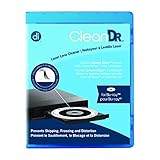
- Laser lens cleaner for Blu-Ray players and Blu-Ray video game systems having issues with discs that load slowly, skip, or freeze during playback
- Patent-pending Zero-Clearance Technology and 10-Brush Cyclone Clean process removes dirt and dust build-up that causes audio and video dropout and distortion
- Cleaning the laser lens can extend the life of the Blu-Ray player while improving sound and image quality
- Includes Image & Sound Calibration Tools and instructions in English, French or Spanish
- Works with Blu-Ray Players, DVD Players, XBOX/XBOX 360/XBOX ONE, PS/2/3/4. Not compatible with CD only players
Rank #2

- 【Powerful function】: This external bluray drive has powerful storage capacity and fast reading speed Turbocharge workflows with USB 3.0’s 5Gbps bandwidth—6X faster than USB 2.0. Effortlessly manage BD(100GB). CDs (700MB), DVDs (4.7GB), and dual-layer DVDs (8.5GB). has strong error correction capability, impact resistance, low noise, and low power consumption.(Note: Incompatible with TVs, Tablets, PS4, iPads, Chromebooks, Projectors, or Vehicles.)
- 【Dual USB Power Design for Stable Operation】:Compared with standard external Blu-ray drives, this drive includes an additional USB power cable, ensuring stable power supply for smooth disc reading and writing. Reduces playback interruption and burning failure caused by insufficient power.
- 【Easy to carry】: external blu ray player combines two different USB cables into one. external blu ray drive for laptop。easy carrying and storage of USB3.0 and Type-C interfaces, and it can be easily connected to Type-C or USB 3.0 interface computer。
- [Strong Compatibility]: blu ray drive external Software Required: This blu ray player for pc a wide range of devices, including laptops, PCs, working seamlessly with Windows, macOS, and Linux. However, Bluray playback and writing require specific software, such as PowerDVD, Leawo Blu-ray Player, AnyDVD,or VLC Media Player. iDeer Blu-ray Player Simply install your preferred Bluray software to get started.(Note: This product does not come with the playback software, please purchase it separately.)
- 【Easy to Use】: The usb blu ray drive external is very easy to use, it can compatible read and write CD, DVD and compatible with BD. Designed for convenience, this Blu-ray drive is compact and lightweight, making it easy to carry during business trips or vacations.
Product prices and availability are accurate as of the date/time indicated and are subject to change. Any price and availability information displayed on Amazon at the time of purchase will apply.
Independent reader supportYour contribution helps us test, update, and keep practical guides available for everyone.



