Recommended Free Tools
The EON XBHD is a plug-and-play HDMI adapter for the original Xbox. It connects to the console’s rear component-video output, needs no internal modification or external power, and supports video modes up to 1080i. Its strongest advantages are simple setup, two HD outputs and built-in LAN expansion; its trade-offs are image quality that falls short of stronger upscalers and a price that may be hard to justify if you only need one HDMI connection.
What the EON XBHD does
The XBHD converts the original Xbox’s component-video signal for HDMI displays. It is designed to fit onto the back of the console and is intended as an external, plug-and-play option rather than an internal HDMI modification. EON says it requires no external power supply.
As an Amazon Associate I earn from qualifying purchases.
It is made for the original Microsoft Xbox, not later Xbox generations. ZedLabz says all original Xbox revisions and regions, including NTSC and PAL, are supported; EON’s Spartan Edition page likewise specifies original Xbox consoles only.
Do these 3 things before closing this tab:
1Repair Windows errors before they cause bigger problems2Fix the driver behind crashes, sound loss and screen glitches3Clear out junk files and repair common Windows errorsPorts and supported video modes
The XBHD supports 480i, 480p, 720p and 1080i. These are output modes, not a promise that every game renders at those resolutions. The adapter does not make original Xbox games 4K, and its maximum listed mode is 1080i.
#1 Best Overall
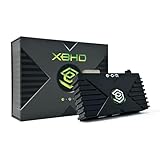
- HDMI Output for Original Xbox: Seamlessly connect your classic Xbox to modern TVs with crystal-clear 480i, 480p, 720p, and 1080i compatible (NTSC resolution settings required).
- Plug and Play Setup: Easy installation with no software, drivers, or external power needed—just connect and play.
- Lag-Free Performance: Ensures smooth, responsive gameplay with zero input lag, perfect for retro gaming.
- Enhanced Visuals: Experience your original Xbox games with improved sharpness and clarity on modern displays.
- Durable and Compact Design: Sleek, space-saving design built with 3 ethernet ports for simplified LAN experience and long-lasting use and portability.
| Feature | What it provides |
|---|---|
| HD outputs | Two HDMI-style HD ports, useful for connecting a display and a capture device or two displays. |
| LAN expansion | Three RJ45 Ethernet ports that expand the console’s single port for linking up to four systems without a separate router. |
| Optical audio | A 3.5mm MiniTOSLINK connection for optical audio. |
| Firmware | The Spartan Edition product page lists XBHD Firmware 2.0. |
Connecting an original Xbox to HDMI with the XBHD
- Confirm that you have an original Xbox. This adapter is not specified for Xbox 360 or later systems.
- Attach the XBHD to the rear of the console at its component-video connection.
- Connect an HDMI cable from one of the XBHD’s HD outputs to your television or monitor. Use the second output if you also want to send the signal to a capture device or another display.
- Connect the console and display, then select the display’s corresponding HDMI input. The XBHD does not require a separate power supply.
For optical audio, connect a compatible optical cable to the 3.5mm MiniTOSLINK jack. For LAN play, connect Ethernet cables from the adapter’s three RJ45 ports to the other linked consoles. The XBHD expands the Xbox’s network connections; it does not change which games support system-link play.
Picture quality: better than legacy AV, but not a high-end upscale
Independent reviews found the XBHD’s image sharper than legacy AV connections, while still softer than results from a quality upscaler or internal HDMI modification. Time Extension also noted reports of dark imagery. GamesRadar+ reported loss of detail in dark scenes, a caveat that can matter in games where shadow detail is important.
Rank #2
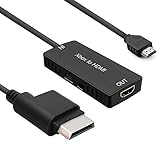
- 🎮 HD Link: Convert the native component signals from Xbox 360 to digital HDMI signals for modern HDTVs/monitors/projectors.
- 🎮Awesome Image: Provide the best signal processing with great precision, colors, resolution and details at this price.
- 🎮HD Ready: maximum possible video quality from our HDMI converter cable. Xbox 360 games that are native 720p will run in their respective resolutions.
- 🎮Compatible with: Microsoft Xbox 360 / XBOX 360 Slim.
- 🎮High Definition Connection; Plug and play; Need External Power Required; Won't affect the sound quality!
Those findings describe reviewers’ experience, not a guarantee that every television, game or setup will look identical. The supported output modes also should not be confused with a game’s native rendering resolution: selecting 720p or 1080i does not mean the Xbox game itself was created at that resolution.
Free tools Windows power users keep installed
One-click scans. No signup required.
Is it suitable for capture or Xbox LAN parties?
Streaming and capture
The two HD outputs let you send video to a capture card while also feeding a main TV or monitor. Time Extension’s reviewer specifically found this useful for capture alongside a display. If you only need one screen and do not use capture equipment, the second output may add little value.
Rank #3

- Dedicated Xbox HDMI Adapter - Supports all Original Xbox output resolutions (480i, 480p, 720p & 1080i)
- Xbox Original Component Cable Quality Display with HDMI Output - The best Original Xbox AV Cable available - Xbox HD Link Cable.
- Easy to use Original Xbox Component cable to HDMI - Plug and Play Original Xbox Video Cable to HDMI Converter - Durable Original Xbox HDMI converter
- Correct and Vivid Colours : The Kaico HDMI cable for Xbox converts your console's analogue component signal into pure, digital HDMI with no transmission loss.
- Original Xbox HDMI with Toslink Port - The new Xbox HDMI comes with an optical port for Dolby digital 5.1 support
System-link play
The three Ethernet ports provide a compact way to expand the original Xbox’s single network port for a LAN setup involving up to four linked systems, without a separate router. This is a connectivity convenience, not a substitute for checking that the game you plan to play supports LAN or system link.
Independent reader supportYour contribution helps us test, update, and keep practical guides available for everyone.Price and buying considerations
EON’s official product page listed the XBHD at $149.99 when accessed in 2026. A&C Games listed it at $249.99 CAD on a page crawled in 2026. These are region-specific listings and can change; check the seller’s current price, stock and shipping before buying. EON names Amazon, CastleMania Games, GamesConnection, StoneAgeGamer, ZedLabz, Retro Island Gaming and Bitjump Games as availability channels.
Rank #4

- The HD Link Cable for Original Xbox convert the original Xbox signal to an HDMI signal and connect to a new TV.
- Original Xbox to HDMI Converter cable length 1m/3.2ft. Male to male connector. Don't need extra hdmi cable. Easy to Use. No need to install drivers, portable, flexible, Plug and play.
- Original Xbox to HDMI Converter cable support HDMI 1080p / 720p output.
- NOTE: Compatible with Original Xbox only. If you have any questions, please contact us feel free for your after-sales service
- You will get: HD Link HDMI Cable for Original Xbox *1; Micro usb power cable(45cm) *1
Earlier review prices are not current quotes: Time Extension referenced $189.99 in its 2023 review, and GamesRadar+ referenced $189.99 on its review page. Those figures help explain why price is central to the decision, but they should not be treated as today’s price.
Quick Recap
Best Value

- [YPbPr Signal Output] Convert YPbPr component signals of Original Xbox console to HDMI signals, and then transmit them to modern HDTVs and monitors through HDMI cable, without any delay.
- [Clear Image] Use YPbPr component signal conversion and transmission to provide the best image colors and details. (Transfer only, can't improve the video quality.)
- [Plug and Play] This adapter does not require external power supply, just connect the adapter and HDMI cable (Note: Without HDMI cable), and it is ready to use.
Who should choose the XBHD?
- Consider it if you want a straightforward HDMI connection for an unmodified original Xbox, value dual outputs for capture and display, or want the LAN ports built into the adapter.
- Compare alternatives if your priority is the sharpest image possible. Reviews found better results from a quality upscaler or internal HDMI modification, though those approaches differ in setup and cost.
- Think twice if you only need a basic single-screen connection and the price is high in your region, or if dark-scene clarity is especially important to you.
Product prices and availability are accurate as of the date/time indicated and are subject to change. Any price and availability information displayed on Amazon at the time of purchase will apply.




