Free tools Windows power users keep installed
One-click scans. No signup required.
ep0nxff1.dll is usually an Epson printer-driver component, not a Windows DLL. If Windows reports that ep0nxff1.dll is missing, the safest fix is to remove the affected Epson printer package and reinstall the correct driver from Epson.
ep0nxff1.dll: what the file is
Available file metadata associates ep0nxff1.dll with Epson’s Epson Universal Printing System XPS and lists SEIKO EPSON CORPORATION as the publisher. Third-party metadata also reports one 32-bit build as version 0.4.1.0, approximately 260,608 bytes, with an Epson copyright notice from 2011.
These details are metadata findings rather than a publicly indexed Epson file manifest. Epson does not publicly identify one printer model that universally installs this DLL, so identify the printer or Epson utility on your own computer before choosing a replacement driver.
| Item | What is known |
|---|---|
| File | ep0nxff1.dll |
| Likely role | Epson printer-driver component |
| Reported architecture | 32-bit |
| Reported publisher | SEIKO EPSON CORPORATION |
| Reported location | An Epson driver-store subfolder on some systems |
| Windows system file | No |
| Visual C++, DirectX, .NET, or game component | No reliable evidence |
The file may be loaded by a 32-bit Epson utility even when Windows itself is 64-bit. A 64-bit operating system does not make a 32-bit driver DLL interchangeable with a 64-bit file.
PC Slower Than It Used to Be?
A free scan shows the junk files, broken settings and background clutter dragging Windows down - then fixes them in one click.Free scan · Windows 10 & 11Crashes, No Sound, or Screen Glitches?
Random freezes, missing sound and display glitches usually trace back to one bad driver. Find and replace yours safely.Free scan · under a minute#1 Best Overall

- Epson printing system is designed to be used exclusively with Epson Genuine Cartridges. Use of non-genuine ink could cause damage not covered under the printer’s ltd. wnty.
- Hassle free ― High-capacity Black ink cartridge for fewer interventions
- Sharp text and brilliant colors for print-shop-quality results
- Fast-drying pigment ink designed for high-speed print jobs
- Compatible Printers: WF-3820, WF-3823, WF-4820, WF-4830, WF-4833, WF-4834
Error messages associated with this file
You may see any of these messages:
- “The program can’t start because ep0nxff1.dll is missing from your computer.”
- “There was a problem starting ep0nxff1.dll. The specified module could not be found.”
- “Error loading ep0nxff1.dll.”
- “The code execution cannot proceed because ep0nxff1.dll was not found.”
- “ep0nxff1.dll is either not designed to run on Windows or it contains an error.”
- “EP0NXFF1.DLL is corrupted.”
- “EP0NXFF1.DLL file could not be loaded.”
These messages do not necessarily identify a particular Epson application. The error can appear when printing, opening an Epson utility, logging into Windows, or starting software that still references an old printer package.
“Specified module could not be found” can also mean that a dependency required by ep0nxff1.dll is missing. The named DLL may exist while another required file does not.
Fix 1: Identify the printer and Windows architecture
Start with the Epson hardware or software that originally installed the file.
- Open Settings.
- Select System.
- Select About.
- Read System type. It will identify whether Windows is 32-bit or 64-bit.
- Note every Epson printer under Settings → Bluetooth & devices → Printers & scanners.
- Check Task Manager → Startup apps for Epson utilities if the error appears at every login.
Write down the exact printer model. Do not select a driver merely because it contains the words “Epson Universal Print Driver.” Epson packages vary by product and operating-system architecture.
If no Epson printer is connected, the message may come from an obsolete Epson monitor or utility. Continue with the removal and reinstall steps, then remove any Epson startup entry that belongs to hardware you no longer use.
Fix 2: Remove and reinstall the Epson driver
This is the most likely solution for a damaged, partially removed, or mismatched package.
Remove the printer
- Open Settings.
- Select Bluetooth & devices.
- Select Printers & scanners.
- Select the affected Epson printer.
- Select Remove.
- Confirm the removal.
- Restart Windows.
If more than one entry exists for the same printer, remove obsolete duplicates as well. Do not manually delete files from C:WindowsSystem32, C:WindowsSysWOW64, or the DriverStore.
Rank #2

- Fast-drying ink
- Brilliant prints on both plain and glossy paper
- Convenient individual ink cartridges
- Works with XP 4105 and WF2850
Download the correct Epson package
Use Epson’s official support page for the exact printer model. Select your Windows version and architecture, open the Downloads section, and download the printer driver or Epson Universal Print Driver offered for that product.
Epson currently lists separate Universal Print Driver core packages for x32 and x64 systems. The listed packages are named EUPD_Core_x86_27205.zip and EUPD_Core_x64_27205.zip, both identified as version 2.72.05 on applicable support pages. Availability depends on the selected printer and operating system.
Some core packages contain driver files and do not launch a normal installer. Follow the Epson instructions for adding the printer if the downloaded package does not open automatically.
Install the package
- Extract the downloaded Epson package if it is a ZIP file.
- Right-click the installer or setup file.
- Select Run as administrator.
- Follow the Epson setup screens.
- Connect or select the printer only when the installer requests it.
- Restart Windows after installation.
- Print a test page from Settings → Bluetooth & devices → Printers & scanners → your Epson printer → Printer properties → Print Test Page.
A successful repair normally removes the startup error and allows the printer utility or print-dependent application to open. If the same message returns immediately, the old driver may still be present in the Windows driver store.
Manually hunting through several Epson packages can be difficult, especially when Windows retains an older architecture or version. Outbyte Driver Updater can scan for driver problems and show what needs attention; its free scan identifies issues, while driver installation is handled by the full version, and reinstalling the exact Epson package remains the definitive fix for this file.
Quick wins for a faster PC:
Scan for outdated or missing drivers - takes under a minuteDriver Scan →Repair Windows errors before they cause bigger problemsFix Now →Fix 3: Remove a retained Epson driver package
Use this step only after removing the printer and identifying the Epson package. PnPUtil manages the Windows driver store, and Microsoft warns against deleting driver-store files manually.
- Open Start.
- Type
Command Prompt. - Select Run as administrator.
- Run:
pnputil /enum-drivers
- Review the output for Epson entries.
- Find the matching
Published Name, which looks likeoem##.inf. - Confirm that the provider and driver belong to the obsolete Epson printer.
- Remove only that confirmed package:
pnputil /delete-driver oem##.inf /uninstall /reboot
Replace oem##.inf with the actual name shown on your computer.
Do not guess the number and do not remove a package merely because its folder resembles an Epson folder. If Windows says the package is in use, remove remaining Epson printer entries, restart, and run the command again. If you cannot confidently identify the package, stop here and reinstall through Epson support or contact Epson.
Rank #3

- Epson printing system is designed to be used exclusively with Epson genuine cartridges. Use of non-genuine ink could cause damage not covered under the printer’s ltd. wnty.
- Sharp text and brilliant color for high-quality results; fast-drying ink
- Brilliant prints on both plain and glossy paper
- Convenient individual ink cartridges
- Compatible Printers: XP-4200, XP-4205, WF-2930, WF-2950
After the reboot, install the exact model-specific Epson driver again and print a test page.
Do these 3 things before closing this tab:
1Fix the driver behind crashes, sound loss and screen glitches2Clear out junk files and repair common Windows errors3Scan for outdated or missing drivers - takes under a minuteFix 4: Check Windows Security quarantine
Antivirus software can quarantine a legitimate driver file or block a modified counterfeit file.
- Open Windows Security.
- Select Virus & threat protection.
- Select Protection history.
- Look for an event involving
ep0nxff1.dllor an Epson driver. - Expand the event and review its location and detection details.
Restore or allow the file only when all of these are true:
- It is located inside the Epson installation or driver directory.
- The Epson package came from the official Epson support page.
- The file’s digital signature identifies Epson or the expected publisher.
- A security scan does not report additional suspicious files.
If any detail is uncertain, do not restore it. Remove the printer package and reinstall it from Epson instead. Microsoft’s guidance for Protection History explains how to review and manage detected items.
If the file is outside an Epson driver directory, was recently created without an Epson installation, or is unsigned, run a full Windows Security scan. Do not whitelist it simply because the filename looks correct.
Fix 5: Repair Windows components when other files also fail
DISM and SFC are secondary repairs. They do not normally reconstruct an Epson driver DLL, but they are appropriate when Windows is showing several unrelated file or component errors.
- Open Start.
- Type
Command Prompt. - Select Run as administrator.
- Run:
DISM.exe /Online /Cleanup-Image /RestoreHealth
- Wait for it to finish.
- Run:
sfc /scannow
- Restart Windows.
If SFC reports that it repaired files, test the Epson utility and print again. If it reports that it could not repair everything, restart and run the two commands once more. If the Epson error remains but other Windows functions work normally, return to the Epson driver removal and installation steps rather than repeatedly running SFC.
Rank #4
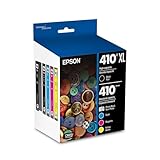
- Archival photos last more than 200 years in an album
- Sharp text
- Use with Epson Premium XP-530, XP-630, XP-830
Repeating DISM and SFC without knowing which component changed can waste time when the real problem is an incomplete printer package. Outbyte PC Repair can scan for broader Windows issues and show what needs attention; its free scan identifies problems, while repair is handled by the full version, and Epson driver reinstallation remains necessary when the missing file belongs to that package.
Fix 6: Check Device Manager and the print system
A failed device entry can prevent Windows from loading the correct Epson driver.
What’s actually slowing this PC down?
Pick the symptom - the matching free tool is one click away.
- Right-click Start.
- Select Device Manager.
- Expand Printers, Print queues, and Universal Serial Bus controllers.
- Look for an Epson device with a warning icon.
- Right-click only the confirmed obsolete Epson device.
- Select Uninstall device.
- If offered, select Attempt to remove the driver for this device.
- Restart Windows.
- Reinstall the Epson package.
If printing remains stuck, restart the Print Spooler:
- Press Windows key + R.
- Type
services.msc. - Press Enter.
- Find Print Spooler.
- Right-click it and select Restart.
- Try the test page again.
Do not enable or disable random items under Windows Features to replace the DLL. Print components should be changed only when Windows itself reports that a required printing feature is missing. The Epson package is still the correct source for an Epson-specific file.
Independent reader supportYour contribution helps us test, update, and keep practical guides available for everyone.If the error appears after a Windows update
A Windows update may expose an old Epson utility, remove an incompatible manufacturer driver, or activate Windows Protected Print Mode. Microsoft explains that unsupported software printers can be uninstalled when this mode is enabled.
Remove the old Epson printer entry, restart, and install the newest package offered for the exact model. If Epson does not provide a compatible driver, check whether Windows can add the printer using a supported built-in driver. Some advanced Epson features may not work with a generic driver.
Recommended Free Tools
If the problem began immediately after a driver installation and no current Epson package works, System Restore is a fallback:
- Open Start and search for Create a restore point.
- Open it and select System Restore.
- Choose a restore point from before the driver change.
- Review the affected programs.
- Start the restoration and restart Windows.
What not to do
Do not download the DLL separately
Random DLL download sites can provide the wrong architecture, an incompatible build, missing dependencies, or a modified file. Copying a loose DLL into System32, SysWOW64, or an application folder can also create version conflicts and does not repair the driver’s registration, dependencies, or printer configuration.
Best Value

- Epson printing system is designed to be used exclusively with Epson Genuine Cartridges. Use of non-genuine ink could cause damage not covered under the printer’s ltd. wnty.
- Sharp text and brilliant colors for print-shop-quality results
- Fast-drying pigment ink designed for high-speed print jobs
- Compatible Printers: WF-3820, WF-3823, WF-4820, WF-4830, WF-4833, WF-4834
The safe source is the official Epson support page for the printer model. Microsoft tools can repair Windows components, but they are not a replacement for the Epson package.
Do not use regsvr32 as a general DLL repair
regsvr32 applies to DLLs that expose registration procedures such as DllRegisterServer. There is no public evidence that ep0nxff1.dll is a COM component requiring registration.
Running:
regsvr32 ep0nxff1.dll
will normally be irrelevant. If it reports that DllRegisterServer is missing, that confirms registration is not the applicable fix. Reinstall the Epson driver instead.
FAQ
Is ep0nxff1.dll a Windows file?
No reliable evidence identifies it as a Windows system DLL. Available metadata associates it with an Epson printer-driver package.
Which Epson printer installed it?
No public evidence identifies one universal Epson model. Use the printer list, Epson startup entries, and the driver package history on your computer to identify the source.
Is the file 32-bit?
The publicly indexed build is reported as 32-bit. Treat that as metadata, not as a complete Epson specification. Install the package matching the printer and Windows architecture rather than copying a similarly named file.
Why does Windows say the module is missing when the file exists?
A required dependency may be missing, the DLL may be in the wrong directory, or the printer package may be mismatched. Reinstalling the complete Epson package repairs these relationships more safely than copying the file.
Should I restore it from antivirus quarantine?
Only after verifying the location, publisher, signature, and Epson installation source. When in doubt, reinstall from Epson and scan the computer.
What if the error appears at startup but I no longer own an Epson printer?
Open Task Manager → Startup apps, identify obsolete Epson utilities, and uninstall the related Epson software. Remove old printer entries and driver packages rather than restoring the DLL manually.
What if reinstalling does not work?
Check for retained driver packages with pnputil /enum-drivers, inspect Device Manager, restart the Print Spooler, and verify whether Windows Protected Print Mode is affecting the printer. If the package still fails, contact Epson with the exact printer model, Windows architecture, and complete error text.
The Tool Desk
Outbyte PC Repair FREEClear out junk files and repair common Windows errorsFree Scan →Outbyte Driver Updater FREEScan for outdated or missing drivers - takes under a minuteDriver Scan →Quick Recap
Product prices and availability are accurate as of the date/time indicated and are subject to change. Any price and availability information displayed on Amazon at the time of purchase will apply.




