The Tool Desk
Outbyte PC Repair FREERepair Windows errors before they cause bigger problemsFix Now →Outbyte Driver Updater FREEScan for outdated or missing drivers - takes under a minuteDriver Scan →For most new players, Fallout: New Vegas Ultimate Edition is the simplest purchase. It combines the base single-player role-playing game with six official add-ons: four story expansions—Dead Money, Honest Hearts, Old World Blues, and Lonesome Road—plus the Courier’s Stash and Gun Runners’ Arsenal content packs.
Choose the PC storefront around your priorities. Steam lists a moddable edition, while GOG explicitly provides a fully offline installer that does not require Galaxy. Xbox has an Ultimate Edition listing, but DLC installation differs between disc and digital ownership. Current PlayStation availability, subscription access, pricing, and some newer-console options require a live check for your region and account.
| # | Preview | Product | Price | |
|---|---|---|---|---|
| 1 |
|
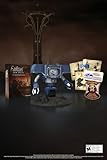
Fallout New Vegas: 15th Anniversary Bundle - PC | $135.78 | Buy on Amazon |
| 2 |

|
Fallout new vegas | $39.95 | Buy on Amazon |
| 3 |

|
Fallout: New Vegas Ultimate Edition | $40.08 | Buy on Amazon |
| 4 |
![Fallout New Vegas [DVD-ROM] [Windows Vista | Windows 7 | Windows XP]](https://m.media-amazon.com/images/I/519U+KAfbdL._SL160_.jpg)
|
Fallout New Vegas [DVD-ROM] [Windows Vista | Windows 7 | Windows XP] | $33.92 | Buy on Amazon |
| 5 |

|
Fallout 3 - PC Game of the Year Edition | $11.99 | Buy on Amazon |
As an Amazon Associate I earn from qualifying purchases.
What does Fallout: New Vegas Ultimate Edition include?
The Ultimate Edition includes the complete Fallout: New Vegas game and six official add-ons. Bethesda’s Ultimate Edition description and the Xbox listing identify the same package:
Recommended Free Tools
| Content | Type | What it adds |
|---|---|---|
| Dead Money | Story expansion | A separate adventure connected to the Sierra Madre casino. |
| Honest Hearts | Story expansion | A wilderness expedition in Utah’s Zion region. |
| Old World Blues | Story expansion | A science-fiction storyline at Big Mountain. |
| Lonesome Road | Story expansion | A final journey through the Divide. |
| Courier’s Stash | Content pack | A compilation of four pre-order bonus packs, with equipment available from the start. |
| Gun Runners’ Arsenal | Content pack | Unique weapons, ammunition, weapon modifications, challenges, and the Mad Bomber perk. |
The four story expansions each increase the level cap by five. Completing all four raises the cap to level 50. Bethesda distinguishes the two content packs from those expansions: Courier’s Stash and Gun Runners’ Arsenal add equipment, challenges, or perks but do not raise the level cap.
#1 Best Overall
- Welcome back to New Vegas and enjoy your stay with this 15th Anniversary Bundle. A must-have for every Courier.
- The anniversary set combines iconic memorabilia from the Mojave Wasteland with the Ultimate Edition of the game.
- Explore vast expanses of desert wastelands from small towns to the New Vegas strip. Choose sides in the upcoming war and forever change lives of New Vegas inhabitants. Enjoy finely tuned real-time combat mechanics with the V.A.T.S. targeting system, Hardcore mode, and streamlined companion commands.
- In a huge, open world with unlimited options you can see the sights, choose sides, or go it alone.
- Joined by Victor the Securitron, the 15th Anniversary Bundle will bring the spirit of this desert oasis right to your home.
The Ultimate Edition is not a separate campaign or a remake. It is the original game bundled with its official downloadable content. Store listings may present the base game and Ultimate Edition as separate purchase choices, so check the contents panel before buying.
Do I need to buy the DLC separately?
Not if you buy an Ultimate Edition that includes the six add-ons. Buying the base game alone leaves the four expansions and two content packs outside that purchase. Whether an individual store sells a complete bundle, a base game, or separate add-on licenses is a storefront question; compare the edition name and included-content list rather than assuming every listing contains the same package.
When buying on PC
Steam lists the base game and an Ultimate purchase option. GOG also lists an Ultimate Edition. Prices, discounts, regional taxes, and bundle availability change, so use the current store page for the amount charged in your country.
Quick wins for a faster PC:
Fix the driver behind crashes, sound loss and screen glitchesFind Drivers →Clear out junk files and repair common Windows errorsFree Scan →When buying on Xbox
Xbox has an Ultimate Edition listing. Owners of a physical Ultimate Edition may have to use the second disc to queue the downloadable content. Digital owners may need to install DLC they already own separately from Xbox Marketplace. Bethesda’s support documentation addresses Xbox 360 licenses and installation on Xbox One; confirm compatibility for your particular console generation and account before purchasing.
What about the 15th Anniversary Bundle?
Bethesda announced a 2026 15th Anniversary Bundle for PC. The announcement describes a PC digital Ultimate Edition code packaged with physical collectibles. That is a collector product, not evidence of a standard physical Ultimate Edition for current consoles. Stock, shipping, regional fulfillment, and the ability to order it can change, so verify those details before treating it as an available purchase.
Rank #2
How do I start Dead Money, Honest Hearts, Old World Blues, or Lonesome Road?
The add-ons do not all begin from a single menu. After entering the Mojave, watch the Pip-Boy radio and quest tabs for the relevant signal. The following are Bethesda’s documented triggers.
Dead Money
- Enter the Mojave and wait for the Sierra Madre Broadcast to appear on the Pip-Boy.
- Activate the broadcast to receive the Sierra Madre Grand Opening quest.
- Follow the quest to the Abandoned Brotherhood of Steel Bunker.
Save before entering if you want a fallback point: the expansion takes you into a separate scenario with its own rules and equipment restrictions.
Honest Hearts
- Find the Happy Trails Caravan signal on the Pip-Boy.
- Accept the Happy Trails Expedition quest.
- Travel to the Northern Passage and meet Jed Masterson.
The expansion’s crafting recipes are available from the start when your character meets the relevant level and item requirements. You do not have to discover each recipe through a separate storyline first.
Old World Blues
- Listen for the Mysterious Broadcast.
- Activate the Midnight Science Fiction Feature quest.
- Go to the Mojave Drive-In between 11 p.m. and 3 a.m. to proceed.
If the location appears inactive, check the in-game time rather than abandoning the quest. The time window is part of the documented trigger.
Lonesome Road
- Locate the Radio Signal on the Pip-Boy.
- Start The Reunion quest.
- Follow it to Canyon Wreckage and into the Divide.
The four expansions can be approached at different points in a playthrough. Their level-cap increases are cumulative, but the game does not require you to finish all four before continuing the main story.
Rank #3
- Beyond the Wasteland: The world of New Vegas is more expansive than ever. Each new distinct area presents a fresh set of branching-quests, remarkable personalities and more chances to play the Savior or the Pariah to the natives of New Vegas.
- Dead Money: Lured into a trap masquerading as the Sierra Madre Casino, you are thrown into a high stakes game where you'll have to work with three other lost souls if you want to survive.
- Honest Hearts: An expedition into Utah's Zion National Park goes horribly wrong and you become embroiled in a war between tribes and put into a conflict between a New Canaanite missionary and the mysterious Burning Man.
- Old World Blues: Transported to the Big MT research crater, you are enlisted by the Think Tank to save them from their own science experiments that have gone horribly out of control.
- Lonesome Road: Ulysses, the original Courier Six, contacts you and promises to answer why he refused to deliver the Platinum Chip at the start of Fallout: New Vegas, but only if you make one last journey into the treacherous canyons of the Divide.
Where can I play Fallout: New Vegas?
| Platform or storefront | What is established | Important qualification |
|---|---|---|
| Steam on PC | The store lists the single-player game, an Ultimate purchase option, and modding support. | The listed minimum requirements are legacy specifications. Steam’s client supports Windows 10 and later from January 1, 2024, but old game requirements do not guarantee flawless performance on every modern system. |
| GOG on PC | The Ultimate Edition is listed with a fully offline installer. | Galaxy is optional; the installer does not require it. Check individual mod documentation for current compatibility. |
| Xbox | An Ultimate Edition listing exists, and Bethesda documents Xbox One installation for Xbox 360 physical and digital owners. | Disc, digital-license, console-generation, and account conditions affect DLC installation. Verify the current listing for your hardware. |
| PlayStation | No current official PlayStation storefront or support listing was established here. | Do not assume PS5 availability, backward compatibility, or subscription access without checking the current regional store. |
Is Steam or GOG better for New Vegas mods?
Neither storefront is universally better. The right choice depends on whether you value an established storefront workflow, an offline installer, or compatibility with a particular mod tool.
Do these 3 things before closing this tab:
1Repair Windows errors before they cause bigger problems2Fix the driver behind crashes, sound loss and screen glitches3Clear out junk files and repair common Windows errorsWhy choose Steam
- Steam’s listing identifies the game as moddable and single-player.
- Many installation guides use the standard PC executable and Steam library path as their example.
- You can keep the game in a conventional library while managing mods separately.
Why choose GOG
- GOG explicitly offers a fully offline installer.
- Galaxy is optional, which is useful if you want an installer independent of that client.
- You can preserve the installer for reinstalling without relying on a client being logged in.
An offline installer is not the same thing as a guarantee that every mod will work. Read the requirements for the exact utility, script extender, patch, or total-conversion project you plan to use. Keep a clean game directory and a backup of save files before experimenting.
How do I install and manage PC mods?
New Vegas has a large community catalogue covering bug fixes, gameplay changes, quests, graphics, and utilities. Nexus Mods describes Vortex as a manager with Fallout support, installation features, load-order tools, and profiles. Vortex is an option, not a requirement; experienced users may install some files manually or use another manager.
- Choose a supported PC edition. Before purchasing, identify whether your planned mods require Steam, GOG, or a particular executable. Do not select a subscription or storefront solely because the base game launches there.
- Install the game outside a heavily protected system folder when practical. A simpler, writable library location can reduce permission problems. Follow the manager’s current setup guidance for your operating system.
- Read every mod’s requirements. Check required masters, utilities, load-order instructions, DLC requirements, and whether the author supports your game version.
- Install a manager if it suits your workflow. Vortex can deploy files, organize load order, and maintain profiles. A profile lets you separate a testing setup from a stable playthrough.
- Add foundational fixes before cosmetic changes. Install one change at a time, launch the game, and test a save. This makes a broken dependency or conflict identifiable.
- Use load-order tools deliberately. Automatic sorting is helpful, but it cannot understand every gameplay conflict. Follow an author’s explicit ordering instructions over a generic rule.
- Back up saves. Removing a mod that added scripts, quests, or items can permanently affect a save. Keep a clean save from before major changes.
No hands-on compatibility test establishes that every listed mod works on every current Windows configuration. Treat each project’s current documentation as authoritative, especially after a storefront update or a change to your mod manager.
What is NVSE, and which PC editions does it support?
New Vegas Script Extender, commonly called NVSE or xNVSE, expands the game’s scripting capabilities. Mods that depend on it can add functions that the unmodified game cannot provide. Its project documentation lists the Xbox Game Pass, Epic Games Store, and Bethesda.net versions as unsupported.
Rank #4
- ESRB Rating: Mature 17+
That warning applies to NVSE-dependent mods. It does not prove that every mod is unavailable on every unsupported storefront: some mods use only the base game, while others require different utilities. Check the current script-extender documentation and each mod’s requirements before selecting an edition. If a mod page says NVSE is mandatory, an unsupported executable is the wrong foundation for that mod list.
Independent reader supportYour contribution helps us test, update, and keep practical guides available for everyone.Can I play Fallout: New Vegas on Xbox One or newer Xbox consoles?
Xbox has an Ultimate Edition listing, and Bethesda documents an Xbox One installation path for people who own Xbox 360 physical or digital copies. The exact process depends on ownership type.
Physical Ultimate Edition
Bethesda’s support guidance says to use disc 2 to queue the DLC. Insert the disc, follow the console’s installation prompts, and confirm that the add-ons appear in the game’s manage-content screen.
Digital ownership
Digital owners may need to install the DLC separately from Xbox Marketplace even when the license is already attached to the account. If an add-on is shown as owned but not installed, open the game’s manage-content panel and check the Marketplace listing rather than buying it again.
Newer Xbox hardware and services
Backward compatibility, subscription catalogues, cloud play, and regional availability can change independently of the original Xbox 360 listing. Verify the current store page for your console model and account. Do not infer that a physical disc, a digital license, and a subscription entitlement behave identically.
Best Value
- Fallout 3: Game of The Year Edition
Can you mod Fallout: New Vegas on Xbox?
The documented mod ecosystem is primarily a PC ecosystem. Nexus Mods catalogues PC files, and NVSE-dependent projects require a compatible PC executable. The available material does not establish an Xbox workflow for installing that community catalogue or running NVSE.
Therefore, do not buy the Xbox edition expecting to reproduce a PC load order, script-extender setup, or Vortex profile. On Xbox, plan around the unmodified console release and its official downloadable content unless the current console documentation explicitly identifies a supported mod feature.
Can I play New Vegas on PS5?
Current PlayStation availability was not verified by an official storefront or support page in the material used for this guide. That means there is no reliable basis here for promising a PS5 version, backward compatibility, a classic-games catalogue entry, or subscription access.
What’s actually slowing this PC down?
Pick the symptom - the matching free tool is one click away.
Check the PlayStation Store in your region and Sony’s current compatibility information immediately before buying or subscribing. Availability can differ by country and can change after a catalogue refresh, so an older listing or a third-party claim is not enough.
Which edition should a new player choose?
| Your priority | Most practical starting point | Reason |
|---|---|---|
| All official story and item content | Ultimate Edition | It bundles the base game with all six official add-ons. |
| PC modding with a conventional storefront | Steam Ultimate Edition, after checking mod requirements | Steam lists the game as moddable, but individual tools still determine compatibility. |
| Client-independent installation | GOG Ultimate Edition | GOG states that Galaxy is optional and provides a fully offline installer. |
| Console play | Xbox Ultimate Edition, if your hardware and license are supported | The Xbox listing and Bethesda’s support material document an Ultimate package and DLC installation paths. |
| Collector merchandise | 2026 PC 15th Anniversary Bundle, only after stock and shipping checks | It includes a PC digital Ultimate code and physical collectibles; it is not a standard console edition. |
For a first purchase, avoid paying separately for add-ons that are already included in the Ultimate Edition. For a mod-heavy PC playthrough, choose the storefront only after confirming the requirements of the script extender and other tools you intend to use. For Xbox, confirm whether you own a disc or digital license and how the add-ons will be installed on your console.
Quick Recap
Product prices and availability are accurate as of the date/time indicated and are subject to change. Any price and availability information displayed on Amazon at the time of purchase will apply.




