Recommended Free Tools
In the PC version of Fallout: New Vegas, press the backquote key (`) while in-game to open the console; on US keyboards, it is usually the tilde key (~). Enter a command and press Enter. Use the examples below by task, and make a backup save before commands that alter a character, NPC, quest, or location.
How to open and use the console
- Load into the game and make sure it is not paused.
- Press the backquote key (
`), commonly the tilde key (~) on a US keyboard. It is usually left of 1 or beneath Esc, but the symbol and key position vary by layout. - Type the command, then press Enter. The game pauses and the camera freezes while the console is open.
If the key does not open the console, check your keyboard layout and whether the game is receiving controller input. The Fallout Wiki notes that players using a computer-compatible Xbox controller may need to switch settings to mouse to use console commands. If the console prompt is partly off-screen on the left, the wiki describes editing Fallout_default.ini to shift it right. The in-game help command does not list every command in the reference.
| # | Preview | Product | Price | |
|---|---|---|---|---|
| 1 |
|
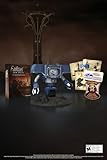
Fallout New Vegas: 15th Anniversary Bundle - PC | $135.78 | Buy on Amazon |
| 2 |

|
Fallout new vegas | $39.95 | Buy on Amazon |
| 3 |

|
Fallout: New Vegas Ultimate Edition | $40.30 | Buy on Amazon |
| 4 |
![Fallout New Vegas [DVD-ROM] [Windows Vista | Windows 7 | Windows XP]](https://m.media-amazon.com/images/I/519U+KAfbdL._SL160_.jpg)
|
Fallout New Vegas [DVD-ROM] [Windows Vista | Windows 7 | Windows XP] | $33.92 | Buy on Amazon |
| 5 |

|
Fallout 3 - PC Game of the Year Edition | $11.00 | Buy on Amazon |
These are PC debugging commands; they can also be used to cheat or change game state. Command examples and caveats are documented in the Fallout Wiki command reference and PC Gamer’s guide.
Commands by task
Character advantages and movement
| Task | Command | Effect |
|---|---|---|
| Toggle god mode | tgm |
Turns god mode on or off, granting infinite health, unlimited ammunition, no reload requirement, and unlimited carrying capacity while active. |
| Toggle noclip | tcl |
Removes collision so you can move through obstacles; it may help if you are stuck. |
| Move to quest target | movetoqt |
Moves the player to the quest target or next optional quest spot. |
HUD, camera, and map
| Task | Command | Effect |
|---|---|---|
| Toggle the HUD | tm |
Turns the HUD on or off. |
| Toggle free camera | tfc |
Enables or disables free camera. PC Gamer also lists tfc 1 for freezing the scene for screenshots. |
| Show map markers | tmm 1 |
Adds map markers. The command reference also describes variants for hiding or revealing markers. |
Items and player stats
| Task | Command | Effect |
|---|---|---|
| Add an item | player.additem <itemID> <quantity> |
Adds the specified quantity when the item form ID is valid for your installed content. PC Gamer’s example is player.additem 0015FD5C 1. |
| Inspect owned item IDs | player.showinventory |
Displays base IDs for items in the player’s inventory. |
| Change a skill or SPECIAL value | player.modav <ActorValue> <value> |
Changes the specified actor value by the amount entered. |
Replace the angle-bracketed parts with actual values; do not type the brackets. For example, the item command takes an item ID followed by a quantity.
Crashes, No Sound, or Screen Glitches?
Random freezes, missing sound and display glitches usually trace back to one bad driver. Find and replace yours safely.Free scan · under a minuteWindows Errors? Fix Them Before They Spread
Repair common Windows errors and clear accumulated junk for a smoother, more stable PC - no reinstall needed.Free scan · no reinstall#1 Best Overall
- Welcome back to New Vegas and enjoy your stay with this 15th Anniversary Bundle. A must-have for every Courier.
- The anniversary set combines iconic memorabilia from the Mojave Wasteland with the Ultimate Edition of the game.
- Explore vast expanses of desert wastelands from small towns to the New Vegas strip. Choose sides in the upcoming war and forever change lives of New Vegas inhabitants. Enjoy finely tuned real-time combat mechanics with the V.A.T.S. targeting system, Hardcore mode, and streamlined companion commands.
- In a huge, open world with unlimited options you can see the sights, choose sides, or go it alone.
- Joined by Victor the Securitron, the 15th Anniversary Bundle will bring the spirit of this desert oasis right to your home.
Item IDs and expansion content
player.additem needs the correct form ID for the item and the quantity to add. IDs beginning with xx are associated with expansions and may not work if the relevant expansion is not installed. Check that an ID matches the content in your game before entering it; player.showinventory can help identify base IDs for items you already possess. The item syntax and expansion caveat are covered in PC Gamer’s guide.
Steam achievements and save risks
Bethesda Support says that console commands affecting the character disable Steam achievements for that play session. Its guidance is to restart the play session and avoid console use to enable achievements again. The warning is specifically about Steam and character-affecting commands; it does not establish behavior for every storefront or console opening.
Rank #2
“If you open the debug console by pressing the [`] key and enter console commands that affect your character (ex: rewarding experience or modifying S.P.E.C.I.A.L. stats), Achievements will be disabled for the play session.”
That guidance appears on Bethesda Support’s Steam achievements page.
Free tools Windows power users keep installed
One-click scans. No signup required.
Rank #3
- Beyond the Wasteland: The world of New Vegas is more expansive than ever. Each new distinct area presents a fresh set of branching-quests, remarkable personalities and more chances to play the Savior or the Pariah to the natives of New Vegas.
- Dead Money: Lured into a trap masquerading as the Sierra Madre Casino, you are thrown into a high stakes game where you'll have to work with three other lost souls if you want to survive.
- Honest Hearts: An expedition into Utah's Zion National Park goes horribly wrong and you become embroiled in a war between tribes and put into a conflict between a New Canaanite missionary and the mysterious Burning Man.
- Old World Blues: Transported to the Big MT research crater, you are enlisted by the Think Tank to save them from their own science experiments that have gone horribly out of control.
- Lonesome Road: Ulysses, the original Courier Six, contacts you and promises to answer why he refused to deliver the Platinum Chip at the start of Fallout: New Vegas, but only if you make one last journey into the treacherous canyons of the Divide.
Save before consequential changes. The Fallout Wiki warns that coc does not work for every location and some uses can freeze the game or place the player in a black pit. It also cautions that changing carry weight with player.modav carryweight or player.forceav carryweight can interfere with later Carry Weight changes from Strength. Teleportation, NPC manipulation, quest advancement, and stat edits can all leave a save in an unexpected state.
Which commands require a mod?
The command search <term> <form type> is listed as requiring the JIP LN NVSE plugin, so do not assume it is available in an unmodified game. The Fallout Wiki identifies this requirement in its console command reference.
Quick Recap
Best Value
- Fallout 3: Game of The Year Edition
Rank #4
- ESRB Rating: Mature 17+
Product prices and availability are accurate as of the date/time indicated and are subject to change. Any price and availability information displayed on Amazon at the time of purchase will apply.




