What’s actually slowing this PC down?
Pick the symptom - the matching free tool is one click away.
You do not need a dedicated cockpit or an expensive high-end computer to start flight simulation. A practical Microsoft Flight Simulator 2024 setup needs a compatible platform, display, stable internet connection, and an analog control device such as a gamepad, joystick, or HOTAS. Add pedals, a yoke, head tracking, VR, and cockpit furniture only when they solve a specific problem for the way you fly.
The three levels of a flight simulator setup
| Level | What it includes | Best for |
|---|---|---|
| Basic | Display, keyboard and mouse where applicable, plus a gamepad or joystick | Trying the simulator and casual flying |
| Enhanced | Joystick or HOTAS, yoke or stick, throttle control, and rudder pedals | Regular flying and better aircraft control |
| Premium | Head tracking or VR, external panels, dedicated mounts, and a cockpit frame | Frequent users who want maximum immersion |
These layers are incremental. Start with the control device that suits your aircraft rather than buying a complete cockpit immediately.
Choose the platform first
PC
A PC is the most flexible option. It supports the widest range of flight controls, VR headsets, head tracking, multiple monitors, graphics settings, mods, and third-party content. The trade-off is a higher potential cost and more configuration. Hardware compatibility and performance must be assessed component by component.
Xbox Series X|S
Xbox is a simpler plug-and-play route. However, a USB flight peripheral is not automatically Xbox-compatible. Confirm Xbox support on the manufacturer’s product page before buying; some devices include a physical PC/Xbox switch. Microsoft’s hardware guidance specifically warns that most PC peripherals do not work on Xbox by default.
#1 Best Overall
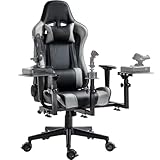
- 【Flight Simulator Chair Cockpit】The bracket integrates flight, air combat and racing modes, with 3 large-size shift levers, and can be fitted with a variety of accessories to achieve a variety of ways to play
- 【Professional Flight Chair】Special center of gravity design, perfect fit with the flight stand will not topple. The backrest can be adjusted 90-180° freely for excellent comfort
- 【Stable Structure】High-strength steel bracket, laser welding process, load-bearing up to 300 pounds, 5 locking rollers to ensure driving stability
- 【Flexible Adjustment】Flight bracket synchronized with the seat lift, 3 shift levers height and depth adjusted at will, easy to disassemble, can switch office mode, while taking care of work and entertainment
- 【Widely Compatible】Support major brands of accessories,for Thrustmaster, for Logitech X56 X52 , for Hotas Warthog controller interface, and encourage DIY
PlayStation 5 and PS5 Pro
PlayStation is sensible for people who already own the platform. Microsoft lists the DualSense controller, Thrustmaster T.Flight HOTAS 4, and TFRP Flight Rudder Pedals as compatible examples. Do not confuse the PlayStation HOTAS 4 with the Xbox-compatible HOTAS One. Microsoft’s current guidance described PlayStation VR support as planned for 2026, so verify the launch status and supported headset before relying on VR.
Cloud gaming
Cloud gaming lowers the hardware barrier and can support devices such as compatible PCs, Macs, phones, tablets, and Xbox One consoles. It is useful for trying the simulator, but streaming quality, latency, supported input devices, and subscription access make it a poor foundation for a peripheral-heavy cockpit.
MSFS 2024 is available through PC, Xbox Series X|S, PlayStation 5/PS5 Pro, Steam, Game Pass, and Xbox Cloud Gaming according to Microsoft’s current platform pages. Its normal operation requires a constant internet connection, so it is not a good choice for unreliable offline use. See Microsoft’s platform guide.
PC requirements for Microsoft Flight Simulator 2024
Microsoft publishes these software specification tiers:
| Component | Minimum | Recommended | Ideal |
|---|---|---|---|
| Operating system | Windows 10, latest update | Windows 10, latest update | Windows 10, latest update |
| DirectX | DX12 | DX12 | DX12 |
| CPU | Ryzen 5 2600X or Core i7-6800K | Ryzen 7 2700X or Core i7-10700K | Ryzen 9 7900X or Core i7-14700K |
| GPU | Radeon RX 5700 or GeForce GTX 970 | Radeon RX 5700 XT or GeForce RTX 2080 | Radeon RX 7900 XT or GeForce RTX 4080 |
| VRAM | 4GB | 8GB | 12GB |
| RAM | 16GB | 32GB | 64GB |
| Storage | 50GB | 50GB | 50GB |
These are published tiers, not frame-rate guarantees or current buying recommendations. Minimum hardware is not a sensible target for high resolution, dense airports, complex aircraft, VR, or triple monitors. CPU performance matters in dense airports, traffic-heavy scenes, and complex aircraft; GPU performance matters more at high resolutions, ultra settings, and in VR. RAM and storage headroom also matter for updates, rolling cache, add-ons, and community packages. Check Microsoft’s official FAQ before purchasing.
Rank #2
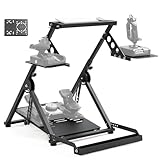
- 【Flexible and Varied Settings】The flight stand includes three gear shift panels, supporting both flight and racing games. Steering and pedal panels are wider with pre-drilled holes, compatible with various accessories for a customizable setup
- 【Durable and Heavy Duty Compatible】The flight stand sturdy structure fit for heavy equipment like Velocity One flight system and THRUSTMASTER TMX racing wheel. Compatible with direct-drive wheels under 8nm for optimal performance in racing games
- 【Aavanced & Stability】Unique X-shape design with double triangle mechanics provides excellent stability and ensures the flight simulation experience without shaking. With strong stability, the flight simulator stand can be firmly fixed on any surface
- 【High Compatibility】Compatible with Logitech G29/G920/G923, Thrustmaster T16000, Airbus Rocker & Throttle, A10C and many other devices. The wider panel design supports a wide range of flight and racing equipment
- 【Easy Installation & Space Saving】80% pre-installed for quick assembly. Adjustable bottom bolt lift pedal quickly folds down to compact size to save storage space. Comes with mounting tool and nuts and bolts for mounting controller
Choose controls by aircraft type
Gamepad
A gamepad is adequate for learning, casual flying, consoles, and cloud gaming. Its short analog travel and limited buttons make precise throttle, rudder, and cockpit interaction harder. Microsoft recommends analog controls for the best in-flight experience.
Joystick or HOTAS
For most beginners, a joystick with a built-in throttle and twist rudder is the best first dedicated control. Look for pitch and roll axes, yaw or twist, a hat switch, trim and view buttons, and enough controls for flaps, landing gear, brakes, and autopilot functions.
A HOTAS separates the stick and throttle and suits military aircraft, helicopters when appropriately configured, space simulators, and mixed fleets. The Thrustmaster T.Flight HOTAS One Microsoft Flight Simulator Edition is an entry-level PC/Xbox example. Thrustmaster lists five axes, 14 buttons, a trigger, a hat switch, detachable throttle, and dual rudder functionality. Its US page showed $109.99 on August 18, 2026; prices vary by region and date.
PC Slower Than It Used to Be?
A free scan shows the junk files, broken settings and background clutter dragging Windows down - then fixes them in one click.Free scan · Windows 10 & 11Crashes, No Sound, or Screen Glitches?
Random freezes, missing sound and display glitches usually trace back to one bad driver. Find and replace yours safely.Free scan · under a minuteYoke and throttle quadrant
A yoke is more appropriate for Cessna-style general aviation, turboprops, and airliners. It is not universally better than a stick: it is more authentic for some civilian aircraft but less versatile across the simulator’s full aircraft selection. A throttle quadrant becomes valuable for multi-engine aircraft and dedicated mixture, propeller, flap, spoiler, or reverse-thrust controls.
Rudder pedals
Pedals improve coordinated turns, taxi steering, tailwheel flying, helicopter control, and differential braking. They are usually an upgrade rather than a first purchase, especially if the joystick already has a twist rudder. They need floor space, a stable chair, and platform-compatible connections.
Rank #3

- Excellent Compatibility: Support With Almost All of Flight Game Hand-Control Devices. EG STARTS Hotas Chair Mount support X56/X56 Rhino/X55/x52/X52 Pro/T.16000M/TCA Officer Pack Airbus/Warthog Stick(not long for throttle) /VKB Gunfighter Mk.lll/VKB Gladiator/Pro/Airrow/VPC Mongoos T-50 Throttle/ X65F/T.Flight Hotas 4/TSSH Handbrake/TH8A Shifter/ClubShifter SQ V 1.5 Flight Throttle Quadrant and so on
- Excellent Stability: EG STARTS Heavy and Strong Chair Mount Stably Hold Your Equipment In The Best Position. Say goodbye to the messy and disorderly worries. Gives you a clean and tidy desktop.
- Super Easy Installation: fixed to the bottom of the seat by means of screws. The maximum height can be adjusted by 6 inches. It can be adjusted outwards by 45°. Adjust your sitting position conveniently.
- Game comfortably: Control your aircraft comfortably and ergonomically. The joystick is completed by sitting easily in the chair, and the sturdy stand is stable when set up and can be easily installed.
- Prepare For Gaming: Ready Your Cockpit And Take Flight. The EG STARTS Flight Joystick Controller Mount Is The Ideal Addition To Your Battle Station For That Immersive Flight Simulation Gaming Experience.
Recommended setups by use case
- Lowest cost: existing PC, console, or supported cloud device; existing display; gamepad or entry-level joystick.
- Most beginners: PC meeting at least Microsoft’s recommended tier, one 1080p or 1440p monitor, joystick or HOTAS with twist rudder, keyboard, mouse, and a comfortable chair.
- General aviation and airliners: yoke, throttle quadrant, rudder pedals, single large monitor or ultrawide, and stable desk mounts.
- Helicopters, military aircraft, or mixed fleets: joystick or HOTAS first, then pedals or specialized controls.
- High immersion: performance-headroom PC, quality controls, pedals, head tracking or VR, and a dedicated frame only after the preferred control layout is known.
Display and immersion options
Single monitor
A single monitor is the easiest and best-value choice. It uses less performance, leaves room for the keyboard and mouse, and is simpler to troubleshoot. A 27-inch display is a reasonable general-purpose choice, not a requirement.
Ultrawide or triple monitors
An ultrawide provides a wider view with less installation complexity than three screens, but demands more GPU performance than a conventional single display. Triple monitors provide broad peripheral vision but require more desk space, careful bezel alignment, additional mounting, and more rendering performance.
Recommended Free Tools
Head tracking
Head tracking lets you look around the cockpit while retaining visible physical controls. Microsoft lists TrackIR and Tobii Eye Tracker 5 as examples. It requires calibration and suitable sensor placement, and it does not provide VR’s stereoscopic depth.
VR
VR offers the strongest cockpit presence and a 360-degree view, especially for VFR sightseeing and helicopters. It also demands more performance, can cause motion sickness, makes physical controls harder to see, and can be awkward for keyboards, menus, and cockpit switches. Keep a physical joystick, yoke, throttle, or pedals rather than depending entirely on VR hand controllers.
Microsoft’s peripheral guide identifies Meta Quest 3 and Pimax Crystal Light as examples. It lists Quest 3 at 2,064 × 2,208 pixels per eye and Pimax Crystal Light at 2,880 × 2,880 per eye. These figures describe the headsets, not guaranteed simulator performance.
Rank #4

- 【Tough Design】In a simulator environment stability is key, given that we built the GF500 Flight Cockpit to utilize an aluminum base frame and steel supporting brackets, allowing for a very rigid cockpit while still maintaining ease of adjustment and maintainance.
- 【Fly Comfortable】In order to provide a comfortable and immersive experience we gave the GF500 a fiber glass bucket seat with a rail system for 220mm of forward and back movement as well as adjustment points for an extra 30mm of vertical adjustment or up to 6 degrees of tilt.
- 【Adaptive Solutions】With so many different configurations and variations of hardware on the market we wanted to ensure a good experience and compatibility. So to go along with a variety of mounting points the pedal mounts have four angles of tilt, Yoke mount can be adjusted forward and back and the joystick mount has three additional angles of tilt.
- 【Compatibility】Designed for use with Sticks, Throttles, Yokes, and Pedal plates from companies like Thrustmaster, Logitech, Turtle Beach, Virtual Fly, VKB, Virpil, and Winwing. See compatibility chart for full list of compatible plates.
- 【Whats Included】The GF500 Flight Simulator Cockpit comes with the Aluminum Base Frame and Steel Supporting Mounts for Pedals, Throttle, and Yoke/Stick, as well as the Fiberglass Bucket seat along with the supporting mounts and rail system.
Configure controls in MSFS 2024
- Connect the device before launching the simulator.
- Open the main menu, select the Settings wheel, then open Controls.
- Confirm that the device is detected and select its profile.
- Use Customization to create a custom profile if the default mapping is unsuitable.
- Test pitch, roll, yaw, throttle, brakes, and neutral positions.
- Verify bindings for elevator trim, flaps, landing gear, parking brake, view reset, pause, camera look, ATC push-to-talk, and autopilot disconnect.
- Calibrate the hardware and adjust dead zones or response curves gradually.
- Test on the ground before flying a complex aircraft, then save a known-good profile.
A dead zone filters small hardware noise; sensitivity and response curves change how quickly the aircraft reacts. There is no universal numerical setting because devices, aircraft, and pilot preferences differ. Create separate profiles for general aviation, airliners, helicopters, and military aircraft when necessary.
MSFS 2024’s current settings categories are General, Assistances, Controls, Accessibility, and VR. To switch between 2D and VR, open the VR Mode menu and choose Switch to VR, or press Ctrl + Tab. Labels can change with updates; Microsoft documents the current structure in its settings overview.
Independent reader supportYour contribution helps us test, update, and keep practical guides available for everyone.Desk ergonomics matter
Mount the stick or yoke where your forearm can rest naturally. Keep the throttle within easy reach, place the monitor at a comfortable height, and ensure the keyboard and mouse remain accessible. Prevent pedals from sliding, particularly on hard floors, and use a chair that does not roll backward under pedal pressure. Cable management and ventilation improve reliability, while a cockpit frame is best treated as furniture and infrastructure rather than a flight-control upgrade.
Common problems and fixes
Peripheral not detected
- Confirm that the operating system sees the device.
- Reconnect it directly instead of through an unreliable hub.
- Install the manufacturer’s current driver or firmware utility.
- Restart the simulator and check Controls.
- Use Customization, remove duplicate bindings, and test one axis at a time.
Aircraft moves at neutral
Recalibrate the device, check its neutral position, remove duplicate axis assignments, and increase the dead zone slightly if the hardware produces noise. Test with a default profile before editing further.
VR performs poorly
Lower render scale and graphics settings systematically, then test again. Traffic, terrain detail, complex aircraft, and wireless headset streaming can all reduce frame-time headroom. Change one variable at a time.
Best Value

- 【Tough Design】In a simulator environment stability is key, given that we built the GF500 Flight Cockpit to utilize an aluminum base frame and steel supporting brackets, allowing for a very rigid cockpit while still maintaining ease of adjustment and maintainance.
- 【Fly Comfortable】In order to provide a comfortable and immersive experience we gave the GF500 a fiber glass bucket seat with a rail system for 220mm of forward and back movement as well as adjustment points for an extra 30mm of vertical adjustment or up to 6 degrees of tilt.
- 【Adaptive Solutions】With so many different configurations and variations of hardware on the market we wanted to ensure a good experience and compatibility. So to go along with a variety of mounting points the pedal mounts have four angles of tilt, Yoke mount can be adjusted forward and back and the joystick mount has three additional angles of tilt.
- 【Compatibility】Designed for use with Sticks, Throttles, Yokes, and Pedal plates from companies like Thrustmaster, Logitech, Turtle Beach, Virtual Fly, VKB, Virpil, and Winwing. See compatibility chart for full list of compatible plates.
- 【Whats Included】The GF500 Flight Simulator Cockpit comes with the Aluminum Base Frame and Steel Supporting Mounts for Pedals, Throttle, and Yoke/Stick, as well as the Fiberglass Bucket seat along with the supporting mounts and rail system.
Loading or stability problems
Outdated Community-folder packages can affect performance and behavior. Microsoft’s August 13, 2026 Sim Update 6 notes recommend moving Community packages elsewhere and relaunching when troubleshooting these symptoms.
Upgrade in the right order
- Controller to joystick: gain longer, more precise analog travel.
- Joystick to pedals: improve yaw, taxiing, tailwheel control, and differential braking.
- Add a yoke or throttle quadrant: do this when civilian or multi-engine aircraft justify the layout.
- Monitor to head tracking or VR: upgrade visual immersion after primary controls are comfortable.
- Desk to mounts to cockpit frame: invest in a frame only when controls moving around is a regular problem.
The Next Level Racing Flight Simulator MSFS Edition is an example of dedicated furniture, not a complete simulator: its page states that electronics and accessories are excluded. The listed US price was $899 on August 18, 2026, before any regional taxes or shipping.
Important ownership and compatibility details
Check every peripheral for the exact platform and model. Add-ons from MSFS 2020 should not be assumed individually compatible, although Microsoft’s FAQ says current aircraft, airports, and virtually all Marketplace add-ons are supported in MSFS 2024; third-party products should still be checked.
Microsoft also says Marketplace purchases do not transfer when moving between PC Steam, Xbox, and PlayStation. Game Pass access to Marketplace products depends on continued access to the base simulator through the subscription. These policies and catalog details can change, so check Microsoft’s current platform documentation.
Do these 3 things before closing this tab:
1Scan for outdated or missing drivers - takes under a minute2Repair Windows errors before they cause bigger problems3Fix the driver behind crashes, sound loss and screen glitchesQuick Recap
Product prices and availability are accurate as of the date/time indicated and are subject to change. Any price and availability information displayed on Amazon at the time of purchase will apply.




