
What’s actually slowing this PC down?
Pick the symptom - the matching free tool is one click away.
If your GameCube picture looks too dark on a CRT, first check the TV input and cable connections, then compare more than one game and—if possible—another cable or television. Darkness alone does not identify a faulty console, cable, or TV; the right next step depends on where the picture changes.
Check the TV input and cable connections
- Make sure the yellow video plug is connected to a TV video input, not an output, and select the matching AV or source input on the TV. Nintendo’s GameCube instruction booklet specifically says to use the TV’s “IN” or “INPUT” connectors, not “OUT” or “OUTPUT.”
- If you are using the component-video setup shown in that booklet, do not connect the yellow composite-video plug; the manual’s component instructions do not use it.
- Check that each plug is fully seated and that the TV is set to the input the console is actually connected to.
Find out whether it is one game or the whole setup
Compare the picture in another game and in the console menu. If only one game appears dark, look for that game’s own brightness or picture settings and check its documentation before blaming the console. This comparison is a practical way to narrow down the issue, not a diagnosis established by Nintendo’s support instructions.
As an Amazon Associate I earn from qualifying purchases.
Try another cable or television
For picture problems affecting all games, Nintendo UK’s picture troubleshooting guidance recommends checking the connections, trying another television if available, and testing another connection cable. Treat the result as a clue:
The Tool Desk
Outbyte PC Repair FREEClear out junk files and repair common Windows errorsFree Scan →Outbyte Driver Updater FREEScan for outdated or missing drivers - takes under a minuteDriver Scan →- If the picture changes after swapping cables, the original cable may be damaged or unsuitable for the setup. Consider a replacement only after checking that it matches the console’s connector and region.
- If the picture changes on another television, investigate the original TV’s input, settings, or compatibility with the connection being used.
- If neither change helps, those checks still do not prove that the console itself has failed.
Identify the connection before changing it
GameCube setups can use composite AV, S-Video, RGB SCART, component video, or a converter, but support depends on the console, region, cable, and TV inputs. The manual documents stereo AV and S-Video connections. Its component-video and progressive-scan guidance applies to the DOL-001 (USA), not the DOL-101 (USA). Nintendo UK’s RGB cable instructions describe connection to a TV with an RGB SCART input. Do not assume a particular cable or adapter works with every GameCube or television.
#1 Best Overall

- Wide Compatibility –This AV RCA cable works perfectly with Nintendo 64 (N64), GameCube, and SNES (Super Nintendo) consoles. It fits the standard multi-out port, supporting both composite and component audio video output, ideal as a replacement AV cord.
- Composite Video & Audio – Equipped with 3-color RCA connectors (yellow for video, red/white for stereo audio), this cable delivers stable composite video and crisp sound with no flicker, static, or signal loss during gaming.
- Plug & Play for TV/Monitor – This AV cord connects your Nintendo console directly to any TV or monitor with RCA input ports. No extra drivers or complicated setup needed—just plug in and start gaming instantly.
- 6FT Durable Flexible Cable – The 6-foot (1.8m) length provides flexible placement for your gaming setup. Made with premium PVC jacket and reinforced joints, it resists bending and wear for long-lasting use.
- Warm Tip –N64 component cable only works with devices that have RCA ports. If your device only has an HDMI port, you’ll need an RCA to HDMI converter (not included)!!!
Before buying anything, note the console’s model number and region, the cable and any adapters in use, and the TV’s make, model, and input. A replacement GameCube stereo AV cable is worth considering if a cable swap improves the image or the existing cable is visibly damaged; it is not a guaranteed fix for a dark picture.
Independent reader supportYour contribution helps us test, update, and keep practical guides available for everyone.When the cause is still unclear
Record whether the image is dark in every game and in the console menu, and whether another cable or TV changes it. Nintendo’s legacy-system support page gives basic picture checks but says it cannot provide service for this discontinued product. With no console model, cable, TV, or signal path identified, there is not enough information to call the problem a console fault or to recommend a specific connection standard.
Quick Recap
Best Value

- 【Compatible with Classic Nintendo Consoles】 Works with N64, SNES, SFC, and GameCube (NGC), providing a simple connection for your retro gaming setup.
- 【RCA Composite Output】 Transmits video and audio from the console to any TV or monitor that has standard yellow-red-white RCA ports.
- 【Ideal for Older Displays】 Allows classic consoles to display video on older CRT TVs or other RCA-supported screens without additional adapters.
- 【Plug-and-Play Setup】 Easy to connect—just plug the AV connectors into your display and the console port, no configuration required.
- 【Durable and Flexible Cable】 Built with reliable materials for stable AV transmission and consistent performance during gaming.
Rank #4
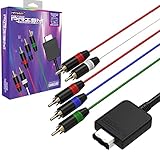
- Compatible with Nintendo GameCube consoles (model DOL-001) with Digital AV Out
- Functions with displays that have component inputs (Y, Pb, Pr, L-Audio, and R-Audio)
- Supports 480i, 480p, 576i, 576p resolutions on compatible NTSC and PAL consoles
- 6ft / 1.8m fully shielded cable
Rank #3
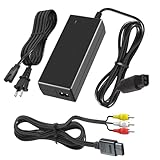
- Product Compatibility;Replacement AC power adapter and audio video RCA AV cable compatible with gamecube console.
- Product Specifications:Designed specifically for gamecube console,this power adapter with 2 prong figure 8 power cord length:3.9Ft(120cm),100-240V input and delivers DC 12V/3.25A output. It features a 4.59Ft(1.4M) long cable,AV RCA cable length: 1.8M/6FT.standard AV composite lead with RCA AV (yellow,red and white connectors) on one end and NGC console input on the other.Bringing your classic gamecube consoles back to life.
- Smart Charging Protection:The power adapter features a red indicator light to indicate operation.Equipped with an intelligent IC chip, it provides multiple safety features including short-circuit protection, over-current protection and overload protection, ensuring safe and stable charging for your devices and extending their lifespan.
- Plug and Play: The gamecube AV cable is color-coded for easy identification, simply connect the game input jack to the back of your console and TV. It is designed to provide you with super clear video and sound while you play Gamecube games.
- Product Includes:1xpower supply,1x AV RCA cable,2 prong figure 8 power Cord*1
Rank #2
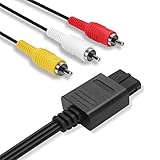
- 2.5M Professional Customization: Specially designed for Nintendo 64 (N64), GameCube (GC), Super Nintendo (SNES). Connect your console with TV through the red, yellow and white connectors to get a superior image and sound. Bring you a fantastic game playing experience.
- Quick Easy Install: Our dock connector plug of the cable is designed to be able to connect to the game console directly to simplify deployment process. Yellow, White, Red color coded connectors can help you to identify and install the cable much easier.
- Everlasting Durability: High quality copper wire inside for optimal signal clarity to guarantee no lag during your gaming time. The copper pins connector heads slot in easily and steadily, and won't get loose or fall out of your devices. Premium PVC housing, flexible and tangle free.
- Powerful Function & Compatibility : The Video and Audio Cable are compatible with many TV games, suitable for Nintendo 64, GameCube, Super Nintendo SNES etc. (Support TV with RCA input only.) bring you extraordinary experience when you play games on TV.
- Warranty & Customer Service: We always stick to the high-quality Composite AV Cables and high-grade professional service. If any issues happen to the cables after sale, please don’t hesitate to contact us. We will reply to you within 24 hours!
Product prices and availability are accurate as of the date/time indicated and are subject to change. Any price and availability information displayed on Amazon at the time of purchase will apply.
Quick wins for a faster PC:
Clear out junk files and repair common Windows errorsFree Scan →Fix the driver behind crashes, sound loss and screen glitchesFind Drivers →Repair Windows errors before they cause bigger problemsFix Now →
