
What’s actually slowing this PC down?
Pick the symptom - the matching free tool is one click away.
Short answer: the 15-inch Surface Book 2 is still a reasonable 1080p gaming machine for older AAA games, esports, indie titles, strategy games, and some less demanding modern releases—provided it is connected to its proper charger. It is not a good primary gaming laptop for current demanding AAA games, ray tracing, 120/144Hz gaming, or long unplugged sessions.
The important detail is the model: only the 15-inch version has the dedicated GeForce GTX 1060 6GB. The detachable design, aging batteries, relatively limited cooling, and documented power-delivery behavior matter just as much as the GPU specification.
As an Amazon Associate I earn from qualifying purchases.
Which Surface Book 2 is the gaming model?
Do not buy a listing described only as “Surface Book 2.” The 15-inch configuration is the one to seek for gaming. Microsoft lists it with an eighth-generation Core i7 processor and a dedicated NVIDIA GeForce GTX 1060 with 6GB of GDDR5 memory. The 13.5-inch models use Intel integrated graphics or, in higher-end configurations, a GTX 1050 with 2GB of GDDR5.
The Tool Desk
Outbyte PC Repair FREERepair Windows errors before they cause bigger problemsFix Now →Outbyte Driver Updater FREEFix the driver behind crashes, sound loss and screen glitchesFind Drivers →Confirm the following before buying:
- The screen size is 15 inches.
- Windows Device Manager or NVIDIA Control Panel identifies a GTX 1060 6GB.
- The keyboard base detects the GPU consistently.
- The system has 16GB of RAM if possible.
- Both the tablet and base batteries are healthy.
- The original Microsoft power supply is included.
Microsoft’s official specifications are the best reference for distinguishing configurations.
#1 Best Overall

- Microsoft Surface Book 2 Features a 7th generation Intel Dual Core i5 Processor, 256 GB of storage, 8 GB RAM, and up to 17 hours of video playback
- Includes an Intel HD Graphics 620 integrated GPU
- The fastest Surface Book yet, with 2x more power
- Vibrant PixelSense Display: now available with an improved 13.5in touchscreen
Surface Book 2 15-inch gaming specifications
| Component | What it means for gaming |
|---|---|
| GPU | NVIDIA GeForce GTX 1060, 6GB GDDR5 |
| CPU | Eighth-generation Intel Core i7-8650U-class processor |
| Display | 15-inch PixelSense touchscreen, 3:2 aspect ratio |
| Memory | Commonly 16GB; check the individual unit |
| Storage | PCIe SSD options including 256GB, 512GB, and 1TB |
| Ports | Two USB-A, USB-C, two Surface Connect ports, and full-size SD card reader |
| Weight | Approximately 4.2lb for the 15-inch i7 model |
| Wireless | 802.11ac Wi-Fi and built-in Xbox Wireless |
The GTX 1060 makes this the most gaming-capable Surface Book 2, but it remains an older, lower-power laptop implementation. Notebookcheck’s testing placed its performance toward the lower end of laptop GTX 1060 results. Do not assume it performs like every full-power GTX 1060 gaming laptop.
How well does it play PC games?
Think of the Surface Book 2 as a 1080p machine, not a native-resolution gaming system. Its tall 3:2 productivity display is excellent for documents and creative work, but many games are designed for 16:9. Use 1920×1080 or another 16:9 resolution when possible; games may show black bars or scale the image.
| Game type | Realistic expectation | Starting point |
|---|---|---|
| 2D, indie, retro, and roguelike games | Generally comfortable | Native or 1080p; medium-to-high settings |
| Older esports games | Playable at 1080p; high frame rates require compromises | Low-to-medium settings and a frame cap |
| 2016–2019 AAA games | Often playable, depending on the title | 1080p medium-to-high settings |
| Recent competitive shooters | Potentially playable, but CPU and engine demands vary | 1080p low settings |
| Current demanding AAA games | Requires substantial compromises and may still perform poorly | Low settings and upscaling where available |
| Ray-traced games | Not a sensible target | Disable ray tracing |
| VR | Not recommended as a sustained use case | Choose newer hardware |
The GTX 1060 has no hardware ray-tracing cores, DLSS support, or modern frame-generation features. Some newer games can still run through conventional rendering, but “playable” does not mean stable 60fps performance after a long session.
Outdated Drivers Are Slowing You Down
One free scan finds every outdated or missing driver and matches the right update for your exact hardware.Free scan · exact hardware matchWindows Errors? Fix Them Before They Spread
Repair common Windows errors and clear accumulated junk for a smoother, more stable PC - no reinstall needed.Free scan · no reinstallThe biggest gaming problem: battery drain while plugged in
The Surface Book 2 has an unusual power limitation. Contemporary testing and reporting found that its 102W power supply can be unable to run the CPU and GPU at maximum load while also charging the battery. In a demanding game, the battery percentage may fall even though the charger is connected.
Rank #2

- Microsoft Surface Book 2 Features a 8th generation Intel Dual Core i7 Processor, 15" Touchscreen 3000 x 2000
- 512GB of storage SSD, 16GB RAM
- NVIDIA GeForce GTX 1050 GPU (2GB GDDR5), Up to 17 hours of video playback, SDXC Media Card Slot
- Detachable 2-in-1 Laptop, 2 x USB 3.1 Gen 1 Type-A, 1 x USB 3.1 Gen 1 Type-C (with USB Power Delivery revision 3.0), 2 x Surface Connect ports, 3.5 mm headphone jack
- Windows Hello face authentication camera (front-facing), 5.0 MP front-facing camera with 1080p HD video, 8.0 MP rear-facing autofocus camera with 1080p HD video, Windows 10 Professional 64-bit Edition
Windows Central’s coverage documented this behavior, which Microsoft acknowledged at the time. It does not mean every unit drains at the same rate: the result depends on the game, power mode, charger condition, battery health, and system behavior.
Expect the problem to be worse on a used unit with degraded batteries. “Plugged in” does not guarantee uninterrupted full performance, and Microsoft’s original “up to 17 hours” claim was a video-playback result under specified test conditions—not a gaming-runtime estimate for an aged second-hand machine.
Best settings before gaming
- Install current Windows and Surface updates. Microsoft’s Surface Book 2 update history recommends moving to Windows 11. Microsoft ended Windows 10 support on October 14, 2025. Windows 11 eligibility does not make this a modern gaming platform, but an updated installation is preferable for security and compatibility.
- Attach the keyboard base securely. The GTX 1060 and its cooling hardware are in the base.
- Use the original Microsoft power supply. USB-C charging should not automatically be treated as equivalent for sustained gaming.
- Select the highest Windows performance mode. In Windows 11, use Settings → System → Power & battery → Power mode → Best performance, or the highest available equivalent on your build.
- Assign the game to the GTX 1060. Go to Settings → System → Display → Graphics, add or browse to the game executable, choose Options, select High performance, and save.
- Start at 1920×1080 and medium settings. Reduce shadows, volumetrics, reflections, and anti-aliasing before lowering textures. Disable ray tracing.
- Use a frame cap. Capping frames can reduce heat, power draw, and battery drain, especially in games that do not need maximum GPU output.
- Play on a hard, ventilated surface. Do not cover the base with bedding or soft fabric.
Use Task Manager, NVIDIA Control Panel, or a reputable monitoring utility to confirm that the GTX 1060 is active during gameplay.
Fixing low FPS or the wrong GPU
If a game reports Intel graphics, shows almost no NVIDIA activity, or suddenly performs far worse, work through this sequence:
Rank #3
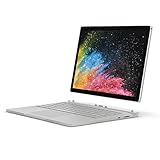
- Microsoft Surface Book 2 Features a 8th generation Intel Quad Core i7 Processor, 512 GB of storage, 16 GB RAM, and up to 17 hours of video playback
- Enhanced Graphics performance with NVIDIA GeForce GTX 1050 discrete GPU w/2GB GDDR5 Graphics Memory
- The fastest Surface Book yet, with 2x more power. Runs Windows 10 Pro
- Vibrant PixelSense Display: now available with an improved 13.5" touchscreen
- Four versatile modes of use and new USB-C port
- Fully attach the tablet to the keyboard base.
- Restart Windows.
- Open Settings → System → Display → Graphics, add the game executable, and select High performance.
- Check the game-specific preference in NVIDIA Control Panel if available.
- Open Device Manager and inspect Display adapters.
- Install the appropriate Surface driver package.
- If the GPU remains missing, consider restoring the official Surface recovery image after backing up your data.
If the GPU repeatedly disappears, clocks collapse, or the base disconnects under load, treat the problem as a possible hardware, connection, battery, or aging-device fault—not merely a graphics-setting error. Microsoft Q&A contains user reports of clock drops and external-display issues, but these are reports rather than proof that every unit behaves the same way: GPU clock-drop report and external-monitor report.
Can you game in tablet mode?
Only for lightweight games. The tablet portion does not contain the GTX 1060. Detaching the screen leaves you with integrated graphics, so demanding games must be played with the keyboard base attached. Tablet mode is suitable for touch games, streaming, retro titles, and simple 2D games—not serious 3D gaming.
External monitors and USB-C
The Surface Book 2 can connect to an external display through USB-C or Surface Connect accessories, but its USB-C port is USB 3.1 Gen 1 with USB Power Delivery, not Thunderbolt 3 or 4. Microsoft lists the port details in its specifications.
Recommended Free Tools
Use a reliable video adapter or dock rated for the monitor’s intended resolution and refresh rate. Do not assume every dock supports high-refresh gaming. Test the exact adapter, display, resolution, and refresh rate before judging performance. The machine is a more natural match for 1080p/60Hz external gaming than for a modern high-refresh competitive setup.
Rank #4

- Microsoft Surface Book 2 Features a 8th generation Intel Quad Core i7 Processor, 512 GB of storage, 16 GB RAM, and up to 17 hours of video playback
- Enhanced Graphics performance with NVIDIA GeForce GTX 1060 discrete GPU w/6GB GDDR5 Graphics Memory
- The fastest Surface Book yet, with 4x more power
- Vibrant PixelSense Display: now available with a new 15" touchscreen. Weight : Starting at 4.2 pounds including keyboard
- Four versatile modes of use and new USB-C port
Is a used Surface Book 2 15-inch worth buying?
It can be worthwhile as a hybrid productivity and occasional-gaming machine, but not when its price approaches a newer RTX laptop. Battery age is the key difference between a good used unit and a false economy.
Used-unit inspection checklist
- Confirm the 15-inch display and GTX 1060 6GB.
- Run a 3D game or benchmark for at least 20–30 minutes.
- Watch whether the battery falls while connected to power.
- Check tablet and base battery indicators where available.
- Test the detach mechanism and base connection.
- Listen for abnormal fan noise and check for overheating or clock reduction.
- Inspect for battery swelling, screen separation, or chassis deformation.
- Verify the charger’s authenticity and wattage.
- Check SSD health, Windows activation, ports, keyboard, touchpad, screen, and SD reader.
A 256GB model can fill quickly after Windows, launchers, and large games. Memory and internal storage are not straightforward user upgrades, so budget for an external USB SSD if needed.
Surface Book 2 versus a newer gaming laptop
The Surface Book 2’s advantages are its touchscreen, pen support, detachable tablet, professional design, excellent productivity display, and relatively portable hybrid form factor. Those features can justify it when gaming is secondary and the price is low.
A newer RTX 4050 or RTX 4060 laptop is normally the better gaming purchase. It offers newer GPU features, hardware ray tracing, DLSS support, better efficiency, more sustained cooling, stronger current-game support, and usually a more predictable battery and power system. Models such as the Lenovo LOQ, ASUS TUF Gaming F16, and newer Acer RTX gaming laptops are more appropriate when gaming is the priority. Prices, configurations, and stock change, so compare the specific live model rather than relying on a generic product name.
Best Value
- Microsoft Surface Book 2 Features a 8th generation Intel Quad Core i7 Processor, 256 GB of storage, 16 GB RAM, and up to 17 hours of video playback
- Enhanced Graphics performance with NVIDIA GeForce GTX 1060 discrete GPU w/6GB GDDR5 Graphics Memory
- The fastest Surface Book yet, with 4x more power
- Vibrant PixelSense Display: now available with a new 15" touchscreen
Microsoft’s Surface Laptop Studio 2 is the closer modern alternative for readers who want a Surface design, touchscreen, and pen support with RTX 4050, RTX 4060, or RTX 2000 Ada configurations. It is still a premium creative/productivity machine rather than the best performance-per-dollar gaming laptop.
Verdict
If you already own the 15-inch Surface Book 2: keep using it for older, indie, esports, and moderately demanding games if the GTX 1060 is stable and the batteries are safe. Connect the proper charger and accept that demanding sessions may drain the battery.
If you can buy one very cheaply: it can be a compelling productivity-and-gaming hybrid, provided the GPU, base, charger, and batteries pass inspection.
Quick wins for a faster PC:
Fix the driver behind crashes, sound loss and screen glitchesFind Drivers →Repair Windows errors before they cause bigger problemsFix Now →If gaming is your main reason to buy: choose a newer RTX 4050 or RTX 4060 laptop unless the Surface Book 2 is substantially cheaper. Its distinctive detachable design—not raw gaming value—is the reason to choose it in 2026.
Quick Recap
Product prices and availability are accurate as of the date/time indicated and are subject to change. Any price and availability information displayed on Amazon at the time of purchase will apply.

