Quick wins for a faster PC:
Clear out junk files and repair common Windows errorsFree Scan →Scan for outdated or missing drivers - takes under a minuteDriver Scan →To appear online to your Steam friends, open Friends & Chat in the lower-right corner of the Steam client, select the status dropdown beside your avatar, and choose Online. Online is Steam’s default presence; if you are showing as offline, another status may be selected.
Set your Steam status to Online
- Open Friends & Chat from the lower-right corner of the Steam client. You can also open the same interface in a web browser.
- Select the dropdown beside your Steam avatar.
- Choose Online. Friends can then see when you are online and when you are playing a game.
Steam lists the presence options and their effects in its Friends & Chat FAQ.
What Steam’s status options mean
| Status | What friends see | What you can do |
|---|---|---|
| Online | You appear online, including while playing a game. | Use Steam community features while connected. |
| Away | Your status indicates you are unavailable. | Steam community features remain available. |
| Invisible | You appear offline to other players. | You can still view your friends list, send and receive messages, and participate in the Steam community. |
| Offline | You are signed out of the Steam community. | Friends cannot contact you, and Steam features that depend on being online will not work. |
| Do Not Disturb | This status is about notifications, not whether you are online. | It controls notifications from chat, invites, and other requests. |
Online, Invisible, Offline, and Offline Mode are different
Choose Invisible for privacy without signing out
Invisible is useful when you want to use Steam’s community features without appearing online. Steam Support describes it this way: “Invisible – This status will show you as offline to other players.”
Choose Offline to sign out of the Steam community
Offline is a presence setting that signs you out of the community and disables features that require an online connection. It is not the same as merely hiding your presence with Invisible.
#1 Best Overall

- Effortless Organization - Effortlessly keep your earrings, bracelets, and other jewelry meticulously organized and tangle-free. Enjoy an elegant and visually pleasing display of your entire jewelry collection at a glance, making choosing the perfect piece for any occasion a breeze.
- Space-Saving Brilliance - Our wall-mounted jewelry organizer ingeniously holds up to 58 pairs of earrings, and includes extra S-hooks for your cherished necklaces and other longer jewelry items. Maximize your space while beautifully showcasing your jewelry.
- Enduring Craftsmanship - Designed for longevity, our organizer boasts an attractive, all-steel construction, and is coated with a durable powder finish. It retains its luster even after years of daily use, ensuring it remains a timeless addition to your decor.
- Thoughtful Gift - Delight your loved ones on special occasions like Valentine's Day, Birthdays, Christmas, and more with this stylish and practical gift. Show them you care by helping them keep their jewelry collection both organized and stylish.
- No Fuss Installation - Say goodbye to the hassle of assembly. We provide a convenient mounting template and all the necessary hardware for a trouble-free setup. You can even mount it inside closet doors to optimize your storage space. We've included U.S. wall anchors to ensure a secure hold on Drywall, Solid Masonry, Doors, and most other surfaces.
Use Offline Mode to play without a Steam Network connection
Offline Mode is a separate client mode, rather than a friends-list status. Steam says, “Offline Mode allows you to play games through Steam without having an active connection to the Steam Network.” To enable it, open the Steam menu and select Go Offline. Steam features that require a connection are unavailable in this mode; see Steam’s Offline Mode FAQ for details.
Independent reader supportYour contribution helps us test, update, and keep practical guides available for everyone.If your status will not change
The Steam support pages explain how to select a presence and what each option does, but they do not give a specific fix for a status change that fails to take effect. For help with that problem, consult Steam Friends & Chat Support rather than assuming a particular cause.
Quick Recap
Rank #3
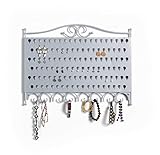
- Effortless Organization - Effortlessly keep your earrings, bracelets, and other jewelry meticulously organized and tangle-free. Enjoy an elegant and visually pleasing display of your entire jewelry collection at a glance, making choosing the perfect piece for any occasion a breeze.
- Space-Saving Brilliance - Our wall-mounted jewelry organizer ingeniously holds up to 58 pairs of earrings, and includes extra S-hooks for your cherished necklaces and other longer jewelry items. Maximize your space while beautifully showcasing your jewelry.
- Enduring Craftsmanship - Designed for longevity, our organizer boasts an attractive, all-steel construction, and is coated with a durable powder finish. It retains its luster even after years of daily use, ensuring it remains a timeless addition to your decor.
- Thoughtful Gift - Delight your loved ones on special occasions like Valentine's Day, Birthdays, Christmas, and more with this stylish and practical gift. Show them you care by helping them keep their jewelry collection both organized and stylish.
- No Fuss Installation - Say goodbye to the hassle of assembly. We provide a convenient mounting template and all the necessary hardware for a trouble-free setup. You can even mount it inside closet doors to optimize your storage space. We've included U.S. wall anchors to ensure a secure hold on Drywall, Solid Masonry, Doors, and most other surfaces.
Rank #2
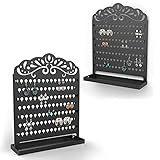
- Elegant Jewelry Organization - Elevate your jewelry storage with the Mango Steam Slim Profile Wall-Mounted Jewelry & Earring Organizer in a captivating Peacock Black design.
- Effortless Earring Storage - Keep your earrings and jewelry meticulously organized and free from tangles with space for up to 58 pairs of earrings.
- Sturdy All-Steel Construction - Crafted with durability in mind, this organizer boasts a robust all-steel construction, finished with a resilient powder coating.
- Versatile Display Options - Mount it on your wall or use it as a stylish standing organizer – enjoy the flexibility of how you showcase your precious pieces.
- Simple Installation - Quick and hassle-free installation is made possible with the included template and all the necessary mounting hardware, ensuring your jewelry is beautifully displayed in no time.
Product prices and availability are accurate as of the date/time indicated and are subject to change. Any price and availability information displayed on Amazon at the time of purchase will apply.




