To claim a Fortnite competitive prize, sign in to Fortnite Competitive with the account you used in the event, open My Prizes, and select Start Tax Interview. After Epic verifies your Tax Profile, follow Hyperwallet’s activation instructions, add a transfer method, and accept any pending prize in the Competitive Dashboard. Check the event rules first: placement or score requirements and regional eligibility vary by event. Epic recommends using a desktop browser because the forms may not display properly on mobile.
“Fortnite earnings” can also mean Support-A-Creator revenue or Fortnite island developer payouts. Those are separate programs with different eligibility and portal flows; the competitive prize steps below apply to tournament and event prizes.
How to claim a Fortnite competitive prize
- Check that you qualify. Review the specific event’s rules in the Fortnite Competitive Rules Library. Epic says eligibility depends on the event’s placement or score requirements and may also be restricted by country or region.
- Start the tax interview. Sign in to Fortnite Competitive using the account that competed. Open My Prizes, choose Start Tax Interview, and complete the requested information. Use a desktop browser if possible; Epic warns that the forms may not display properly on mobile.
- Wait for Tax Profile verification. Epic says this can take up to five business days, depending on your country of residence. Epic will email you when the profile is verified and direct you back to enrollment.
- Activate Hyperwallet. Once your tax information is validated, watch for Hyperwallet’s activation email and follow its instructions to set up the payout account. Epic says the email may take up to five business days to arrive after validation. A parent or legal guardian may be contacted to complete setup for a recipient who needs one.
- Add a transfer method and resolve requests. Complete Hyperwallet’s profile and activation steps, then select a transfer method. If the prize is not moving forward, check that Hyperwallet is verified, a payment method has been added, and no verification requests remain outstanding.
- Accept the prize and track the claim. In the Competitive Dashboard, look for a pending prize that requires acceptance and accept it when available. Epic aims to notify recipients within 30 days after an event ends, but verification can extend the process. If you have received neither a notification nor the prize within 60 days of the event, contact Epic Support with the event name and your placement.
Hyperwallet is the payout service used to transfer funds from Epic to the destination you select; it is not a general-purpose stored balance.
Which Fortnite earnings program applies?
| Earnings type | Where to start | What determines eligibility |
|---|---|---|
| Competitive prize | Fortnite Competitive portal, under My Prizes | The event’s placement or score rules, plus any country or region restrictions |
| Support-A-Creator revenue | Creator-program tax setup linked from Epic’s creator support page; confirm payout details in the relevant creator portal | Support-A-Creator program requirements and the creator’s revenue |
| Fortnite Developer Program engagement payout | Fortnite Developer Program enrollment and its payout setup | Developer Program eligibility and island engagement; Support-A-Creator enrollment alone does not qualify someone for these payouts |
All three routes involve their own program context. Do not assume that a competitive prize claim can be completed through a creator portal, or that participation in Support-A-Creator automatically enrolls you in the Developer Program.
#1 Best Overall

- GILDED TROOPER: Board the Battle Bus and drop in with Fortnite Legendary Skull Trooper (Gilded)!
- FORTNITE: 6-inch action figure is inspired by the video game Fortnite
- ARTICULATED: Feature 28 points of articulation to win any Battle Royale
- ACCESSORIES: Comes equipped with Back Bling and Harvesting Tools
- BONUS CODE: Code for virtual item included: Mecha-jolly
Why a competitive prize may be delayed
- The event requirements were not met. Confirm the posted placement or score threshold and any regional eligibility terms.
- The Tax Profile is still being checked. Epic says verification may take up to five business days, depending on residence country.
- Hyperwallet setup is incomplete. Check for its activation email, finish account verification, add a transfer method, and clear any outstanding requests.
- The prize still needs acceptance. Check the Competitive Dashboard for a pending prize and accept it if prompted.
- The notification window has not elapsed. Epic aims to notify winners within 30 days after the event ends. If there is still no notification or prize after 60 days, contact Epic Support with the event name and your placement.
Tax forms for Fortnite payouts
Epic’s published tax-form guidance says the tax year is based on when Epic paid the reward, not when it was earned. The page lists these forms and schedules:
| Program and recipient | Form listed by Epic | Stated timing or threshold |
|---|---|---|
| US esports competitors | 1099-MISC | By the end of January |
| Esports competitors outside the US | 1042-S | By March 15 |
| US Support-A-Creator participants and Fortnite Developers | 1099-NEC | By the end of January |
| Non-US Support-A-Creator participants and Fortnite Developers | Epic says it does not issue a tax form for these programs | Not stated |
Epic’s page says a US resident receives a form only when rewards total more than $600. These are Epic’s published statements, not a determination of your tax liability; check its current guidance for the applicable tax year and program. Epic says it cannot provide tax advice. Its creator guidance points US readers to the IRS instructions for Form 1099-NEC and advises non-US creators to consider local tax obligations and consult a tax or financial adviser.
Quick Recap
Rank #2
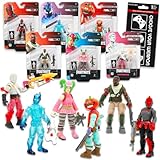
- Fortnite Action Figures Legendary Series Set for Kids - Bundle of 6 Figurines of Red Knight, Zero, and More, Plus Stickers | Fortnite Figures for Boys, Girls, Styles May Vary.
- This Fortnite set includes 6 figurines from the popular video game, Fortnite. Charactes can include Red Knight, Zero, Tomatohead, Love Ranger, and more.
- These Fortnite Legendary Series figures will be great for boys and girls! Perfect for fans and collectors, watch as you assemble your squad with these memorable characters.
- Great for play & display, imaginative storytelling, showcasing, and more. This action figure set is great as party favors, party supplies, goodie bag fillers, loot bag stuffers, and more. Each action figure is 2.5 inches tall.
- Officially licensed Fortnite action figure pack for boys and girls, ages 8 and up. Set also includes a Choose Your Weapon decal sticker.
Product prices and availability are accurate as of the date/time indicated and are subject to change. Any price and availability information displayed on Amazon at the time of purchase will apply.




