What’s actually slowing this PC down?
Pick the symptom - the matching free tool is one click away.
To erase a game’s saved progress on Nintendo Switch, open System Settings > Data Management > Delete Save Data, choose the game and the save data or user shown, then follow the on-screen prompts. This removes the selected save—not just the installed game.
Delete a game’s local save data
- From the HOME Menu, select System Settings.
- Select Data Management.
- Select Delete Save Data.
- Choose the game whose save you want to remove.
- Select the relevant save data or user as displayed, then confirm using the on-screen prompts.
Nintendo documents this route in its Data Management support. Check the game and user carefully before confirming: deleting a save removes that progress.
Deleting a game does not delete its save
Saved progress and installed software are separate. Archiving or deleting software to free storage does not erase the save; use Delete Save Data when the goal is to remove progress. Conversely, deleting the save does not serve as a way to uninstall the game.
Local saves, cloud backups, and storage cards are different
Nintendo says save data is stored in the console’s system memory and cannot be stored on or moved to a microSD card or game card. Those cards therefore are not a way to back up or delete saved progress.
The Tool Desk
Outbyte Driver Updater FREEFix the driver behind crashes, sound loss and screen glitchesFind Drivers →Outbyte PC Repair FREEClear out junk files and repair common Windows errorsFree Scan →#1 Best Overall
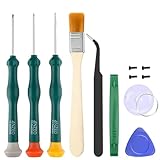
- Professional Repair Tool for Joy Con -- The tool repair kit set is suitable for Jon Con. Unscrew the screws with sdcrewdrivers. Pry the screen with suction cup, triangle plates and pry bars. Clean the device interior with a brush. Turely makes your repairment easier.
- Safe & Customized -- Triwing Screwdrivers are made of industrial grade quality steel which is much more durable and harder. Precise and accurate to fit and remove your screws with no hassle and strip.
- Application -- Use for joy con for battery change and repairment. Perfect for DIY work. This is a good repair tool for technicians, amateurs, students in everywhere.
- What's Included -- There are 8 pcs. 1* "Y"2.0 screwdriver, 1* "Y"1.5 screwdriver, 1* "+"2.0screwdriver, 1*tweezers, 1* brush, 1*pry bar,1*pry opening repair tool,1*suction cup.
- Risk-free Shopping Experience -- We provide ★30 DAYS FREE RETURN & REPLACEMENT. If there are any problems with quality, lifetime customer service ensures that an ideal solution will be given to bring your smile back.
A Nintendo Switch Online Save Data Cloud backup is a separate server copy. Cloud backup requires an eligible subscribing user and supported software, and not every game supports it. Nintendo’s exception list is dated July 30, 2026; it includes examples such as Animal Crossing: New Horizons and several Pokémon titles. Check the game’s current support status in its options while connected or in its eShop details. See Nintendo’s Save Data Cloud support.
Delete a cloud backup without deleting the console save
If you mean to remove the server backup rather than the local save, use this separate menu path:
Rank #2

- EASY MOBILE APP MANAGEMENT:Manage, organize, save, and access your profile library directly through mobile app connectivity for a streamlined experience.
- LARGE PROFILE STORAGE CAPACITY:Keep thousands of profiles organized in one compact device without carrying multiple separate tags.
- FAST PROFILE SWITCHING:Quickly switch between saved profiles using intuitive controls and a built-in display for convenient daily use.
- NO NFC PHONE REQUIRED:Compatible with Android and iOS workflows without requiring NFC functionality on your mobile device.
- USB-C RECHARGEABLE WITH LONG STANDBY:Built-in rechargeable battery with ultra-low power design supports up to 180 days of standby performance.
- Open System Settings > Data Management > Save Data Cloud.
- Choose the user.
- Select Settings > Delete Save Data on Server.
- Select the software and follow the confirmation prompts.
This deletes the server copy only; Nintendo says the console save remains. The server deletion cannot be undone, so verify that you have selected the intended game and backup first.
If you want to keep playing on another Switch
Do not delete the save. Use Nintendo’s console-to-console save-data transfer or, where the user and game support it, download the backup through Save Data Cloud. Transfer conditions vary by account and title; Animal Crossing: New Horizons uses a separate transfer service. Nintendo’s transfer support explains the available options. A microSD card or game card cannot carry the save for you.
Rank #3

- Whether you're troubleshooting an LCD, OLED, or you need to fix those ever-troublesome Joy-Cons, our toolkit is designed to cater to all your needs.
- Based on our extensive experience and driven by our community's needs, this toolkit is assembled to handle a large variety of model repairs across the board.
- With this toolkit compatible with Nintendo Switch/Switch Lite, you're equipped to extend the life of your console, enhance its performance, and save money by repairing it yourself.
- Kit Includes: iFixit Precision Bit Driver, 4 mm bits, Spudger, Tweezers, Opening Picks, ESD-Safe Brush and Precision Cleaning Brushes, Anti-Static Wrist Strap.
For selling, gifting, or disposing of the console
Deleting one game’s save is not a full privacy wipe. If you are handing the Switch to someone else, transfer any data you want to keep first, then initialize the console. Nintendo says initialization erases all data in system memory and makes software data on a microSD card unusable; it does not delete your Nintendo Account. Follow Nintendo’s transfer and disposal guidance and initialization instructions.
Quick Recap
Best Value

- 【Comprehensive Repair Tool Kit for Switch】Specifically tailored for Switch / NS / Joycon, Switch Lite / NSL, Switch Oled, Switch 2, this all-inclusive cleaning and repair tool kit contains essential tools for maintenance. The kit comprises precision screwdrivers, including PH00(+2.0)x1,PH000(+1.5)x1,Y00(Y2.0)x1,Y000(Y1.5)x1, along with Tweezerx1, Pry Barx1, Triangle Prying toolx1 and Cleaning Brushx1.
- 【Magnetic and Precision Screwdrivers Made of S2 Steel】Crafted from high-quality S2 steel, the screwdrivers feature magnetic tips for a secure grip on tiny screws. Their precision and accuracy ensure seamless fitting and removal of screws with minimal effort.
- 【Comprehensive Cleaning and Opening Tools Kit】The tool set includes Tweezer for easy and safe removal of small components, while the pry tools are specifically designed to open the shell without causing damage. Additionally, the cleaning sweep helps effectively remove dust.
- 【Non-slip Handle and Swivel Cap for Enhanced Grip】The screwdrivers boast ergonomically designed handles made of plastic with PP material, featuring a non-slip grip with a figure of fish scale for extended use. The swivel cap enhances handling, making it ideal for prolonged repair sessions.
- 【Risk-free Shopping Experience with Guaranteed Satisfaction】We offer a ★30 DAYS FREE RETURN & REPLACEMENT policy. If any quality issues arise, our lifetime customer service ensures that an ideal solution will be provided to bring your smile back. Shop with confidence knowing that your satisfaction is our top priority.
Rank #4

- BUILT-IN GAME LIBRARY, MORE FUN RIGHT AWAY: Store 4000+ saves and rich built-in data in one compact NFC emulator, so you can switch faster, play more freely, and enjoy a smoother, more satisfying experience at home or on the go
- UNLIMITED REWRITE, MORE FREEDOM: Rewrite data anytime without dealing with time changes, so switching feels quick, smooth, and frustration-free. From a short break after work to a cozy late-night session, it helps you enjoy your game your way
- EASY SETUP, EASY UPDATES, EASY TO ENJOY: Works with iOS and Android apps and lets you update the game database anytime via Bluetooth. This compact NFC writer keeps managing, updating, and switching data simple and stress-free, so everyday use feels easier, smoother, and more enjoyable
- READY FOR HOME, TRAVEL, AND EVERYDAY FUN: Designed for Switch, Wii U, and 3DS, this portable game data tool supports multiple regional versions and features a 1.2in LCD, 23.8g lightweight design, long battery life, and Type-C charging for easy carry and smoother play anywhere
- A GIFT PLAYERS WILL TRULY ENJOY: More than a basic accessory, it brings a cleaner, easier, and more flexible way to play. Whether it is for a game lover, a tech enthusiast, or anyone who enjoys portable convenience, it is a thoughtful gift that feels fun to receive and satisfying to use again and again
Choose the operation that matches your goal
| Goal | Operation | What it affects |
|---|---|---|
| Erase one game’s progress | Data Management > Delete Save Data | The selected local save |
| Remove a cloud backup | Data Management > Save Data Cloud > Delete Save Data on Server | The server copy; the console save remains |
| Free storage for installed games | Archive or delete software data | Installed software data; the save remains |
| Move progress to another Switch | Save-data transfer or supported cloud backup/download | Save transfer or copy, subject to account and game support |
| Prepare the console for a new owner | Transfer anything you need, then initialize | All console data; microSD software data becomes unusable |
Product prices and availability are accurate as of the date/time indicated and are subject to change. Any price and availability information displayed on Amazon at the time of purchase will apply.




