Recommended Free Tools
Farming Simulator 22 can be installed and played on a Windows 11 PC. GIANTS Software documents installation on Windows 10 and Windows 11, although its published minimum-requirements line still names 64-bit Windows 10 rather than a separate Windows 11 specification. For the safest download, use the official GIANTS Software store, Steam, or Xbox PC—not an unverified game-key or software-download site.
Before buying, check your PC against the published baseline, choose the edition you actually need, and leave at least 35 GB of free storage. The instructions below cover the legitimate download routes, installation, updates, editions, mods, multiplayer, and the most common Windows 11 problems.
As an Amazon Associate I earn from qualifying purchases.
Where to download Farming Simulator 22 for Windows 11
There are three straightforward digital routes for the Windows PC version:
PC Slower Than It Used to Be?
A free scan shows the junk files, broken settings and background clutter dragging Windows down - then fixes them in one click.Free scan · Windows 10 & 11Outdated Drivers Are Slowing You Down
One free scan finds every outdated or missing driver and matches the right update for your exact hardware.Free scan · exact hardware match- GIANTS Software: Buy the Windows PC Digital edition directly from the publisher’s official Farming Simulator 22 purchase page.
- Steam: Purchase and install it through the Farming Simulator 22 Steam listing.
- Xbox PC: The game is also listed as a PC title in the Xbox PC store.
All three are legitimate storefront options. The best choice usually depends on where you already keep your PC games, whether you want Steam features such as Steam Cloud and Family Sharing, and which store has the edition or sale price you prefer. Prices, promotions, and availability change, so verify the current total at checkout. The GIANTS US store has recently listed the Windows PC Digital versions at $19.99 for the standard edition, $29.99 for Platinum Edition, and $39.99 for Premium Edition, but those figures are not permanent.
#1 Best Overall

- Collaboration product with the Farming Simulator series creators: GIANTS Software GmbH
- Multifunction twist axis control lever and throttle for the utlimate farming equiment control
- 13.4 inch / 35 cm diameter rubberized steering wheel with spinner knob is set at 40° angle and capable of 900° rotation
- Magnetic Hall Effect sensors in steering wheel, pedals, control lever and throttle for durability and accuracy
- Control all Farming Simulator functions without need for a keyboard with 76 total buttons and customize layout and other settings with companion app (Please update firmware with app before using for best experience)
Which download route should you choose?
| Route | Best for | Important details |
|---|---|---|
| GIANTS Software | Buying directly from the publisher | Windows PC Digital editions; installation and verification tools are provided by GIANTS. |
| Steam | Players who use Steam for their PC library | Supports Steam Cloud, Family Sharing, single-player, online co-op, and cross-platform multiplayer as listed by Steam. |
| Xbox PC | Players who use the Xbox PC ecosystem | Lists PC and handheld play, online co-op, Xbox cross-platform co-op, and PC gamepad support. |
Do not download a cracked copy or an installer from a random “free game” website. Apart from copyright and malware risks, unofficial installers may be modified, outdated, incompatible with updates, or unable to use official multiplayer and ModHub services.
Windows 11 system requirements
GIANTS Software’s official minimum specification lists a 64-bit Windows 10 operating system. Its installation instructions explicitly cover Windows 10/11, so the accurate way to describe compatibility is: Windows 11 is a documented installation target, and your computer should meet or exceed the published 64-bit Windows 10 baseline. GIANTS does not publish a separate Windows 11 minimum-specification table for Farming Simulator 22.
Published minimum requirements
- Operating system: 64-bit Windows 10 baseline; GIANTS’ installation instructions cover Windows 10 and Windows 11.
- Processor: Intel Core i5-3330 or AMD FX-8320.
- Memory: 8 GB RAM.
- Graphics: NVIDIA GeForce GTX 660 or AMD Radeon R7 265, or better, with at least 2 GB of VRAM.
- Graphics API: DirectX 11 or DirectX 12 support; the Steam listing specifies DirectX 11 in its requirements.
- Storage: 35 GB of available space.
- Internet: Broadband internet connection.
Meeting the minimum does not guarantee a particular frame rate, visual quality, loading time, or mod performance. Large mod collections, busy farms, multiplayer sessions, high graphics settings, and newer content can place additional demands on a system. GIANTS also cautions that published requirements cannot account for every hardware and software configuration.
Check your Windows 11 PC before installing
- Open Settings > System > About and confirm that Windows reports a 64-bit system under System type.
- Open Settings > System > About or press Ctrl + Shift + Esc and inspect your processor and installed RAM.
- Press Windows key + R, type
dxdiag, and press Enter. Use the System and Display tabs to check DirectX information, graphics hardware, and display memory. - Open File Explorer > This PC and confirm that the drive receiving the game has at least 35 GB free. More space is sensible if you plan to install maps, vehicles, and other mods.
How to install the game
Steam installation
- Install and open the Steam client from the official Steam service.
- Sign in, purchase Farming Simulator 22, and open Library.
- Select Farming Simulator 22, then choose Install.
- Choose the installation drive and confirm. Steam downloads the game and applies available updates through the client.
- Start the game from the Library when the installation finishes.
Steam updates the game automatically according to your Steam download settings. If the game will not start or files appear damaged, open its Steam properties and use Steam’s installed-file verification option.
Xbox PC installation
- Open the Xbox app on Windows or use the Xbox PC listing.
- Buy the PC version or redeem a valid purchase associated with your Microsoft account.
- Select Install, choose the destination, and allow the Xbox app and related Windows gaming components to complete setup.
- Launch Farming Simulator 22 from the Xbox app after the download and updates finish.
The exact Xbox app labels can vary as Microsoft updates the app. The important distinction is to select the PC version, not assume that a console-only purchase automatically supplies a Windows installation.
GIANTS Software direct or PC-DVD installation
For a direct GIANTS or PC-DVD installation, download the latest full version from GIANTS when automatic updating is unavailable. On Windows 10 or Windows 11:
Rank #2

- Updated with engineering enhancements that address feedback from the community
- 900-degree rotation steering wheel offers the realistic rate of rotation for a tractor steering wheel
- Integrated Dual Analog Sticks enables control of your farmer when walking between vehicles
- Side Panel Loader Control Stick offers flexible control of the attachments to any piece of farming equipment in the game
- Set and Forget Cruise Control Speed Dial and 37 programmable buttons you need in order to control everything on your farm
- Download the installation image supplied by GIANTS.
- Open the downloaded
.IMGfile. Windows should mount it as a virtual drive. - Open the mounted drive and run
Setup.exe. - Follow the installation wizard and enter any required purchase or activation information.
- Launch the game after setup completes.
GIANTS also documents a ZIP-based installation method: unpack the ZIP archive and start FarmingSimulator2022.exe. Use the method associated with your legitimate purchase rather than mixing files from different editions or sources.
If the direct or DVD version has installation problems, GIANTS recommends holding SHIFT while starting the game and selecting Verify Installation. Steam and Xbox PC versions should normally be repaired or updated through their respective storefront clients instead.
Updates and the current FS22 version
GIANTS’ official updates page currently identifies Farming Simulator 22 Update 1.14.0.0, dated April 25, 2024, as the latest base-game update found in this research. That is an FS22 update—not the version number for the newer Farming Simulator 25. Storefront clients may handle patch delivery differently, and DLC or mod compatibility can change over time, so check the official updates page if a version mismatch appears.
For the direct edition, GIANTS says to download the latest full version when automatic updating is not available. Steam and Xbox PC generally manage updates through their own clients. Close the game before applying a manual installer or replacing game files.
Which edition of Farming Simulator 22 should you buy?
Standard Edition
Choose the standard edition if you want the base game and prefer to decide later whether additional expansions are worthwhile. It is the simplest starting point for a player who mainly wants the core farming, animals, forestry, production, and multiplayer systems.
The Tool Desk
Outbyte PC Repair FREEClear out junk files and repair common Windows errorsFree Scan →Outbyte Driver Updater FREEScan for outdated or missing drivers - takes under a minuteDriver Scan →Platinum Edition
Steam describes Platinum Edition as including Farming Simulator 22 and the Platinum Expansion. It costs more than the base game but can be a sensible option if you already know you want the Platinum content rather than buying it separately.
Rank #3

- BUILT FOR FARMING SIMULATOR 25 on Xbox Series X|S & PC – This farming simulator joystick is designed specifically for Farming Simulator 25, delivering a true plug-and-play experience so you can jump straight into gameplay with no setup required (Xbox compatible with FS25 only).
- REALISTIC 3-AXIS JOYSTICK: for farming and heavy machinery simulation – Experience precise, smooth control when operating tractors, loaders, and construction equipment, giving you a more immersive and lifelike farming simulator setup.
- UP TO 33 PROGRAMMABLE INPUTS for total control – Featuring buttons, thumbwheel, mini-stick, triggers, and rocker switches, this joystick lets you manage every function without relying on a keyboard, perfect for serious farming simulator players.
- HALL EFFECT MAGNETIC SENSORS for ultra-accurate performance – H.E.A.R.T technology eliminates drift and wear, ensuring long-term precision and reliable control for demanding farming and construction simulation gameplay.
- A racing wheel is required in conjuction with the Farmstick.
Premium Edition
Steam describes Premium Edition as the base game plus the Year 1 and Year 2 Season Passes. GIANTS describes the package more broadly as including the base game, six maps, seven official content packs, and both Year 1 and Year 2 expansions. Compare the exact contents shown by the store where you plan to buy, because package descriptions and regional listings can change.
You do not need a premium edition to install the base game on Windows 11. The edition affects included content, not the operating-system installation procedure.
What you get in Farming Simulator 22
Farming Simulator 22 combines several simulation activities rather than limiting you to planting and harvesting crops. The game includes:
Free tools Windows power users keep installed
One-click scans. No signup required.
- Agriculture, animal husbandry, and forestry.
- Three environments to develop and manage.
- More than 400 authentic machines and tools from more than 100 agricultural brands, according to GIANTS.
- Seasonal cycles and a crop calendar that influence when different work can be performed.
- Production chains that let farm outputs move into additional stages of processing.
- Three career modes: New Farmer, Farm Manager, and Start from Scratch.
- Single-player and cooperative multiplayer.
- Free community-created content through the official ModHub.
New Farmer is the most approachable starting point, while Farm Manager provides more resources and flexibility. Start from Scratch is designed for players who want a tougher economic beginning. The seasonal system and crop calendar add planning requirements, so a new player should consult the in-game information screens before choosing what to plant and when.
Multiplayer and crossplay
Farming Simulator 22 supports cross-platform multiplayer. According to GIANTS’ crossplay FAQ, a PC-hosted server can support up to 16 players, while console-hosted sessions support up to six. The host’s platform therefore matters when planning a group farm.
Console players are limited to mods available through the official ModHub. PC players may have additional flexibility, but everyone joining a multiplayer farm must have compatible required content. If a friend cannot join, compare the game version, map, installed DLC, and required mods before changing network settings.
Rank #4

- Farming simulation pack including T128 racing wheel, SimTask Steering Kit and SimTask FarmStick
- Versatile T128 racing wheel with dynamic Force Feedback and T2PM pedal set, for realistic driving sensations
- 100% metal attachment system for desk or table (thickness: 0.6" / 15 mm minimum, 2.0" / 50 mm maximum), allowing for flat wheel positioning
- Super-precise 3-axis FarmStick joystick (with H.E.A.R.T. sensors), ambidextrous and full-featured with 33 action buttons
- Multifunctional stick with 6 buttons, 1 thumbwheel, 1 mini-stick, 2 rocker switches and 2 triggers
Mods: use the official ModHub first
The official Farming Simulator 22 ModHub provides maps, vehicles, equipment, gameplay additions, and other community-created content. Mod availability and compatibility can change, and a mod made for another Farming Simulator version may not work correctly in FS22.
For the safest experience:
- Filter specifically for Farming Simulator 22.
- Read the mod description and required version information.
- Install only the content you need; a very large collection can complicate troubleshooting and multiplayer matching.
- Keep a note of which mods a save game depends on.
- Remove or disable a recently added mod if crashes or loading failures begin afterward.
Avoid unverified third-party downloads that promise “exclusive” vehicles or cracked game files. They can contain malware, outdated files, or incompatible modifications.
Optional controls and accessories
The game supports mouse, keyboard, and gamepad controls, so no special hardware is required. Players who spend many hours operating tractors, loaders, forestry equipment, and other machinery may nevertheless prefer a dedicated farm simulator side panel or related control setup. Logitech G’s Farm Simulator Side Panel Control Deck is designed around configurable buttons and a loader-style joystick.
Treat dedicated controls as an optional comfort and immersion purchase, not a Windows 11 requirement. Confirm current stock, pricing, included cables, and Windows 11 compatibility before buying a particular model; those details can change.
Physical PC copy: an alternative to digital download
If you specifically want a box or disc, a physical product such as Farming Simulator 22 for PC may be available through marketplace listings. Product databases identify a PC edition associated with ASIN B097RB8JJB, while a separate Collector’s Edition for PC/Windows has historically been associated with ASIN B09CV6GMC3.
What’s actually slowing this PC down?
Pick the symptom - the matching free tool is one click away.
Physical stock is not the default recommendation for a Windows 11 download. Check the seller, condition, language, region, activation method, and whether the included code has already been redeemed. A disc may still require an internet connection, patches, or account activation, and availability varies by country and date.
Independent reader supportYour contribution helps us test, update, and keep practical guides available for everyone.Windows 11 troubleshooting
The installer will not start
- Confirm that you downloaded the installer from GIANTS, Steam, or Xbox PC.
- Restart Windows and try again.
- Check that Windows Security or another security product has not quarantined an installer component.
- For the direct GIANTS or DVD edition, mount the IMG correctly and run
Setup.exefrom the mounted drive. - Use GIANTS’ SHIFT + launch > Verify Installation procedure for the direct or DVD version.
The game crashes or shows graphics errors
- Install pending Windows updates and restart.
- Install the latest graphics driver directly from NVIDIA, AMD, or Intel for your GPU.
- Verify or repair the game files through Steam or the Xbox app if you used one of those storefronts.
- Temporarily disable recently installed mods and test a clean game launch.
- Lower graphics settings if the PC is near the minimum specification, especially with high-resolution displays or large multiplayer farms.
Do not assume a driver utility will increase FPS or is necessary to launch the game. Official hardware-manufacturer drivers and Windows Update should be the first-line options. If you are specifically troubleshooting missing or outdated graphics, audio, network, or controller drivers after installation, an optional driver troubleshooting tool such as Outbyte Driver Updater can scan, back up, and recommend Windows 11 driver updates. Review every recommendation before applying it, and retain a restore or backup path.
The controller or gamepad is not detected
- Reconnect the controller and try a different USB port if applicable.
- Install the controller manufacturer’s official Windows driver or firmware.
- Close other remapping or overlay software temporarily.
- Check the game’s control settings and confirm that the intended device is selected.
- Test without mods if the problem started after adding a gameplay or vehicle mod.
Multiplayer will not connect
- Ensure every player is on the same game version.
- Check that all required DLC and mods are installed and compatible.
- Have the host restart the session and confirm the correct crossplay settings.
- Remember the different player limits: PC-hosted sessions can support up to 16 players under GIANTS’ crossplay guidance, while console-hosted sessions support up to six.
Before you click Install
- Use GIANTS Software, Steam, or Xbox PC.
- Confirm a 64-bit Windows 11 system and compare it with the published Windows 10 baseline.
- Check for 8 GB RAM, a compatible 2 GB-VRAM DirectX-capable GPU, and 35 GB free space.
- Choose standard, Platinum, or Premium based on included content—not Windows 11 compatibility.
- Plan for updates and leave additional space if you want ModHub content.
- Use official ModHub downloads for mods.
- Buy physical media only if you specifically want it, and verify seller and activation details.
Frequently Asked Questions
Is Farming Simulator 22 compatible with Windows 11?
Yes. GIANTS Software’s installation instructions cover Windows 10 and Windows 11. Its published minimum operating-system line says 64-bit Windows 10, so Windows 11 should be described as a supported installation target rather than as having its own separately published minimum specification.
Best Value
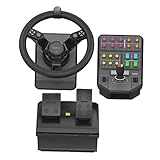
- Now updated with engineering enhancements that address feedback from the community, The heavy equipment bundle is ready for the rigors of life on the farm.
- Offers the realistic rate of rotation for a tractor Steering wheel
- Enables control of your Farmer when walking between vehicles
- Offers flexible control of the attachments to any piece of farming equipment in the game
- Set and forget cruise control speed dial and 37 programmable buttons
Can I download Farming Simulator 22 for free?
The full PC game is a paid title. Download it through GIANTS Software, Steam, or Xbox PC, and avoid cracked or unofficial installers. Free official ModHub content can be added after you own the game.
Quick wins for a faster PC:
Clear out junk files and repair common Windows errorsFree Scan →Fix the driver behind crashes, sound loss and screen glitchesFind Drivers →How much storage does Farming Simulator 22 need?
The published minimum requirement is 35 GB of available storage. Keep additional space available if you intend to install maps, vehicles, expansion content, and other mods.
Which Farming Simulator 22 edition is best?
The standard edition is the simplest choice for the base game. Platinum Edition includes the Platinum Expansion, while Premium Edition includes the base game plus the Year 1 and Year 2 Season Pass content. Compare the current store description and price before purchasing.
Does Farming Simulator 22 support crossplay?
Yes. GIANTS supports cross-platform multiplayer. GIANTS’ FAQ states that PC-hosted sessions can support up to 16 players and console-hosted sessions up to six; console players are limited to mods available through the official ModHub.
The Bottom Line
For Windows 11, download Farming Simulator 22 from GIANTS Software, Steam, or Xbox PC, and check your computer against the 64-bit Windows 10 baseline published by GIANTS: 8 GB RAM, a compatible DirectX GPU with at least 2 GB VRAM, and 35 GB free space. Choose the standard edition unless you specifically want the Platinum or Premium content, use the official ModHub for mods, and treat physical copies, dedicated controls, and driver tools as optional alternatives—not requirements.
Do these 3 things before closing this tab:
1Fix the driver behind crashes, sound loss and screen glitches2Repair Windows errors before they cause bigger problems3Scan for outdated or missing drivers - takes under a minuteQuick Recap
Product prices and availability are accurate as of the date/time indicated and are subject to change. Any price and availability information displayed on Amazon at the time of purchase will apply.




