
Free tools Windows power users keep installed
One-click scans. No signup required.
Open your inventory, select the item, then activate Favorite. On desktop with a mouse and keyboard, you can also hold Alt and click the item. A border or indicator shows that it is favorited.
How to favorite an item
- Open your inventory and select the item you want to protect.
- Activate Favorite. Use the highlighted Favorite button in the inventory. The control is available across desktop, console, and mobile interfaces, though its placement and input method can differ. See the Terraria Wiki’s Favourite page.
- Check the indicator. On desktop, the item displays a border when favorited. Selecting it and activating Unfavorite toggles the status off.
Desktop mouse-and-keyboard shortcut
Hold Alt and click the item to toggle its favorite status. If that shortcut does not work with your setup, check Settings > Controls; controls can be changed, and the available inputs vary by platform. The Game controls reference lists platform-specific controls.
As an Amazon Associate I earn from qualifying purchases.
What favorite status protects against
Favorite status helps prevent accidental loss or movement by blocking these actions:
- Dropping the item.
- Quick trashing it.
- Quick Stack to Nearby Chests.
- Sort Inventory.
These protections apply to the listed actions, not every possible way to handle an item. You can still deliberately place a favorited item in the trash; doing so removes its favorite status. The Inventory reference describes these protections and this manual-trash exception.
#1 Best Overall

- Terraria core figure assortment is a must-have for any fan
- Each 2.75-inch scale figure comes with 4 accessories and 5 points of articulation. Each sold separately
- Collect them all
Platform and equipment edge cases
Because controls differ across desktop, console, and mobile, use the inventory’s Favorite or Unfavorite button rather than assuming a single controller or touchscreen gesture. If you need a device-specific shortcut, review the in-game Controls settings.
An item may lose favorite status if you move it into an equipment slot and then return it to your inventory. Favorite it again after moving it back if you want it protected.
Quick Recap
Rank #4

- 【Size】: You will receive 4pcs/set of action dolls. size is 7.8 inches.
- 【 Material】: Siren Toys is made of PVC material.
- 【Occasion】: With this fantastic monster playset, your child will not get bored that easily.
- 【Easy to Clean】: Use a small amount of detergent to remove stains and let it dry naturally.
- 【Purchase guarantee】: Any questions please contact us; Wewould deal with it in a 24-hour time. Have a Nice Day.
Rank #3

- Terraria deluxe boss pack series is ready to attack your terraria town
- Pack includes dungeon guardian with a skeleton mask, book of skulls, and skeleton hand. Collect all series 1 terraria action figures
- Collect them all
Rank #2
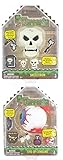
- The very world is at your fingertips as you fight for survival, luck, and glory. delve deep into cavernous expanses, seek out ever-greater foes to test your mettle in combat, or construct your own city - in the world of terraria, the choice is yours! This Terraria Deluxe Action Figure Set features two bosses from the game: eye of cthulhu and skeletron! bosses feature a secret compartment, while the included demon eye and skull heads fit all terraria action figures (sold separately).
- High quality product
- Good strength
- Elegant appearance
Product prices and availability are accurate as of the date/time indicated and are subject to change. Any price and availability information displayed on Amazon at the time of purchase will apply.

