The Tool Desk
Outbyte PC Repair FREERepair Windows errors before they cause bigger problemsFix Now →Outbyte Driver Updater FREEFix the driver behind crashes, sound loss and screen glitchesFind Drivers →Open the Xbox app on your TV and select Sign in. The app should show a temporary code, a QR code, or both. Use the web address displayed on the TV to enter the code or continue through the QR link; the code is not in your TV settings or on an Xbox console.
Find the code and sign in
-
Open the Xbox app on your smart TV or streaming device and choose Sign in. Button wording may vary by device or app version.
-
Wait for the sign-in screen. Keep it open so the temporary code remains available.
-
On a phone or computer, either scan the QR code shown on the TV or open the web address displayed there.
Recommended Free Tools
Special offer. See more information about Outbyte and uninstall instructions. Please review EULA and Privacy policy.#1 Best Overall
 Anker HDMI Switch, 2 in 1 Out HDMI Switcher, Monitor Switch with 4K@60Hz
- HDMI Switching Simplified: Dive directly into your chosen media with a single button for hassle-free transitions between your game or movie without unplugging cables. Note: Manual button switching is supported. Automatic signal detection is not supported.
- - Enjoy 4K Excellence: Turn your regular viewing sessions into cinematic experiences with our HDMI switch that supports resolutions up to 4K@60Hz. Note: to guarantee a 4K60 display, please ensure that both the input and output HDMI cables are shorter than 3.3 feet with 30AWG, and that the combined length does not exceed 6.5 feet. Note: Supports one display at a time. Simultaneous dual display output is not supported.
- Huge Compatibility: Seamlessly compatible with a wide range of devices, this HDMI switch integrates everything from laptops and game consoles to TV screens and VR headsets. Note: This switch does not support HDMI CEC.
- What You Get: Anker HDMI Switch (2 in 1 Out, 4K HDMI), safety guide, 18-month warranty, and our friendly customer service.
-
If you opened the address manually, enter the code from the TV exactly as shown. Do not add spaces or punctuation.
-
Sign in with the Microsoft account associated with the Xbox profile you want to use. Check the account or gamertag shown before approving the sign-in.
-
Return to the TV. The Xbox app should complete sign-in after you authenticate in the browser.
Use the exact address shown in the Xbox app rather than assuming every device uses the same activation page. For setup guidance, see Xbox smart-TV app setup and, for applicable Samsung TVs, Samsung smart-TV cloud-gaming setup.
Free tools Windows power users keep installed
One-click scans. No signup required.
Use the QR code or enter the code manually
Scanning the QR code opens the sign-in flow on your phone and avoids typing errors. If the camera cannot scan it, use the web address printed on the TV screen and type the displayed code on that page. You can use a computer instead, which may be more convenient if you need to switch Microsoft accounts or complete another verification step.
Rank #2

- 【Bidirectional HDMI Switcher】This HDMI Switch offer 3 HDMI Ports, so you could connect two HDMI sources to one HDMI display, or connect one HDMI source to toggle between two displays.( NOTE: ONLY one of the display would work at a time! ) With 2 LED indicators, you can easily know which port is active from the LED light.
- 【4K High Resolution】Support 4k@60Hz and backward compatible with 2k/1080p. Enjoy 3D visual and experience immersive scenery as cinema. Note: please use standard HDMI 2.0 Cable, the total length of hdmi cable is no more than 3M if you need to get vivid 4K video.(HDMI Cable is not included.)
- 【Fast and Stable Transmission】This aluminum HDMI AB Switcher not only support high bandwidth 3.4Gbps data transmission, but also ensure stable and high-definition display of audio and video, reduce data transmission loss and improve signal transmission efficiency.
- 【Broad Compatibility】 HDMI Splitter Switcher compatible for most standard HDMI port devices. Support Input: computer, XBox 360, XBox One, PS3 / PS4 ,Blu-Ray DVD player etc. Output: HD-Ready or Full HD TVs, monitors, projectors etc.
- 【No External Power Needed】 This 4k HDMI Switch Box is easy to use, no external power is required, just simply press the button on the HDMI switch box to make shift of input or output source. It comes with lifetime technical support & friendly customer service and would solve your problem within 12 hours. So just feel free to contact us by message-centre if you encounter any problem while during the use.
Enter the TV code on the webpage opened from the TV screen—not in the Xbox mobile app unless the TV explicitly directs you there. Only enter your password on a Microsoft or Xbox page reached through the address displayed by the official app.
If no code appears on the TV
Try these steps in order, returning to the sign-in screen after each one:
-
Wait briefly on the Xbox app’s sign-in screen. If a Sign in option is still available, select it again.
Special offer. See more information about Outbyte and uninstall instructions. Please review EULA and Privacy policy. -
Close and reopen the Xbox app.
-
Restart the TV or streaming device, then reopen the app.
-
Check that the device is connected to the internet.
Rank #3
 avedio links 4K HDMI Splitter 1 in 2 Out with 4 Ft HDMI Cable, Mirror Only
- 1x2 HDMI Splitter Duplicate/Mirror Only(Not Support Extend): avedio links HDMI Splitter can only duplicate same content from one HDMI input signal to two HDMI displays, transmit video and audio simultaneously, two displays can work at the same time. Note: This splitter not support dual-screen extension. Due to HDMI standards, it only mirrors one signal to two displays simultaneously.
- Not Support: 1.Not Extended,it not extend different content to two monitors; 2.Not a switcher, it not support connect two HDMI input signal to one monitor; 3.Not a audio extractor, not support connect to any audio device such as speaker,sound-bar...
- 4K Ultra HD Resolution: Powered HDMI Splitter support 4K@30Hz, Backward compatible with 1080p@50/60Hz/1080i@50/60Hz/720p@50/60Hz/720i@50/60Hz/576p@50Hz/576i@50Hz/480p@60Hz/ [email protected] use HDMI 2.0 AWG 26 cable, for 4K,length≤16ft; for 1080P,length≤32.8ft
- Plug and Play: No external drivers required. Please connect a 5V 1A power adapter to ensure stable performance, avoid no signal output or screen flickering issue. Support HDMI v1.3/1.4,HDCP1.4 (Not Compatible With HDCP2.2). Support deep color 12 bit/16 bit. Support audio format: DTS-HD/Dobly-true HD/LPCM7.1/DTS/Dobly-AC3/DSD/HD(HBR)
- Package List: 1* 1 in 2 out HDMI splitter(size:2.48*2.05*0.51inch), 1*4FT high speed HDMI cable, 1 * 2.6 ft USB power cable( power adapter not included, plug the usb cable with power adapter into wall outlet is necessary); use HDMI 2.0 AWG 26 cable, length ≤16ft for 4k; length ≤32.8ft for1080P
-
Install available updates for the TV’s operating system and the Xbox app.
-
If the sign-in screen remains incomplete, uninstall and reinstall the app if your device allows it.
Special offer. See more information about Outbyte and uninstall instructions. Please review EULA and Privacy policy.
For device-specific help, consult Xbox’s smart-TV cloud-gaming troubleshooting page. If the Xbox app is unavailable in your TV’s app store or the setup flow says the device is unsupported, code entry will not resolve that availability issue. Supported devices and app availability can vary by model, operating system, and region; Xbox also has guidance for cloud gaming on third-party services and devices.
If the code is rejected or has expired
TV sign-in codes can expire, and a code from an earlier attempt may no longer work. Return to the TV app and start sign-in again to generate a fresh code; do not keep retrying an old one.
-
Type the new code exactly as displayed, without spaces or punctuation.
Rank #4
 OREI HDMI Splitter 1 in 2 Out - UltraHD 4K@30Hz, HDCP - Adapter Included
- HDMI DUPLICATOR 1 x 2 - Duplicates Mirror Displays to 2 TVs, NOT FOR LAPTOPS OR PC TO EXTEND MULTI MONITORS. ONLY Split one HDMI input signal to two HDMI output signals identical to the input signal.Supported resolution: up to 4K/30Hz, 1080p, 720p, VGA to WUXGA. The device comes with a dual voltage supply using a US plug, and an adapter/converter is provided for international use.
- WILL NOT STRIP OR BYPASS HDCP - Fully Compatible with any HDMI 1.4/ 1.3/ 1.2 version, support HDCP 1.4(NOTE: Will Not BYPASS HDCP), Easily Split Signal for devices with standard HDMI interface. Input: Computer, XBox 360, XBox one, PS3, PS4 Pro, Fire Stick, Blu-Ray DVD player, Satellite Receiver, Chromecast, PC, Projectors etc. Output: HD-Ready, Full HsD TVs,HD Monitors and more.
- DUPLICATE DISPLAY ONLY - Maximum HDMI Cable Use- 30 Feet. For Best Picture quality do not use with cables over 30 Feet. The heavy-duty cool metal enclosure protects the insides and keeps the unit cool by aiding in quick heat absorption and dissipation. Operating temperature is0°C 40°C / 32°F 104°F . Power Consumption (Max): 5W, We recommend using this splitter with HDMI cables that are 30 feet or shorter and of excellent quality.
- HDMI CABLES NOT INCLUDED, WILL NOT WORK WITH HDCP. Full Video format3D, 4K x 2K@30hz, 1080P @30hz, 1080P @60hz. Deep Color 4K @ 30Hz / 480i/ 576i/ 480p/ 576p/ 720p/ 1080i/ 1080p/ 1440i/ 1440p eidi duration 6 seconds. DOES NOT SUPPORT HDCP 2.0 & 2.2
- Package includes - 1 - 4K 1x2 Splitter, 1 - Power Adapter, 1 - User Manual. If you have any questions regarding our splitters please feel free to contact us through support. Remember this is a HDMI Duplicator will not extend display.
-
Use the address shown on the current TV screen, not a saved page from a previous attempt.
Special offer. See more information about Outbyte and uninstall instructions. Please review EULA and Privacy policy. -
Check which Microsoft account is active in the browser. If it is the wrong one, sign out or use a private browser window, then repeat sign-in and verify the intended Xbox profile.
-
If a fresh code still fails, restart the Xbox app and check the device’s internet connection and software updates.
On a shared or family TV, the account you approve in the browser may be the one connected to the app. If the wrong profile appears, sign out in the app and repeat the activation flow with the intended account.
Independent reader supportYour contribution helps us test, update, and keep practical guides available for everyone.If Microsoft asks for another security code
A Microsoft security code is different from the temporary TV pairing code. The pairing code appears on the TV and is entered on the activation page. A security code is requested during account verification and comes through a method configured for that Microsoft account, such as email, text, or an authenticator app. Retrieve it from the selected method and enter it where Microsoft asks for verification—not in the TV activation-code field. See Xbox guidance on authentication codes.
Quick wins for a faster PC:
Repair Windows errors before they cause bigger problemsFix Now →Scan for outdated or missing drivers - takes under a minuteDriver Scan →Clear out junk files and repair common Windows errorsFree Scan →Best Value
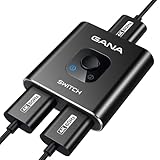
- 【Bidirectional HDMI Switcher】This HDMI Switch offer 3 HDMI Ports, so you could connect two HDMI sources to one HDMI display, or connect one HDMI source to toggle between two displays.( NOTE: ONLY one of the 2 displays would work at a time! ) With 2 LED indicators, you can easily know which port is active from the LED light.
- 【4K High Resolution】Support 4k@60Hz and backward compatible with 2k/1080p. Enjoy 3D visual and experience immersive scenery as cinema. Note: please use standard HDMI 2.0 Cable, the total length of hdmi cable is no more than 3M if you need to get vivid 4K video.
- 【Fast and Stable Transmission】This aluminum HDMI AB Switcher not only support high bandwidth 3.4Gbps data transmission, but also ensure stable and high-definition display of audio and video, reduce data transmission loss and improve signal transmission efficiency.
- 【Broad Compatibility】 HDMI Splitter Switcher compatible for most standard HDMI port devices. Support Input: computer, XBox 360, XBox One, PS3 / PS4 ,Blu-Ray DVD player etc. Output: HD-Ready or Full HD TVs, monitors, projectors etc.
- 【No External Power Needed】 This 4k HDMI Switch Box is easy to use, no external power is required, just simply press the button on the HDMI switch box to make shift of input or output source. It comes with lifetime technical support & friendly customer service and would solve your problem within 12 hours. So just feel free to contact us by message-centre if you encounter any problem while during the use.
If the screen shows an error code
An error identifier is not a sign-in code. A short code beside sign-in instructions is generally for activating the TV app; a longer identifier such as one beginning with 0x is generally an error code. Record the complete error, including letters, numbers, and any prefix, and use Xbox Support to find the relevant help.
Does signing in require an Xbox console?
The smart-TV app’s cloud-gaming sign-in is separate from signing in on a physical Xbox console. Follow the activation process shown in the TV app; you do not need to look for a code in a console menu. Account access and service availability are separate from activation, so signing in by itself does not guarantee access to every game or feature.
Keep the sign-in safe
-
Do not post or share the temporary TV code; someone else could use it during the sign-in attempt.
-
Do not share your Microsoft password or one-time security code.
Special offer. See more information about Outbyte and uninstall instructions. Please review EULA and Privacy policy. -
If a sign-in code appears when nobody in your household is trying to connect the TV, cancel the process and review your account security.
Quick Recap
Product prices and availability are accurate as of the date/time indicated and are subject to change. Any price and availability information displayed on Amazon at the time of purchase will apply.




