What’s actually slowing this PC down?
Pick the symptom - the matching free tool is one click away.
If Call of Duty: Black Ops Cold War keeps crashing on PC, start by repairing its game files in the launcher you use, then test with background apps closed. Check shader preloading, system compatibility, drivers, and ventilation if the crash continues. Activision lists these as practical troubleshooting steps, not a guaranteed fix for every crash.
Start by noting when the crash happens
Write down whether the game fails at startup, during a match, or in a particular mode, and record any error code exactly as shown. A crash during public Multiplayer and a crash on launch are different symptoms; neither alone identifies the cause. Activision’s Known Issues page lists some PC crashes and freezes as issues under investigation, rather than assigning one cause to every affected player.
![PS5 - Call of Duty: Black Ops Cold War - [PAL EU - NO NTSC]](https://m.media-amazon.com/images/I/51WYbyuyXhL._SL160_.jpg)
As an Amazon Associate I earn from qualifying purchases.
The page, updated July 7, 2023, names error codes 887A0005, 0x0 (0xA2E8EF8F) N, and 0x0 (0x1AEC5F31) N. If your code appears there, that confirms it was reported as a tracked issue at that time; it does not establish that the same diagnosis or workaround applies to other codes.
Free tools Windows power users keep installed
One-click scans. No signup required.
Repair the game files in your launcher
Choose the repair option for the platform where your copy is installed. Activision’s PC troubleshooting guide recommends these checks:
#1 Best Overall

- Bakker & Elkhuizen
- Mouse
- Colour: Black
- Package Dimensions: 14.8 L x 9.2 H x 10.2 W (cm)
- Model number: BNEEVR4S
- Battle.net: select Scan and Repair for the game.
- Steam: verify the integrity of the game files.
Let the launcher finish checking and repairing before starting the game again. If it still crashes, continue through the checks below rather than assuming file repair ruled out every possible cause.
Close software that may interfere
Fully exit background applications, then relaunch the game and see whether the crash returns. Activision’s later crash and freeze guide calls out overlays, input-remapping software, recording software, and other background programs as possible conflicts. Its earlier PC guide also names NZXT CAM, MSI Afterburner, and Razer Cortex as examples. These are troubleshooting leads, not proof that a particular application caused your crash or a complete list of incompatible software.
Rank #2
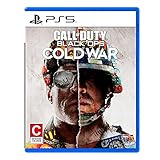
- The iconic Black Ops series is back with Call of Duty: Black Ops cold War - the direct sequel to the original and fan-favourite Call of Duty: Black Ops.
- Black Ops cold War will drop fans into the depths of the Cold War's volatile geopolitical battle of the early 1980s. Nothing is ever as it seems in a gripping single-player campaign, where players will come face-to-face with historical figures and hard truths, as they battle around the globe through iconic locales like East Berlin, Vietnam, Turkey, Soviet kgb headquarters and more.
- as Elite operatives, you will follow the trail of a shadowy figure named perseus who is on a mission to destabilize the global balance of Power and change the course of history. Descend into the dark center of this global conspiracy alongside iconic characters woods, Mason and Hudson and a new cast of operatives attempting to stop a plot decades in the making.
If closing likely conflicts does not help, Activision’s PC troubleshooting page suggests trying a clean boot. A clean boot starts Windows with a reduced set of startup programs and services, which can help test whether something running in the background is involved.
Wait for Shader Preloading to finish
After starting the game, remain at the main menu until Shader Preloading completes before entering a mode. Activision says navigating away from the main menu stops preloading and can lead to performance issues. If you leave the menu early, return and allow the process to finish before testing again.
Rank #3

- As Elite operatives, you will Follow the trail of a shadowy Figure named perseus who is on a mission to destabilize the global balance of power and change the course of history.
- Descend into the dark center of this global conspiracy alongside iconic characters woods, Mason and hudson and a new cast of operatives attempting to stop a plot decades in the making.
- Beyond the campaign, players will bring a cold war arsenal of weapons and equipment into the next generation of multiplayer and Zombies experiences.
- Includes PS5 version on disc. Not playable on PS4 system or disc less PS5 system.
- Some features may require an internet connection and an online subscription
Check compatibility, drivers, and cooling
Compare your PC with Activision’s published requirements
Activision’s minimum and recommended requirements page, dated August 5, 2021, lists Windows 10 64-bit, DirectX 12 compatibility, 8 GB of RAM, and specified minimum CPU and GPU classes. Its recommended configuration lists 12 GB of RAM and higher CPU and GPU classes. These are the specifications on that dated page, not a current guarantee that every system meeting them will run without crashes. The page also notes that laptops may use different GPU models, so do not assume a laptop is compatible solely because its GPU name resembles a listed desktop model.
The same page lists launch-era storage requirements and warns that mandatory updates may require additional space. Activision’s requirements and driver guidance say Intel integrated graphics are not supported for Black Ops Cold War; that statement should not be generalized to unrelated Intel discrete graphics hardware.
Install a current GPU driver from its manufacturer
Check for a current driver through the support or update channel for your NVIDIA or AMD graphics card. Activision’s Cold War requirements page lists NVIDIA 457.30 and AMD 20.11.03 or later as game-specific recommendations, but those are old, launch-era version numbers—not current 2026 driver releases. Activision’s video-card driver guidance also points players to driver updates. Do not downgrade a newer driver solely to match the old numbers on the game’s requirements page.
Make sure the PC has adequate ventilation
Activision advises keeping the system adequately ventilated. Check that the PC’s vents are not blocked and that its cooling system can move air freely. This is a general system check, not evidence that heat is the cause of a particular crash.
Quick Recap
If the crash continues
- Keep the exact error code, if one appears, and note when the failure occurs.
- Check the Known Issues page for a matching report.
- If your issue is not listed, use Activision’s support or bug-report route to report it. Include the code and the circumstances of the crash so the report describes what is happening without assuming a cause.
Product prices and availability are accurate as of the date/time indicated and are subject to change. Any price and availability information displayed on Amazon at the time of purchase will apply.




