Do these 3 things before closing this tab:
1Repair Windows errors before they cause bigger problems2Scan for outdated or missing drivers - takes under a minute3Clear out junk files and repair common Windows errorsIf Fallout 4 keeps crashing on Xbox Series X or Series S, start by checking Creations and add-ons, then fully power-cycle the console. If the game will not open to manage content, clear only its Reserved Space; reinstall the game only after the earlier steps fail. These are troubleshooting steps, not guaranteed fixes, and you should protect your actual save files throughout.
Start with Creations and add-ons
Creations can cause crashes even when Fallout 4 has not just received an update. Bethesda also warns that Creations and add-ons may stop working properly after a game update until their creators update them. Removing content is therefore a useful diagnostic step, not proof that every crash is mod-related. See Bethesda’s Xbox crash troubleshooting.
- If the game opens, go to the Creations menu and disable or delete individual content, especially content installed shortly before the crashes began.
- If crashes began after a game update, test the game with Creations removed. Add content back cautiously after confirming whether the unmodified game still crashes.
- If a large number of mods prevent the game from loading, skip to the Reserved Space instructions below rather than repeatedly trying to enter the menu. Bethesda advises against downloading too many new mods at once; its console loading guidance covers this situation.
Power-cycle the Xbox
If removing or disabling Creations does not help—or you cannot clear Reserved Space—follow Bethesda’s full power-cycle procedure:
- Hold the Xbox button on the front of the console for 10 seconds, until the console turns off.
- Unplug the console’s power cable and wait 10 seconds.
- Reconnect the cable and turn the console back on.
This is a full power cycle, not simply putting the console into standby and waking it again.
#1 Best Overall

- Freedom and Liberty Do whatever you want in a massive open world with hundreds of locations, characters, and quests. Join multiple factions vying for power or go it alone, the choices are all yours
- Be Whoever You Want With the S.P.E.C.I.A.L. Character System. From a Power Armored Soldier to the Charismatic Smooth Talker, You Can Choose From Hundreds of Perks and Develop Your Own Playstyle
- New Next Generation Graphics & Lighting Engine Brings to Life the World of Fallout. From the Blasted Forests of the Commonwealth to the Ruins of Boston, Every Location Is Packed With Dynamic Detail
- Intense first or third person combat can also be slowed down with the new dynamic Vault Tec Assisted Targeting System (V.A.T.S) that lets you choose your attacks and enjoy cinematic carnage
Clear Fallout 4’s Reserved Space if the game will not load
Use this when you cannot open Fallout 4 to manage Creations, or when a large amount of mod data is preventing startup. Reserved Space is for the game’s mod data. Clearing it removes that data, so treat it as a more disruptive step than disabling individual Creations.
- Open My Games & Apps.
- Highlight Fallout 4 and open Manage Game.
- Under Saved Data, select Reserved Space.
- Choose Clear reserved space.
Do not choose or delete your actual save file. Bethesda explicitly distinguishes clearing Reserved Space from deleting saves in its crash instructions and loading guidance.
Rank #2

- ANNIVERSARY EDITION — Get Fallout 4, all six official expansions, and more than 150 Creation Club items in one package.
- EXPLORE THE COMMONWEALTH — Play as the Sole Survivor of Vault 111 and shape the Commonwealth through choices, factions, and exploration.
- SIX EXPANSIONS — Explore Automatron, Wasteland Workshop, Far Harbor, Contraptions Workshop, Vault-Tec Workshop, and Nuka-World.
- CREATION CLUB ITEMS — Enrich your adventure with more than 150 items, including unique weapons, power armor sets, building packs, paint jobs, homes, and Dogmeat appearance options.
- OPEN-WORLD RPG — Explore the post-nuclear world, craft weapons and armor, and build and manage settlements.
Reinstall the game only if the earlier steps fail
Bethesda’s next step is to uninstall and reinstall Fallout 4. From Manage Game and add-ons, uninstall the game itself, then reinstall it from your library or game disc. Keep your save files: remove the game, not the saves. Bethesda’s wording is direct: “Do not delete your save files, but only the game itself.” See the full Xbox crash procedure.
Check whether a listed update matches your crash
Bethesda’s patch notes dated August 18, 2026 list fixes for a top crash caused by a streaming-audio error and a Microsoft Store crash when entering Creations after internet connectivity resumes. Those notes describe specific issues; they do not establish that every Xbox Series X|S crash has been fixed. Check the official Fallout 4 patch notes if your crash closely matches either circumstance.
Rank #3
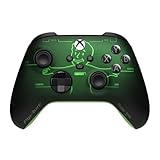
- FALLOUT PIP-BOY EDITION — Introducing the XBOX Wireless Controller – Fallout Pip-Boy. Display your survival prowess on console, PC, and cloud. Inspired by the arm accessory worn by Fallout's vault dwellers, this Vault-Tec approved gear radiates craftsmanship and heritage.*
- WASTELAND-READY DESIGN — The black top case features the outer casing of Pip-Boy with a bright green icon of the Vault Boy in the center, paired with Fallout's signature green tones and HUD iconography throughout.
- PRECISION PERFORMANCE — Stay on target with a hybrid D-pad and textured grip on the triggers, bumpers, and back case for enhanced handling — whether you're exploring the wasteland or battling raiders.
- UP TO 40 HOURS OF BATTERY LIFE — Get up to 40 hours of battery life so your sessions last as long as the wasteland demands. Crafted for enhanced comfort and effortless control during gameplay.*
- PLAY ACROSS EVERY SCREEN — Quickly pair with, play on, and switch between devices including console and PC. Stream games across mobile, gaming handhelds, Smart TVs, and supported VR headsets with XBOX Cloud Gaming.**
For context, the May 13, 2024 Next Gen Update 2 notes list Xbox Series S|X version 1.10.765 and added 30, 40, or 60 FPS targets, with 60 FPS as the default. Selecting 40 FPS requires a 120 Hz display. Bethesda recommends default settings and says Performance mode is recommended when targeting 60 FPS; display modes can only be changed from the main menu. The notes also mention general stability improvements, but do not say that changing a graphics setting fixes crashes. See the Next Gen Update 2 notes.
Independent reader supportYour contribution helps us test, update, and keep practical guides available for everyone.When to contact support
If the console continues having problems after these steps, Bethesda directs players to Xbox Support. For a crash that remains specific to Fallout 4, contact Bethesda Support with a clear description of when it happens—such as during startup, after loading a save, or when opening Creations—and the steps you have already tried.
Quick Recap
Best Value

- Start your journey by customizing your appearance and deciding your Background and Traits
- Venture through the stars and explore more than 1000 planets
- Pilot and command the ship of your dreams.
Rank #4

- WASTELAND SURVIVAL — Play as the sole survivor of Vault 111 in a single-player RPG set in a world devastated by nuclear war.
- OPEN-WORLD FREEDOM — Explore the Commonwealth’s hundreds of locations, characters, and quests. Join factions, form alliances, or go it alone as your choices shape the future.
- S P E C I A L SYSTEM — Create a character and choose from hundreds of Perks to develop a playstyle that suits you, from stealthy sniper to Power Armor fighter.
- CRAFT AND BUILD — Scavenge resources and craft or customize thousands of items, including weapons, armor, and food. Construct and manage settlements across the Commonwealth.
- CHOICE AND CONSEQUENCE — Rebuild, reshape, and reclaim the Wasteland your way, making decisions that affect its future.
Product prices and availability are accurate as of the date/time indicated and are subject to change. Any price and availability information displayed on Amazon at the time of purchase will apply.




