Free tools Windows power users keep installed
One-click scans. No signup required.
A contactless joystick replacement can remove wear at the original DualSense’s resistive sensor track, but no repair can guarantee a controller will never drift or fail again. For the standard PS5 DualSense, the replacement covered by the sources here is a TMR module—not a Hall Effect module. It is a soldered hardware repair, and the new sticks must be calibrated afterward.
Why a TMR repair is not the same as a Hall Effect repair
Both TMR and Hall Effect sensors detect magnetic fields without relying on the original joystick’s resistive sensing track. But the terms describe different sensing technologies; they are not interchangeable. GuliKit lists a TMR joystick module for the DualSense and says to calibrate after replacement. Calling that particular part “Hall Effect” would misidentify it.
GuliKit says its single TMR sensor uses 0.1–0.3 mA, compared with 0.5–2 mA for a single linear Hall sensor. Those figures are manufacturer-published specifications, not independent measurements, and the product page does not state a publication date. GuliKit also describes its product as a “Direct Replacement Installation, Without Requiring Any Circuit Modifications.” That does not mean the repair is solder-free: the matching iFixit set requires soldering.
What the repair can—and cannot—fix
Replacing the joystick module with a contactless sensor avoids wear at the resistive sensing interface that can contribute to stick drift. It does not eliminate every possible cause of bad input: other mechanical or electrical parts can still wear, fail, or be damaged. The available product and repair information does not establish a guaranteed service life or prove that drift can never return.
#1 Best Overall

- 【Usage Notes】When using the gamepad for the first time, it needs to be connected to the PS5 console via a USB-C cable(It must be the data cable included in the package or the original data cable), and then press the Home button to activate it.
- 【Extended Grip Controller 】Its larger, ergonomic design—paired with Hall Effect joysticks and triggers—fits bigger hands perfectly, ensuring comfort and significantly reducing hand fatigue during long gaming sessions. Compatible with PS5 Pro/Slim/PC/Mac/iOS/Android.
- 【4 Macro Buttons 】Four programmable back paddles on the controller offer remappable functionality, supporting up to 16-key programming. Seamlessly clear all settings with one button, they enhance your gaming experience.
- 【Adjustable Vibration & RGB Lighting 】Enjoy granular control with four adjustable vibration modes and intensity settings from 0 to 100%, while personalizing your setup with a spectrum of 7 RGB colors and a memory function to lock you into the action.
- 【Controller with Sound】 The controller is capable of producing sound, providing an immersive gaming experience. Please note that the controller is only equipped with a speaker and has no microphone. If you want to use the microphone fuacnction, please use an external headset. It is equipped with a 3.5mm TRRS headphone jack(not compatible with Apple headphones.)
Calibration is also not a substitute for replacing worn hardware. iFixit notes that DualSense joysticks are calibrated during manufacturing; replacing or transferring sticks to another board can leave them uncalibrated and likely to report drift. A calibration step is required after a replacement, but it cannot restore a worn sensor track.
Check your controller before buying a replacement
- Identify the controller and revision. The iFixit product page lists its GuliKit TMR set for standard DualSense revisions V1 through V5. For the repair procedure, iFixit advises checking the controller’s FCC ID; its guide notes differences for controllers whose ID ends in A.
- Do not assume DualSense Edge compatibility means an identical repair. GuliKit lists DualSense Edge compatibility, but iFixit warns that Edge installation may require circuit-board modification. Confirm the exact part and procedure for that controller before ordering.
- Decide whether you can do solder work. The replacement is not a settings change or a plug-in stick swap. The modules are soldered to the board, so replacing them involves desoldering and soldering. iFixit marks its procedure difficult and estimates one to four hours; that is the guide’s estimate, not a prediction for every repair.
Replace and calibrate the joystick modules
- Confirm compatibility and gather the right repair information. Match the replacement to the controller model and revision, and use a guide specific to that controller. The iFixit motherboard guide explains revision differences and recommends checking the FCC ID.
- Open the controller and remove the original modules. Follow the revision-specific disassembly and soldering procedure. The modules must be desoldered from the board before the replacements can be installed; do not treat GuliKit’s “without circuit modifications” wording as a promise that soldering is unnecessary.
- Install the replacement modules and reassemble the controller. Use the manufacturer’s directions for the part. Avoid guessing at soldering temperatures or other settings not specified in the instructions.
- Calibrate the replacement sticks. GuliKit instructs users to calibrate after replacement and directs DualSense owners to its third-party open-source calibration tool. Follow the current tool instructions for the installed module.
- Test the assembled controller. GuliKit directs users to test with the case and screws installed. Check that both sticks return and register input as expected after calibration.
When professional repair makes more sense
If you do not have soldering experience or the appropriate tools, use a repair provider familiar with DualSense stick replacement rather than attempting a difficult board-level repair. Halleffect.de advertises a Germany-based service that replaces both DualSense analog sticks with Hall Effect or TMR sticks and includes calibration and a functional test. This establishes that the service is offered, not its quality, price, warranty, or suitability for customers outside its shipping region.
Rank #2

- Upgraded Hall Effect Anti-Drift Joystick: Adopts premium Hall effect analog sticks with zero drift and accurate deadzone control. This wireless gaming controller is fully compatible with PS5, PS5 Slim, PS5 Pro and Windows PC
- Programmable Back Paddles & Macro Function: Features 2 customizable rear back paddles, supports macro recording and button remapping. Built-in turbo rapid fire function greatly improves your gaming operation efficiency
- 6-Axis Gyro Motion Control & Dual Vibration: Built-in 6-axis gyroscope motion sensor and high-performance dual vibration motors, delivering realistic immersive gaming feedback and precise motion aiming
- Stable Bluetooth 5.0 Connection & Powerful Battery: Equipped with low-latency Bluetooth 5.0 wireless transmission and colorful RGB LED light. Built-in 1000mAh rechargeable battery delivers long play sessions and quick USB-C charging
- Muilt-Platform & Plug and Play: Native support for PS5 (Pro & Slim) and Windows PC; Android and PS4 support available via Bluetooth/USB (see setup notes). and a 3.5mm audio jack for headsets. Plug and play wireless gamepad, ideal replacement for original PS5 controller
Before sending a controller to any provider, confirm that it accepts your model and revision, which sensor technology it will install, whether calibration and testing are included, and the total cost, warranty, and shipping arrangements. Those terms vary by provider and are not established for the named service here.
Quick Recap
Best Value

- 🎮️【Custom Process】The galaxy design are printed on the controller shell by water transfer process. They are not cheap stickers. We apply a smooth hand feel oil to the surface to ensure that hand sweat will not erode it.It's inspired by the designer's love for the vast universe, different colors of nebulae accompanied by meteorites, if you use it at night, with a little light, then, you are not only holding the controller, but the whole universe and comfortable gameplay.
- 🎮【Compatibility and Notes】AceGamer wireless controller compatible with PS5/Pro/Slim(❌not compatible with PS4). ❗*Attention*❗: Must activate the device with the USB-C cable for the first pairing and connection, and then press the Home button to activate it.(It must be the data cable included in the package or the original data cable)
- 🎮【Dual Hall Effect Sensing Sticks 】Drift-free precision, dominate with confidence. Our Dual Hall Effect Joysticks use magnetic sensors to eliminate stick drift permanently, a lifespan over 10 times longer than traditional potentiometer sticks and provides millisecond-level responsiveness, gives you a crucial edge in fast-paced competitive games.
- 🎮【Customizable Back Buttons】The gamepad features 2 additional programmable buttons on the back, allowing you to customize trigger combos or any other features to enhance your gaming convenience and experience.
- 🎮【Function Highlights】Gaming-grade conductive rubber buttons with a 500,000-press lifespan. Controller which built-in 6-axis gyro sensor has dual motor vibration, excellent dual shock effect design makes the tactile sense more sensitive. 3 turbo speeds, the optimized buttons and triggers, ergonomic design non-slip grips, ensures comfort and significantly reduces hand fatigue during extended gaming sessions, which offer you fantastic gaming experience.
Rank #4
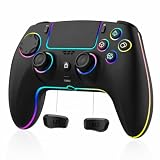
- 【Connection and Notes】:Use the included USB cable(or the original cable) to plug it into your PS5. Wait for the touchpad light to stay on, then press the HOME/PS button. After pairing, unplug the cable to use it wirelessly. Please note: There is no built-in microphone!!!
- 【Wide Compatibility & Extended Playtime】: This wireless controller is designed for PS5, Android, iOS, PC, and Mac, featuring a high-capacity 1500mAh rechargeable battery that supports up to 10-12 hours of continuous gameplay, so you can play longer without interruption.
- 【HALL EFFECT JOYSTICKS & TRIGGERS】: Magnetic Hall sensing delivers smooth, precise input with reduced wear and improved resistance to stick drift, giving you confident control in FPS, racing and action games.
- 【Programmable Buttons & Turbo Function】: Customize your gameplay with programmable button mapping and adjustable turbo settings. Tailor the controller to match your play style for enhanced performance and convenience in any game.
- 【Ergonomic & Anti-Slip Grip Design】: Designed for comfort during long gaming sessions, the controller features an ergonomic shape that fits naturally in your hands. Its textured, anti-slip surface ensures a secure hold even during intense gameplay, preventing slips from sweaty palms.
Rank #3

- Applicable Devices: The wireless gamepad is compatible with PS-5/Pro/Slim, PC
- Unparalleled Triggers: Whether you're doing throttle acceleration through virtual worlds or performing actions like shooting, sensitive triggers ensures a seamless gaming experience
- Delicate Vibration: The black & white wireless controller simulates delicate vibration effects such as muddy doff-road riving, raindrops and metal collisions, bringing you an immersive gaming experience
- Hall Effect Joysticks: The Hall Effect Joysticks deliver a durable lifespan of up to 5 million cycles, precise and responsive feedback, plus the wear-resistant rings, ensuring no drift no delay performance
- Macro Back Button: The Macro Programming function enables you to swiftly execute a series of commands during gameplay, giving you a competitive edge against your opponents
Sources and compatibility details
- GuliKit TMR joystick product page: DualSense and DualSense Edge compatibility, manufacturer sensor claims, power figures, and calibration direction.
- iFixit GuliKit TMR replacement set: two-stick kit details, soldering and calibration requirements, and listed standard DualSense revisions.
- iFixit DualSense motherboard guide: factory-calibration warning and revision-specific repair guidance.
- Halleffect.de DualSense repair service: advertised Hall Effect or TMR stick replacement with calibration and functional test.
Product prices and availability are accurate as of the date/time indicated and are subject to change. Any price and availability information displayed on Amazon at the time of purchase will apply.
The Tool Desk
Outbyte PC Repair FREERepair Windows errors before they cause bigger problemsFix Now →Outbyte Driver Updater FREEFix the driver behind crashes, sound loss and screen glitchesFind Drivers →



