Quick wins for a faster PC:
Clear out junk files and repair common Windows errorsFree Scan →Fix the driver behind crashes, sound loss and screen glitchesFind Drivers →For the clearest Sony-documented connection, use a PlayStation 2 component AV cable with a TV that has component inputs, then set the console’s Component Video Out option to “Y Cb/Pb Cr/Pr.” This connection supports 480p progressive scan when the console, cable, and TV all support it. Sony’s progressive-scan instructions concern DVD playback; they do not establish that every PS2 game can output 480p.
Choose a connection your TV actually supports
Check the back or side of your TV before buying a cable. Component video uses separate color-coded video inputs, typically labeled Y, Pb/Cb, and Pr/Cr. Sony’s listed PS2 component AV cable models are SCPH-10490 and SCPH-10100, compatible with the SCPH-90000, 70000, 50000, 30000, and 10000 series. Confirm the cable listing and your console model rather than assuming every cable fits every setup. Sony’s accessory compatibility chart lists the applicable models.
If the TV lacks component inputs, Sony also lists S-Video, composite AV, RGB, and D-terminal cable families. The official sources cited here identify component AV as compatible with 480p, but do not provide controlled tests ranking all cable types across different TVs. Choose according to your TV’s inputs and the signal formats it supports; the result can also depend on the television’s processing and scaling.
Match the PS2 video setting to the cable
After connecting component video, open System Configuration and set Component Video Out to Y Cb/Pb Cr/Pr. If your TV supports RGB input only, select RGB instead. Sony warns that a mismatch between the console setting and the TV connection can make the picture unstable. Sony’s PS2 troubleshooting guide covers these output choices.
PC Slower Than It Used to Be?
A free scan shows the junk files, broken settings and background clutter dragging Windows down - then fixes them in one click.Free scan · Windows 10 & 11Crashes, No Sound, or Screen Glitches?
Random freezes, missing sound and display glitches usually trace back to one bad driver. Find and replace yours safely.Free scan · under a minute#1 Best Overall

- Get the best analog video & audio out of your PS2 or PS3 using this high-quality fully shielded cable
- HD Retrovision cables are properly engineered and constructed; don't settle for cheap unshielded cables which result in poor video quality and audio interference issues
- Supports all available PS2 & PS3 YPbPr video resolutions up to and including 1080p (see product description below)
- Full coverage 360° shielding prevents audio and video crosstalk (click on photos for more details)
- Proper 75Ω (75 ohm) coaxial cable impedance for optimal video quality (click on photos for more details)
Use progressive scan only where it applies
Sony documents the PS2 component AV cable as compatible with 480p progressive scan, but the console, cable, and TV must all support 480p. The cited user guide’s Progressive control is a DVD-player setting: its instructions specify NTSC-format DVDs and a 480p-capable TV. That is not evidence that a particular game—or every game—offers progressive output.
If enabling progressive mode makes a DVD picture worse or causes it to disappear, switch the setting off. Sony’s PS2 user guide also describes recovering when a DVD is left in progressive mode. Use the guide for the exact recovery steps for your console and DVD setup.
Rank #2
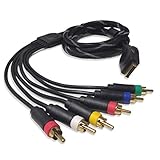
- Wide Console Compatibility: The component multi-out cable is compatible with PS2 & PS3 & PS3 Slim gaming console
- Enhanced Gaming Experience: The component audio video cable connects your PS2 / PS3 / PS3 Slim to TV, allowing you to enjoy high-quality graphics and audio during gaming
- Multiple Connection Ports: For TV connection side, there are 6 outputs multi out ports, they are: video, Component Y/Pr/Pb, audio L channel, audio R channel
- High Resolution Support: Owing to Y/Pr/Pb components, you can connect the Composite RCA Audio Video Cable to High Resolution TV and supports TV / LCD of 480p / 1080i / 720p resolution
- Cable Specifications: The length of the Component Audio Video Cable is 6 feet (180cm), weight is around 220 grams, and its main color is black
Check the TV input and the rest of the signal path
- Select the TV input that corresponds to the cable you connected.
- For a DVD picture that is unstable through a VCR or DVD recorder, connect the PS2 directly to the TV, as Sony advises.
- Check the TV’s aspect-ratio or widescreen controls. A TV’s own settings may override image-size settings in the console or DVD player, and some discs or TVs do not permit image-size adjustment.
Keep DVD picture controls separate from game settings
The PS2 DVD player offers picture controls that should not be treated as general game enhancements. Sony’s manual lists DNR Off, DNR1, and DNR2; DNR2 reduces roughness more than DNR1, but may produce afterimages. For Outline Sharpening, Sony says to normally select 0. These options apply to DVD playback, not as universal fixes for game graphics.
Independent reader supportYour contribution helps us test, update, and keep practical guides available for everyone.If your modern TV has no compatible analog inputs
A video adapter or scaler may be needed to connect a PS2 to a TV without matching analog inputs. Its result depends on the particular device and display, and the official sources cited here do not establish the compatibility or performance of any specific adapter. Check that a device explicitly supports the PS2’s output and your TV’s input before relying on it.
Free tools Windows power users keep installed
One-click scans. No signup required.
Quick Recap
Best Value

- This PS2/PS3 Component cable, we can use AV signal and Component signal output to ensure more stable signal transmission and clearer picture.
- For TV connection side, there are 6 outputs multi out ports, they are: Video, Component Y/Pr/Pb, Audio L channel, Audio R channel. The component multi-out AV cable is compatible with PlayStation PS2 & PS3 & PS3 Slim gaming console.
- Set your TV to "Component" or "AV" as the input signal. This PS2 PS3 Component AV cable should be connected to the Component / AV input port of your TV correspondingly. Component--Video: Blue-Green-Red;Aduio: Red & White. AV--Video: Yellow; Audio--Red & White.
- High Resolution: Supports high resolution of 480P, 720P, 1080P. This Component cable provides clearer video and sound for your PS2/PS3 console, greatly enhancing the gaming experience.
- Material: The PS2 PS3 Component AV Cable is made of full copper, plus PVC mesh sheath, durable and not easy to damage, 1.8m long cable is more convenient to use.
Rank #4

- Wide Compatibility with PlayStation Consoles--Compatible with Sony PlayStation 1, PS2, PS2 Slim and PS3 game consoles, this 6ft RCA composite AV cable connects your PlayStation console directly to any TV or monitor with RCA composite inputs. It is a perfect replacement or backup cord for your original lost or damaged PlayStation AV cable.
- Plug-and-Play Audio Video Transmission--This 1.8M/6ft audio video cable transmits both stereo audio and composite video via 3 color-coded RCA connectors (yellow for video, red/white for left/right audio). No extra drivers or adapters are needed — simply plug and play for instant classic gaming.
- Stable & Clear Retro Gaming Performance--Delivers stable composite video signal and crisp stereo sound for PS1/PS2/PS3 classic games, restoring the original retro gaming experience. Tinned copper conductors and durable shielding minimize signal loss and interference for consistent, lag-free performance.
- Durable Replacement for Original Cords--Ideal for replacing lost, broken or damaged original PlayStation AV cables. The flexible PVC jacket and reinforced connector joints withstand frequent plugging and long-term use, making it a reliable spare for home or travel use.
- Compatibility Reminder--This is a 3-connector RCA composite AV cable for PS1/PS2/PS3. Please ensure your display has red/yellow/white RCA composite ports before purchase; it is not compatible with 5-port component video inputs. If your device only has an HDMI port, you’ll need an RCA to HDMI converter (not included)!!!
Rank #3
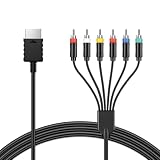
- Attention: Must set PS2 to Y Pb Pr / Y Cb Cr output before using this converter, or you will see out of range.
- PS2 Ypbpr Component Video Cable Provide the best upscaled signal processing with great precision, colors, resolution.
- Our PS2 Ypbpr Component Video Cable No need to install drivers
- Supports all available PS2 & PS3 YPbPr video resolutions up to and including 1080p. It Supports All PS2/PS3 Display Modes 480i, 576i, 480p.
- Get the best analog video & audio out of your PS2 or PS3 using this high-quality fully shielded cable
Product prices and availability are accurate as of the date/time indicated and are subject to change. Any price and availability information displayed on Amazon at the time of purchase will apply.




