Free tools Windows power users keep installed
One-click scans. No signup required.
You can link Epic Games to Discord from Discord’s User Settings → Connections menu. Choose Epic Games, sign in to the Epic account you want to use, and select Allow. Epic recommends signing out of Epic Games in your browser first so an existing session does not connect the wrong account.
These instructions reflect the official support guidance available as of August 18, 2026. Menu names and placement can vary between Discord versions and devices.

As an Amazon Associate I earn from qualifying purchases.
What linking Discord and Epic Games does
Linking associates a selected Epic Games account with your Discord profile through Discord’s Account Connections feature. Depending on the integration and your visibility settings, Discord may display the connected account or related gaming activity on your profile.
It does not merge Epic Games accounts, transfer purchases or game progress, move Fortnite or Rocket League data between accounts, or automatically connect PlayStation, Xbox, or Nintendo accounts. It also does not necessarily enable Discord voice chat inside every Epic game.
#1 Best Overall

- PLAYSYNC AUDIO 3-System Switching: The A50 wireless gaming headset with mic connects to 3 platforms at once via USB-C so you can tap between Xbox, PS5, PC/Mac or Nintendo Switch/Switch 2 via on-ear control
- PRO-G GRAPHENE Audio Drivers: Groundbreaking clarity and response for precise audio separation, location and timing accuracy (40mm diameter with live edge technology)
- 24-bit LIGHTSPEED Wireless: This wireless headset with mic offers uncompressed, immersive gaming audio at lightspeed
- Broadcast-Quality Mic: Experience maximum articulation with the 48 kHz full-bandwidth boom mic that achieves new levels in voice quality
- Bluetooth Dual-Device Mixing: Connect to your mobile device and mix your Discord comms or music into your game audio
See Discord’s Account Connections FAQ and Epic’s official linking instructions for the platform-specific details.
Before you start
- Sign in to the Discord account you want to use.
- Have the sign-in details for the intended Epic Games account ready.
- Sign out of Epic Games in your browser first, as recommended by Epic.
- Make sure you can access any email, authenticator, or other security method Epic requests.
- Use a stable internet connection and an up-to-date Discord app or browser session.
Link Epic Games to Discord on desktop or in a browser
- Open the Discord desktop app or visit Discord in a browser.
- Click the gear icon to open User Settings.
- Select Connections.
- Click View More to show additional services.
- Select Epic Games.
- When the authorization page opens, sign in to the Epic Games account you want to connect.
- Check the Epic display name carefully.
- Review the authorization request and click Allow.
- Return to Discord and check the Connections page.
Epic Games should now appear among your connected accounts. Discord may also show a confirmation message such as “Connected your Epic Games account to Discord.”
Link Epic Games to Discord on iPhone or Android
Discord’s mobile route is different from the desktop route. Epic Games may not appear in every mobile client or account’s connection list, so continue only if it is available.
What’s actually slowing this PC down?
Pick the symptom - the matching free tool is one click away.
- Open the Discord mobile app.
- Tap your avatar in the bottom-right corner.
- Tap the gear icon in the top-right corner.
- Tap Connections.
- Tap Add in the top-right corner.
- Select Epic Games, if listed.
- Sign in to the intended Epic Games account.
- Approve the authorization request.
Return to Connections and confirm that Epic Games is listed.
How to confirm the connection worked
Use these checks:
- Epic Games appears under Discord’s Connections settings.
- Discord displays a successful connection message.
- The Epic display name is the account you intended to authorize.
- The connection remains visible after reopening Discord.
- If profile display is enabled, the connected account or supported activity appears on your Discord profile.
Profile visibility is controlled by Discord’s connection and profile settings. Linking does not make your Epic password, email address, or payment information public.
How to unlink Epic Games from Discord
- Open Discord and go to User Settings.
- Select Connections.
- Find Epic Games.
- Click or tap the X beside it.
- Confirm with Disconnect.
This removes the Discord account connection. It is not a universal control for removing other accounts or platforms connected to Epic Games. Discord says Support cannot remove the connection for you; it must be disconnected from your own Discord settings.
Rank #3
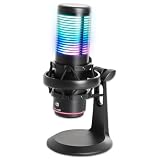
- Versatile Polar Patterns: Switch between Cardioid (front-facing) and Omni-directional (360-degree) to suit gaming, streaming, podcasts, and recording needs.
- Crisp, Clear Audio: Cardioid pattern isolates your voice and minimizes background noise, ensuring professional-quality sound for all your content.
- RGB Lighting & Touch Controls: Multicolored RGB lights create an immersive atmosphere, with easy touch controls for mute, noise rejection, and lighting settings.
- Built-In Anti-Vibration Shock Mount: Reduces surface vibrations for cleaner, distortion-free audio during gaming, streaming, or recording.
- Real-Time Monitoring: 3.5mm headphone jack for zero-latency audio monitoring while you stream or record.
Epic Games will not link to Discord: fixes
Epic Games is missing
- On desktop, select View More in Connections.
- Make sure you are in Connections, not Profiles or another settings section.
- Restart Discord and check again.
- Try Discord in a browser if the desktop app does not show the option.
- If mobile does not list Epic Games, try the desktop or browser route.
- Sign out and back in to Discord, then repeat the process.
The official support pages do not guarantee that every service appears in every client, account, region, or version.
The Tool Desk
Outbyte Driver Updater FREEScan for outdated or missing drivers - takes under a minuteDriver Scan →Outbyte PC Repair FREERepair Windows errors before they cause bigger problemsFix Now →The wrong Epic account opens
Cancel the authorization instead of selecting Allow. Sign out of Epic Games in the browser, or use a private browsing window, then reopen Discord’s Connections flow. Sign in again and verify the Epic display name before authorizing.
The authorization page does not open
As practical troubleshooting steps, allow pop-ups and redirects, temporarily disable extensions that block cookies or redirects, and try another browser or Discord client. Restart Discord and repeat the process.
Rank #4

- PLAYSYNC Simultaneous Multi-System: Xbox + PS5 + Switch/Switch 2+ PC all at once. Stay connected to all your platforms and switch AUDIO & VIDEO between them with on-ear control
- PRO-G GRAPHENE Audio Drivers: Groundbreaking clarity and response for precise audio separation, location, and timing accuracy (40 mm diameter)
- Pro-grade LIGHTSPEED Wireless: Ultra high-performance, end-to-end technology for responsive and immersive gaming audio free from wires
- State-of-the-art HDMI 2.1 Passthru: Delivers Ultra HD resolution for the highest levels of console audio (24 bit) and visual fidelity (4K 120 Hz)
- Broadcast-quality Mic: Sound like a pro; 48 kHz full-bandwidth LIGHTSPEED mic uplink achieves new levels in wireless boom mic quality
You clicked Allow, but nothing appears
- Wait briefly, then reopen User Settings → Connections.
- Refresh Discord or restart the app.
- Sign out and back in to Discord.
- Confirm that the browser completed authorization.
- Repeat the process after signing out of Epic Games.
- Try another browser, the desktop app, or mobile.
If the connection still fails, contact Discord Support. If you cannot sign in to Epic Games at all, recover the Epic account through Epic’s account-support system; Discord cannot bypass Epic authentication.
Independent reader supportYour contribution helps us test, update, and keep practical guides available for everyone.If you mean Fortnite or a console
There are several separate connections that are easy to confuse:
Windows Errors? Fix Them Before They Spread
Repair common Windows errors and clear accumulated junk for a smoother, more stable PC - no reinstall needed.Free scan · no reinstallOutdated Drivers Are Slowing You Down
One free scan finds every outdated or missing driver and matches the right update for your exact hardware.Free scan · exact hardware match- Epic Games to Discord: the profile connection described in this guide.
- PlayStation, Xbox, or Nintendo to Epic Games: an Epic account-linking task handled separately through Epic.
- PlayStation or Xbox to Discord: a separate Discord integration.
- In-game voice chat: dependent on the specific game and platform.
Connecting Epic Games to Discord does not by itself link every console account, synchronize game progress, or guarantee Discord voice chat in Fortnite.
Best Value
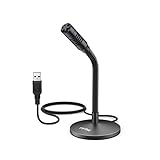
- [Portability] The usb podcast microphone is a portable mini computer mic for travel and portability. Gaming microphone is flexibility adjustable gooseneck design, tiny enough to take up only minimal desk space. The flexible PC microphone is ideal for everyday use in both busy broadcast and live environments.
- [Compatibility] USB microphone features a standard USB connection, plug n' play for both laptop and PC (no drivers required), ideal for all PC, desktop and recording applications. Great for internet voice chat, multiplayer internet gaming, video conferencing, language & other training, as well as Dragon speech recognition, dictation and transcription. (Incompatible with Xbox and Phones)
- [Fully Adjustable] The USB laptop microphone is with 6.56ft cable that allows flexibility in the work area. Flexible 5.7 inch gooseneck for easy positioning, can be effortlessly adjusted to any horizontal direction and vertically to fit the comfort level of the speaker, perfect for online communications as well as voice recordings.
- [Solid Construction] Sturdy metal base streaming microphone with easy-to-adjust, rugged neck can be easily positioned and relied on to keep its place.Anti-slip Rubber pad ensures base remains firmly on desk. USB condenser microphone element is surrounded by metal tubing to provide unmatched durability. Perfect for Speech Recognition with Dragon NaturallySpeaking, podcasting, Skype or other VoIP and chat programs.
- [Includes] Fully 5.7" adjustable gooseneck microphone with usb cable (6.56ft long shielded cord can easily withstand environmental damage), a windscreen to reduces background noise and improves sound quality. Friendly Technical Support.
Security and privacy reminders
- Start the process from Discord’s official settings, not from an unknown linking website.
- Enter Epic credentials only on an official Epic sign-in page.
- Check the Epic account name before approving authorization.
- Do not share authorization links or screenshots containing account information.
- Review Discord’s profile visibility options if you do not want the connection or supported activity displayed.
- Use appropriate account-security protections on both Discord and Epic Games.
Frequently Asked Questions
Can I connect more than one Epic Games account to the same Discord account?
The documented process connects an Epic Games account through Discord’s Connections system. If you need to switch accounts, disconnect the existing Epic Games connection first, then repeat the process while signed in to the intended Epic account.
Can I connect Epic Games from the Epic Games Launcher?
The documented starting point is Discord’s User Settings → Connections menu. Begin there rather than looking for a launcher-based connection option.
Can I hide the Epic Games connection from my Discord profile?
Review the visibility controls for the connection in Discord. Account Connections can display connected-account information or supported activity, but the exact options can vary by integration and Discord version.
Is Discord Nitro required?
No paid plan or purchase is required by the documented Epic Games and Discord connection flow.
Quick Recap
Product prices and availability are accurate as of the date/time indicated and are subject to change. Any price and availability information displayed on Amazon at the time of purchase will apply.




