Crashes, No Sound, or Screen Glitches?
Random freezes, missing sound and display glitches usually trace back to one bad driver. Find and replace yours safely.Free scan · under a minutePC Slower Than It Used to Be?
A free scan shows the junk files, broken settings and background clutter dragging Windows down - then fixes them in one click.Free scan · Windows 10 & 11Start with the game’s accessibility, audio, video, and gameplay menus. Look for content warnings, options to hide or bypass selected scenes, separate volume controls, subtitles or captions, visual and motion settings, and difficulty adjustments. What is available—and how much it helps—varies by game, platform, and version. These settings can reduce particular sources of intensity, but they cannot guarantee that a horror game will feel comfortable.
First, identify what is making the game feel scary
Different settings address different sources of discomfort. A sudden sound may call for a volume adjustment; camera movement may be affected by a motion setting; a specific creature or scene may have a content filter or bypass. Difficulty and control options can ease play pressure, but they do not necessarily change frightening content.
| # | Preview | Product | Price | |
|---|---|---|---|---|
| 1 |
|
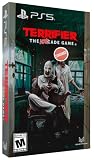
Terrifier: The ARTcade Game Limited Edition - PlayStation 5 | $65.83 | Buy on Amazon |
| 2 |

|
Poppy Playtime Triple Pack PS5 | $28.08 | Buy on Amazon |
| 3 |

|
Resident Evil Requiem Amazon Exclusive Edition - PlayStation 5 | $49.99 | Buy on Amazon |
| 4 |

|
Feardemic: Horror Bundle - Nintendo Switch | $29.97 | Buy on Amazon |
| 5 |

|
Project Songbird - PlayStation 5 | $29.99 | Buy on Amazon |
- Specific content: look for content advisories, scene warnings, visual filters, or skip and bypass options.
- Sound: check for separate sliders for effects, music, dialogue, and cinematics. Subtitles or captions may help you follow dialogue without relying on loud audio, though they may not describe every sound.
- Visual intensity and motion: check brightness and contrast, camera shake, head bob, and motion blur options where offered.
- Challenge or control pressure: look for difficulty, aim assistance, quick-time-event options, remapping, and toggle controls. These may make play easier without removing frightening scenes.
Try changing the setting that corresponds to the specific problem, rather than assuming one adjustment will work for everyone. Raising brightness, lowering volume, or choosing an easier difficulty is not guaranteed to make a game less scary.
Check content warnings, filters, and scene bypasses
A warning and a content control do different jobs: a warning tells you what may be coming, while a filter or bypass can alter or avoid some of it. Microsoft’s Xbox Accessibility Guideline 123 recommends giving players information about potentially distressing content and ways to customize, avoid, remove, or bypass it where appropriate. It suggests options such as advance online information, in-game warnings, and the ability to skip or bypass a cutscene or mission.
Quick wins for a faster PC:
Fix the driver behind crashes, sound loss and screen glitchesFind Drivers →Repair Windows errors before they cause bigger problemsFix Now →#1 Best Overall
- Gorgeous Pixel Art & Animation: The game captures the essence of the Terrifier films with bright, cartoonish pixel art and fluid animations that vividly depict the gruesome action.
- Multiplayer Mayhem: Team up with up to 4 players for a chaotic local co-op experience. Work together—or against each other—in various game modes. Travel through multiple stages, each with different paths to explore and enemies to defeat. Prepare yourself for intense boss battles that will test your skills.
- Bloody Arsenal of Weapons: From chainsaws to cleavers, pick up a variety of weapons to turn your enemies into bloody pulp. Enjoy hilarious and gory attacks that make every fight as entertaining as it is brutal. The finishing moves are guaranteed to leave a gory delight impression! Relive the golden age of gaming with a glorious chiptune soundtrack that perfectly complements the retro aesthetic.
- Multiple Game Modes: With 6 different game modes, whether you're looking for a quick beat 'em up session or an extended challenge, there's a mode that fits your style.
- Languages: English, French, German, Italian, Portuguese (Brazil), Spanish (LATAM), and Spanish (Spain) in game text.
Before relying on a skip, check whether it preserves progress and whether it can be used after the scene begins. Microsoft says players should ideally be able to choose to skip or bypass relevant content during a mission or cutscene. The actual behavior is specific to each game.
Content options need not remove a game’s story or premise. Microsoft’s guidance emphasizes informing players and supporting their choices, rather than directing developers to remove story content. Its example from Grounded describes an arachnophobia safe mode that changes how spiders look; it does not remove them completely or affect gameplay or difficulty.
Rank #2
- This pack contains the first three chapters in the Poppy Playtime saga
- Each chapter features engaging new toy characters that can be either friend or foe
- Survive and progress by solving challenging puzzles
- Each game reveals to you a newly discovered area of the massive toy factory
- The Poppy Playtime Triple Pack includes a reversible coversheet and a Poppy Playtime sticker sheet
Use ordinary audio, visual, and gameplay settings
Accessibility settings are not always labeled as fear-reduction features. Standard audio, display, motion, and difficulty controls can still help with a particular source of intensity. Their names and scope vary, so check the game’s own guide if an option is unclear.
Audio and captions
If loud effects or music are the problem, reduce the relevant slider rather than muting everything by default. Separate controls can let you lower effects or cinematic audio while keeping dialogue audible. Subtitles and closed captions may provide another way to follow speech or some sound information. Caption coverage is not necessarily complete: Bethesda’s Redfall Accessibility Guide, for example, notes that captions do not cover every possible sound effect.
Rank #3
- Amazon Exclusive - 2 sided poster included in every game!
- Grace Ashcroft, an FBI intelligence analyst who is introverted and easily scared, representing a new type of character for the Resident Evil series. Grace will experience horror from the same perspective as the player as she learns to overcome her fears throughout the course of the story.
- For the first time ever in Resident Evil history, players will be able to freely switch between both first- and third-person perspectives throughout the game.
- An Anniversary to Remember: With March 2026 marking the Resident Evil series’ 30-year anniversary, Resident Evil Requiem marks its own milestone in the franchise.
- Pre-orders for Resident Evil Requiem are now open, with the bonus of Grace’s costume: Apocalypse. Please note that the picture weapon does not come with the costume, but it can be obtained in-game.
Brightness, contrast, and motion
Brightness and contrast can change visibility, while camera-shake or head-bob toggles can reduce some movement in the presentation. These settings may make a specific visual element easier to manage, but they do not remove the game’s underlying content. Check for motion blur controls too, if camera movement is uncomfortable; the option may not exist in every title.
Difficulty and controls
A lower difficulty, aim assistance, simplified quick-time events, remapping, or toggle controls can reduce the effort or pressure of playing. Treat these as gameplay adjustments, not content filters. Some changes may take effect only after restarting or reloading: Bethesda notes that in Redfall, enemies already present may not reflect a mid-game difficulty change until the game is reloaded.
Rank #4
- Featuring Burnhouse Lane, No Son of Mine, and Dagon: Complete Edition
- 5D Chess - Solve classic adventure-style inventory puzzles.
- Find the Truth Or Die In Shame and Terror - enjoy a hardcore survival horror experience.
- 100% faithful adaptations of Lovecraft's works brought to life through atmospheric voice acting
- Compact stories, each suitable for one gaming session
What two official game examples show
Official documentation illustrates how different the scope of these options can be. The examples below are specific to the named games, not a checklist of features every horror game provides.
| Game and source | Documented options | Important scope or limitation |
|---|---|---|
| Dead Space, EA’s accessibility article | Configurable subtitles, including font size, capitalization, text/background color inversion and background opacity, and speaker-name display; camera-shake reduction; optional warnings for potentially disturbing scenes; and an option to obscure selected upcoming visuals. | EA says the content features are optional and disabled by default. The visual obscuring option leaves the scene’s audio audible. EA also notes that what a player finds disturbing is subjective. |
| Redfall, Bethesda’s accessibility guide | Four difficulty levels; subtitles or closed captions; font scaling and colorblind filters; camera-shake and head-bob toggles; separate music, effects, dialogue, and cinematic volume controls; brightness and contrast; and vibration on/off. | Bethesda says captions do not cover every possible sound effect. Enemies already present may not change when difficulty is adjusted mid-game until reload. |
In EA’s Dead Space article, EA accessibility program lead Morgan Baker explains that the options recognize that some players may want to avoid seeing certain content typical of horror and gore games. EA also quotes a developer emphasizing that “Dead Space remains a horror game, with gore and blood.” The distinction matters: a setting may give you more control over a particular scene without removing the genre’s premise.
Do these 3 things before closing this tab:
1Clear out junk files and repair common Windows errors2Fix the driver behind crashes, sound loss and screen glitches3Repair Windows errors before they cause bigger problemsBest Value
- A dark, enthralling 4-5 hour narrative to keep you hooked and guessing until the end. Gorgeous visuals as you traverse numerous and diverse environments, presented with a cinematic, film-like aesthetic. Ranged and melee combat with upgradeable weapons to help you survive your nightmarish journey.
- A stellar voice cast, starring Valerie Rose Lohman (What Remains of Edith Finch, Wolfenstein: Youngblood), Jonah Scott (Dying Light 2: Stay Human, Date Everything), and Aleks Le (Persona 3: Reload, Marvel Rivals, Ghost of Yotei).
- A beautifully dynamic and haunting soundtrack composed and performed by Jacob Noska, and Jonah Henthorne: members of the band Auric Echoes.
- The puzzles you encounter are more than your standard key hunt. Project Songbird rewards those with an eye for detail, making each puzzle a challenge of creativity and wits.
- The combat of Project Songbird offers a variety of approaches inspired by the classics of the survival horror genre. Melee and gunplay is slow and weighty, and ammo is incredibly scarce. However, combat isn't your only option, as you have a multitude of tools at your disposal to aid in sneaking past any creatures that wish to do you harm.
Verify the options for your game and platform
- Open the game’s Settings or Options menu. Check Accessibility first, then Audio, Video or Display, and Gameplay or Controls.
- Look for both information and controls. Read content advisories and check whether the game offers scene warnings, filters, concealment, or a skip/bypass option.
- Confirm what the option changes. Find out whether it affects visuals only, audio too, gameplay, all scenes, or only selected content.
- Check when it can be changed. A setting may need to be enabled before play, may be adjustable during a scene, or may require a reload to take effect.
- Consult the current official manual or accessibility guide. Confirm that it covers your game, platform, and version; menu labels and features can differ.
If the guide does not explain whether a bypass preserves progress or how broadly a filter applies, do not assume. Warnings can help you make an informed choice, but a warning alone does not remove content or guarantee comfort.
Quick Recap
Product prices and availability are accurate as of the date/time indicated and are subject to change. Any price and availability information displayed on Amazon at the time of purchase will apply.




