Windows Errors? Fix Them Before They Spread
Repair common Windows errors and clear accumulated junk for a smoother, more stable PC - no reinstall needed.Free scan · no reinstallCrashes, No Sound, or Screen Glitches?
Random freezes, missing sound and display glitches usually trace back to one bad driver. Find and replace yours safely.Free scan · under a minuteTo join a live Blooket game, go to play.blooket.com, enter the host’s Game ID, choose a nickname, and select a Blook. You can also join by scanning the host’s QR code or opening their Join Link. A Blooket account is not required for live games, although logging in unlocks account-based features such as saved Blooks, points, tokens, XP, stats, and solo play.
How to join a live Blooket game
- Open play.blooket.com.
- Enter the Game ID or game code shown by the host.
- Enter a nickname, unless the host has enabled Use Random Names.
- Choose a Blook while you wait in the lobby.
- Wait for the host to start the game.
Blooket’s current official help pages disagree about whether game codes contain six or seven digits. Do not rely on a fixed length: enter the exact code displayed by the host.
As an Amazon Associate I earn from qualifying purchases.
Other ways to join
- QR code: Scan the QR code displayed by the host.
- Join Link: Open the link shared by the host. It takes you to the game without requiring you to type the code manually.
Do you need a Blooket account?
No. Students can join a live game without creating or signing in to an account. However, you generally need to be logged in to use a personal Blook and receive account-linked progress such as points, tokens, XP, and statistics. Accounts also provide access to solo games and unlocked Blooks.
Blooket’s current quick-start guide says users must be over 13 in the United States or at least 16 outside the United States to create an account. Those account-age requirements do not prevent someone from joining a live game without an account. See Blooket’s account guidance for the current details.
#1 Best Overall

- TURN MATH INTO AN ADVENTURE! – Make math practice fun with this interactive math board game for kids! This addition and subtraction game is perfect for preschool, 1st, 2nd, and 3rd graders, and family game night.
- LEARNING THROUGH PLAY – No boring worksheets! With Number Hunter kids board game, kids embark on a fun expedition around the world, learning addition, subtraction, and even and odd numbers without even realizing it.
- EASY TO LEARN, FUN TO PLAY – Roll the dice, add or subtract the numbers, and move forward. Land on a star tile to complete a fun action or math challenge. Be the first to reach the finish line to win!
- BUILD EARLY STEM SKILLS – This number game for kids 5-7 supports early math learning, critical thinking, and problem-solving in a playful, stress-free way.
- HOMESCHOOL ESSENTIAL – This kids game is a great choice for parents and teachers looking for a fun number game that can be used as part of homeschool supplies.
How to host a Blooket game
- Open Blooket and find a question set in My Sets or Discover.
- Open the question set’s page and select Host.
- Choose a game mode, then click Host again.
- Adjust the available settings.
- Select Host Now.
- Share the displayed Game ID, QR code, or Join Link.
- When everyone is ready, click Start.
The full process is documented in Blooket’s official hosting guide.
Host settings explained
- Time: Ends the game after the selected duration.
- Goal: Ends the game when a player reaches the selected score.
- Show Answer Correctness: Shows the correct answer after an incorrect response.
- Time Penalty for Incorrects: Makes players wait for the selected number of seconds after answering incorrectly.
- Question Ordering: Choose Random, Ordered to follow the question-set order, or Mastery to show questions answered incorrectly more often.
- Allow Late Joining: Lets players join after the game has started. If it is disabled, late players may be unable to enter.
- Use Random Names: Automatically assigns generated nicknames.
- Mute Player Sounds: Disables gameplay sound effects for all players.
- Allow Student Accounts: Controls whether students can use or create Blooket accounts during the game.
- Banned Blooks: Prevents selected Blooks from being used.
- Reset to Defaults: Restores the default settings.
Which Blooket modes support live hosting?
Blooket’s general hosting guide lists these live-hostable modes:
- Monster Brawl
- Deceptive Dinos
- Gold Quest
- Crypto Hack
- Fishing Frenzy
- Blook Rush
- Battle Royale
- Tower Defense
- Cafe
- Factory
- Racing
- Classic
That list should not be treated as a complete, permanent catalog. Blooket also has separate official pages for newer or separately documented modes, including Busy Bees and Laser Tag, which are marked as Blooket Plus subscriber modes. Busy Bees and Laser Tag may therefore appear differently depending on the account, subscription, or current interface.
Rank #2

- BUILD YOUR OWN SENTENCES!: Turn sentence and grammar building skills into a fun adventure with this hands-on activity! Young learners will gain confidence in reading and writing while exploring creative ways to form sentences.
- INCLUDES: 120+ color-coded word tiles (1.3 x 1 inches) organized by parts of speech, 20 wooden sentence builder tiles, 2 cloth bags, and an easy-to-follow instruction manual.
- HOW TO PLAY: Lay out the wooden sentence builder tiles and place all the colored tiles in one bag. Draw 10 colored tiles from the bag, read them aloud with your child, and work together to create sentences. Toss the used words into the second bag and refresh with new ones to keep the activity going!
- LOOKING FOR FUN WAYS TO LEARN? Designed by educators, this engaging activity helps kids focus on building sentences step-by-step, improving their vocabulary, grammar, and overall language development.
- STEP-BY-STEP GUIDE: The included instruction manual provides a clear, step-by-step guide to building sentences and introduces basic sentence-building rules, helping kids learn essential grammar concepts in a fun and interactive way.
Crazy Kingdom and Tower of Doom are listed by Blooket as solo/Homework-only rather than standard live-hosted modes.
How to play Blooket solo
- Open Discover or My Sets.
- Open the question set you want to use.
- Select Solo or Play Solo.
- Choose a game mode.
- Click Play.
The exact button can vary by dashboard. On a student dashboard, select Solo on the question-set card. On a teacher dashboard, hover over the set’s gear icon and choose Solo.
Blooket’s general solo guide lists Tower Defense 2, Monster Brawl, Tower Defense, Cafe, Factory, Crazy Kingdom, and Tower of Doom. Separate official game pages also document solo-capable modes such as Study, Zorblitz, and Pirate Pool, so the seven-mode list is not a complete current catalog.
Rank #3

- Educational Journey: Embark on an exciting educational journey with the Scholastic Race Across the USA Game. Explore the diverse geography of our country while having fun with this engaging board game.
- State-Hopping Adventure: Visit six states, answer geography questions, and race back to your home state to claim victory! The game combines learning and entertainment, making it an ideal choice for educational play.
- Grade-Appropriate Questions: Tailored to each player's grade level, the game ensures that questions are suitable for their educational stage. Enjoy a personalized learning experience that adapts to the unique needs of players.
- Inclusive Gameplay: Designed for kids aged 8 and up, this game allows children from different grades to play together on an even field. Foster friendly competition and collaboration as players of various ages join forces in this educational adventure.
- Perfect for Group Play: Whether it's a family game night or a classroom setting, the Scholastic Race Across the USA Game encourages group play. Bring kids together for a shared learning experience that promotes camaraderie and knowledge sharing.
How to use Study mode
From Discover, open a question set, select Play Solo, and choose Study. On a teacher dashboard, use My Sets → gear icon → Solo → Study. Study mode is designed for working through the questions rather than competing in a live lobby.
The Tool Desk
Outbyte Driver Updater FREEScan for outdated or missing drivers - takes under a minuteDriver Scan →Outbyte PC Repair FREERepair Windows errors before they cause bigger problemsFix Now →In solo games, the checkered flag in the top-right corner exits the game or returns to the menu. The gear icon opens settings and accessibility options.
How to complete Blooket Homework
- Open the Homework Link provided by the teacher, or scan the Homework QR code.
- Click Get Started.
- Choose a solo game mode.
- Click Play.
- Enter a nickname and complete enough questions to meet the assignment goal.
You do not need a Blooket account to complete Homework. Logged-in students can earn experience points and tokens. During the assignment, the top-right display shows how many additional correct answers are needed to reach the goal. Use the gear icon for volume and accessibility controls, or the checkered flag to end the game or switch modes.
Rank #4

- Flags, Capitals & Location - Show the country on the map, recognize the flags of the world or name the capital city. All 194 countries & a world map included.
- Family Board Game - Find the strongest fact about the country and win. Train your memory and brain while having fun.
- For Kids & Adults - For all stages of knowledge. One of the best educational board games for kids 8-12. Smart birthday / Christmas gift idea for teen boys and girls.
- Up-to-date Geography Game - An award-winning world learning card game. Can also be used as flash cards or trivia. Country's data is updated regularly.
- Fun & Educational - The more you play the more you know. Take it on a travel or road trip. For 2 to 5 players ages 8 and up.
When you reach the goal, the Homework Complete! dialog gives you Keep Going and End Now options. The goal is recorded either way. Starting Play Again after completion does not count toward the assignment and is not shown to the teacher as additional Homework progress.
Blooket recommends completing Homework in one session. Closing the window or leaving the tab inactive for too long may require you to restart from the original Homework Link or QR code. See the official Homework instructions if the assignment does not resume correctly.
Blooket joining problems and fixes
The code does not work
Confirm that you are using the current Game ID from the host and that you entered every digit correctly. Because Blooket’s official pages currently disagree about code length, do not add or remove digits based on an assumed six- or seven-digit format. A Join Link or QR code can avoid typing errors.
Best Value
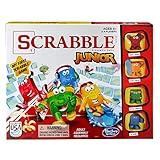
- Letter-matching fun for your little one
- Features cute character tokens for score keeping
- Features cute character tokens for score keeping
- Players create their own words in the advanced level
- Scrabble Junior is letter-matching fun for your little one
I joined, but the game will not start
The host controls when the game begins. Stay on the lobby screen until the host clicks Start. If you are trying to join after the game began, the host must have enabled Allow Late Joining.
Blooket is blocked or buttons do not work
Browser extensions, including AdBlock and similar blockers, can interfere with Blooket even though Blooket does not run ads. Temporarily disable the extension for Blooket or try a browser profile without it. School networks and firewalls can also interfere with the site: Blooket says that firebaseio.com must be accessible for parts of its backend to work. Ask a network administrator to review that restriction if joining or hosting fails on a school network.
I cannot log in
Blooket usernames are case sensitive. Enter the username with the same capitalization used when the account was created. If you only need to join a live game, try joining without logging in; an account is not required for that activity.
What’s actually slowing this PC down?
Pick the symptom - the matching free tool is one click away.
Quick Recap
Quick reference
| What you want to do | Where to start | Account required? |
|---|---|---|
| Join a live game | play.blooket.com plus the host’s Game ID, QR code, or Join Link | No |
| Host a game | Question set → Host → game mode → Host Now | Typically, yes |
| Play solo | Discover or My Sets → question set → Solo | Use the account interface available to you |
| Complete Homework | Teacher’s Homework Link or QR code → Get Started | No |
Product prices and availability are accurate as of the date/time indicated and are subject to change. Any price and availability information displayed on Amazon at the time of purchase will apply.




