What’s actually slowing this PC down?
Pick the symptom - the matching free tool is one click away.
Gamma is a free PlayStation 1 emulator for iPhone and iPad, but it does not include games. To use it, install Gamma from the App Store, add a PS1 game image you are legally entitled to use, import it through the Files app, and then launch it from Gamma’s library. Gamma supports touch controls, compatible controllers, save states, memory cards, screenshots, and multi-disc games.
The current App Store listing requires iOS or iPadOS 15.0 or later. Gamma is developed by ZODTTD LLC and is not affiliated with Sony or PlayStation.
As an Amazon Associate I earn from qualifying purchases.
What you need
- An iPhone or iPad running iOS or iPadOS 15 or later.
- Gamma – PS 1 Game Emulator installed from the App Store.
- A PS1 game image you created from a disc you own or otherwise have the legal right to use.
- Enough free storage for the game and, if necessary, temporary archive extraction.
- Optional: a compatible Bluetooth, wired, MFi, PlayStation, Xbox, or other iOS-compatible controller.
- Optional: a compatible PS1 BIOS obtained through a lawful backup process.
Copyright and backup laws differ by country and region. Gamma does not supply commercial PlayStation games, and this guide does not link to ROM or BIOS download sites.
Free tools Windows power users keep installed
One-click scans. No signup required.
Install Gamma from the App Store
Open the App Store and search for Gamma – PS 1 Game Emulator, or use the official App Store listing. Confirm that the developer is ZODTTD LLC, then tap Get and authenticate the download.
#1 Best Overall

- 【High Stable Signal】: Our wired ps2 controller has a premium cable, making the connection between the wired controller and your ps2 console having more stable signal and without any delay.
- 【Plug and Play Wired PS2 Controller】: This controller is designed with cable, plug and play, without needing extra wireless receiver for connection, save your time at learning how to connect the controller and ps2 console.
- 【Ergonomic Design】:Our wired controller for PS2 is perfectly suitable for human beings palms, all the buttons are complied with your hands and make you not feel fatigue when you handhold the controller for a long time.
- 【Double Vibration Motors】: This PS2 controller is built in double vibration motors, every motions and each game steps,as if put yourself into a realistic game world and providing you with more comfortable and more exciting gaming experience.
- 【Compatible with PS2/PS2 Slim/PS1】: Our wired ps2 controller is compatible with PS2/PS2 Slim/PS1, and we provide 2pcs wired ps2 controllers for you, suitable for playing ps2 games together with your friends and family, relaxing your life now!
Gamma is free to download, although it contains advertising and offers optional in-app purchases. The U.S. listing showed Gamma Pro – Remove Ads at $4.99 during the research period; prices and availability can vary by country and may change.
Prepare the PS1 game file
Gamma’s official importing guide lists .bin, .cue, .iso, and .img files. The App Store listing also describes support for CHD, PBP, MDS, ZIP, RAR, and ECM. Support for 7z has been associated with Gamma Pro and particular app versions, so check the current listing before relying on it.
Keep CUE and BIN files together
Many PS1 games are stored as a .cue file plus one or more .bin files. The CUE file describes the disc’s tracks, including CD audio. Keep every file belonging to the same disc in one folder and import the matching CUE file when one is available.
Importing only one BIN file can cause a game to fail to boot, lose music, or load incomplete data. If the CUE file refers to a specific BIN filename, do not rename the BIN unless you also update the CUE file correctly.
Import a game using the Files app
This is the simplest transfer method for most iPhone and iPad users.
Rank #2

- 【Compatible with PS2/PS2 Slim/PS1】: Our wireless ps2 controller is compatible with PS2/PS2 Slim/PS1, suitable for playing various ps2/ps1 games, spending leisure time accompany friends and family by playing games together
- 【2.4GHz Wireless Connection】: We provide a 2.4GHz wireless receiver for this ps2 controller, only need to insert the wireless receiver into the ps2 console and wait to connect with the wireless ps2 controller, easy to operate and convenient to use
- 【High Stable Signal】: Our wireless ps2 controller resolves the issue of disconnection and will have stable signal once the ps2 controller has been connected successfully, don't worry the signal interruption any more.
- 【Comfortable for Palm Structure】:Our wireless controller for PS2 is designed for human beings palms, when the wireless controller is handheld by your hands, you don't feel fatigue even if you have played games for a long time, giving you a comfortable gaming experience
- 【Dual Vibration Motors】: Our PS2 controller wireless is installed with dual vibration motors, every motions and each race match shaking touch feeling, giving you more realistic and more immersive gaming feel
- Open the Files app.
- Browse to the game in On My iPhone, iCloud Drive, or another enabled storage provider.
- For a CUE/BIN game, confirm that the CUE and all referenced BIN files are together.
- Touch and hold the game file. For a multi-track game, select or share the matching CUE file rather than an individual BIN where possible.
- Tap Share.
- Select Gamma from the share sheet.
- Wait for the import to finish.
- Open Gamma and check its game library.
- Tap the imported title or cover art to start it.
Gamma’s official importing guide documents the Files-app share workflow. Depending on the iOS and Gamma versions, the app may also provide a + button or an Import command. Use that control to select the file through Apple’s document picker if sharing is inconvenient.
If Gamma is missing from the Share sheet
- Tap More in the share sheet and look for Gamma.
- Open Gamma and use its + or import control.
- Move the file from a cloud provider to On My iPhone, then try again.
- Extract the archive in Files if the installed Gamma version does not accept that archive type.
- Keep the complete disc folder together instead of sharing only one file.
Labels and icons can differ between iOS and Gamma versions, so look for the import function rather than relying on one exact button design.
Do these 3 things before closing this tab:
1Clear out junk files and repair common Windows errors2Scan for outdated or missing drivers - takes under a minute3Repair Windows errors before they cause bigger problemsTransfer games from a Mac or PC
Modern macOS with Finder
- Connect the iPhone or iPad to the Mac.
- Open Finder and select the device in the sidebar.
- Open the device’s Files section.
- Find Gamma in the list of file-sharing apps.
- Drag the game files into Gamma’s document folder.
Windows or older macOS with iTunes
- Connect the device and open iTunes.
- Select the iPhone or iPad.
- Open the Files or file-sharing section.
- Select Gamma.
- Drag the game files into Gamma’s document area.
These computer-transfer steps come from Gamma’s official importing documentation. After copying, open Gamma and allow a moment for the library to update.
Import from iCloud Drive or another cloud service
- Upload the legally obtained game file to iCloud Drive or another supported cloud provider.
- Open Files on the iPhone or iPad.
- Navigate to the provider’s folder.
- Touch and hold the game file.
- Tap Share, then choose Gamma.
Importing a game through Files is different from synchronizing saves or app data. Gamma’s App Store description mentions Google Drive and Dropbox syncing, but review Gamma’s privacy policy and terms before enabling cloud features, particularly if they may include game files, BIOS files, or save data.
Start a game and configure controls
After the import completes, open Gamma, tap the game in the library, and wait for it to boot. Gamma provides on-screen controls and supports portrait and landscape controller layouts. Tap the screen or open the in-game pause menu to access emulator controls when needed.
Rank #3
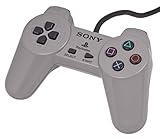
- Original Sony Playstation Controller
Newer versions include analog-related options, including an Analog As Pad setting, L3/R3 controls, customizable controller layouts, enhanced rendering, and other per-game options. Exact menu names can vary by version.
Connect a physical controller
- Put the controller into pairing mode.
- Open Settings on the iPhone or iPad.
- Tap Bluetooth.
- Select the controller when it appears.
- Open Gamma and start a game.
- Open Gamma’s pause or controller settings if buttons need mapping.
- Test the D-pad, face buttons, shoulder buttons, Start, Select, and analog sticks.
The App Store listing identifies support for compatible PlayStation, Xbox, MFi, Bluetooth, wired, and Bluetooth-keyboard controllers. Pairing and button mapping can vary by controller firmware and iOS version. Games designed for analog input may require an analog controller layout, an analog-mapping option, or a physical controller.
Save progress correctly
In-game saves and memory cards
Use the game’s own save points for important progress. These memory-card saves most closely reproduce original PS1 behavior and are generally more portable than a temporary emulator state.
Gamma save states
Gamma also supports save states, allowing you to save at almost any point. They are useful for difficult sections or short sessions, but they are not identical to memory-card saves.
- Use normal in-game saves as your primary backup.
- Use save states for convenience.
- Keep more than one state for difficult sections.
- Do not assume a save state will work after moving files or changing emulator versions.
- Back up or export memory cards where Gamma’s current version provides that option.
Does Gamma need a PS1 BIOS?
Many PS1 games can start in Gamma without a BIOS, but it would be inaccurate to promise universal BIOS-free compatibility. Some titles or configurations may work better with a correct regional BIOS, and some may require one.
Recommended Free Tools
Rank #4

- DUAL VIBRATION MOTORS: Each controller features two built-in vibration motors, delivering immersive, realistic feedback during sports and fighting games.
- STABLE WIRED CONNECTION: The premium 5.9-foot cable ensures a reliable, lag-free connection between the controller and your PS2, PS2 Slim, or PS1 console.
- PLUG AND PLAY: No setup or configuration needed—simply plug the wired controller into your console and start playing immediately.
- ERGONOMIC DESIGN: Contoured to fit comfortably in your hands, this controller reduces fatigue during extended gaming sessions.
- 2-PACK VALUE: Includes two wired PS2 controllers in the package, allowing you to enjoy multiplayer games with friends and family.
A BIOS is system firmware, not a game file. If Gamma asks for one, use a BIOS obtained from your own PlayStation or another lawful backup source. Do not download one from an unauthorized ROM site. Gamma’s update history indicates that fewer games need a BIOS than before and that an imported BIOS can be removed through the app.
Play multi-disc games
Gamma advertises multi-disc support. A multi-disc game may be packaged as a single multi-disc PBP file, or as separate disc images such as Disc 1 and Disc 2.
- Keep each disc’s complete file set together.
- Import all discs into Gamma if the game uses separate images.
- Start the first disc and play until the game requests the next one.
- Pause the game and look for a Disc, Swap Disc, or similarly named command.
- Select the next disc and resume.
Exact menu wording can change between versions. Do not eject or replace a disc until the game has reached its disc-change screen.
Independent reader supportYour contribution helps us test, update, and keep practical guides available for everyone.Fix common Gamma problems
| Problem | Likely cause | What to try |
|---|---|---|
| Game does not appear | The import did not complete or the file is in an unsupported location. | Re-import through Files or Gamma’s picker. Move the file to On My iPhone first. |
| Game will not boot | Incomplete, invalid, or unsupported disc image. | Confirm it is a PS1 image, preserve all related files, extract the archive if necessary, and re-copy it. |
| No music | Only one BIN file was imported, or the CUE references the wrong filename. | Restore the complete CUE/BIN set and import the matching CUE file. |
| Black screen | Compatibility, region, image, or BIOS issue. | Try the correct regional image, a lawful BIOS, legacy compatibility mode, or another graphics setting. |
| Controller does not work | Bluetooth pairing or button mapping problem. | Disconnect and re-pair the controller, remap it in Gamma, and test touch controls. |
| Save disappeared | A save state was confused with a memory-card save, or files were moved. | Use the game’s normal save system and back up or export memory cards when available. |
| Import fails | Insufficient storage or an archive Gamma cannot extract. | Free storage, extract the archive in Files, and retry with the complete game folder. |
| European or Japanese game behaves incorrectly | Region-specific compatibility or BIOS expectations. | Use the correct regional files, try compatibility options, and check current in-app help. |
No music in a CUE/BIN game
CD-audio tracks are a common reason a PS1 game boots without music. Check that the CUE file and every BIN file it references are present. If the game uses an SBI patch for copy-protection or timing data, keep that file with the relevant game files and use Gamma’s current SBI import or patch option where provided.
Graphics or sound are wrong
Gamma includes optional enhancements such as high-resolution rendering, geometry correction, CRT effects, and enhanced audio. These can improve some games but may introduce visual or performance differences in others. Try the original or lower resolution, turn off aggressive enhancements, toggle enhanced audio, and test legacy compatibility mode.
Best Value

- Original Gray Playstation Dual Shock Controller
If the problem appears only with a controller, switch temporarily to touch controls. That helps separate an emulation issue from a pairing or mapping issue.
Gamma’s update history records fixes involving imports, CUE and SBI selection, RAR and ECM support, archive extraction, European and Japanese games, and legacy compatibility. If the problem persists, check the current App Store notes and Gamma’s in-app help or bug-report function.
Is Gamma Pro necessary?
No. Gamma is available as a free download and ordinary supported games do not universally require Gamma Pro. The U.S. App Store listing observed during the research period showed an optional $4.99 Gamma Pro purchase to remove ads.
PC Slower Than It Used to Be?
A free scan shows the junk files, broken settings and background clutter dragging Windows down - then fixes them in one click.Free scan · Windows 10 & 11Outdated Drivers Are Slowing You Down
One free scan finds every outdated or missing driver and matches the right update for your exact hardware.Free scan · exact hardware matchSome format support, including 7z importing, has been associated with Gamma Pro in update notes. Because feature availability and pricing can change, check the current in-app purchase description before choosing a format specifically for that reason. If you only want to test one game, it is sensible to confirm that the game imports and runs before paying for an upgrade.
When Gamma is the right choice
Gamma suits users who want a dedicated PS1 app with a straightforward Files-based import process, touch controls, controller support, save states, screenshots, cover art, and optional visual enhancements.
A different emulator may be preferable if you want one app for multiple console generations, extensive per-game configuration, or a multi-system workflow. RetroArch, for example, is designed for broader multi-system use but generally requires more setup. Delta is aimed primarily at other console families rather than dedicated PS1 emulation. Check current iOS availability and features in your region before choosing an alternative.
Quick Recap
Final setup checklist
- Gamma is installed from the official App Store listing.
- The device runs iOS or iPadOS 15 or later.
- The game file was obtained legally.
- The complete CUE/BIN set or other required disc files are together.
- The game was imported through Files or Gamma’s import picker.
- The game appears in Gamma’s library and boots.
- A controller is paired and mapped if you are using one.
- An in-game memory-card save has been tested.
- Save states are being used as convenience saves, not as the only backup.
- Multi-disc files are imported before the game asks for the next disc.
Product prices and availability are accurate as of the date/time indicated and are subject to change. Any price and availability information displayed on Amazon at the time of purchase will apply.
The Tool Desk
Outbyte PC Repair FREEClear out junk files and repair common Windows errorsFree Scan →Outbyte Driver Updater FREEFix the driver behind crashes, sound loss and screen glitchesFind Drivers →



