What’s actually slowing this PC down?
Pick the symptom - the matching free tool is one click away.
In The Crew 2, open the secondary or Tools menu to find the documented route out of the game. On PC, press B; on Xbox, the cited guide lists Y; on PS4, it lists triangle. Choose Select Profile to return to the title screen, then exit there. Menu prompts may differ on newer console versions.
Quit The Crew 2 using the documented menu route
- Open the secondary or Tools menu: press B on a keyboard, Y with an Xbox controller, or triangle with a PS4 controller.
- Select Select Profile to return to the title screen.
- Choose the exit option from the title screen.
PCGamesN documented this path in June 2018, and Ubisoft Support described the B/Y profile-change route in a May 2019 Steam reply. The cited guide gives the PS4 button mapping. These are dated instructions, not a current control manual for every platform.
| # | Preview | Product | Price | |
|---|---|---|---|---|
| 1 |
|
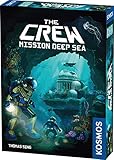
The Crew: Mission Deep Sea | Cooperative Card Game | $12.49 | Buy on Amazon |
| 2 |

|
The Crew: Family Adventure - Marooned in Paradise | Kids Co-op Card Game | $11.19 | Buy on Amazon |
| 3 |

|
The Crew 2 (PS4) | $25.97 | Buy on Amazon |
| 4 |

|
The Crew 2 - PlayStation 4 | $24.80 | Buy on Amazon |
What to do if the quit option is hard to find
The exit option may not appear where you expect in the pause menu. A 2024 Steam discussion includes player reports of a Quit Game option in the menu opened with B, but that observation is anecdotal. Check the on-screen prompts in your version if the labels or controls differ.
PC alternatives and controller support
On PC, a Steam user reported that Alt+F4 closed the game and saved progress. That is an individual report, not a guaranteed or official save method; use the in-game menu route when possible.
#1 Best Overall
- A follow-up to the Kennerspiel des Jahres winner, The Crew, with an underwater narrative,
- The Crew: Mission Deep Sea has the same innovative cooperative twist on the classic trick-taking card game...with a few new surprises!
- Work together to win the right tricks at the right time.
- Communication is essential but limited when underwater - be quick, creative, and strategic.
- Difficulty increases as the game progresses; perfect choice for players of all skill levels.
A controller is optional on PC: Ubisoft’s 2018 PC features article lists mouse-and-keyboard support and tested Xbox 360, Xbox One, and Xbox One Elite controllers. It does not establish support details for every later controller model.
Independent reader supportYour contribution helps us test, update, and keep practical guides available for everyone.Console control caveat
The available instructions list Y for Xbox and triangle for PS4, but do not verify the current prompts on Xbox Series consoles or PS5. If you are playing on newer hardware, follow the button prompts shown in your game rather than assuming the older mapping still applies.
Quick Recap
Rank #4
- Jump in the driver seat of exotic cars, bikes, planes, and boats as you dominate the land, air, and sea
- Go where your heart takes you and travel the USA like never before: with a massive open world and No limits
- Seamlessly Switch between vehicles with the fast fav feature, to go from boat to car to plane to motorcycle, without loading screens
- Team up or Ride solo as you enter the exciting motors ports realms of Street racing, pro-racing, off-roading, and Freestyle
- Stay connected as you compete for Street cred, create exhilarating challenges for others, and share your most memorable moments
Rank #3
- Be the Champion You Want to Be - Join four different motorsports families from around the country: street and pro racers, off-road experts, and freestylers. They'll hook you up with new rides, and they'll introduce you to their own unique motorsports culture and set of disciplines. Through competitions and chance encounters, find and hone your personal style, collect and customize your dream rides, show them off in your HQ, and make your mark on the entire US motorsports scene
Rank #2
- YOUR CREW IS YOUR FAMILY - Share your love of The Crew with up to 5 family members, or learn to play it together with this new family-friendly version, ages 8 & up
- AWARD-WINNING - A family-friendly addition to the Kennerspiel des Jahres winning series, The Crew. In these trick-taking games, the winner of each round is the one who puts down the highest card of the original suit.
- MISSIONS ABOUND - The logbook will have you searching for supplies and battling pirates across 35 unique missions.
- MAP OUT YOUR ACTIONS - Illustrated game board provides bright and bold visuals to see all the possibilities. Use it to help show progress and plan the next move.
- POWER-UPS - All-New power-ups and abilities allow you to turn the tide when facing your toughest challenges
Product prices and availability are accurate as of the date/time indicated and are subject to change. Any price and availability information displayed on Amazon at the time of purchase will apply.




