Free tools Windows power users keep installed
One-click scans. No signup required.
Use Sprint + R1 + X on PlayStation, Sprint + RB + A on Xbox, or Sprint + C on keyboard. Start with the ball close enough for your player to control it, then trigger the input to lift it over a challenge.
Rainbow flick controls by platform
| Platform | Input |
|---|---|
| PlayStation | Sprint + R1 + X |
| Xbox | Sprint + RB + A |
| Keyboard | Sprint + C |
These are the inputs in Epic Games Store’s beginner guide. Insider Gaming lists R1 + X and RB + A for controllers, but omits Sprint; use the more complete Epic input if the shorter combination does not work. If you have changed your bindings, check the in-game controls menu for the assignment on your current setup.
How to perform the move
- Bring the ball close to your player so it is under control. Insider Gaming’s controls guide advises waiting until the ball is in front of you and close enough to control.
- Face or move toward the play you want to make, such as lifting the ball over an approaching defender.
- Use the rainbow-flick input for your platform. On keyboard, Sloclap’s mouse-and-keyboard guidance says to treat the mouse like a joystick; moving diagonally can help aim at different angles. This is aiming advice, not an alternate flick key.
What to expect from a rainbow flick
The flick lifts the ball and can help you get it over an obstacle, but it also takes the ball out of close control. A defender who anticipates the move may challenge the ball, so timing and direction matter. The animation and outcome can vary with the ball’s state: Sloclap’s launch-era Patch #0 notes discuss both a volley variation and chained flicks, rather than promising one identical interaction in every situation.
Those notes, published June 16, 2025 and updated July 2, 2025, said the first ball interaction using the volley variation should feel fast and fluid, while chained flicks still received balancing changes to avoid keeping the ball out of play too long. That describes launch-era tuning, not necessarily the exact balance today.
Quick wins for a faster PC:
Repair Windows errors before they cause bigger problemsFix Now →Fix the driver behind crashes, sound loss and screen glitchesFind Drivers →Quick Recap
Rank #3
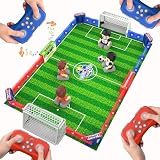
- 【Complete RC Soccer Arena, Not Just a Toy】Bring home a full remote control soccer toy experience with a large 33.2" x 22.2" game field, 4 RC soccer players, 4 remotes, 3 balls, 2 goals, field fences, LED scoreboard, lights, and sound effects. More than a simple soccer toy, this foosball table game creates a real mini match setup for kids and families.
- 【1-4 Player Soccer Battle for Family Game Night】Designed for solo practice, 2-player matches, or exciting 4-player team battles, this soccer board game turns any table or floor into a competitive soccer arena. Kids, parents, friends, and adults can join the action together, making it a fun indoor family game for parties, playdates, weekends, and holiday gatherings.
- 【Remote Control Action with Shooting, Defense & Scoring】Each player uses a remote to move, attack, defend, and shoot toward the goal. The LED scoreboard helps track the match, while lights and sound effects make every goal feel more exciting. This RC soccer game keeps kids engaged with real competition instead of passive screen time.
- 【Rechargeable Players with Long-Range Control】The RC soccer players are powered by a rechargeable 3.7V lithium battery and provide up to 1 hour of playtime per charge. The remotes offer control from up to 50 meters, giving players smooth movement and responsive gameplay. AA batteries for the remotes are included, so kids can start playing right out of the box.
- 【Premium Soccer Gift for Boys, Girls & Families Ages 6+】Made of durable ABS plastic and certified to CPC, ASTM, and CPSIA standards, this remote control foosball table game is built for repeated matches and family fun. A standout birthday gift, Christmas gift, or soccer gift for boys and girls ages 6-8, 8-12, teens, and adults who love competitive games.
Rank #2

- Supported Multi-Platform: Switch/Switch 2 (NO support wake-up function)/iOS/Android/Windows PC (Notice:Not compatible with Xbox, PlayStation or GeForce Now, For game platforms not mentioned, please consult customer service before buying)
- Connection Modes: Wired/Bluetooth/Wireless Dongle(Connect to PC via Bluetooth : Select iOS mode, but it's not recommended; Dongle is more stable)
- 【Innovative Intelligent Interactive Screen】Manba One V2 wireless game controllers create a new era of controller screens; Equipped with a 2-inch display, no App & software needed, you can set the pc controller directly through the screen visualization, More convenient operation
- 【Micro Switch Button】Manba One wireless controller has Micro Switch Button and ALPS Bumper; The 6-axis gyroscope function makes switch games more immersive
- 【Customize Your Own Controller】The intelligent interactive screen allows you to easily set vibrations, buttons, joysticks,lights, etc., without the need for complex key combinations; 4 configurations can be saved to unlock your own gameplay for different games; The 4 back keys support macro definition settings, and you can activate the set character's ultimate move with one click
#1 Best Overall

- 【Wide Compatibility Platform&Wireless Bluetooth Connection】Wireless Controller for PS5 compatible with PS5 Pro/Slim,Steam,iOS,MAC,Android/PC Windows 10 and Above.Quick Connect: Plug & play on PS5—press HOME for instant pairing (USB-C cable for first-time setup). Works on Windows PCs too! (No drivers, no hassle)—switch from God of War on PS5 to Valorant on PC in seconds.Perfect for multi-device gamers.Our wireless controller for PS5 allows you to enjoy delay free gaming within a range of 33 feet.
- 【Built-in 1500mAh Lithium Battery&Hall Effect Joysticks】 - .Our wireless plays-tation 5 controller built-in 1500 mAh lithium battery, supporting Type-c port charging, it only needs 2-3 hours of charging and can be used for 10-14 hours.No more stick drift! Hall sensor techeliminates physical wear—joysticks stay precise after 100k+ moves. 40% wider dead zone reduction vs. standard controllers. Built to outlast even the longest PS5 sessions—trust it for years of gaming.
- 【Programmable&Autro Turbo】Buttons "ML/MR" on the back of P-S5 controller can map basic function keys of X/口/O/△/LB/RB/L3/R3/D-PAD, achieving 1-16 combination function keys.Program complex combos (e.g., R2+Triangle+L3) to a single button for easy noob combos in Street Fighter 6. Turbo mode turns single taps into auto-fire—dominate Elden Ring’s bosses with infinite arrows.This turbo controller for PS5 helps you unleash continuous attacks without repeatedly mashing buttons during critical moments.
- 【3.5mm Stereo Jack&4-Speed Dual Vibration Motors&6-Axis Motion Control】 Wireless plays-tation 5 controller has a 3.5mm stereo jack that can connect headphones and microphones,allowing users to receive and transmit audio simultaneously.Feel every explosion with dual haptic motors & aim like a pro using the 6-axis gyro. Built-in 3.5mm jack + speakers let you hear footsteps/weapon reloads up close. Ideal for FPS (Apex/COD) or story-driven games.And our's 4-speed dual motor regulation has a memory function.
- 【Mute Button&Built-in Microphone】Short press the Mute key, indicating that the controller microphone has been turned off.Press and hold the Mute key, and indicating that all audio on the controller has been turned off (vibration has also been turned off).Built-in Microphone for Instant Voice Chat-Communicate clearly without extra headsets using the built-in microphone. Press the audio button to quickly turn audio on/off during team shooters, battle royale, or co-op adventures.
If the input does not work
- Check that the ball is close enough for your player to control it before triggering the move.
- Confirm the Sprint and flick bindings in the in-game controls menu, especially if you use custom controls.
- Remember that Rematch has received gameplay updates. The official site’s patch 1.205.003 announcement, released September 29, 2026, says Season 5 changed core gameplay, including dribbling; it does not specify a rainbow-flick binding change. See the official Rematch news page for updates.
Product prices and availability are accurate as of the date/time indicated and are subject to change. Any price and availability information displayed on Amazon at the time of purchase will apply.




