Do these 3 things before closing this tab:
1Fix the driver behind crashes, sound loss and screen glitches2Clear out junk files and repair common Windows errors3Scan for outdated or missing drivers - takes under a minuteIf BitLife data disappeared, first check whether you deleted and reinstalled the app. BitLife says that reinstalling causes earlier game data to be lost. If you did not reinstall, contact BitLife support with the missing-data details, your device model, and operating system. Restoring a paid purchase is a separate process and will not restore saved lives or achievements.
First identify what is missing
BitLife progress and paid purchases are different things. A saved life, ribbon, heirloom, or achievement is game data; a paid feature is a purchase entitlement tied to the platform account used to buy it. Use the relevant path below rather than treating purchase restoration as save recovery.
If a saved life, ribbon, heirloom, or achievement is missing
You deleted and reinstalled the app
BitLife says that if you deleted and reinstalled the app, your earlier game data is lost. The help guidance does not offer a recovery procedure for that situation, so do not expect restoring a purchase to bring back saved lives, ribbons, heirlooms, or achievements. BitLife’s lost-progress guidance addresses this distinction.
You did not delete and reinstall the app
Contact BitLife Support and describe exactly what is missing. Include your device model and operating system. If reporting a technical issue, also explain what happened and the steps that reproduce it. These details help support assess the problem; they do not guarantee that the data can be recovered.
The Tool Desk
Outbyte PC Repair FREERepair Windows errors before they cause bigger problemsFix Now →Outbyte Driver Updater FREEScan for outdated or missing drivers - takes under a minuteDriver Scan →#1 Best Overall

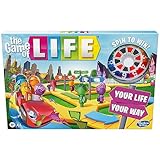
- Choose an awesome vacation: take a ski trip, a safari, or go snorkeling in a coral Reef. Choose an awesome vacation from adventurous to relaxing
- Choose an interesting career: players can choose from 31 Career cards featuring unusual or quirky careers such as ice cream flavor Maker or a secret Agent
- Great family game: do you remember playing this classic Hasbro board game from your childhood. With instant setup and easy play, this exclusive edition is great fun to play when the family is together
- Life is full of adventures: this edition of the game of life game includes 115 cards offering exciting choices As players move through the twists and turns of life
- Play spin to win: who's bound for instant wealth and fortune. Play spin to win and find out. At the end, players pay debts, add up the wealth, and whoever has the most money at the end of the game wins
If a paid purchase is missing
Use the same platform account that made the original purchase. BitLife’s restoration steps differ by platform, and its guidance says purchases cannot be transferred between Android and iOS. See BitLife’s purchase-restoration instructions.
iPhone or iPad
- Open BitLife and go to the game’s Settings menu.
- Choose “Restore Earlier Purchase…”
- Make sure the device is signed in with the Apple ID used for the original purchase.
Apple’s general guidance is that an in-app purchase must be restored from within the app; consumable purchases cannot be restored. That is platform context, not a guarantee about any particular BitLife purchase. Apple’s restore-purchases guidance explains the distinction.
Rank #2
- MAKE CHOICES: Players get to make some big life decisions They can choose whether or not to go to college, to get married, grow their family, or retire early
- WILL IT PAY TO INVEST: Players can take a chance to grow their money by investing in numbers on the board Get paid every time someone spins that number
- Will it pay to invest: players can take a chance to grow their money by investing in numbers on the board get paid every time someone spins that number
- Kids can pick their own path: buckle up and take a spin in this fun family board game, every crossroad brings exciting twists, turns, and adventures
Android
- Sign in to Google Play Services with the account used for the original BitLife purchase.
- Launch BitLife and check whether the purchase is recognized.
If the original purchase was on the other platform, BitLife says it cannot be transferred. This purchase rule does not establish whether a particular saved game can be moved between Android and iOS.
Independent reader supportYour contribution helps us test, update, and keep practical guides available for everyone.Does Google Play Games back up BitLife saves?
Google says some games autosave progress when players are signed in with Google Play Games. Its statement applies to games that support the feature; BitLife’s cited guidance does not confirm that BitLife saves are backed up this way. Do not rely on Google Play Games as a BitLife recovery method unless BitLife confirms support for your case. Google Play Help’s autosave explanation describes the general feature.
Quick Recap
Rank #4

- GENERATIONAL SHOWDOWN: Step into the shoes of different generations and settle the debate on who truly reigns supreme in this fun twist on The Game of Life, featuring the Greatest Generation, Baby Boomers, Gen Xers, Millennials, and Gen Zers!
- PICK YOUR DESTINY: Choose a generation and navigate life's major events, discovering how different age groups handle everything from parenting to side hustles, creating an entertaining and thought-provoking gameplay for the whole family.
- LIFE'S TWISTS & TURNS: Embark on a life path filled with humorous cultural and lifestyle references from each generation! Generational Spaces and Action Cards make every turn on the gameboard an exciting, unpredictable, and memorable ride.
- INCLUSIVE & ACCESSIBLE: Joy For All's version of The Game of Life features bigger cards with easy-to-read text to ensure a fully inclusive experience, making it accessible for players of varying abilities and ages—from kids and teens to older adults.
- JOY FOR ALL GAMES: Explore the complete collection of Joy for All's reimagined classic board games, including 3-in-1 Scrabble Bingo, The Game of Life Generations, and Trivial Pursuit Generations, for the ultimate family game night experience that caters to all interests, ages, and abilities.
Rank #3
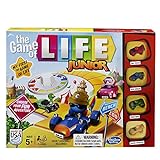
- THE GAME OF LIFE GAME FOR YOUNGER KIDS: In The Game of Life Junior family board game, kids get to make their own choices and engage their imagination to create a fantastic day
- CHOOSE AN ADVENTURE: Have a ball on the beach? Go to the zoo? Visit a chocolate factory? Kids try to visit as many places on the board as they can—and get a star at every stop. The first to earn 10 stars winsCHOOSE AN ADVENTURE: Have a ball on the beach? Go to the zoo? Visit a chocolate factory? Kids try to visit as many places on the board as they can—and get a star at every stop. The first to earn 10 stars wins
- ADORABLE 3-D CAR MOVERS: In this fun kids game, choose from 4 brightly colored 3-D car movers—Pink Cruiser, Blue Wheeler, Green Rider, and Yellow Speedster—and get movingADORABLE 3-D CAR MOVERS: In this fun kids game, choose from 4 brightly colored 3-D car movers—Pink Cruiser, Blue Wheeler, Green Rider, and Yellow Speedster—and get moving
- TELL A STORY, SING, AND PERFORM FUNNY ACTIONS: Action cards prompt players to tell a story, act out an impression, or even sing. These cards can also give or take away stars or money
- EASY AND QUICK FOR ANYTIME FUN: This fast-paced preschool game is easy to set up, learn, and play, so it’s just right for playdates, Family Game Night, and more EASY AND QUICK FOR ANYTIME FUN: This fast-paced preschool game is easy to set up, learn, and play, so it’s just right for playdates, Family Game Night, and more
Product prices and availability are accurate as of the date/time indicated and are subject to change. Any price and availability information displayed on Amazon at the time of purchase will apply.




