What’s actually slowing this PC down?
Pick the symptom - the matching free tool is one click away.
For a composed character or scenery photo, open the Paimon Menu, select the camera or Take Photo option, frame the shot, and use the capture control shown on screen. To capture gameplay or screens the in-game photo interface cannot capture, use your device or platform’s screenshot feature instead.
Choose the right capture method
| What you want to capture | Use | What to know |
|---|---|---|
| A composed image of your character or the scenery | Photo Mode, opened from the camera or Take Photo option in the Paimon Menu | It provides an in-game interface for composing a shot. The exact controls shown may vary. |
| Gameplay, inventory, map, or another screen Photo Mode does not capture | Your device or platform’s screenshot feature | A HoYoLAB community post reports that Photo Mode does not capture inventory or map screens. Check the current game version; use your platform’s capture controls for those screens. |
Photo Mode and a device-level screenshot are different: the first is an in-game camera for arranging a photo; the second captures the screen through your operating system or console.

As an Amazon Associate I earn from qualifying purchases.
Open Photo Mode from the Paimon Menu
- Open the Paimon Menu. HoYoverse’s October 2020 instructions say to tap Paimon’s portrait on mobile, press Esc on PC, or press Options on PS4.
- Select the camera or Take Photo option. A HoYoLAB community reply locates it on the left side of the menu; follow the current menu labels if they have changed.
- Compose the character or scenery image using the controls shown in Photo Mode.
- Use the on-screen capture control to take the photo. Check the interface and your device’s gallery or storage for the result.
Those menu-opening controls are specific to the platforms listed in HoYoverse’s article; they should not be assumed to describe PS5 or Xbox controls.
Take a screenshot of gameplay or another screen
When you need to capture a screen that Photo Mode cannot show, use the screenshot or capture function built into your current device or platform. Its button combination, interface, and save location depend on the system and may change. Use the current system capture controls, then check that platform’s gallery or capture library; there is no verified universal shortcut or file path for every current version of PC, mobile, PlayStation, and Xbox.
#1 Best Overall

- Genshin Impact Gift Set: package included 1 pack drawstring bag, 50 Pcs Cartoon Stickers of no-repeat stickers, 1 pack lanyard, 2 pack keychains, 2 pack bracelets, 4 pack button pins, 3 pack Tattoo Stickers for Genshin Impact fans.
- Genshin Impact Drawstring Bag's size is 15*12.6 inches; Genshin Impact lanyard's size is 17*1 inches(L*W); Genshin Impact stickers' size is 8.5*6.5 inches, the sticker is nice decoration for your laptop/luggage/skateboard etc.
- 2pcs Genshin Impact bracelets with 2 colors, The bracelet can be adjusted; 4pcs Genshin Impact button pins can be used on your bag/t-shirt/jacket/guitar strap and anywhere else you would like, 2.36 inches in diameter.
- 3Pcs Genshin Impact Tattoo Stickers of no-repeat, 2 pack of different keychains.
- If you have any problem, pls contact with us, we promise solve for you within 24h.
How the Kamera gadget differs
The Kamera is an in-game gadget workflow, not simply another name for a device-level screenshot. HoYoverse’s Version 1.3 update notice documented a specific PS4 optimization: “When equipped, using the Kamera directly stores a screenshot with the UI hidden to the local storage.” The notice also said players could “Take a photo and save it to the PS4’s local storage in one single action.” Those statements apply to the PS4 feature described in that historical update notice; they do not establish the same behavior on other platforms or confirm current behavior across versions.
If the Paimon Menu is unavailable on mobile
HoYoverse’s October 2020 instructions say mobile players must first reach the first Statue of The Seven before they can open the Paimon Menu. If you have already reached it and still cannot find the camera option, follow the labels in the current game interface.
Rank #2

- Size : 60 PCS cards in one box. 55Pcs UR and 5Pcs UTR Card Which with Gilded text Size of: 8.8*6.3 cm /3.5*2.5 in
- Playable Characters and Weapons: These cards showcase a wide array of playable characters, each with their own distinct abilities, personalities, and stories.
- Best Collectibles: meticulously crafted world, replete with captivating characters and breathtaking landscapes, offers an immersive and collectible-worthy experience, Value-for-money card combinations are a must for collection!
- Perfect Gift For Boys &Girls: Cards transcend gender boundaries, making them an ideal gift for both boys and girls. With their visually striking designs and engaging gameplay elements, these cards serve as an excellent choice for family gatherings, fostering joy, camaraderie, and unforgettable moments during game nights that appeal to everyone.
- Upgraded Quality: These TCG cards are meticulously fashioned from premium materials, ensuring a tactile and durable experience. The rarest cards boast a lustrous sheen, while the high-definition printing guarantees vivid clarity, allowing every card to shine brilliantly and showcase intricate details that truly come to life. If you have any questions about the product, please feel free to contact us.
Get a cleaner-looking image without hurting performance
Available graphics and image-quality settings depend on the device. A 2024 HoYoLAB photography guide notes that mobile has fewer options than PC and warns that higher settings can overload a device; it also cautions that higher render resolution does not necessarily mean a better-looking result.
Quick Recap
Best Value

- This keychain set includes 7 different keychains, each representing one of the 7 elements in the popular video game Genshin Impact.
- The keychain frames are made of high-quality zinc alloy, while the vision is crafted from durable glass.
- Suitable for anime party decorations, Halloween, Christmas, graduation and birthday gifts.
- Our Genshin Impact vision Keychain set is the perfect accessory for fans of the game and collectors alike. Each keychain is intricately designed to showcase the unique element it represents, making it a great conversation starter and a must-have for any Genshin Impact enthusiast.
- Whether you're looking to add to your personal collection or gift it to a fellow Genshin Impact fan, our vision Keychain set is sure to impress.
Rank #3
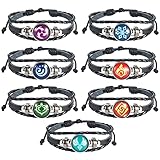
- Complete Element Set - This 7-piece bracelet collection features all elemental designs. Perfect for fans who want to represent every elemental power.
- Customizable Fit - The adjustable drawstring closure ensures a perfect fit for any wrist size (adjusts from 7 to 9.5 inches). Each elemental charm measures 0.71 inches in diameter for balanced visibility.
- Glow-in-the-Dark Feature - These intricately designed bracelets absorb sunlight to create a magical glow at night, making them eye-catching day or night.
- Premium Materials - Crafted with durable woven leather cords and alloy/glass gem charms that maintain their luster through daily wear.
- Ideal Gift Choice - Whether you're shopping for friends who love anime accessories, or treating yourself, this elemental set makes a memorable gift that stands out from ordinary jewelry.
- Adjust only the image-quality settings your device can handle reliably.
- Prioritize stable performance over maximum settings, especially if the game stutters or becomes unstable.
- Use Photo Mode’s composition controls for a deliberate character or scenery image; use a device screenshot when you need the visible game screen.
Product prices and availability are accurate as of the date/time indicated and are subject to change. Any price and availability information displayed on Amazon at the time of purchase will apply.




