If Marvel vs. Capcom Fighting Collection: Arcade Classics keeps crashing on PS4, start with a full console restart, then check for game and system updates. Capcom’s published guidance covers general PS4 game problems; it does not confirm a crash bug or a guaranteed fix specific to this collection. Work through the steps below in order, choosing the disc-specific checks only if you own the physical copy.
Start with a restart and updates
Capcom recommends these general PS4 troubleshooting steps for games that fail to start or work normally. They may help with a temporary loading problem, but are not a confirmed title-specific fix.
As an Amazon Associate I earn from qualifying purchases.
- Turn the PS4 fully off, then start it again. Use the console’s power menu to shut it down completely rather than leaving it in Rest Mode.
- Check for a game update. If the console is connected to the network, highlight the game on the PS4 home screen, press OPTIONS, and select Check for Update.
- Check for a system update. Open Settings > System Software Update and follow any available update prompts.
Capcom’s general guidance is available in its PS4 troubleshooting article and package-copy troubleshooting article.
Free tools Windows power users keep installed
One-click scans. No signup required.
If you play from disc, inspect it
Remove the disc and check its read side for dirt, scratches, or other damage. Capcom warns that even small scratches or dirt can cause operation problems. Do not use a disc with damage or scratches, or with dirt that cannot be removed.
#1 Best Overall

- Experience your Favorite MARVEL vs. CAPCOM classics All in One – Enjoy 7 of your favorite classic titles that helped shaped the MARVEL vs. CAPCOM universe both single player and online.
- To enhance your playability experience, we incorporated the favorite added features from Capcom Fighting Collection including gallery mode, quick save, training mode for all fighting titles, and the high score challenge.
- This collection also includes rollback net code for a smooth and enjoyable experience online. Play casually or competitively through casual, ranked, or custom matches using rules of your choosing!
If simpler steps fail on a package copy
Capcom’s general package-copy guidance lists the following additional options. They are not verified fixes for this particular game. Protect your save before deleting or reinstalling the application.
Restore licenses
On the PS4, go to Settings > Account Management > Restore Licenses > Restore.
Rank #2
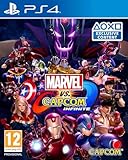
- Adventure horror game from Capcom
- Playstation 4
- Marvel Vs Capcom Infinite (PS4)
Rebuild the database in Safe Mode
- Turn the PS4 fully off.
- Press and hold the console’s power button until you hear the second beep.
- Connect the controller to the console with a USB cable when prompted.
- Select Rebuild Database.
Capcom warns that rebuilding the database can remove folder organization, which you may need to set up again. The USB connection is required to use the controller at this Safe Mode step; the cable itself is not a crash remedy.
Crashes, No Sound, or Screen Glitches?
Random freezes, missing sound and display glitches usually trace back to one bad driver. Find and replace yours safely.Free scan · under a minuteWindows Errors? Fix Them Before They Spread
Repair common Windows errors and clear accumulated junk for a smoother, more stable PC - no reinstall needed.Free scan · no reinstallDelete and reinstall the application only after protecting the save
If the preceding steps do not help, Capcom suggests deleting the installed application data and reinstalling the game. Before doing that, confirm that your save is backed up: Capcom says PS4 save data can be uploaded to PlayStation Plus online storage, which requires a membership. Its guidance does not guarantee that local save data survives every reinstall scenario. See the Capcom FAQ for this collection.
Rank #3

- Casual Matches, Ranked Matches or Custom Matches
- Team up with people from all over the world, dropping in and out as you please. You can also spectate other player's games.
- Compete with other players for the highest score under set rules. Try for the spot at the top of the leaderboards!
- Pick your favorite character and stage, and train to your heart's delight!
- You can view the original arcade release's marquee card at any time while playing.
Decide whether to contact Capcom or PlayStation
Notice whether the crash occurs at startup or during play, and whether other games are affected. Those details help distinguish a game-specific problem from a broader console issue; they do not establish a cause on their own.
- Several games have problems: Capcom says the console may be responsible and recommends consulting the hardware manufacturer.
- Only this game still crashes: If the general steps have not helped, contact Capcom Support with your PS4 model or specifications, when the crash occurs, any error code, and the steps you have tried.
Capcom notes that non-personal diagnostic information, including console model or specifications and error codes, may be shared with hardware manufacturers or relevant parties when needed. Capcom’s support category for the collection does not provide a dedicated PS4 crash fix.
Quick Recap
Best Value

- Face Off with Friends Online: Online play is available across all eight titles, featuring rollback netcode for a strong and stable online experience!
- Hit the Training Bag: Training Mode is now available across all titles with tons of features to help you master combos and setups!
- Expanded Language Support: 14 languages will be supported including English, Latin American Spanish, Brazilian Portuguese, Japanese, French, Italian, German, Castilian Spanish, Russian, Polish, Korean, Simplified Chinese, Traditional Chinese, and Arabic!
- A Museum’s Worth of Content: Explore art and music galleries with official art, concept art, design documents, and more never-before-seen content.
- Customize Your Experience: Fine-tune specific features of your gameplay experience via EX Settings specialized to each game, various Display Filters, button customization, and more.
Rank #4

- UK PSN account may be required for any online features
Product prices and availability are accurate as of the date/time indicated and are subject to change. Any price and availability information displayed on Amazon at the time of purchase will apply.
The Tool Desk
Outbyte Driver Updater FREEScan for outdated or missing drivers - takes under a minuteDriver Scan →Outbyte PC Repair FREERepair Windows errors before they cause bigger problemsFix Now →



