To turn on Builder Pro in Fortnite on PS4, press Options, open Settings, choose Controller Mapping, select Builder Pro, then apply the change. Check the controller diagram shown in your game for the exact button assignments; the layout can be customized and may differ from older guides.
How to enable Builder Pro on PS4
- From Fortnite, press the Options button to open the game menu.
- Choose Settings.
- Open the Controller Mapping page.
- Select Builder Pro from the controller presets.
- Apply the change, then review the controller diagram and prompts displayed in-game.
These steps follow Epic Games’ controller setup instructions for PlayStation.
As an Amazon Associate I earn from qualifying purchases.
Where to check Builder Pro controls
After applying the preset, use Fortnite’s current controller diagram and on-screen prompts to check what each button does. Epic’s setup instructions explain how to select the preset but do not list every current PS4 button assignment. Controls vary by device and can be customized in-game, as Epic notes in its Fortnite controls documentation.
If you have changed bindings, your diagram may not match a guide showing a default layout. Treat the assignments currently displayed in your game as authoritative for your configuration.
#1 Best Overall
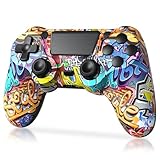
- Super Compatibility - The wireless controller is fully compatible with PS4/Slim/Pro (The first connection to console requires to use the included USB-C charging cable to activate the device). Press and hold the "SHARE+HOME" button on controller for 3 seconds to pair with PC Windows.
- Innovative Features - Revolutionary features like the touch pad, integrated light bar, and built-in speaker offer exciting ways to experience and interact with your games, and its 3.5mm audio jack offers a practical personal audio solution for gamers who want to listen to their games in private.
- Precision Control - The controller buttons are sensitive, providing timely feedback and accurately responding to player actions. The precision and speed of the joystick allow players to more accurately control the movement and aiming of their characters in the game.
- Enhanced Vibration - Feel the action of your favorite games right in your hands as this controller generates intense vibration feedback during all the hits, explosions, crashes and other high-intensity moments of your games.
- 6-Axis Motion Sensing - The 6-axis gyro of the controller can detect the rotation on three different axes, so that the characters or objects in the game can accurately respond to the player's hand movements. This means players can experience a more realistic and precise sense of control in racing, flight simulation, or sports games.
Builder Pro is a preset, not a required layout
Epic lists Old School, Quick Builder, Combat Pro, Builder Pro, and Custom as available controller configurations. Builder Pro provides a ready-made setup; Custom lets you adjust controls to suit your preferences. The current support instructions do not rank the presets by speed or establish Builder Pro as the best choice for every player.
Fortnite’s settings can depend on the mode selected in the lobby or currently being played. Epic advises checking the selected mode when settings appear different or unavailable. Its instructions for changing Fortnite controls also say to select the gamepad tab when using a controller.
Rank #2

- Exclusive Fortnite content includes epic Neo Versa Outfit, epic Neo phrenzy back Bling and 500 v-bucks
- Precision control the enhanced feel, shape, and sensitivity of the dualshock 4 wireless Controller offers players absolute control over all games on the PlayStation 4 system
- Sharing at your fingertips the addition of the Share button makes sharing your greatest gaming moments as easy as a press of a button. Upload gameplay videos and screenshots directly from your system
- New ways to Play revolutionary features like the touch pad, integrated light bar, and built in speaker offer exciting new ways to experience and interact with your games
If Builder Pro does not appear
- Make sure you are looking at the controller or gamepad settings, rather than a keyboard-and-mouse settings page.
- Check which game mode is selected from the lobby; the options shown can depend on the mode.
- If the diagram differs from an online guide, check for custom bindings and follow the in-game diagram.
Why older Builder Pro guides may differ
Epic’s May 24, 2018 State of Development – V5 discussed Builder Pro in the context of console building controls and changes from that version era. It is historical context, not a current PS4 button map. For today’s assignments, use the controls shown in Fortnite rather than assuming an older guide matches your settings.
Windows Errors? Fix Them Before They Spread
Repair common Windows errors and clear accumulated junk for a smoother, more stable PC - no reinstall needed.Free scan · no reinstallOutdated Drivers Are Slowing You Down
One free scan finds every outdated or missing driver and matches the right update for your exact hardware.Free scan · exact hardware matchQuick Recap
Best Value

- 🎮【Attention】It's compatible with PS4/Pro/Slim/Windows PC. When you are connecting it to game console for the first time, you need to use the charge cable in the package. When you are connecting it to PC, you need to hold down 'share + home' for 3 seconds. The controller's white light would flash, and you'll see the controller on your PC, which has the BT name 'wireless controller'.
- 🎮【Unique Design】The Galaxy design is inspired by the designer's love for the vast universe, different colors of nebulae accompanied by meteorites, if you use it at night, with a little light, then, you are not only holding the controller, but the whole universe.
- 🎮【Custom Process】The galaxy design are printed on the controller shell by water transfer process. They are not cheap stickers. We apply a smooth hand feel oil to the surface to ensure that hand sweat will not erode it.
- 🎮【Turbo Function】You can customize any key as a turbo key. First, hold down the 'share' key, then click the turbo key you want to set up successfully. Secondly, you can adjust the turbo frequency. First, hold down the 'share' key, then touch the joystick on the right up and down. There are three gears to adjust in total.
- 🎮【To Be AceGamer】You Can Get:1x Controller for PS4;1x USB-C Charge Cable;1x User Manual. AceGamer specializes in providing customized controllers for game lovers. No matter what problem you encounter, please leave us a message, we will reply to you within 24 hours.
Rank #4
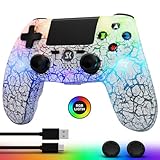
- Adjustable Light Modes: The controller for PS4 features 5 adjustable light modes: breathing light, randomized light flashing, gradient color, single color constant light, and turn-off lights. You can customize the light modes based on your preferences. Stand out from your friends with this feature!
- Wide Compatibility: The wireless controller is fully compatible with PlayStation 4/Pro/Slim/PC/IOS/Android. You'll need to use a USB cable for the initial pairing. After that, a up to 33 feet wireless connection can be established.
- 1000 mAh Battery: The controller for PlayStation 4 is equipped with a 1000 mAh high-capacity rechargeable battery offering 8-12 hours of gaming time. There are two charging options available to choose from a USB charging cable or a charging station, taking just 2 hours for a full charge. (USB charging cable included)
- Elevate Your Game: The ergonomic, non-slip design not only enhances grip to prevent accidental drops but also ensures a better fit for your hands, minimizing fatigue even during extended gaming sessions. Additionally, the multi-touch and clickable touchpad on the face of the game controller offers a new way to play games for both veteran gamers and newcomers.
- Closer to the Game: The PC controller's built-in double motors provide varying intensities of vibration feedback based on different in-game collisions. The 6-axis motion sensor ensures that every action you make is accurately translated into the corresponding in-game action. Use it to immerse yourself in the gaming world and relax when you're feeling tired.
Rank #3

- Unique Fortnite Drift design
- 2 customizable modules with built-in Hall-Effect technology
- 6-button Fightpad Module with Kailh microswitches
- 11 interchangeable components
- 5-stop Hall-Effect Clutch Triggers with Hair-Trigger mode
Product prices and availability are accurate as of the date/time indicated and are subject to change. Any price and availability information displayed on Amazon at the time of purchase will apply.




