To use StarRupture’s player-controlled Building Drone, enter build mode, select a structure, then press C. The view moves with WASD; press Space to rise and Ctrl to descend. If it cannot reach a spot, move your character closer and try again. These controls come from a gameplay guide rather than a current official control manual, so check the on-screen prompts in your game.
Activate and move the Building Drone
-
Enter build mode and select the structure you want to place.
-
Press C to switch to the Building Drone view.
-
Move the view horizontally with WASD. Use Space to move higher and Ctrl to lower it.
-
Place the structure through the normal building workflow. The drone view is a placement aid, not an automatic construction worker.
Special offer. See more information about Outbyte and uninstall instructions. Please review EULA and Privacy policy.#1 Best Overall
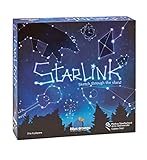 Blue Orange Games Starlink Party Game- New Party Drawing Game for 3 to 6 Players. Recommended for Ages 8 & up
- CREATIVE DRAWING GAME: Starlink is a cosmic themed party game perfect for developing fine motor and drawing skills for both children and adults! This new party game has an amazing table presence with beautiful and high-quality cardboard pieces
- FAMILY OR ADULT GAME: This 3 to 6 players cosmic game can be enjoyed by children, parents, or the whole family! Best recommended for ages 8 & Up
- HOW TO PLAY: Each turn you will be given a new concept that you must represent by drawing lines between the available stars on the board. But watch out! Once a star has been used in one constellation, it can no longer be used for the rest of the game! The player who creates the best constellations is the winner!
- INCLUDES 100 Constellations cards, 1 Dry Erase game board, 2 Dry Erase Markers, 1 Telescope card, 1 Sand timer, Rules

The activation sequence and movement keys are reported by a Phrasemaker gameplay guide and are consistent with a Steam community discussion. Neither is an official current control reference; follow the live HUD prompts if they differ.
What to do if the view cannot reach a location
The guide says the Building Drone’s reach is related to your character’s position. Move closer to the intended building area, then activate the view again and retry. No measured range is established, so there is no reliable distance to quote.
Rank #2
Use the view for deconstruction
The same guide reports that you can enter deconstruction mode with F and then press C to use the Building Drone view. This is a secondary-source instruction, not a confirmed current official control. Check the prompts shown in deconstruction mode in your game.
Building Drone versus logistics drones
These are different systems. The Building Drone is a player-operated view for manually positioning structures. Logistics drones are part of the automated factory system: Creepy Jar’s official material discusses drone pathfinding, priorities, and drone-rail upgrades. A Creepy Jar developer guide announcement covers those logistics concepts, but does not provide a complete current setup procedure.
Recommended Free Tools
Rank #3

- In the far future, countless alien species explore the galaxy in search of fortune and fame. The last interstellar war ended over fifty years ago and since then peace treaties have been in effect. Trade routes are set, civilizations flourish, and a new source of power was discovered – the Hexis crystals.
- Star Scrappers: Cave-in is the first game in the Star Scrappers series, set in a rich and exciting space-western universe, with a unique gameplay mechanics.
- Players take roles of Galactic entrepreneurs, rival mining bosses who compete in this difficult, sometimes even merciless industry.
- As a mining boss, you will have to recruit new mercenary laborers, use their skills, and collect precious artifacts. Your job is to excavate the Hexis crystals but never let your guard down though, as your competition is waiting for a chance to buy off your trusted men and steal the bounty from under your nose! The goal of the game is to get as many victory points as possible before the crystal mine collapses.
- Star Scrappers: Cave-in uses a unique game mechanics called “discard building”. With every action taken, players put their mercenaries into their discard piles. The order of the discarded cards matters because your top card is your Leader and gives you a special action at the beginning of your next turn. Beware, if your discard pile grows too much, it will draw the attention of other players who will not hesitate to steal cards from you – they’re just bribing your men!
| System | Purpose | How it is controlled |
|---|---|---|
| Building Drone view | Helps you place structures manually; a gameplay guide also describes using it for deconstruction. | Reportedly activated from build or deconstruction mode with C; movement uses WASD, Space, and Ctrl. |
| Logistics drones | Automate transport within the factory/base system. | Developer material discusses paths, priorities, and rails; it does not establish a complete current setup procedure. |
Creepy Jar’s Devlog #2 also presents drone automation as part of base-building. If your goal is moving items between factory sections or distant bases, the Building Drone view is not the tool you need.
Independent reader supportYour contribution helps us test, update, and keep practical guides available for everyone.Unlocks and current controls
The available sources do not establish a definitive current unlock prerequisite for the player-controlled Building Drone. They describe activating a mode from the building workflow, rather than crafting or equipping a separate drone item, but they do not confirm whether a particular unlock is required in the current game. Check the build menu and its prompts rather than relying on an assumed corporation level, research node, or recipe.
StarRupture is an Early Access PC game by Creepy Jar. Its Steam store page lists a January 6, 2026 release date and ongoing updates, including a hotfix announced October 5, 2026. Controls and mechanics can change, and the official materials cited here do not confirm the Building Drone’s current keybindings.
Quick Recap
Product prices and availability are accurate as of the date/time indicated and are subject to change. Any price and availability information displayed on Amazon at the time of purchase will apply.
The Tool Desk
Outbyte Driver Updater FREEScan for outdated or missing drivers - takes under a minuteDriver Scan →Outbyte PC Repair FREEClear out junk files and repair common Windows errorsFree Scan →



