Do these 3 things before closing this tab:
1Repair Windows errors before they cause bigger problems2Scan for outdated or missing drivers - takes under a minute3Clear out junk files and repair common Windows errorsMyAbandonware is not a blanket safety guarantee. The site says it usually scans files with VirusTotal, but notes that file size and format can limit scanning. It advises users to check each download and warns that some NoCD files and keygens may contain real malware. Treat each file as untrusted, review its current scan evidence, and check whether the game is available from an official seller before downloading.
What MyAbandonware says about file safety
MyAbandonware says it usually scans files with VirusTotal as a precaution, but that limits apply because of file size or format. The site also tells users to check every file and refresh an attached VirusTotal report if it is old. Its general scanning statement and any dated report are not an independent, current audit of every hosted file.
That means safety has to be assessed file by file. Before opening an archive, check the report for that particular download and whether it is recent. Do not treat a scan report as a guarantee: scanning may be limited, and a file can change or acquire new detections after a report was produced.
How to interpret NoCD, crack, and keygen warnings
MyAbandonware describes NoCDs and cracks as modified game files that bypass DRM, and keygens as programs that generate product keys. Security software may flag these tools, but the site explicitly warns that some contain embedded malware. A detection is therefore a reason to investigate the specific file, not proof by itself that it is infected—and it should not be dismissed automatically as a false positive.
#1 Best Overall

- ✅【Compatibility】Compatible with Raspberry Pi, Windows PC, Linux ,Mac. Specifically designed for playing classic old school retro snes games on computer or laptop.This is the USB controller what has a USB plug for PC, NOT compatible for Original SNES super Nintendo console
- ✅ 【Ergonomic Design】Super precise cross key and function buttons,the cross direction key adopts frosted concave design,anti-sweat and anti-slip.The shape of the controller is designed to fit the contour of your hands,easy and comfortable to hold.
- ✅ 【Advanced Game Experience】PC running operating system:Windows 98/2000/ ME/XP/Vista/Win7/8/8.1/11 or later,or Mac running OS X 10.0/Mac OS X or above.It works with most of emulators you wish to download and use,such as VirtuaNES(PC),sens9x,Zsens,sensgt,Uosnesw,RetroArch,OpenEmu(MAC),NESEmu and Jnes etc.
- ✅ 【Wired USB Connection】Standard USB 2.0 port with a 1.5 meters (5ft) cable, don't need to install any drivers, you must manually set the buttons and directionals within the emulator you're using, and the controller not automatically assigns buttons/directional axes. Notice: please download the game emulator first before start the games, you can download the emulator “VirtuaNES” on PC and “OpenEmu”on MAC.
- ✅【Satisfaction】Third party controller(USB Version), not for original snes console and not support for switch. If there is an incompatibility on MAC or Raspberry Pi , please contact the seller for a support.
- Check the file’s current scan report rather than relying on an old result attached to a page.
- Pay particular attention to whether the download includes a NoCD, crack, keygen, or installer, not just the game archive.
- If you cannot establish that a flagged file is trustworthy, do not run it.
Keep the game download separate from advertisements
The site says advertisements can lead to third-party programs for which it is not responsible. Do not confuse an unrelated installer or offer shown in an advertisement with the game file you intended to download. Avoid installing extra software unless you have independently verified what it is and why it is needed.
Can a virtual machine make a suspicious file safe?
A virtual machine (VM) runs an operating system inside software on another computer. MyAbandonware describes VMs as useful for running old software and opening suspicious files, but a VM is an isolation measure, not a guarantee that a file is safe.
Rank #2

- 【Supported Operating System】The Game Controller is specifically designed for playing classic old school retro snes games on computer or laptop. Compatible with Windows 98 / ME / Vista / 2000/2003 / XP / 7 / 8 / 8.1 / 10/11, Mac OS X/ OS X 10.0 and beyond, Raspberry Pi, Raspberry PI 2 model B,Model A, Raspberry Pi 1 Model B+, Raspberry Pi 2,Raspberry Pi OS, Raspberry Pi 3 Model B+, Raspberry Pi 3, Raspberry Pi Zero.
- 【Simple USB Plug and Play】If your program or application accepts USB controller input, this classic game controller do not need install drivers or patches. 1.5 meter external cable(approx. 5 ft. Long). Notice: Please download the game emulator first before start the games, and then you must manually set the buttons and directionals within the emulator you're using, and the controller not automatically assigns buttons/directional axes. If on the Steam platform, you need to first enable Steam's "Universal Controller Configuration Support" and then restart Steam. After entering the game, you also need to manually bind key positions in the game
- 【High Sensitivity without Delay】Super sensitive buttons for precision control: 6 fire buttons, a 'Start' button and a 'Select' button, motion control cross. Play your favorite old school games with classic retro feel. Fits perfectly in the hand and also perfect for two player action.Note: Not applicable to Switch/PS games. Not Compatible with TV/ TV Box, third Mini Games Box and Tesla Model 3
- 【Supported Game Emulators】The game controller works with most emulators. Download any emulator you wish to download and use from Google and do the same with ROMS. Notice:Third party controller, not original controller. But it works phenomenal with the Raspberry Pi game emulation and so on
- 【Product Service】If you have any problem during use, send message to us and we will help you to solve the problem soon
The site warns that sharing resources between the VM and host weakens separation. In particular, it cautions against shared folders, clipboard access, drag-and-drop, copy and paste, and networking when opening suspicious files. If you cannot configure and maintain that isolation, do not use a VM as a reason to run a file you otherwise consider unsafe.
Independent reader supportYour contribution helps us test, update, and keep practical guides available for everyone.Is downloading an “abandonware” game legal?
Malware risk and copyright are separate questions. MyAbandonware defines abandonware around games no longer sold by their company, but says the category is not clear-cut; some older games return to sale through services such as GOG or Steam. A game’s age, discontinued support, or absence from a current store listing does not by itself establish that it is legal to download.
Free tools Windows power users keep installed
One-click scans. No signup required.
Rank #3

- AUTHENTIC 16-BIT GAMING – Relive the golden era of gaming with the Retro-Bit Legacy16 wired controller, inspired by classic 16-bit consoles. Enjoy a familiar ergonomic design with a responsive D-pad and precision buttons for retro and modern games alike.
- ENHANCED FUNCTIONALITY – Features dedicated Home, Screenshot, and ZL/ZR shoulder buttons, providing expanded functionality for Nintendo Switch while maintaining the nostalgic feel of a classic retro controller.
- PLAY ACROSS MULTIPLE PLATFORMS – Compatible with Nintendo Switch, PC, MacOS, RetroPie, Raspberry Pi, and other USB-enabled devices. Perfect for retro emulation, indie games, arcade classics, and modern platformers.
- USB CONNECTION – Includes a generous 10 ft (3 m) cable for comfortable gameplay.
- DESIGNED FOR RETRO GAMING – Engineered for fighting games, shooters, and arcade classics with comfortable controls, durable construction, and authentic styling that captures the feel of the original 16-bit era.
The U.S. Copyright Office explains that videogames and software can be protected by copyright, and that a work enters the public domain when its applicable copyright term expires. The term depends on factors such as when and how the work was created or published. This is general U.S. guidance, not a determination of the rights status of a particular game or of the law in another country.
MyAbandonware recommends checking whether a game can be bought through official or established sellers first, naming GOG, Steam, Amazon, and eBay. Its contact page also asks contributors to check digital stores before submitting a game and describes a process for rights holders to request removal. Verify the availability and rights situation for the individual title rather than assuming “abandonware” means free of copyright restrictions.
Quick Recap
Rank #4
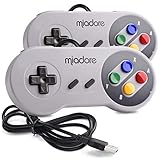
- ✔ Compatible with Windows98/ME/Vista/2000/2003/XP/7/8/8.1/10; Mac OS X and beyond ; Emulators ;Raspberry Pi ;Raspberry PI 2 model B ;Retro Pi OS; Retropi System.
- ✔ Simple USB plug and play, no drivers and software required. Note: If you have trouble with using this, make sure it is plugged in before starting your emulator. Also go into input settings and you may have to map the buttons.
- ✔ Work with any emulator you wish to download and use. Google S-N-E-S emulator and then the same for Roms. Way better than normal joypad and keyboard and mouse playing to really enjoy the emulator experience.
- ✔ Super sensitive buttons for precision control, Eight-way directional pad and six digital buttons. Play your favorite old school games with authentic retro feel. Arrowed D-pad, concave X and Y buttons, convex A and B buttons, rubber start and select buttons. Cord is approx. 5 ft. Long, providing a comfortable distance while playing.
- ✔ If you want to play S-N-E-S, N-E-S, PSX, Atari, Genesis, or any other types of this vintage of games... get this. You will not regret it. NOTE:Third party controller, not original S-N-E-S / N-E-S controller. But it works phenomenal with the Raspberry Pi game emulation and so on.
A practical check before you download
- Look for an official release. Search for the specific game on its publisher’s or developer’s site and established stores such as GOG or Steam.
- Inspect the exact file. Note what the game page offers and whether the download includes a NoCD, crack, keygen, or installer.
- Review a current scan report. Check the report for the individual file, refresh an old result if possible, and consider what each detection says. Do not rely on a general claim that files are usually scanned.
- Decide whether you can manage the risk. If a file remains suspicious, skip it. A VM is not a guarantee; if you use one, avoid the host-sharing features MyAbandonware identifies as weakening isolation.
- Check the law where you live. Confirm that downloading the particular game is lawful in your jurisdiction; malware checks do not answer the copyright question.
Product prices and availability are accurate as of the date/time indicated and are subject to change. Any price and availability information displayed on Amazon at the time of purchase will apply.




