
The Tool Desk
Outbyte PC Repair FREEClear out junk files and repair common Windows errorsFree Scan →Outbyte Driver Updater FREEScan for outdated or missing drivers - takes under a minuteDriver Scan →Yes. Roblox is available as a free-to-download app on both PS4 and PS5 in supported countries, including the United States. It supports cross-platform play with PC, mobile, Xbox, and Meta Quest users, but individual Roblox experiences must support console players and some features have platform-specific limits.
The PS5 also has a native version, released on April 14, 2026. PlayStation says it can load up to 30% faster than the previous experience, although that figure is an official claim rather than an independent benchmark.
As an Amazon Associate I earn from qualifying purchases.
At a glance
| Question | Answer |
|---|---|
| Is Roblox on PS4? | Yes |
| Is Roblox on PS5? | Yes, including a native PS5 version |
| Is it free? | Yes, with optional in-game purchases |
| Is an internet connection required? | Yes; the PlayStation listing requires online play |
| Does cross-platform play work? | Yes, where enabled and supported |
| Does every Roblox experience work? | No; experiences must be published for console users |
| Can you use an existing Roblox account? | Yes |
| Is voice chat available? | Yes on PS4 and PS5, subject to age, verification, regional, account, and experience restrictions |
| Can you redeem Roblox gift cards on PlayStation? | No, according to Roblox’s current PlayStation FAQ |
See the Roblox PlayStation FAQ and the official PlayStation Store listing for the current platform details.
Recommended Free Tools
Is Roblox on PS4?
Yes. Roblox is available as a free PS4 application in the US PlayStation Store and requires an online connection. It supports the DUALSHOCK 4 controller, and PlayStation lists PS4 Pro enhancement for the PS4 version.
#1 Best Overall

- Attention: Compatible with PS5/PS5 Slim/PS5 Pro.
- 【Multifunctional Design for PS5/PS5 Slim/PS5 Pro】This PS5 stand comes with an efficient 3‑speed PS5 cooling fan, a PS5 controller charging station, 3 extra USB ports, LED charge indicators, a headset holder, slots for an external hard drive and a remote control, plus storage for 14 game discs. It keeps all your PS5 accessories clean and neatly organized.
- 【Excellent Storage & Easy Operation】This PS5 vertical stand with a 3‑speed PlayStation 5 fan integrates multiple functions into one unit. It saves a lot of space by storing your PS5 console, PS5 controllers, headset, remote control, and 14 games all together. You can keep so many PS5 accessories in one place, which avoids having to search for items during use. Everything can be stored safely in a vertical position.
- 【Efficient 3‑Speed Cooling】Because the base of the PS5 console has an air outlet, the suction cooling system helps dissipate heat from your PS5 console, preventing overheating after long gaming sessions. It offers low noise and faster cooling for your PS5. There are three different speed settings ranging from 3100 to 3500 RPM; the PS5 fan can be adjusted or turned off via the touch switch on the side of the PS5 holder according to your needs.
- 【Fast Charging & Indicators】This PS5/PS5 Slim/PS5 Pro cooling stand charger can charge two PlayStation 5 controllers simultaneously within 2.5 hours. On the bottom of the PS5 charging station, there is a light that shows the charging status: a breathing light means the PS5 controllers are still charging, while a blue light indicates they are fully charged or in standby mode. You can also check the charging status via the LED indicator next to it: red means charging, green means fully charged/standby.
That does not mean every user-created Roblox experience will work perfectly with a controller. Creators must publish experiences for console users, and an experience may have different menus, controls, camera behavior, or feature support compared with its PC or mobile version.
You can download the PS4 version from the PlayStation Store.
Is Roblox on PS5?
Yes. PS5 owners can use Roblox, and a native PS5 version launched on April 14, 2026. The native version supports DualSense vibration and adaptive trigger effects according to the PlayStation Store listing. PlayStation and Roblox also say it offers up to 30% faster loading than the previous experience.
Free tools Windows power users keep installed
One-click scans. No signup required.
The store may show both PS4 and PS5 editions. Choose the native PS5 listing when it is available. If you already own a PS4, however, you do not need to upgrade solely to access Roblox: PS4 provides the core console experience. PS5 makes more sense if faster loading, DualSense features, newer games, or the longer-lived current-generation ecosystem matter to you.
Download the native PS5 version here.
Is Roblox free on PlayStation?
Roblox is listed as Free on PS4 and PS5. That means there is no purchase price for the application itself. Roblox still includes optional in-game purchases, including Robux and other virtual items.
You need a PlayStation account and a Roblox account for the relevant online features. The store listing confirms that online play is required, but the cited material does not establish a universal requirement for a separate PlayStation Plus subscription, so it should not be treated as automatically mandatory.
Rank #2

- MODERNIZED DESIGN — Experience the modernized design of the XBOX Wireless Controller with sculpted surfaces and updated geometry that enhances comfort and control during long gaming sessions.
- PRECISION PERFORMANCE — Stay on target with a hybrid D-pad and textured grips on triggers, bumpers, and back case for improved accuracy and handling.
- SHARE BUTTON: Seamlessly capture and share content such as screenshots, recordings, and more with the new Share button.
- VERSATILE CONNECTIVITY — Connect via USB-C for plug-and-play on console and PC, or quickly pair and switch between supported devices with XBOX Wireless and Bluetooth support.
- BUILT-IN AUDIO SUPPORT — Plug in compatible headsets using the 3.5mm audio jack for direct voice chat and immersive in-game sound.
Where is Roblox available on PlayStation?
PlayStation availability is limited to select countries rather than being worldwide. Roblox’s current support list includes the United States, Canada, the United Kingdom, Australia, Japan, Brazil, Mexico, and many other countries. Check the official country-availability list if the app does not appear in your store.
What’s actually slowing this PC down?
Pick the symptom - the matching free tool is one click away.
Germany has a specific exception: Roblox says that, from July 11, 2025, new users accessing Roblox on PlayStation must pay €0.25, while users with PlayStation Plus have Roblox included. The same page says existing users who already had Roblox downloaded were not affected. This exception should not be generalized to the United States or other countries.
How to download Roblox on PS4 or PS5
- Open the PlayStation Store on your console, or visit the PlayStation Store online.
- Search for Roblox.
- Select the official listing from Roblox Corporation. The store may display separate PS4 and PS5 editions.
- Choose Add to Library and follow the on-screen instructions.
- Open Game Library from the Games home screen and launch Roblox.
- Sign in to an existing Roblox account with Quick Login using a computer or phone, or create an account if needed.
If Roblox is missing from search, check your country and PlayStation Store region, family restrictions, spelling, and whether you are using the correct account. You can also try the web listing, then restart the console or refresh the store.
Can you use an existing Roblox account?
Yes. Use Roblox’s Quick Login option and approve the sign-in from a computer or phone. Your existing account is the one to use if you want to retain its avatar, friends, progress, and Robux balance.
Be careful before linking accounts. Only one Roblox account can be actively linked to a PlayStation Network account at a time. Roblox says that if a Roblox account is linked to a different PSN account, it cannot be linked to another PSN account until 90 days after the first link. During that period, it can be linked and relinked to the original PSN account. Confirm the intended Roblox and PSN accounts before completing setup.
Can PlayStation players play with friends on other devices?
Yes. Roblox supports cross-platform play between PlayStation and users on Xbox, iOS, Android, desktop, and Meta Quest, provided the experience supports those platforms and cross-platform play is enabled.
Rank #3

- MODERNIZED DESIGN — Experience the modernized design of the XBOX Wireless Controller with sculpted surfaces and updated geometry that enhances comfort and control during long gaming sessions.
- PRECISION PERFORMANCE — Stay on target with a hybrid D-pad and textured grips on triggers, bumpers, and back case for improved accuracy and handling.
- SHARE BUTTON: Seamlessly capture and share content such as screenshots, recordings, and more with the new Share button.
- VERSATILE CONNECTIVITY — Connect via USB-C for plug-and-play on console and PC, or quickly pair and switch between supported devices with XBOX Wireless and Bluetooth support.
- BUILT-IN AUDIO SUPPORT — Plug in compatible headsets using the 3.5mm audio jack for direct voice chat and immersive in-game sound.
To change the setting on PlayStation:
- Log in to Roblox.
- Open the More icon in the upper-right corner.
- Select Settings.
- Under PlayStation Network Settings, select Cross-Platform Play.
- Enable or disable Cross-Platform Play.
When enabled, you can play with users on other supported platforms. When disabled, play is limited to PlayStation users.
How to join a friend
For a quick attempt, both players can open the same experience and press Play at approximately the same time. For a more reliable method, have the PlayStation player join first. The friend on another platform can then open that player’s Roblox profile and choose Join. Two PlayStation users can also join each other through the PlayStation Friends screen.
The PlayStation interface does not expose every Roblox social feature. Roblox says you may need a PC or mobile device to view all friends or accept and reject friend requests.
Are all Roblox games available on PlayStation?
No. Roblox itself is supported on PlayStation, but individual experiences are created and published separately. Roblox’s official FAQ says experiences published for console users are available on PlayStation; it does not guarantee that every experience works on the platform.
When an experience is missing or unplayable, the likely reason is that its creator has not enabled console support, or that its controls depend on a mouse, keyboard, touch input, or another feature that does not translate cleanly to a controller. Performance and feature parity can also vary between experiences and between PS4 and PS5.
Text chat and voice chat on PlayStation
Text chat
Supported experiences can use experience chat. Press Options on the controller, select Chat, type with the on-screen keyboard, and press R2 to send. Roblox also says a USB or Bluetooth keyboard can be connected for text entry.
Rank #4
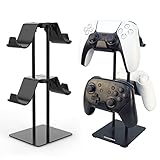
- 1: The problem: I have different controllers for all kinds of game machines, such as PS4, PS5, SWITCH, XBOX and pc games. Nowhere to settle them. The Solution: Set up a home for them, a universal controller holder which has 2 tier 4 places.
- 2: Easy to mount? Absolutely Yes. Follow the description of our manual, one screwdriver two steps 3 minutes and you get 4 places.
- 3: Space Saving: This bracket makes good use of the upward space, allowing the handles to be placed in two layers, Space saved and much more tidier.
- 4: Simple but Stable: The weighted base design makes the stand more stable, and it is not easy to fall over during the handling of the handles.
- 5: Careful and Reliable: The handle hook is made of plastic, make sure the handles will not be scratched. The base is padded to prevent scratches on the desktop.
Voice chat
Current Roblox support documentation says voice chat is available on both PS4 and PS5. It is not automatically enabled for every player. The first activation requires the user to be at least 13 years old and complete ID verification or Facial Age Estimation. Regional availability, account eligibility, and support within the specific experience also apply.
If voice chat is missing, check the user’s age eligibility, verification status, region, account settings, and whether the experience supports voice chat. The feature may also need to be enabled through the experience settings or headphone icon. Roblox’s newer PlayStation voice-chat support page should take precedence over older help text that said voice chat was unavailable.
Robux, purchases, gift cards, and refunds
Buying Robux
You can buy Robux on PlayStation by opening Roblox, selecting the gold Robux icon in the upper-right corner, choosing a package, and paying with a payment method available through the PlayStation Store. An existing Robux balance can also be used on PlayStation.
Redeeming a gift card
Roblox’s current PlayStation FAQ says Roblox gift cards cannot be redeemed directly on PlayStation. Redeem the card through Roblox in a computer browser instead.
Refunds
Roblox says it cannot refund purchases made through PlayStation. Those transactions are subject to PlayStation’s refund policy, so use the PlayStation support and refund process for purchases made through the console.
Parental controls and age ratings
The PlayStation Roblox app is rated T for Teen, recommended for users aged 13 and older. That is the platform rating for the app, not a guarantee that every individual Roblox experience has identical content.
Best Value

- Multi-Port Charging Stand: KDD headphone and controller stand with 2 Type-C ports and 1 USB port, powering smartphones, tablets, headphones, e-reader, power banks, and more. This gaming headset stand is the cool things for gaming desk organizer. Note: The iPhone is not compatible with the USB port and the Type-C port.
- RGB Lighting Memory: The rgb headset stand features 9 lighting effects: 7 single-color fast flashing, 7 single-color breathing, and single colors (red, green, blue, purple, cyan, yellow, white). This desk controller holder includes a memory function that recalls the last mode before turning on. Cool headphones stand lights up your gaming room decor. Note: 7 solid colors cycle one by one ---not a rainbow gradient.
- Versatile Storage Setup: This controller and headset stand holds 1 headphone and 2 controllers, or 4 controllers. Fits most headset sizes and suit for use as a controller rack for most of controllers. Rotates 360° with a cable organizer to keep cords tidy. Ideal for gaming desks and teen rooms, keeping your desk set up organized.
- Quick Assembly Protection: Assemble 5 parts in just 30 seconds for a gaming headphone stand. The controller and headphone stand includes 4 anti-slip rubber bases for excellent stability and durability. Soft protective rubber on this multi controller holder prevents scratches or damage to your devices.
- Durable Gift Choice: KDD video game controller holder plastic shell is built to last. Suitable for any room desktop organization, it's a great choice for upgrading your gaming stuff and room decor. Also a thoughtful gift for boys of all ages, gamers, girls, friends, teen, and boyfriends.
Parents should configure both layers of controls:
- Roblox: content-maturity restrictions, blocked experiences, communication controls, friend and account management, activity monitoring, monthly spending limits, and screen-time controls.
- PlayStation: screen-time duration, messaging permissions, family-member restrictions, and account-level settings through PlayStation Family Management and the PlayStation App.
Roblox says PlayStation preferences are prioritized for purchases, communications, and blocked players. The PlayStation listing also identifies user interaction and in-game purchases, and labels the app “Diverse Content: Discretion Advised.” Parents can review the PlayStation parent guide to Roblox before allowing access.
Common problems and fixes
Roblox does not appear in the PlayStation Store
- Confirm that your country is on Roblox’s supported list.
- Check whether your PSN account has a different country or region.
- Review family and age restrictions that may block the listing.
- Search for the official Roblox Corporation listing and try the web PlayStation Store.
- Restart the console or refresh the store.
You cannot join a friend
- Confirm that both players selected the same experience.
- Have the PlayStation player join first, then use Join from that player’s profile.
- Check that cross-platform play is enabled.
- Confirm that the experience supports console users.
- For two PlayStation players, try the PlayStation Friends screen.
An experience is unavailable
The creator may not have published it for console users, or its controls may not support a controller. Roblox does not promise that every experience is available or identical on PlayStation.
Voice chat is unavailable
Check the 13+ requirement, ID verification or Facial Age Estimation, regional and account eligibility, and whether voice chat is supported and enabled in the experience.
Do these 3 things before closing this tab:
1Scan for outdated or missing drivers - takes under a minute2Repair Windows errors before they cause bigger problems3Fix the driver behind crashes, sound loss and screen glitchesThe wrong Roblox account is linked
Do not repeatedly unlink and relink accounts without checking the consequences. Roblox’s 90-day restriction can prevent linking that Roblox account to another PSN account after the initial link.
A gift card will not redeem
This is expected on the console under Roblox’s cited FAQ. Redeem the card through a computer browser instead.
PS4 or PS5: which is better for Roblox?
Choose PS4 if you already own one, want access to console-compatible Roblox experiences, and are prioritizing cost. It provides the essential Roblox experience without requiring an upgrade solely for this game.
Choose PS5 if you are buying a console for Roblox as well as newer games, want the native PS5 application, value DualSense features, or prefer the newer hardware and its reported loading improvement. The “up to 30% faster” figure comes from PlayStation and Roblox’s announcement and should not be treated as an independently verified performance guarantee.
PC or Mac remains the better choice for Roblox Studio and creation. Mobile and tablet devices offer another convenient way to play or manage an account, while Xbox and Meta Quest are alternative supported platforms with different hardware and control experiences.
Bottom line
Roblox is officially available on both PS4 and PS5, including a native PS5 version released in 2026. It is free to download, supports cross-platform multiplayer, and allows Robux purchases on the console. The important caveats are country availability, console support for individual experiences, the 90-day account-linking restriction, conditional voice chat, and the fact that Roblox gift cards cannot currently be redeemed directly on PlayStation.
Quick Recap
Product prices and availability are accurate as of the date/time indicated and are subject to change. Any price and availability information displayed on Amazon at the time of purchase will apply.

