The Tool Desk
Outbyte PC Repair FREERepair Windows errors before they cause bigger problemsFix Now →Outbyte Driver Updater FREEScan for outdated or missing drivers - takes under a minuteDriver Scan →Myrient closed on March 31, 2026. Before it shut down, the Save Myrient community reported that it had backed up and validated a 385TB mirror, distributed through torrents. That is a significant preservation milestone, but it does not establish that the archive is complete, currently accessible, continuously seeded, or cleared for distribution.
What happened to Myrient?
Myrient’s operator announced the shutdown in the service’s official Telegram announcement: “I have decided to shut down Myrient on 31 March 2026.” MiNERVA’s FAQ confirms that the service closed on that date. Before closure, Myrient described its collection as exceeding 390 terabytes on its memorial page. That is the service’s own scale description, not an independent measurement.
Why did Myrient close?
The operator cited three pressures: inadequate donations to cover operating costs, paywalled download managers bypassing site protections, and rising prices for RAM, SSDs, and hard drives. The operator said, “I have been paying more than $6000 out of pocket every month in order to cover the difference which is not sustainable.” This is the operator’s stated monthly contribution, not an independently audited financial figure.
What has the community preserved?
On March 15, 2026, Tom’s Hardware reported that a Save Myrient moderator had announced that a 385TB mirror was backed up and validated. MiNERVA describes itself as a community effort to archive and distribute Myrient collections using torrents that users can seed. The reported 385TB mirror and Myrient’s “over 390 terabytes” description come from different sources and refer to different claims; they should not be treated as directly comparable measurements.
#1 Best Overall

- High-capacity add-on storage.Compatibility : Windows 10 plus, Reformatting required for use with MacOS.
- Fast data transfers
- Plug-and-play ready for Windows PCs
- WD quality inside and out
How does the community mirror differ from Myrient?
| Aspect | Myrient before closure | Community preservation effort |
|---|---|---|
| Distribution | Hosted downloads from a central service | Torrents, which users can seed, according to MiNERVA’s FAQ |
| Dependency | Access depended on Myrient’s hosted service | Access depends on the archive and ongoing community seeding |
| Scale evidence | Myrient described its collection as exceeding 390 terabytes on its memorial page | Tom’s Hardware reported on March 15, 2026 that a Save Myrient moderator announced a 385TB backup had been validated |
| Current accessibility and completeness | The hosted service closed March 31, 2026, according to MiNERVA’s FAQ | Not established by an authoritative current audit |
| Distribution rights | Not established here | No authoritative legal determination established |
What the backup claim does—and does not—show
“Backed up and validated” describes the reported completion of a preservation milestone; it is not a guarantee of present-day access or permanent availability. The available reporting does not establish that every file from Myrient is included, that torrents remain seeded, or that the mirror has durable governance and uptime. MiNERVA’s FAQ is a project description, not an independent audit.
Preserving game files and having permission to distribute them are separate questions. No authoritative legal assessment of the archive’s contents or distribution rights is established here, so the backup announcement should not be taken as proof that downloading or sharing any particular file is authorized.
Quick Recap
Best Value

- Easy-to-use desktop hard drive—simply plug in the power adapter and USB cable
- Fast file transfers with USB 3.0
- Drag-and-drop file saving right out of the box
- Automatic recognition of Windows and Mac computers for simple setup (Reformatting required for use with Time Machine)
- Enjoy peace of mind with the included limited warranty and Rescue Data Recovery Services
Rank #4
- High-capacity add-on storage.Specific uses: Personal
- Fast data transfers
- Plug-and-play ready for Windows PCs
- WD quality inside and out
Rank #3
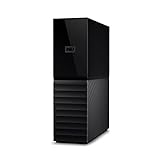
- The My Book is a proven USB 3.0 memory to back up your creations. Reliable desktop storage in an attractive design and proven WD quality secures your data easily and securely
- The external storage includes backup software to back up your important data. Simply set up automatic data backup by determining the time and frequency
- My Book's built-in 256-bit AES hardware encryption with password protection ensures that your content remains confidential and protected at all times
- The My Book external hard drive 22 TB offers you a large amount of storage. Whether to expand your current PC memory or to back up your data, the My Book Destop storage is ideally suited
- Box contents: WD My Book desktop storage 22 TB, USB 3.0 cable, power supply, software for management, backup and password protection of devices, quick installation guide
Rank #2

- No wall warts: Work freely with its bus-powered USB-C. No wall outlet required.
- Big on space: High-capacity storage to store all your files in one place.
- Reliable backup: Safeguard assignments, projects, or sensitive files with trusted performance.
- Fuss-free, clutter-free: One port, one cord, quick connect.
- Peace-of-mind: Comes with two-year limited warranty and Rescue Data Recovery Services.
Product prices and availability are accurate as of the date/time indicated and are subject to change. Any price and availability information displayed on Amazon at the time of purchase will apply.
Independent reader supportYour contribution helps us test, update, and keep practical guides available for everyone.



