Quick wins for a faster PC:
Scan for outdated or missing drivers - takes under a minuteDriver Scan →Repair Windows errors before they cause bigger problemsFix Now →If your Nintendo 3DS-family system is frozen, hold the POWER button until it turns off—Nintendo estimates about 10 seconds—then turn it back on. If the problem returns, use the pattern to choose the next step: a freeze across the system calls for a system update; a crash limited to one downloaded game calls for title-specific repair; SD-card symptoms call for card checks. Persistent freezing after Nintendo’s recommended steps may require service, which is not available for every model in the US.
What to do when the 3DS screen is frozen
- Force the system off. Hold the POWER button until the system turns off; Nintendo estimates this takes about 10 seconds. Nintendo’s freeze guidance recommends this as the first step for a locked-up system.
- Restart and check whether the freeze returns. If it does, move to the relevant troubleshooting branch below instead of repeatedly forcing shutdown.
- Install the latest system update. Nintendo says system updates can improve general stability. An internet connection is required. If the update fails, follow Nintendo’s system update troubleshooting: check the displayed error information, retry as directed, power-cycle the modem or router, and check for wireless interference.
Does the whole system freeze, or just one downloaded game?
This distinction helps narrow the next step. A system-wide lockup points to the restart and system-update steps. If only one downloaded game or application freezes, try repairing that title before assuming the console itself has failed.
As an Amazon Associate I earn from qualifying purchases.
If one downloaded game or app keeps crashing
- Check whether the title has an available update and install it.
- If it is already updated, delete and redownload it, as Nintendo recommends in its freeze guidance.
- Run the Nintendo 3DS Download Repair Tool to check the downloaded title for errors. Nintendo says it can be run even if no errors are found.
- Restart the title and see whether the problem remains. If it does, contact Nintendo Support.
If games and menus across the system freeze
Install the latest system update, then check whether the system remains stable. Nintendo’s guidance is to seek service if freezing continues after the update or, for a downloaded-title problem, after the repair steps. That escalation does not establish that every freeze is caused by hardware.
Free tools Windows power users keep installed
One-click scans. No signup required.
When to check the SD or microSD card
Check the card when the issue appears connected to SD-card errors or content stored on the card; replacing it is not a general fix for every freeze. Always turn the system off before removing or inserting a card. Nintendo’s SD and microSD troubleshooting advises checking compatibility and card condition and, where possible, testing another card in the system or testing the suspect card in another system.
#1 Best Overall
![TQTHL 3DS Battery Pack [3200mAh] (2026 New Upgraded),CTR-003 Battery Compatible with Nintendo 3DS N3DS,2DS, 2DS XL CTR-001 MIN-CTR-001 Gaming Console with Tool Kit (Not for New 3DS, 3DS XL)](https://m.media-amazon.com/images/I/41ItZjlHL9L._SL160_.jpg)
- 🎮【Compatible model】 - This battery is compatible for Nintendo 3DS CTR-003 with Tool Kit Pack(Not compatiable with 3DS XL SPR-003) .Check your device model at first to avoid wrong purchase.
- 🎮【3200 mAhHigher Capacity Battery】3DS battery replacement 3200mAh high capacity Brand New 0 Cycle battery cell capacity is upgraded to store more power, bring more standby time, increasing battery life and and reduce your recharging times.
- 🎮【HOW TO US】When you replace your old battery, please carefully and gently disconnect your old battery's cable then connect your new battery to the mainboard. If you phone cannot be powered on with the new battery, you may need to install it again and be sure to check if the cable has been properly connected.
- 🎮Easy To Install - Instruction/Manual NOT included, but there are many installation tutorials videos on YouTube to reference. Easy to replace, with use our provide tools, most people should be able to do it. Replace your old battery perfectly.
- 🎮【Worry-Free Guarantee】12-hour respond, friendly customer service. Please contact the Taeozi support team for the first time if you are not satisfied with this item. we will reach out to you wit
- If another compatible card works in your system, Nintendo says to replace the suspect card.
- If the suspect card also fails in another system, Nintendo says to replace it.
- If the tests point to the console rather than the card, Nintendo says the system and card may need service.
Use the card type compatible with your exact 3DS-family model. Nintendo’s SD card read-error guidance covers card troubleshooting. On a New Nintendo 3DS XL, accessing the microSD card requires removing the battery cover with a size #0 cross-head screwdriver; do not open the cover while the system is on.
Independent reader supportYour contribution helps us test, update, and keep practical guides available for everyone.When the 3DS needs service
If freezing persists after the system update or the downloaded-title repair steps, Nintendo says the system needs service. In the US, Nintendo’s freeze support page lists the New Nintendo 2DS XL as available for service, while the original 3DS, 3DS XL, New 3DS, New 3DS XL, and 2DS are listed as no longer serviced. Availability can change and differs by region, so check Nintendo’s current service information for your exact model before making arrangements.
Quick Recap
Best Value
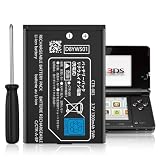
- Compatible with Multiple Models:Only compatible with 3DS Console and 2DS Console (Note: Not compatible with 3DS XL/New 3DS XL/ 3DS LL/New 3DS/2DS XL/New 2DS/New 2DS XL)
- Easy Installation:Designed for user-friendly installation,our 3DS battery allows you to effortlessly replace your old or worn-out batteries. Plug charging, get back to gaming quickly without the hassle of complicated setups.
- High Capacity Performance:Our Rechargeable Battery Pack offers a real capacity of 1300mAh, ensuring long-lasting power for your 3DS Console,Enjoy uninterrupted gaming sessions with our reliable 3DS battery.
- Safe and Reliable Protection: The rechargeable battery output voltage is 3.7v with multiple protection functions. It is equipped with intelligent protection ICs against over-current, over-voltage, over-charging, over-heating and short-circuit. Let you use it safely
- Package includes: 3DS batteries*1,Tool Kit*1
Rank #4

- Compatibility: Widely compatible with Nintendo Game Console 2015 Old 3DS, 2DS, NEW 2DS XL, CTR-001, JAN-001, FTR-001 and compatible with Nintendo Switch Pro Controller HAC-013. Part Number: C/CTR-A-AB,MIN-CTR-001, CTR-003 (Not for New 3DS, 3DS XL).
- High-quality batteries: The CTR-003 replacement batteries are made of high-quality materials, and each battery is manufactured and tested under strict quality control standards. Reliable performance and durability.
- Safety guarantee: CTR-003 replaces the built-in intelligent chip of the battery to prevent overcharge, over discharge, over heating and short circuit to ensure the safety of battery charging and improve battery life.
- Battery parameters: Battery type: Lithium-ion battery, Voltage :3.7V, Capacity: 2000mAh/7.4Wh, Weight: 28g, Size: 2.13 x 1.5 x 0.28 inch. Color: Black.
- Large capacity: CTR-003 replacement battery capacity is 2000mah. The high capacity lasts longer than the original battery, so you no longer need to charge frequently.
Rank #3

- Compatible with Multiple Models:Only compatible with 3DSXL/New 3DSXL/ 3DS LL/New 3DS LL Console(Note: Not compatible with 2DS/2DS XL/New 2DS/New 2DS XL)
- Easy Installation:Designed for user-friendly installation,our 3DS XL battery allows you to effortlessly replace your old or worn-out batteries. Plug charging, get back to gaming quickly without the hassle of complicated setups.
- High Capacity Performance:Our Rechargeable Battery Pack offers a real capacity of 1750mAh, ensuring long-lasting power for your 3DS XL Console, including3DSXL/New 3DSXL/ 3DS LL/New 3DS LL. Enjoy uninterrupted gaming sessions with our reliable 3DS XL battery.
- Safe and Reliable Protection: The rechargeable battery output voltage is 3.7v with multiple protection functions. It is equipped with intelligent protection ICs against over-current, over-voltage, over-charging, over-heating and short-circuit. Let you use it safely
- Package includes: 3DS XL batteries*1,Tool Kit*1
Rank #2
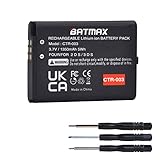
- Compatible with Nintendo 3DS 2DS/2DS XL Game Console;
- Battery Type: Rechargeable Li-ion Battery; Capacity: 1350mAh; Voltage: 3.7V; Premium Grade A cell for longer battery life with no memory effect;
- Multiple Protections: Built with multiple circuit protection -over-charging, short-circuit, high-temperature, and surge protection.
- Batmax Products are tested by manufacturer to match OEM products;
- Package includes 1X Battery + Tool.
Product prices and availability are accurate as of the date/time indicated and are subject to change. Any price and availability information displayed on Amazon at the time of purchase will apply.
The Tool Desk
Outbyte PC Repair FREEClear out junk files and repair common Windows errorsFree Scan →Outbyte Driver Updater FREEScan for outdated or missing drivers - takes under a minuteDriver Scan →



