
The accessories most likely to earn a place beside a Nintendo Switch 2 are a microSD Express card for extra game storage, a carrying case with screen protector for portable play, and a Switch 2 Pro Controller if you prefer a conventional gamepad. Add the Switch 2 Camera only if you will use GameChat video or camera-enabled software. A second dock or replacement AC adapter solves a specific setup problem rather than improving every console.
Nintendo’s official catalog and compatibility guidance establish what each accessory does and which older Switch products work. They do not establish launch-day prices, stock, or whether every listed product was available on a particular historical launch date. Treat the recommendations below as a use-case buying guide, then verify the current retailer listing and exact model before ordering.
As an Amazon Associate I earn from qualifying purchases.
Which Switch 2 accessories are worth prioritizing?
Start with the problem you need to solve instead of buying the entire catalog. The console already includes Joy-Con 2 controllers and Joy-Con 2 straps, so a second controller set is optional. Storage, protection, control preference, camera use, and a second TV location are the decisions that change what you actually need.
| Need | Accessory to consider | Why it makes sense |
|---|---|---|
| More space for Switch 2 games | microSD Express card | Switch 2 game-storage expansion requires the Express standard, with support up to 2 TB. |
| Portable protection | Carrying Case & Screen Protector | Combines a travel case with screen protection for the console. |
| Traditional gamepad controls | Switch 2 Pro Controller | Adds a conventional controller layout and features such as HD rumble 2, motion controls, amiibo functionality, and mappable GL/GR buttons. |
| Video chat or camera-enabled games | Switch 2 Camera or compatible USB-C webcam | Nintendo lists its dedicated USB-C camera and also describes compatible USB-C webcams for GameChat video chat. |
| A second television location | Switch 2 Dock Set | Provides another dock, power adapter, charging cable, and Ultra High-Speed HDMI cable. |
| A replacement or spare power supply | Switch 2 AC Adapter | Designed as a replacement for the adapter included with the console and usable with the console or dock. |
These are priorities, not a universal shopping list. If you play mainly on the television, a case and screen protector may wait. If you never use video chat, a camera is difficult to justify. If you already own a compatible original Switch Pro Controller, you may not need a new controller immediately.
#1 Best Overall
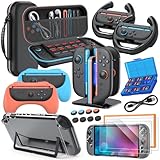
- All in One Accessories Kit for Switch 2 — MENEEA Super Bundle for Nintendo Switch 2(2025) includes: Storage case 1, Protective Hard Case*1, PC Grip Protective Cover x2, Charger dock stand*1, Grips for Joy Con *2, Steering Wheels for Mario Kart *2, Tempered films *2, Thumb grips *8, Game Card Case *1. One purchase solves all accessory problems. It's simply the top picks for Nintendo Switch 2 Owner! (The Clear case Not recommended to dockable on new switch 2, otherwise it will be tighter.)
- Carrying Case for Nintendo Switch 2 — Designed for protection and storage, convenient for travel. 1:1 molded internal grooves provides precise fit for the console, preventing for Nintendo Switch 2 from moving around. The high-quality EVA outer hard shell protects the Switch from falling, while the soft internal material prevents scratches on the device. Mesh provides secure storage space for some small accessories bundle, such as charging cables, earplugs, and 2 additional controller for JoyCons.
- Safe Charging Dock for Joy-con — Magnetic ports enable charging after connect controller, blue light on during charging, lights out when charged/standby. The charging stand offers safe and easy charging for joycon of switch 2 with its safety features like overcharging, overcurrent, overheating, and short-circuiting protection. It can be used with protective cover like our PC cover, eliminating the need to remove the protective cover during charging.
- Ergonomic Grip & Steering Wheels — Enhanced Gaming Experience. The included switch 2 steering wheels and grips for Joycon are made of premium ABS with an ergonomic, anti-slip design. They enhance grip and easy to trigger the SL and SR, improve your experience in racing and fighting games,enhances comfort for Nintendo Switch 2 for Mario Kart. The game card box can hold 24 game cards, and the case can hold 12.
- Clear Case & Screen Protector — The hard protective case made of PC material provides comprehensive protection for your switch 2 console and controller, while support tabletop mode. The screen protector is fingerprint resistant, with a hardness of 9H, and can prevent scratches and bumps, providing comprehensive protection for Nintendo games. You can freely pair it with 8 thumb grills.
Storage: buy microSD Express, not a conventional microSD card
The standard is mandatory for game expansion
Nintendo Switch 2 supports microSD Express cards for additional game storage, with a maximum supported capacity of 2 TB according to Nintendo of America’s technical specifications. The requirement is about the card standard, not merely its physical size. A conventional microSD card does not expand Switch 2 game storage.
Nintendo’s accessory catalog lists a Samsung 256GB microSD Express card. That listing is an example of a supported product, not a statement that 256GB is the only capacity the console accepts. The published specification supports microSD Express cards up to 2 TB, so choose capacity according to the size of your library and the amount of downloading you expect.
What an old microSD card can still do
Nintendo’s compatibility information gives conventional microSD cards a much narrower role: they can be used to copy screenshots and videos from the original Switch. They are not a way to turn Switch 2’s storage into a larger game library. Do not buy a cheap, ordinary card expecting it to work as Switch 2 game expansion.
Do these 3 things before closing this tab:
1Repair Windows errors before they cause bigger problems2Scan for outdated or missing drivers - takes under a minute3Clear out junk files and repair common Windows errorsFor the exact standard and capacity limit, see Nintendo’s Switch 2 technical specifications. For the card Nintendo currently displays in its catalog, see the Switch 2 Accessories page.
Rank #2

- 【Instant Multiplayer with 2 Pro Controllers】 Elevate your gaming experience with 2 included wireless pro controllers—a $50 value! Features sweat-resistant leather grips, dual vibration, and 6-axis motion control. Perfect for lag-free 2-player action right out of the box, saving you over 50% compared to buying each component individually.
- 【Massive 22-Slot Storage Library】 Never leave a game behind. Our upgraded travel case features 20 dedicated game card slots and 2 TF card slots—nearly double the capacity of standard kits. Keep your entire Nintendo Switch 2 collection organized and secure in one sleek, portable command center.
- 【Programmable Precision & Turbo Control】 Take command with 2 Mappable Back Buttons (M1/M2) on each controller, allowing you to remap functions for faster reaction times in competitive play. Includes adjustable Turbo modes and an ergonomic design that fits comfortably in both adult and child hands for marathon sessions.
- 【30s Bubble-Free Auto-Align Installation】 Say goodbye to messy screen protectors. Our bundle includes a professional Auto-Alignment Frame that ensures a precision fit with virtually zero air bubbles in seconds. Protect your Switch 2’s screen with 9H tempered glass that maintains crystal-clear clarity and high touch sensitivity.
- 【Ultimate 18-in-1 Pro Starter Ecosystem】 Stop buying accessories one by one. This all-access bundle provides everything for Nintendo Switch 2 at 50% less cost. INCLUDES: 2× Wireless Pro Controllers (Leather Grip/Back Buttons), 1× 75H Hard Travel Case (22 Slots), 1× Auto-Align Screen Protector Kit (9H Glass), 1× Dockable Console Shell, 2x Joy-Con TPU Covers, 2× Steering Wheels, 2× Ergonomic Grips, 4× Thumb Stick Caps, 1× Portable Game Card Case, and 1× USB-C Cable.
Who should buy one immediately?
- Buy one early if you expect to keep several downloaded games installed or use the console as your primary digital library.
- Wait if you mainly use physical game cards and have little need for downloads; the console’s internal storage may cover your initial use.
- Check that the product description explicitly says microSD Express. The word “microSD” alone is not enough.
Controllers: the Pro Controller is optional, while Joy-Con 2 is already included
What the Switch 2 Pro Controller adds
Nintendo’s Switch 2 Pro Controller is aimed at players who want a traditional, full-size gamepad. The catalog describes HD rumble 2, motion controls, built-in amiibo functionality, a Capture Button, and a C Button for GameChat. It also includes mappable GL/GR buttons and an audio jack. Those features matter most when you play long sessions docked, want extra rear inputs, use motion aiming, or expect to use GameChat controls from the gamepad.
The controller is not a required upgrade for basic play. Every Switch 2 includes Joy-Con 2 controllers and straps, so the purchase is about ergonomics and features rather than gaining the ability to play the console.
When extra Joy-Con 2 controllers make sense
Additional Joy-Con 2 controllers are useful for local multiplayer or for keeping a spare pair available while another set is being used. They are not an automatic launch purchase for a solo player. Decide how many people will play locally and whether a game requires separate controllers before adding another set.
The Tool Desk
Outbyte PC Repair FREEClear out junk files and repair common Windows errorsFree Scan →Outbyte Driver Updater FREEScan for outdated or missing drivers - takes under a minuteDriver Scan →Nintendo also sells a Joy-Con 2 charging grip and Joy-Con 2 straps. Nintendo states that these accessories are for Switch 2 and cannot be used with original Switch Joy-Con. That makes them a poor choice as a way to refresh an old Switch controller set.
Rank #3
![Switch 2 Accessories, [Charge Inside]Case Bundle for Nintendo Switch 2 2025](https://m.media-amazon.com/images/I/51zLiFWmbQL._SL160_.jpg)
- All in One Ultimate Accessories Bundle for Switch 2: Storage case *1, controller charging dock*1,tempered glass*2, switch 2 hand grip*2, steering wheel for Mario Kart*2, hard pc protective shell for Joycon*1 pair, console clear pc protective shell*1, 23+2 SD card slots game card holder ,adjustable display stand*1, non-slip thumb caps*8. All in one case accessories battle-ready,The best gift bundle for Switch 2 players
- Unique Switch 2 Case: Unlike other cases, our case for nintendo switch 2 retains charging cable pass-through port. Allowing you to charge your console while it stays protected, improves portability and travel convenience. Combined with a shock‑resistant exterior and a soft, scratch‑proof interior, the case effectively protects your console from daily wear and tear—guarding against bumps, drops, and scratches whether you’re at home or on the go. NOT INCLUDED charging cable,console and controller
- Switch 2 RGB Controller Charger: Elevate your gaming station with vibrant RGB mood lighting! This 4-in-1 charger features 9 colors to match your style. Long-press (3 seconds) turn the lights off completely. Magnetic ports ensure a perfect, effortless connection every time and charge up to 4 controllers simultaneously, while clear LED indicators show real-time charging status. Built-in triple protection guards against over-voltage, over-current, and overheating for complete peace of mind
- Crystal Clear & Scratch-Resistant Switch 2 Protective Case: Protect your entire console without hiding its style. The hard PC shell guards the console and Joypads without blocking the kickstand, while the tempered glass screen protectors ensure flawless clarity and scratch resistance. Plus, 8 non-slip thumb grips enhance control and provide additional protection
- Immersive Gaming Setup: The adjustable stand offers multiple angles for hands-free viewing. Enhance comfort and control with ergonomic hand grips, or snap on the steering wheels for Mario Kart races. Finally, keep your game cards organized with the massive 23+2 game card holder. Elevate every play style with comfort grip, viewing kickstand& massive storage card holder
Choosing between Pro Controller and extra Joy-Con
- Choose the Pro Controller for a conventional gamepad feel, an audio jack, rear-button remapping, or extended docked sessions.
- Choose extra Joy-Con 2 controllers when the goal is additional local multiplayer positions or a backup pair.
- Choose neither if the included Joy-Con 2 set already fits your games and play style.
Cases and screen protection: pick the format that matches your travel load
Carrying Case & Screen Protector
The standard Carrying Case & Screen Protector is the straightforward portable option. It combines a case for the console with a screen protector, making it the logical first accessory for someone who will carry the Switch 2 in a backpack, luggage, or between rooms. Its value is protection and convenience rather than additional storage for a complete TV setup.
All-In-One Carrying Case
The All-In-One Carrying Case is designed for a larger load: the console, dock, controllers, cables, and up to six game cards. Choose it when you regularly move the entire setup or want one case for both handheld and docked play. It is more appropriate for transporting a complete system than for a light daily commute.
| Case | Best fit | Published capacity or feature |
|---|---|---|
| Carrying Case & Screen Protector | Portable console protection | Includes a screen protector. |
| All-In-One Carrying Case | Traveling with the complete TV setup | Holds the console, dock, controllers, cables, and up to six game cards. |
If you mostly play at home and rarely move the system, postpone a case. If the console will travel immediately, protection is one of the few accessories whose usefulness does not depend on a particular game.
Windows Errors? Fix Them Before They Spread
Repair common Windows errors and clear accumulated junk for a smoother, more stable PC - no reinstall needed.Free scan · no reinstallOutdated Drivers Are Slowing You Down
One free scan finds every outdated or missing driver and matches the right update for your exact hardware.Free scan · exact hardware matchThe Switch 2 Camera is a specialized purchase
What Nintendo’s camera is for
Nintendo describes the Switch 2 Camera as a dedicated USB-C camera for video chat and in-game camera features. It is therefore relevant to players who plan to use GameChat video or software that reacts to a camera feed. It is not a general performance upgrade and has no role in ordinary handheld or docked play that does not use camera features.
Rank #4

- Switch 2 All-in-One Accessories Kit — OUNFNOE Super Bundle 18-in-1 Game Accessory Set: Carrying Case x1, Tempered Glass Screen Protector x2, 4-Slot Joy-Con Charging Dock x1, Controller Grips x2, Steering Wheels x2, Transparent Protective Case x1, Game Card Case (24 slots) x1, Data Cable x1, Silicone Thumb Caps x6, Positioning Frame x1. One purchase solves all your accessory needs. It’s the ultimate choice for Nintendo Switch 2 owners!
- Secure 4-Joy-Con Charger – Safely charge up to 4 Joy-Con 2 controllers at once with magnetic ports. Blue LED lights indicate charging and turn off when fully charged or in standby. Built-in overcharge and short-circuit protection ensures safety, and it works with protective cases.
- Nintendo Switch 2 Portable Carrying Case — Travel-Friendly and Protective. Specifically designed for the Nintendo Switch 2, this case features a custom-molded interior that keeps your console secure and prevents it from shifting during travel. The durable EVA hard shell guards against drops, while the soft inner lining protects the device from scratches. A convenient mesh pocket provides extra storage for small accessories like charging cables, earphones, or two additional Joy-Con controllers, keeping everything organized on the go.
- Ergonomic Grips & Steering Wheels & Game Card Case — Enhance your gameplay with the included Switch 2 Joy-Con grips and steering wheels, crafted from high-quality ABS with an ergonomic, anti-slip design. They provide a secure grip, easy access to the SL and SR buttons, and improved comfort for racing and fighting games like Mario Kart.
- Clear Protective Case & Screen Protector — Full Console Protection. The hard PC shell offers comprehensive protection for your Switch 2 console and Joy-Con controllers, while still supporting tabletop mode. The 9H hardness screen protector resists fingerprints, scratches, and bumps, keeping your screen safe during intense gaming sessions. The set is compatible with 6 thumb grips for added customization and comfort.
A compatible USB-C webcam is another video-chat option
Nintendo’s accessory information also allows a compatible USB-C webcam for GameChat video chat. That gives you a choice between Nintendo’s dedicated camera and a webcam that meets the compatibility requirement. Confirm the connection type and the specific software support before buying; “webcam” by itself does not establish compatibility.
Who should skip it
Skip a camera at launch if you do not use video chat, do not play camera-enabled games, or are still unsure whether those features will become part of your routine. The accessory becomes worthwhile when you can name the GameChat or game feature you intend to use.
Independent reader supportYour contribution helps us test, update, and keep practical guides available for everyone.A second dock and a spare AC adapter solve different problems
Switch 2 Dock Set
Nintendo sells a replacement or second Switch 2 Dock Set containing the dock, an AC adapter, a USB-C charging cable, and an Ultra High-Speed HDMI cable. Because the console already includes one dock, this set is intended for a second television location or for replacing a damaged or missing dock setup.
Free tools Windows power users keep installed
One-click scans. No signup required.
A second dock is useful when you keep the console connected in two rooms and do not want to move cables each time. It is unnecessary if you have one television and are comfortable carrying the included dock.
Best Value

- 17 in 1 Essential Switch 2 Accessories Bundle: Including 1× Switch 2 carrying case, 1× wireless Switch 2 Pro Controller, 2x Switch 2 screen protector, 1× Switch 2 protective case, 2× Joycon grips, 2× Joycon steering wheels, 6× thumb grip caps, 1× game card case(24 slots), 1× charging cable
- Wireless Switch 2 Pro Controller: Easily connect with a one-touch wake-up function. Dual-motor high-definition vibration feedback, ergonomic design for comfortable grip, 6-axis linear sensor for fast response, adjustable RGB lighting, personalized gameplay
- Deluxe Switch 2 All-in-One Case: COOWPS Switch 2 case fits the accessories you need in one organized spot, for Switch 2 Console, Pro Controller, Dock, Joy-Con Charging Grip, AC Adapter, and HDMI Cable, 20 Game card slots. Interior mesh pocket for other smaller accessories. Perfect for home storage and travel
- Steering Wheels & Ergonomic Grip: Enhanced gaming experience. The included Joy-Con steering wheels and grips are made of premium ABS with an ergonomic, anti-slip design. They enhance grip and make it easy to trigger the SL and SR, improving your experience in racing and fighting games
- Screen Protector and Protective Case: The Switch 2 screen protector is made of 9H hardness-tempered glass, which has exceptional durability and scratch resistance. An included application tool makes installation easy. The TPU protective case combined with an ergonomic grip support, makes it more comfortable to use. It's compatible with the Switch 2 dock and also retains the original kickstand functionality
Switch 2 AC Adapter
The listed Switch 2 AC Adapter is described as a replacement for the adapter supplied with the console. It can connect to the Switch 2 console or to the Switch 2 dock. Consider it as a spare for travel, a replacement after loss, or a way to keep a permanent power connection in another location. It does not create a second dock by itself.
What original Switch owners can reuse—and the limits
Many original Switch accessories can connect to Switch 2, but compatibility is item-specific. The most important distinction is between wireless pairing, physical attachment, charging, and TV output. Nintendo’s support page lists the following boundaries.
| Original Switch accessory | Switch 2 compatibility | Important limitation |
|---|---|---|
| Original Joy-Con | Can pair wirelessly | Cannot attach to Switch 2 and cannot be charged by the console. |
| Original Pro Controller | Can pair wirelessly | Can charge through the Switch 2 dock by USB. |
| Original Switch dock | Incompatible | Cannot be used as the Switch 2 dock. |
| High Speed HDMI cable supplied with original Switch | Incompatible | Use the cable supplied for Switch 2 or the one in a Switch 2 Dock Set. |
| Original Switch AC adapter | Can charge the console | Does not provide the output required for TV mode. |
| Original conventional microSD card | Limited file-transfer use | Can copy screenshots and videos from the original Switch, but does not expand Switch 2 game storage. |
| Joy-Con 2 charging grip and Joy-Con 2 strap | Switch 2 accessories | Cannot be used with original Switch Joy-Con. |
For the complete compatibility wording and any model-specific updates, consult Nintendo’s official Switch accessory compatibility support page. Wireless pairing does not mean that an accessory can physically attach, charge, or provide TV output, so check the limitation in the row that matches your old hardware.
Buying paths for common owners
New owner who plays mostly handheld
- Get a microSD Express card only if you need more installed game storage.
- Choose the Carrying Case & Screen Protector for regular travel.
- Use the included Joy-Con 2 controllers unless you specifically prefer a traditional gamepad.
- Add a camera only when you have a planned video-chat or camera-game use.
New owner who plays mostly on a television
- Start with the included dock and AC adapter.
- Consider the Pro Controller if you prefer its full-size layout or want its listed GameChat, audio, motion, and remappable-button features.
- Buy a second Dock Set only when another television location or a replacement is part of your setup.
- Postpone a portable case unless you will carry the console outside the home.
Family or local-multiplayer household
- Count the number of simultaneous players your games require.
- Buy additional Joy-Con 2 controllers only to fill that specific need.
- Use the included straps with the controllers that came with the console; the new Joy-Con 2 charging grip and straps are not accessories for original Switch Joy-Con.
- Choose the Pro Controller separately for the player who wants a traditional gamepad rather than assuming every player needs one.
Player planning to use GameChat video
- Confirm that the intended software uses GameChat video or another camera feature.
- Choose Nintendo’s dedicated USB-C Switch 2 Camera or a compatible USB-C webcam.
- Keep the Pro Controller in consideration if its C Button and audio jack fit the way you expect to manage GameChat.
Existing Switch owner with a large accessory collection
- Keep the original Pro Controller if wireless pairing and USB charging through the Switch 2 dock meet your needs.
- Do not plan to use the original dock or its supplied High Speed HDMI cable with Switch 2.
- Keep the original AC adapter only as a charging option; it cannot run TV mode.
- Do not count conventional microSD cards as Switch 2 game-storage expansion.
- Buy new Joy-Con 2 accessories only for Switch 2, because the charging grip and strap are not compatible with original Joy-Con.
What the launch framing does—and does not—tell you
The phrase “at launch” can make every accessory sound urgent. Nintendo’s official pages confirm the accessory categories, features, and compatibility rules, but the available information does not establish launch-day pricing, launch stock, or which products were on sale in a particular region on a particular date. Availability can also differ by country and retailer.
There is no independent durability testing, consumer survey, reliability study, or price comparison in the official material used for these recommendations. That means the choices above are based on function and compatibility, not a universal “best value” ranking. Check the current product page, regional listing, connector type, and model name before paying, especially for microSD Express cards and USB-C webcams.
A final checklist before you order
- Storage: Is the card explicitly microSD Express, and is its capacity within the 2 TB Switch 2 limit?
- Controllers: Are you solving a traditional-controller preference or a real multiplayer requirement, given that Joy-Con 2 and straps are included?
- Protection: Do you need only portable console protection, or must the case carry the dock, cables, controllers, and up to six game cards?
- Camera: Can you name the GameChat or camera-enabled feature you will use, and is the USB-C webcam you are considering compatible?
- TV setup: Do you need a second location or replacement dock, rather than another copy of equipment already in the box?
- Existing gear: Have you checked the exact limits on original Joy-Con, Pro Controller, dock, HDMI cable, AC adapter, and microSD cards?
For most buyers, the sensible order is storage or protection first, a Pro Controller only if its control style matters, and camera, extra Joy-Con, second dock, or spare power equipment only when a specific use case justifies each one.
Quick Recap
Product prices and availability are accurate as of the date/time indicated and are subject to change. Any price and availability information displayed on Amazon at the time of purchase will apply.

