“Plantillas Pinball” puede referirse a dos cosas distintas: una actividad educativa lista para adaptar o los recursos para diseñar una mesa virtual. Para un cuestionario, la coincidencia más directa es “Quiz Pinball” de Genially; para crear una mesa, Visual Pinball Engine (VPE) ofrece un flujo basado en tablas VPX. También hay una ficha de Scribd con el título exacto, pero no permite confirmar qué contiene el PDF.
Qué tipo de plantilla de pinball buscas
Antes de elegir un recurso, define el resultado que necesitas. Un cuestionario con estética de pinball no es lo mismo que una mesa simulada que se pueda jugar o editar.
| Necesidad | Recurso | Qué se sabe | Qué conviene comprobar |
|---|---|---|---|
| Preparar un cuestionario educativo | Quiz Pinball de Genially | La página lo presenta como una plantilla interactiva y educativa para cuestionarios. | Disponibilidad, condiciones de uso y funciones vigentes de la plantilla. |
| Crear una mesa virtual | Visual Pinball Engine (VPE) | Es un simulador de código abierto orientado a autores y puede leer y escribir el formato VPX. | Requisitos y estado actual del proyecto antes de instalarlo o seguir instrucciones. |
| Buscar gráficos y modelos digitales | Asset Library de VPE | La documentación describe una biblioteca con búsqueda, etiquetas y previsualización; indica que los recursos son gratuitos y acepta contribuciones. | Que los recursos sean adecuados para tu proyecto y revisar las condiciones aplicables a cada uso. |
| Consultar el documento llamado “Plantillas Pinball” | Ficha de Scribd | La ficha visible identifica un PDF de 22 páginas. | Su contenido, derechos y utilidad: la ficha por sí sola no permite establecerlos. |
Plantilla para un cuestionario educativo
La opción que coincide más directamente con una plantilla didáctica es “Quiz Pinball”, de Genially. El resultado disponible la describe como un formato interactivo para responder cuestionarios educativos. Consulta la página de Quiz Pinball para comprobar si sigue disponible y qué opciones de adaptación ofrece; la descripción no basta para asegurar sus condiciones de uso ni sus funciones actuales.
Crear una mesa virtual con Visual Pinball Engine
VPE es una opción para autores que quieran trabajar con mesas virtuales, no una plantilla de cuestionario. Su documentación lo presenta como un simulador de código abierto basado en Visual Pinball/VPX, compatible con la lectura y escritura del formato VPX. También advierte que todavía no está orientado al público general de jugadores.
Recommended Free Tools
#1 Best Overall

- Quality Components: Excellent Control USB Encoder with high quality 8 way joystick and LED buttons featuring good lighting effects for enhanced gaming experience
- Advanced Functionality: DC 5V Arcade Illuminated Pushbutton with 8 ways joystick using microswitch with gilded contact leg, excellent electronic performance, long life, reliability tested to 1,000,000 cycles
- Mounting Specifications: Joystick requires 24mm mounting hole while large buttons require 30mm mounting holes for proper installation
- Package Details: Compact package dimensions of 175 x 95 x 115mm with each button and joystick individually packaged and includes 1 year warranty for quality assurance
- Wide Compatibility: LED Kit supports Windows Arcade Games, PC Games, DIY Projects, Arcade Raspberry Pi for RetroPie system and MAME applications
Flujo inicial documentado
- En Visual Pinball, crea una tabla “Full Example Table” y guárdala en formato VPX.
- En Unity, usa la ruta Pinball -> Import VPX para importarla. La guía de ejecución de VPE describe este punto de partida.
Comprueba los requisitos y el estado vigente del proyecto en la documentación de VPE antes de seguir pasos de instalación: el flujo descrito explica cómo empezar con una tabla, no garantiza compatibilidad con cualquier configuración actual.
Recursos y trabajo gráfico
La Asset Library se describe como una colección digital centralizada con navegador, etiquetas, búsqueda y previsualización. La documentación indica que los assets son gratuitos y permite contribuir recursos. Revisa la idoneidad y las condiciones de cada elemento para tu proyecto.
Rank #2

- EXPAND GAMES FOR YOUR ARCEDE1UP PINBALL MACHINE* Specially designed for Arcade1up Pinball cabinets. Perfectly fit for Arcade1up Pinball cabinets. Our fighting stick is an arcade1up mod kit used on arcade1up pinball. It can convey the games from your switch consoles to the arcede1up screen graphics. After installing our mod kit with your arcade1up machine and console, your arcade1up machine will be able to play much more games.
- PERFECT COMBINATION WITH SWITCH AND PINBALL*The design of joysticks makes itself perfectly fits for FTG/STG/TAB games etc. As a modification kit for arcade1up pinball machine, our product is especially designed to expand games for arcade 1 up pinball. Your Arcade 1up pinball machines and Intecgaming fighting stick mod kit is a perfect combination to play all kinds of games.
- AMAZING JOYSTICK*The design of joysticks makes itself perfectly fits for FTG/STG/TAB games etc.
- Arcade1Up Game Experience on SWITCH* Enable you to get all the Arcade1Up Gaming experience while playing SWITCH Pinball game on it. Feel the Arcade1Up magical design such as the incredible feeling of Push Pull solenoid Electromagnet.
- WARRANTY* All IntecGaming's products are covered by 1 year warranty.
Para un playfield realista, el tutorial de VPE propone un flujo concreto: Photoshop para la textura base, Illustrator para máscaras de materiales, Blender para el modelo 3D y Substance Painter para texturizar. El tutorial menciona Inkscape como alternativa a Illustrator y editores de imagen basados en píxeles como alternativa a Photoshop. Es un ejemplo de herramientas, no una lista de requisitos universales: la elección dependerá de tu proyecto y de las licencias que necesites.
Consulta la guía para crear un playfield realista para ver el flujo completo.
The Tool Desk
Outbyte Driver Updater FREEFix the driver behind crashes, sound loss and screen glitchesFind Drivers →Outbyte PC Repair FREEClear out junk files and repair common Windows errorsFree Scan →Rank #3
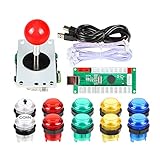
- Quality: Excellent Control USB Encoder. High Quality 8 way joystick. LED Buttons Good lighting effects.
- Fonction: DC 5V Arcade Illuminated Pushbutton, 8 ways Joystick Use Microswitch with gilded contact leg, excellent electronic performance, long life, reliability tested to 1,000,000 cycles!
- Made with highest quality materials! Heat resistant plastic! Environmentally friendly metal!
- Package: 175 x 95 x 115mm. Each button and joystick are individually packaged and 1 year warranty.
- Support: Perfect LED Kit for Windows Arcade Games PC Games DIY Project Arcade Raspberry Pi for RetroPie system MAME
Qué se sabe del PDF “Plantillas Pinball” de Scribd
La ficha titulada “Plantillas Pinball” confirma que se trata de un PDF de 22 páginas y muestra opciones de lectura o descarga. No permite determinar qué plantillas incluye, si son imprimibles, qué permisos de uso tienen ni si sirven para crear una mesa o un cuestionario. Para responder esas preguntas hace falta consultar el documento; no conviene inferir su contenido a partir del título.
Quick Recap
Best Value

- Exquisite LED arace game DIY MAME parts selection!
- 100% Zero Delay Encoder and USB work perfectly all Windows systems!
- 2 Player Arcade MAME DIY Style Perfect Accessory!
- Use the highest quality materials! Made of high temperature resistant plastic!
- Perfect LED Kit Arcade PC Games DIY Choice! Easy to install!
Rank #4

- Beautiful LED Arace Game DIY Parts for MAME JAMMA Project!
- 100% Zero Delay USB Encoders and Perfect work for all windows systems!
- Perfect Parts for 2 Player Arcade MAME DIY Project!
- Made with highest quality materials!Heat resistant plastic!
- Perfect LED Kit for Arcade PC Game DIY Project! Easy Install!
Cómo elegir sin confundir los recursos
- Si necesitas una actividad de preguntas para adaptar, empieza por la plantilla de Genially y verifica su disponibilidad y condiciones.
- Si quieres diseñar una mesa simulada, revisa VPE y su documentación; requiere un flujo de creación distinto del de un cuestionario.
- Si tu objetivo es ilustrar o modelar la mesa, explora la Asset Library y el tutorial de playfield, comprobando que cada recurso y herramienta encaje con tu proyecto.
- Si buscas específicamente el PDF de Scribd, no des por sentado su contenido ni sus derechos de uso a partir de la ficha.
Product prices and availability are accurate as of the date/time indicated and are subject to change. Any price and availability information displayed on Amazon at the time of purchase will apply.




