
pxl2xls.dll is the PXL to XLS file converter from legacy Microsoft ActiveSync software. If Windows says pxl2xls.dll is missing, was not found, or could not be loaded, the safest solution is usually to repair the old ActiveSync-era application that requested it, not to copy a replacement into a Windows system folder.
This DLL converted Pocket Excel .pxl files from a Pocket PC into desktop Excel .xls files. It is not a normal Windows component, Visual C++ runtime, DirectX file, printer driver, or game dependency. Windows 10 and Windows 11 also do not provide a supported modern ActiveSync installation path.


As an Amazon Associate I earn from qualifying purchases.
What pxl2xls.dll is
| Item | Verified identification |
|---|---|
| File | pxl2xls.dll |
| Function | PXL-to-XLS file converter |
| Associated software | Microsoft ActiveSync and related Pocket PC software |
| Publisher association | Microsoft Corporation |
| Architecture | Public inventories identify it as a 32-bit DLL |
| Windows status | Not a normal Windows-protected system file |
| Typical purpose | Converting Pocket Excel files for desktop Excel |
The DLL may be called by ActiveSync itself or by another old application that bundled or relied on ActiveSync components. Therefore, do not assume that every error comes directly from wcescomm.exe or another ActiveSync executable. The exact program named in the Windows error is important.
Reported public metadata has associated some copies with version 3.5.0.1176 and a file size in the approximate 48–49 KB range. Those details are catalogued values, not a universal signature for every build. Do not use size or version alone to decide whether an unexplained DLL is authentic.
First, identify the program requesting the DLL
A missing-DLL dialog usually names the executable, although the wording may be easy to overlook. Record the full message and look for a line similar to:
The program can’t start because pxl2xls.dll is missing from your computer.
The title bar, shortcut, or surrounding application usually identifies the caller. Before repairing anything, answer these questions:
- Does the error appear when connecting a Pocket PC or old Windows Mobile device?
- Does it appear when opening a synchronization utility?
- Does it appear at Windows sign-in because of a leftover startup entry?
- Did it begin after uninstalling ActiveSync, restoring an old disk image, or running cleanup software?
- Are you trying to convert a
.pxlfile rather than synchronize a device? - Is the error from an old application that was copied from another computer?
To inspect the executable more closely:
- Press
Ctrl+Shift+Escto open Task Manager. - Start the application that produces the error, if it gets far enough to appear.
- On the Processes or Details tab, right-click the relevant process.
- Choose Open file location.
- Note the folder containing the executable.
If the program exits too quickly, use the error dialog, the application shortcut, or Event Viewer:
PC Slower Than It Used to Be?
A free scan shows the junk files, broken settings and background clutter dragging Windows down - then fixes them in one click.Free scan · Windows 10 & 11Crashes, No Sound, or Screen Glitches?
Random freezes, missing sound and display glitches usually trace back to one bad driver. Find and replace yours safely.Free scan · under a minute- Press
Win+R. - Type
eventvwr.mscand press Enter. - Open Windows Logs and select Application.
- Look for an error recorded at the time the program failed.
- Record the Faulting application name, Faulting module name, and path if shown.
This step prevents a common mistake: repairing Windows or installing an unrelated runtime when the real problem is a leftover shortcut or a partially removed ActiveSync installation.
Fix 1: Repair or reinstall the original ActiveSync software
This is the most likely and safest fix when the caller is an old synchronization or Pocket PC application.
Microsoft’s archived ActiveSync 4.5 download page documents the package and its operating-system limitation. ActiveSync 4.5 is intended for Windows XP SP2 or earlier, not as a supported installation for Windows 10 or Windows 11.
On a compatible Windows XP computer
- Disconnect the Pocket PC or Windows Mobile device.
- Close Outlook, synchronization tools, and any ActiveSync tray program.
- Open Control Panel.
- Select Add or Remove Programs.
- Look for Microsoft ActiveSync.
- If it is present, select it and choose Change or Remove, depending on the available options.
- If the installer offers Repair, choose it and follow the prompts.
- If repair is unavailable or fails, uninstall ActiveSync.
- Restart Windows.
- Run the official ActiveSync installer from Microsoft.
- If the download provides
setup.msi, open it and complete the installation. - Restart again before reconnecting the device.
- Launch the application that previously reported
pxl2xls.dll.
A successful repair means the application starts without the missing-file message, or the synchronization program reaches its normal device-connection screen. If the same error returns, check the application directory and confirm that the error is coming from the installation you just repaired rather than from an old shortcut.
Free tools Windows power users keep installed
One-click scans. No signup required.
On Windows 10 or Windows 11
Do not treat ActiveSync 4.5 as a current Windows 10 or Windows 11 component. The installer may refuse to run, install incompletely, or produce a program that cannot communicate with modern Windows.
If you still need the historical workflow, practical choices are:
Rank #2
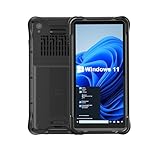
- Portable Size & Rugged Construction — This tablet comes with 6.5-inch size with 20:9 TFT screen which is built to fit ergonomically in one hand & lighten your load on the job, also allows for big display. The rugged construction can sustain wild daily use in demanding environments such as warehouse, logistics, retail, point of service, manufacturing etc.
- Windows-based Enterprise Mobility— With optimized hardware platform, pre-installed Windows 11 IoT Enterprise OS, 8GB LPDDR4 + 128GB EMMC + expandable memory, this rugged handheld tablet can be widely used for windows-based enterprise mobile applications, provides familiar UI for enterprise users, as well as upgraded data security, enhanced system efficiency, reduced maintenance & improved productivity.
- Professional 1D, 2D & QR Bar Code Reading — The built-in Honeywell N3680 2D scan engine provides professional & extraordinary barcode data capturing capability on any 1D & 2D bar codes incl. UPC/EAN, Code128, Code39, Code93, Interleaved 2 of 5, PDF417, Data Matrix, QR Code etc. You have no worries about damaged or blurred barcodes reading. Ideal for intensive scan environment.
- All-in-one Design, Built for Work — Except for barcode scanner, this handheld device also integrates 13.56MHz HF RFID reader, camera, GPS, WiFi & Bluetooth functions. Support NFC function (ISO/IEC 14443A/14443B/15693/18092/mifare protocol). Can be used for a wide range of enterprise mobility & point of sales applications, tasked with delivering high levels of customer service all day long, reducing operational costs.
- Industrial Leading Durability — This portable tablet comes with IP65 grade water-proof & dust-proof sealing. You have no worries about moisture, drops, shocks, dirt, mud, sand etc. And it can sustain 1.5meters drop to wooden floor. Perfect for warehouse, logistics, manufacturing environments.
- Run the old software inside a supported Windows XP environment or virtual machine.
- Keep that environment isolated and use it only for the legacy device or file conversion.
- Move the files to a current system after conversion.
- Replace the old synchronization workflow with a modern application that supports the device or file format.
Windows Vista used Windows Mobile Device Center instead of ActiveSync. Microsoft-era discussion indicates that the PXL converter was dropped from later ActiveSync or Windows Mobile Device Center versions. Do not claim that installing Windows Mobile Device Center will restore pxl2xls.dll; it may not contain the converter.
Fix 2: Check whether security software quarantined the file
An old, rarely used, or unsigned binary may be quarantined. Quarantine is not proof that the file is malicious, but a familiar filename is not proof that it is safe either.
To check Microsoft Defender:
- Press the
Windowskey. - Type Windows Security and open it.
- Select Virus & threat protection.
- Choose Protection history.
- Review detections recorded around the time the error began.
- Expand a detection related to the ActiveSync installation.
- Record the detected path and threat name.
Only consider restoring a quarantined file when all of the following are true:
- The file was installed by the verified original ActiveSync package.
- The path belongs to the application you identified.
- You have checked the installer and the machine for broader malware symptoms.
- Your security software provides a clear reason to treat the detection as a false positive.
If those conditions are not met, leave the file quarantined and reinstall the original application instead. A standalone DLL from an unknown source can be a malicious replacement, a different build, or a file with the right name but the wrong contents.
Fix 3: Restore the file to the application directory, not System32
Windows normally searches the directory containing the calling application before it searches system directories for a traditional desktop DLL. That means the expected location is usually the folder installed by ActiveSync or the legacy application.
Do not begin by copying pxl2xls.dll to:
C:WindowsSystem32
Do not copy it to:
C:WindowsSysWOW64
On 64-bit Windows, System32 conventionally contains native 64-bit Windows system components, while SysWOW64 contains 32-bit Windows components. The names are confusing, and neither directory is a general-purpose storage location for an old application DLL.
If an administrator has a verified original copy from the same installer and knows the expected folder, place it beside the executable that requests it:
- Right-click the application shortcut.
- Select Properties.
- On the Shortcut tab, select Open File Location if available.
- Confirm that the folder contains the calling executable.
- Copy the verified DLL into that application folder.
- Start the application again.
Manual placement is a fallback, not the preferred repair. Reinstalling the parent application restores the correct file, directory, permissions, and related dependencies together.
A 32-bit legacy application also needs a compatible 32-bit dependency. A 64-bit replacement cannot be made compatible simply by putting it in another folder. If Windows reports an architecture or “not designed to run on Windows” error, remove the questionable replacement and reinstall the original software in a compatible environment.
Fix 4: Determine whether another dependency is actually missing
“Could not load pxl2xls.dll” does not always mean that the named file itself is absent. The file may exist while one of its own dependencies is missing, damaged, or incompatible.
What’s actually slowing this PC down?
Pick the symptom - the matching free tool is one click away.
Check the application folder:
- Right-click the application shortcut.
- Choose Properties.
- Select Open File Location.
- Search that folder and its subfolders for
pxl2xls.dll. - If it exists, note its path and inspect its Properties and Digital Signatures tabs if available.
- Do not replace it solely because its version or size differs from an online listing.
If the DLL exists but the error remains, reinstall the complete application. A legacy converter may depend on other files that were removed during cleanup or an incomplete uninstall. Process Monitor can also reveal the exact path Windows tried to open, but it is an advanced diagnostic tool and should be used only when the application owner can interpret the results.
Look especially for these patterns:
- The executable searches an old installation folder that no longer exists.
- A startup shortcut launches a deleted ActiveSync component.
- The DLL is present, but Windows reports another module as missing.
- A 32-bit application is being launched from a damaged or incomplete copied folder.
- The file is blocked by security software or has incorrect permissions.
Fix 5: Remove a leftover startup reference
If the error appears immediately after signing in, ActiveSync may already have been removed while its startup entry remained.
Try the supported startup controls first:
- Press
Ctrl+Shift+Esc. - Select Startup apps.
- Look for an old ActiveSync, Pocket PC, or synchronization entry.
- Select it and choose Disable.
- Restart Windows.
If the entry is not listed, inspect Settings:
- Open Settings.
- Select Apps.
- Choose Startup.
- Disable an entry only when you can identify it as the obsolete synchronization program.
Do not delete random registry values to suppress the error. If the entry belongs to software you still need, reinstall that software instead. If it belongs to a program already removed, disabling the startup entry may stop the message, but it does not restore the converter.
Fix 6: Use System Restore after a recent removal
System Restore can help when the DLL worked recently and the problem began after an uninstall, cleanup operation, or system change.
Quick wins for a faster PC:
Repair Windows errors before they cause bigger problemsFix Now →Fix the driver behind crashes, sound loss and screen glitchesFind Drivers →- Press
Win+R. - Type
rstrui.exe. - Press Enter.
- Select Next.
- Choose a restore point dated before the problem began.
- Select Scan for affected programs if available.
- Review the programs and drivers that may be changed.
- Select Finish and allow Windows to restart.
System Restore does not replace personal documents, but it can reverse application and system configuration changes. After the restart, test the original program. If the error remains, reinstall ActiveSync or the calling application rather than repeatedly restoring older points.
Microsoft also documents System Restore through its recovery guidance.
Fix 7: Repair Windows components only when Windows itself is damaged
DISM and SFC repair protected Windows components. They are useful when Windows has several integrity problems, corrupted system files, update failures, or unexplained built-in application errors. They are unlikely to restore pxl2xls.dll, because this DLL belongs to legacy ActiveSync rather than Windows.
Run DISM first:
- Open the Start menu.
- Type Command Prompt.
- Right-click Command Prompt.
- Select Run as administrator.
- Approve the User Account Control prompt.
- Run:
DISM.exe /Online /Cleanup-Image /RestoreHealth
- Wait for the operation to finish.
- Then run:
sfc /scannow
- Wait until verification reaches 100 percent.
- Restart Windows and test the application again.
Microsoft’s System File Checker and DISM instructions explain these commands.
The Tool Desk
Outbyte Driver Updater FREEScan for outdated or missing drivers - takes under a minuteDriver Scan →Outbyte PC Repair FREEClear out junk files and repair common Windows errorsFree Scan →If DISM or SFC reports repaired Windows files but pxl2xls.dll is still missing, that result is expected. Return to the ActiveSync installation and compatibility checks.
Running these scans manually can be repetitive when you do not know which component changed. Outbyte PC Repair can scan for reported Windows problems and show what needs attention, while repair actions are handled by the full version; it is optional, and reinstalling ActiveSync remains the definitive fix for this application-specific DLL.
Independent reader supportYour contribution helps us test, update, and keep practical guides available for everyone.Fix 8: Do not reinstall drivers unless the device problem is actually a driver problem
A missing pxl2xls.dll message is not established evidence of a missing USB or device driver. Reinstalling graphics, printer, sound, or chipset drivers will not normally restore an ActiveSync converter.
Use Device Manager only when Windows separately shows a device error:
Do these 3 things before closing this tab:
1Repair Windows errors before they cause bigger problems2Fix the driver behind crashes, sound loss and screen glitches3Clear out junk files and repair common Windows errors- Connect the Pocket PC or related hardware.
- Right-click the Start button.
- Select Device Manager.
- Expand Portable Devices, Universal Serial Bus controllers, or another category appropriate to the hardware.
- Look for a yellow warning icon.
- Right-click the affected device and select Properties.
- Read the Device status message on the General tab.
- Open the Driver tab and select Update Driver.
- Choose Search automatically for drivers.
- Restart Windows and reconnect the device.
If the device is unknown or has a code indicating that Windows cannot start it, obtain the driver from the hardware manufacturer or use a compatible legacy environment. Do not assume that a driver update will supply pxl2xls.dll.
Manually checking every device and matching old driver packages is time-consuming. Outbyte Driver Updater can scan for reported driver issues and identify updates, while installation is handled by the full version; it is optional, and it will not replace the ActiveSync installer when the DLL belongs to that application.
If your real goal is converting a .pxl file
You may not need ActiveSync at all. The historical purpose of pxl2xls.dll was converting Pocket Excel files to desktop Excel files.
If the Pocket PC still opens the document:
- Open the
.pxlfile on the device. - Use the device application’s Save As, Export, or equivalent command.
- Choose
.xlsif the option is available. - Transfer the converted file using a method supported by the device and your current computer.
The exact menu depends on the Pocket PC software and its installed Office components. If the device cannot convert the file, use an isolated compatible XP environment with the original Microsoft software, or locate a current application that explicitly supports .pxl.
Do not rename file.pxl to file.xls. Changing the extension does not convert the file format and may make the document harder to open.
What not to do
Do not download a random standalone DLL
Unknown DLL download sites pages can provide malware, the wrong build, the wrong architecture, or a file that does not match the rest of the ActiveSync installation. Even a clean-looking replacement may fail because the real missing item is a dependency or because the calling application is obsolete.
Use the original Microsoft ActiveSync package, the original application installer, a verified backup, or a controlled XP environment instead.
Best Value
Do not copy the file into both Windows system folders
Putting the file in System32 and SysWOW64 can create loader conflicts and leaves the real installation broken. It also makes future troubleshooting harder by hiding which application owns the DLL.
Recommended Free Tools
Do not run regsvr32 as a routine repair
regsvr32 registers DLLs that export registration functions such as DllRegisterServer. It is not a general missing-file repair command. An ordinary application library may not support registration at all.
For that reason, do not run:
regsvr32 pxl2xls.dll
unless documentation for the original application specifically requires registration and the DLL is known to provide the required export. A registration error does not prove that the file is corrupt.
Do not reinstall unrelated runtimes first
There is no established relationship between pxl2xls.dll and Visual C++, DirectX, .NET, printer drivers, or games. Install or repair those products only when the error identifies one of their own files.
FAQ
Is pxl2xls.dll a Windows system file?
No evidence supports that conclusion. It is associated with Microsoft ActiveSync and Pocket PC software, not with ordinary current Windows installations.
Windows Errors? Fix Them Before They Spread
Repair common Windows errors and clear accumulated junk for a smoother, more stable PC - no reinstall needed.Free scan · no reinstallCrashes, No Sound, or Screen Glitches?
Random freezes, missing sound and display glitches usually trace back to one bad driver. Find and replace yours safely.Free scan · under a minuteIs the file 32-bit or 64-bit?
Public inventories consistently identify it as a 32-bit module. The application that loads it must also be able to use a 32-bit dependency. Do not place a random copy in 64-bit system directories.
Will Windows 11 or Windows 10 repair it automatically?
Usually not. Windows Update, DISM, and SFC repair Windows components, while pxl2xls.dll belongs to legacy application software. Repair the application or use a compatible legacy environment.
Does ActiveSync 4.5 work on Windows 11?
Microsoft documents ActiveSync 4.5 for Windows XP SP2 or earlier. It is not a supported Windows 10 or Windows 11 solution.
Should I install Windows Mobile Device Center?
Vista directed users toward Windows Mobile Device Center, but available Microsoft-era discussion indicates that the PXL converter was dropped from later software. Installing it is not proof that pxl2xls.dll will be restored.
The Tool Desk
Outbyte PC Repair FREEClear out junk files and repair common Windows errorsFree Scan →Outbyte Driver Updater FREEScan for outdated or missing drivers - takes under a minuteDriver Scan →Why does the error say “could not be loaded” when the file exists?
The DLL may have a missing dependency, an incompatible architecture, incorrect permissions, or a path problem. Reinstall the complete original application and inspect the calling executable’s directory.
Can I fix it with regsvr32?
Usually no. regsvr32 is for registering DLLs that provide the appropriate registration exports. It does not download, repair, or make an incompatible DLL usable.
What if the error appears after ActiveSync was uninstalled?
Disable the leftover startup entry, then remove the obsolete shortcut or reinstall the application that still needs the converter. If you need the old workflow, restore it inside a compatible XP environment rather than forcing it into current Windows.
Quick Recap
Product prices and availability are accurate as of the date/time indicated and are subject to change. Any price and availability information displayed on Amazon at the time of purchase will apply.

