The Tool Desk
Outbyte Driver Updater FREEScan for outdated or missing drivers - takes under a minuteDriver Scan →Outbyte PC Repair FREEClear out junk files and repair common Windows errorsFree Scan →Riot’s anti-cheat change can be rough on some older PCs, but it is not a universal cutoff for aging hardware. Since December 18, 2025, Vanguard has been able to stop VALORANT from launching with VAN:Restriction when it cannot establish enough system integrity—often because motherboard firmware has not correctly initialized pre-boot DMA protection.
The first response should be to identify the exact motherboard or OEM model and check for an official BIOS/UEFI update. A new motherboard is a fallback for systems with no supported firmware path, not Riot’s blanket instruction to replace every old PC.
As an Amazon Associate I earn from qualifying purchases.
The short version
Riot is not universally blocking every old PC. Its December 18, 2025 Vanguard change introduced targeted VAN:Restriction launch blocks for some VALORANT accounts or hardware configurations when Vanguard could not establish enough system integrity. Riot said that receiving a restriction did not necessarily mean the player had been caught cheating; it meant the machine resembled configurations that cheaters have used to evade detection.
The underlying concern is a pre-boot firmware problem involving DMA and IOMMU protections. On affected motherboards, the firmware could report that DMA protection was enabled without correctly initializing the hardware protection itself. The practical fix is usually an official motherboard or OEM BIOS/UEFI update followed by the correct security settings—not immediately buying a new PC.
#1 Best Overall

- [FOLDABLE & SOFT MEMORY FOAM PADDING]: Features flexible headphones with telescopic arms and soft ear pads. The headphones fold inside the arm, making them perfect for easy storage and travelling.
- [COMFORTABLE LIGHTWEIGHT DESIGN]: Comfortable for kids and adults alike, the soft memory foam ear cushions are extremely lightweight, allowing for up to 8 hours usage without excess pressure build up, meaning you won't feel any discomfort even after many hours of gaming. The overall weight is only 0.66lb; approximately 40% lighter than standard gaming headsets.
- [NOISE CANCELLING ANTI-STATIC MICROPHONE]: The bendable microphone arm can be fixed to any position to ensure the clearest voice pick-up, and filters out surrounding environmental noise and eliminates static. The Senzer SG500 noise cancelling headset with microphone provides real-time in game chat without delay, making it easier to communicate with team-mates, friends and family without unnecessary interruptions.
- [SURROUND SOUND CAPABLE]: Proven to enhance your gaming performance, this surround sound gaming headset gives you crystal clear audio and provides you a truly immersive video game experience. Pick up the direction of gunfire, vehicles and voices more clearly, as well as enjoying a more enhanced audio experience as subtle sounds like footsteps, wind and rain are projected with more clarity and precision.
- [PLUG AND PLAY MULTI-PLATFORM COMPATIBILITY]: Works with most modern devices which include a 3.5mm jack like PlayStation 4/5, Xbox One (Older version requires adaptor), Apple Mac, Laptop, PC & Mobile(Note: When Used on PC, a 3.5mm Audio Splitter Needs to be Connected). No drivers or downloads required, simply Plug & Play, making it the ideal headset for travelling or as a gift, safe in the knowledge it will fit a multitude of devices.
A later June 2026 update adds Vanguard Pre-Check and an optional On-Demand mode. That update has stricter prerequisites, including Windows 11 25H2 or later, UEFI Secure Boot, TPM 2.0, Virtualization-Based Security with Hypervisor-Protected Code Integrity, IOMMU, and possibly current BIOS firmware. It should not be confused with a universal motherboard lockout.
What Riot actually changed
Riot’s December 18, 2025 announcement described a security enforcement change aimed at systems whose hardware behavior or statistical profile triggered suspicion. The restriction could be applied at the account or hardware-ID level and could stop VALORANT from launching until the player enabled required security features or updated motherboard firmware.
That wording matters. The initial measure was targeted enforcement, not a rule saying that every PC built before a particular year would stop working. Riot also said it was investigating whether to apply a stronger baseline to players at Ascendant rank and above. That was a possible expansion discussed by Riot, not proof that every player—or every League of Legends player—was already subject to the same requirement.
| Change | What it means for players |
|---|---|
| December 2025 VAN:Restriction enforcement | Some VALORANT systems could be prevented from launching when Vanguard detected insufficient system integrity or suspicious hardware-related signals. |
| Possible higher-rank baseline | Riot discussed investigating stricter requirements for Ascendant and higher, but this was not announced as a universal requirement for all Riot players. |
| June 2026 Vanguard Pre-Check | Vanguard checks whether a PC meets a more complete set of security prerequisites for the newer operating mode. |
| June 2026 On-Demand mode | On sufficiently secured PCs, Vanguard can load when a Riot game starts and stop when the session ends. The mode is optional; players can keep the previous always-present configuration. |
Riot reported that 35% of players already met the Pre-Check requirements and that approximately 3% of weekly players in Riot regions did not have hardware capable of supporting the changes. Those are Riot’s own estimates, not independently audited hardware measurements.
Why a BIOS update is involved
The issue is easier to understand if the boot process is divided into two phases.
- Before Windows starts: UEFI firmware initializes the processor, memory, PCIe devices, and security protections.
- After Windows starts: the operating system and security software can enforce additional rules and monitor devices.
A PCIe device with DMA capability can access system memory directly instead of asking the CPU to perform every read or write. That capability is useful for legitimate hardware, but it also creates a security problem if a malicious or modified device can access memory before Windows and anti-cheat protections are fully active.
An IOMMU acts as a translation and permission layer for device memory access. In simplified terms, it should limit each device to the memory ranges it is allowed to use. The pre-boot problem described by CERT/CC was a mismatch between the protection reported by some UEFI firmware and the protection actually initialized by that firmware. A device with physical access to the PCIe bus could potentially read or modify memory during that early window and inject code before operating-system defenses were running.
Recommended Free Tools
This is why changing a Windows setting alone may not solve the problem. If the motherboard firmware initializes the IOMMU incorrectly, Windows cannot retroactively make the earlier boot stage behave as though it had been protected correctly. Vanguard is checking for a trustworthy security foundation, not merely for a checkbox inside Windows.
The vulnerability does not mean that every affected owner has been hacked, that every PCIe accessory is malicious, or that normal gaming hardware is inherently unsafe. It explains why Riot treats certain firmware configurations as inadequate for its anti-cheat threat model.
Which motherboards and systems are implicated?
The vendor picture is model-specific. The CERT/CC record identifies four related vulnerability records:
| Vendor | Record | Scope described in the research |
|---|---|---|
| ASUS | CVE-2025-11901 | Intel Z490, W480, B460, H410, Z590, B560, H510, Z690, B660, W680, Z790, B760, and W790 families were listed, with ASUS directing users to specified BIOS versions and the IOMMU DMA Protection setting. |
| Gigabyte | CVE-2025-14302 | Intel 600-, 700-, and 800-series platforms, AMD 600- and 800-series platforms, and TRX50 platforms were listed, with firmware updates released across a broad range of boards. |
| MSI | CVE-2025-14303 | CERT/CC listed MSI as affected; the applicable board and firmware must be checked by exact model. |
| ASRock | CVE-2025-14304 | CERT/CC listed ASRock as affected; the applicable board and firmware must be checked by exact model. |
The same CERT/CC vendor table listed several OEM system manufacturers—including Acer, Dell, HP, Lenovo, and Microsoft—as unknown at the time of the record. In this context, unknown does not mean that every system from those companies is vulnerable or that every system is safe. It means the status was not established in that record.
Quick wins for a faster PC:
Repair Windows errors before they cause bigger problemsFix Now →Scan for outdated or missing drivers - takes under a minuteDriver Scan →Rank #2

- TRIFORCE TITANIUM 50 MM DRIVERS — Our cutting-edge proprietary design divides the driver into 3 parts for the individual tuning of highs, mids, and lows—producing brighter, clearer audio with richer highs and more powerful lows
- HYPERCLEAR CARDIOID MIC — An improved pickup pattern ensures more voice and less noise as it tapers off towards the mic’s back and sides, with the sweet spot easily placed at the mouth because of the mic’s bendable design
- ADVANCED PASSIVE NOISE CANCELLATION — Sturdy closed earcups fully cover the ears to prevent noise from leaking into the headset, with its cushions providing a closer seal for more sound isolation
- LIGHTWEIGHT DESIGN WITH MEMORY FOAM EAR CUSHIONS — At just 240 g, the headset features thicker headband padding and memory foam ear cushions with leatherette to keep gaming in peak form during grueling tournaments and training sessions
- VOLUME WHEEL — Its on-headset control makes it convenient to adjust audio levels without having to fiddle with any system or program settings
Do not identify compatibility by processor generation alone. Two PCs with the same CPU family can have different motherboards, firmware branches, and available fixes. A retail motherboard may receive a corrective BIOS while an OEM desktop or laptop using a technically similar platform may not receive an equivalent update.
Why older PCs are the difficult edge case
Age is only a rough warning sign. The more useful question is whether the exact board or OEM system model has a supported firmware release and the necessary security capabilities.
An older PC can fall into one of several categories:
- Old but supported: the manufacturer has released a BIOS that corrects the initialization problem, and the required security options are available.
- Supported with configuration work: the firmware is current, but UEFI mode, Secure Boot, TPM, IOMMU, or Windows security features still need to be enabled.
- Technically capable but undocumented: the platform may have the hardware capability, but the vendor has not published a clear fix or validation statement.
- Unsupported: no matching BIOS exists, the OEM no longer provides firmware updates, or the board lacks a required capability.
Windows 11 compatibility by itself does not settle the question. A processor and motherboard may meet Microsoft’s operating-system requirements while still lacking a BIOS update that corrects the specific pre-boot behavior Riot is concerned about.
Outdated Drivers Are Slowing You Down
One free scan finds every outdated or missing driver and matches the right update for your exact hardware.Free scan · exact hardware matchPC Slower Than It Used to Be?
A free scan shows the junk files, broken settings and background clutter dragging Windows down - then fixes them in one click.Free scan · Windows 10 & 11What to do if VALORANT shows VAN:Restriction
1. Record the exact hardware identity
Before downloading anything, identify the exact motherboard or complete OEM model.
On Windows, press Win+R, enter msinfo32, and check:
- System Manufacturer
- System Model
- BIOS Version/Date
- BIOS Mode
- Secure Boot State
For a retail desktop motherboard, PowerShell can provide another identity check:
Get-CimInstance Win32_BaseBoard | Format-List Manufacturer,Product,Version,SerialNumberFor a laptop or branded desktop, use the manufacturer’s complete system model and service tag where applicable. Do not substitute the CPU model, the computer’s marketing name, or a visually similar motherboard name.
What’s actually slowing this PC down?
Pick the symptom - the matching free tool is one click away.
2. Use the manufacturer’s official support page
Search the vendor’s support site for the exact model, revision, and—where relevant—the exact OEM product number. Look for:
- a BIOS or UEFI release newer than the one installed;
- release notes mentioning DMA protection, IOMMU initialization, pre-boot security, or the relevant CVE;
- the vendor’s required update method and recovery procedure;
- any instructions for enabling IOMMU DMA Protection after updating.
Riot specifically directs players to manufacturer guidance. Do not use a BIOS file intended for a similar board, a different board revision, or an unofficial download mirror. A firmware image that is merely close in name can be the wrong image.
3. Prepare before flashing
- Back up important documents and confirm that game saves or other irreplaceable data are not stored only on the PC.
- If BitLocker or another device-encryption system is enabled, make sure you can access the recovery key. Follow the vendor’s instructions about temporarily suspending protection before the update; do not permanently disable encryption just to play VALORANT.
- Record custom BIOS settings such as boot order, fan curves, memory profiles, virtualization, and storage configuration. A firmware update may restore defaults.
- Use reliable power. Avoid starting a firmware flash during a storm, from an unstable outlet, or while moving a laptop.
- If the vendor’s procedure requires removable media, use the exact file system and file placement it specifies. Some methods require a FAT32-formatted USB drive, but not every update method does.
4. Install only the matching BIOS or UEFI update
Follow the motherboard or OEM instructions exactly. Some systems update from within UEFI, while others use a Windows utility or a dedicated flashback port. The correct method depends on the model.
Rank #3

- [Wide Compatibility] This professional gaming headset for PC gamers is compatible with PC (Windows 7/8/10), PS4/PS5 console, laptops, and other devices with a USB audio port.(Note: EKSA E1000 is not compatible with game controllers.)
- [Driver-free 7.1 Surround Sound] Enjoy an instant immersive gaming experience with its 7.1 surround sound. EKSA PC gaming headset has a built-in USB audio sound chip and 50mm magnetic neodymium driver that gives you a vivid surrounding sound field. No extra downloads or hassle to get the best experience, just plug and play.
- [Noise Cancelling Microphone] The EKSA gaming headset for PS5 reduces distracting background noise and guarantees loud and crystal-clear communication with its 120° adjustable high-sensitive microphone. The headset’s omnidirectional noise reduction tech allows you to enjoy quality sound when gaming or in-game chats.
- [Comfortable Ergonomic Design] Premium soft memory protein earmuffs ensure ultimate comfort even for a prolonged period. In addition, there’s absolute comfort during lengthy gaming sessions with an adjustable headband designed for balanced weight distribution and reduced clamping force. Short cables are also not your problem anymore as its 2.2m extremely durable cable allows you to enjoy your game with no boundary.
- [2 Years Warranty] EKSA gaming headsets are under strict quality inspection on each production line. We offer 24-hour customer support and a 2-year warranty. We will make our most incredible effort to take responsibility for your shopping experience.
Do not turn off the PC, remove power, reset the system, or press the case power button while the firmware is being written. Do not assume that a long pause or an automatic restart means the update has failed. Use the vendor’s stated recovery process if something goes wrong rather than repeatedly interrupting the machine.
Do these 3 things before closing this tab:
1Clear out junk files and repair common Windows errors2Scan for outdated or missing drivers - takes under a minute3Repair Windows errors before they cause bigger problemsThis is a higher-risk maintenance operation than installing an ordinary Windows application. The article does not assume or claim that any particular update procedure has been tested.
5. Enable the required protections
After the update, enter UEFI setup and check the settings required by the vendor and Riot. Names vary, but the relevant features can include:
- UEFI boot mode instead of Legacy or CSM mode;
- Secure Boot;
- TPM 2.0, which may appear as Intel PTT or AMD fTPM;
- IOMMU or DMA protection;
- Virtualization-Based Security and Windows’ Memory integrity, which corresponds to Hypervisor-Protected Code Integrity.
ASUS’s instructions specifically refer to IOMMU DMA Protection and selecting Full Protection. Other manufacturers may use different labels or combine the controls. The vendor’s model-specific instructions take priority over a generic settings list.
If the system currently boots in Legacy mode or uses a nonstandard boot configuration, do not blindly switch to UEFI and Secure Boot. Check the Windows installation and disk-partition requirements first; an incompatible change can leave Windows unable to boot until the configuration is corrected.
6. Verify Windows after the change
Once Windows starts normally:
- Run
msinfo32again and confirm BIOS Mode and Secure Boot State. - Run
tpm.mscand confirm that Windows detects a usable TPM 2.0. - Open Windows Security > Device security > Core isolation details and check the Memory integrity status. An incompatible driver may prevent HVCI from being enabled.
- Run
winverto check the Windows version if you are trying to use Vanguard Pre-Check. - Restart the PC before testing VALORANT again.
Keep in mind that a setting showing as enabled in Windows does not prove that the motherboard’s pre-boot IOMMU initialization is correct. That is why the BIOS update and the vendor’s own instructions remain important.
How the June 2026 Vanguard On-Demand mode changes the picture
Riot’s June 2026 Vanguard announcement describes two related features: Pre-Check and On-Demand mode.
Pre-Check is intended for PCs that meet Riot’s stronger security baseline. Riot lists these prerequisites:
- Windows 11 version 25H2 or later;
- UEFI mode;
- Secure Boot;
- TPM 2.0;
- Virtualization-Based Security with Hypervisor-Protected Code Integrity;
- IOMMU;
- possibly an updated BIOS, depending on the system.
Riot says Windows 11 25H2 is required in part because that release added a runtime driver-attestation capability used by the newer arrangement.
On a sufficiently secured PC, On-Demand mode allows Vanguard’s driver to load when a Riot game starts and stop when the session ends instead of launching with Windows. It is optional. A player who does not want On-Demand mode can leave Vanguard in its prior always-present configuration.
On-Demand mode does not make an unsupported BIOS safe, and it does not mean the security checks have disappeared. It changes when Vanguard’s driver is active; it does not remove the need for the platform protections Riot says are required for Pre-Check.
Rank #4
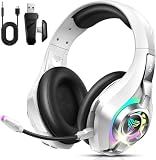
- 4-in-1 Connection Ways & Multi-platform Compatibility: Enjoy wireless gaming through 2.4GHz, USB, Bluetooth, or 3.5mm wired connection. Leveraging a 2.4GHz connection through its USB dongle, this gaming headsets ensures consistent gameplay for PCs and many consoles. Support Xbox One , PC, Nintendo Switch, PS4/PS5, Laptop, Tablet, iPad, Computer, Mobile Phone.【PS: Supports Xbox game console with 3.5mm audio jack, suitable for Xbox One model】
- Clear Calls: Featuring an ENC (Environmental Noise Cancellation) microphone, the noise-cancelling headphones ensure your voice comes through clearly on calls, even in loud surroundings. The closed-back earcups with plush memory foam cushions create a tight seal around your ears, providing excellent passive noise isolation. This wireless headset (fully compatible with PS5) delivers crisp audio transmission, giving you a competitive edge in every match.
- Immersive Stereo Sound with Virtual 7.1 Support: Engineered with oversized 40mm dynamic drivers and highly-flexible silk diaphragms, these Xbox One headsets deliver powerful, deep bass and exceptionally crisp treble for stunning clarity. Experience lag-free audio (under 20ms) and rock-solid connectivity up to 55 ft. GS400 Ultra wireless gaming headphones are the perfect audio gear for capturing every critical detail in competitive games like Fortnite/starfield/Call of Duty/PUBG.
- 40 Hrs Playtime & Adjustable for Perfect Fit: This ps5 gaming headset has a sustainable game time of 35-40Hrs. With RGB lighting effect turned on(15-20Hrs). Full-recharge in just 2Hrs. Ordtop noise cancelling headphones have ultra-soft protein leather earcups with memory foam padding to fit snugly over your ears. The adjustable headband ensures a secure, customized fit for a wide range of head sizes. A thoughtful and practical present for Christmas.
- Sleek Circular RGB Computer headsets: Built for style and performance. Command your light: enjoy the brilliant 7-color RGB display, or double-tap to switch it off for a clean, focused look. This wireless headphones is designed for those who stand out. Let its dynamic colors amplify your gameplay, or let its sleek design make a statement in your daily life—turning every moment into an opportunity to shine.
If your manufacturer has no BIOS fix
Do not jump directly to a motherboard purchase. First confirm that:
- you searched the exact model and revision;
- the current BIOS notes do not already contain the relevant fix under different terminology;
- the system is not an OEM model with a separate support page;
- the restriction is not caused by a missing Windows security setting that the existing hardware can support;
- the vendor has not published a separate security advisory or staged release.
If the status remains unclear, contact the motherboard or OEM manufacturer with the exact model, current BIOS version, and the Vanguard message. Avoid unofficial BIOS images, modified firmware, and generic BIOS-flashing tools that are not provided for the specific system.
A replacement becomes reasonable only when the existing board has no supported update, cannot provide a required security feature, or is part of an old platform whose repair path is no longer practical. If you are already replacing the processor and memory, an AM5 motherboard upgrade is one possible modern-platform route for an AMD build—but it is not a universal solution. An AM5 board generally requires a compatible AM5 processor and DDR5 memory, and the exact board still needs its own firmware and feature checks.
Before buying any replacement motherboard, verify:
- CPU socket and processor support;
- DDR4 or DDR5 memory type and the number of modules you need;
- case form factor;
- power-supply connectors and capacity;
- graphics-card clearance and PCIe requirements;
- M.2, SATA, USB, Wi-Fi, and other expansion needs;
- Windows activation and whether a clean installation or repair may be needed.
Common misunderstandings
| Claim | More accurate explanation |
|---|---|
| Riot is blocking every old PC. | The December 2025 enforcement was targeted. An older PC may work if its exact firmware and security configuration meet the relevant checks. |
| VAN:Restriction proves the player cheated. | Riot said the restriction did not necessarily indicate cheating. It indicated that Vanguard could not establish sufficient system integrity or saw a configuration resembling those used to evade anti-cheat controls. |
| Windows 11 automatically solves the problem. | Windows 11 support does not guarantee corrected motherboard firmware, IOMMU initialization, Secure Boot, TPM, HVCI, or every other Pre-Check requirement. |
| Adding a TPM module alone will fix it. | TPM is only one part of the newer security baseline. It cannot correct an IOMMU initialization problem in motherboard firmware. |
| A Windows driver updater can replace the BIOS fix. | Ordinary device-driver maintenance is separate from motherboard firmware. BIOS and UEFI files should come from the motherboard or OEM manufacturer. |
| Vanguard On-Demand is mandatory. | Riot describes On-Demand as optional. Players can retain the earlier always-present Vanguard behavior. |
| This is already a universal League of Legends hardware lockout. | The December announcement was about VALORANT restrictions and discussed possible expansion. Riot’s later On-Demand article discusses the broader Vanguard environment, but that should not be presented as a universal League gameplay lockout. |
What this means for an older-PC owner
The sensible response is diagnostic rather than alarmist:
- Read the exact Vanguard message and determine whether the problem is a restriction, a missing Windows feature, or a normal game-launch error.
- Identify the exact motherboard or OEM system model.
- Check the official firmware and security guidance for that model.
- Update the BIOS only if the vendor provides a matching, supported release.
- Enable UEFI, Secure Boot, TPM, IOMMU, and Windows security features only as applicable to the documented requirements.
- Replace the motherboard or platform only if the existing system has no supported path forward.
The real risk is not that every aging gaming PC will suddenly become unusable. It is that some systems—especially older or poorly documented OEM machines—may have no official way to correct a firmware-level weakness that an anti-cheat system is now checking. That is a serious compatibility problem, but it is narrower than the headline that Riot is blocking all old computers.
Sources and scope
The technical and policy details in this article come from Riot’s December 2025 motherboard-security announcement, Riot’s June 2026 Vanguard On-Demand announcement, and the CERT/CC vulnerability record. Vendor coverage and patch status can change, and the manufacturer’s current support page for the exact model should take precedence over a general summary.
Free tools Windows power users keep installed
One-click scans. No signup required.
Frequently Asked Questions
Is Riot blocking every old PC from VALORANT?
No. Riot’s December 2025 change targeted certain VALORANT accounts or hardware configurations that failed its system-integrity checks. An older PC may continue to work if its exact firmware and security settings meet the applicable requirements.
Does VAN:Restriction mean I was banned for cheating?
No. Riot said VAN:Restriction does not necessarily mean the player was caught cheating. It means Vanguard could not establish sufficient system integrity or detected a configuration resembling hardware behavior associated with anti-cheat evasion.
Will enabling TPM 2.0 by itself fix the Vanguard problem?
No. TPM 2.0 is only one part of the newer Vanguard Pre-Check baseline. The system may also need updated BIOS firmware, IOMMU, UEFI mode, Secure Boot, Windows 11 25H2 or later, and Virtualization-Based Security with HVCI.
Is Vanguard On-Demand mode mandatory?
No. Riot describes On-Demand mode as optional. On a sufficiently secured PC, it allows Vanguard to load when a Riot game starts and stop when the session ends. Players can keep Vanguard in its previous always-present configuration.
Free tools Windows power users keep installed
One-click scans. No signup required.
Should I buy a new motherboard if my PC is affected?
Only after confirming that the exact motherboard or OEM system has no supported BIOS update or cannot provide a required security feature. A replacement may also require a compatible CPU, memory, case, power supply, and potentially a Windows repair or reinstall.
The Bottom Line
Bottom line: Riot’s Vanguard change is a targeted VALORANT security requirement, not a blanket ban on old PCs. Check the exact motherboard or OEM model for an official BIOS fix, enable the documented security features, and consider replacement hardware only when the existing system has no supported path.
Quick Recap
Product prices and availability are accurate as of the date/time indicated and are subject to change. Any price and availability information displayed on Amazon at the time of purchase will apply.




